Recent Discussions

Some Questions About `log_send_rate`, `log_send_queue_size`, `redo_queue_size`, and `redo_rate`.
Hello, I've recently been trying to monitor the latency of the Available Group. Regarding logsend latency and redo latency, I hope to monitor them using the `log_send_queue_size` / `log_send_rate` and `redo_queue_size` / `redo_rate` metrics in the `dm_hadr_database_replica_states` DMV. However, in the process, I noticed that even in busy systems, `log_send_queue_size` and `log_send_rate` are often 0, whereas in idle systems, `redo_rate` is never 0. Could you please explain the specific definitions of `log_send_rate` and `redo_rate`? Why is `redo_rate` not zero when no data synchronization is taking place? In a system where data synchronization is occurring, `log_send_rate` and `log_send_queue_size` may be zero. My understanding is that log sends occur very quickly, while the monitoring granularity is not fine-grained enough—is that correct? Hope someone from the community comment on this.38Views0likes2Comments
SQL 2025 Fabric Mirroring
We have setup fabric mirroring in SQL 2025 on top of a replicated subscriber using azure arc, this is just for a proof of concept, the mirroring seems to work but there is a microsoft document https://learn.microsoft.com/en-us/fabric/mirroring/sql-server-limitations#database-level-limitations advising CDC and replication is not supported in 2025 for fabric mirroring, We observed with CDC enabled it did not allow fabric mirroring to be configured, but with replication it still allowed, we noticed change feed doesnt seem to work as there was a latecy of atleast 30 secs to mirror data to fabric. Is this something to do with replication being enabled we dont know, we still havent tested a plain database (without replication and/or cdc enabled) Following details are shared to our BI team about the current situation in an email Current Observations When executing the following command on the source database: EXEC sp_help_change_feed; the engine returns: Change Feed or Fabric Link is not enabled on database 'ourdb'. Additionally: SELECT [name], is_data_lake_replication_enabled FROM sys.databases WHERE [name] = 'ourdb'; returns: 0 Based on these results, the SQL Server 2025 Change Feed engine does not appear to be enabled for the database under test. Mirroring Behavior Despite the Change Feed status indicating disabled, data continues to be synchronized successfully to Fabric. This suggests that Fabric Mirroring is currently obtaining changes through an alternative mechanism rather than through the native SQL Server 2025 Change Feed feature. We also observed an approximate latency of 30 seconds, even for single-row insert or update operations. Further clarification from Microsoft may be required to determine the exact mechanism being used and whether this behavior is expected when SQL Server Replication is present. Production Considerations While the functionality appears to work in a test environment, several questions remain regarding production suitability: If the native SQL Server 2025 Change Feed engine cannot be enabled alongside replication, it is unclear how Fabric guarantees change retention and recovery during periods of high transaction volume. Additional validation is required to determine whether transaction log truncation, checkpoints, or backup activity could affect Fabric's ability to capture all changes consistently. Fabric Mirroring may introduce additional background workload against the source database, resulting in increased read I/O and resource consumption on a server already processing replication activity. Conclusion At present, data is successfully reaching Fabric; however, the native SQL Server 2025 Change Feed functionality does not appear to be active. The key question requiring clarification is whether SQL Server Replication prevents or alters Change Feed operation, and whether the current mirroring behavior is a fully supported production configuration. Until this is confirmed, we should treat the current implementation as a successful proof of concept rather than confirmation of a supported production architecture. Next Step: test a plain database with some rapid data insertion mechanism to see if change feed kicks in to push data to fabric at near real time speed. --Can someone from the community comment on this.26Views0likes1Comment
Feature Proposal: Ability to Exclude a column/subset of Columns in Select.
Summary I would like to propose a new T-SQL feature that allows developers to select all columns from a table while explicitly excluding a small subset of columns. Currently, when a table contains many columns and only one or two need to be omitted, developers are forced to mention every remaining column manually in the "Select" SQL. This leads to verbose queries, reduced maintainability, and a higher chance of mistakes when the schema evolves. Motivation Consider a table with 20 or more columns. Current approach, SELECT EmployeeId, FirstName, LastName, Department, Designation, Email, PhoneNumber, DateOfBirth, Address, City, State, Country, PostalCode, ManagerId, JoiningDate, LastModifiedDate, Status, IsActive, CreatedDate FROM Employees; If the intention is simply to exclude a single sensitive column such as Salary, the query becomes unnecessarily long. A more concise alternative could be: SELECT * FROM Employees EXCLUDE (Salary); The engine would expand * internally and remove the specified columns before execution. Benefits 1. Reduces boilerplate code. 2. Improves readability for wide tables. 3. Makes queries easier to maintain as schemas evolve. 4. Reduces the likelihood of accidentally omitting newly added columns. 5. Makes it simpler to exclude sensitive or internal-use columns from result sets. Expected Behavior Single column exclusion SELECT * FROM Employees EXCLUDE (Salary); Returns all columns except Salary. Multiple column exclusion SELECT * FROM Employees EXCLUDE (Salary, PasswordHash); Returns all columns except Salary and PasswordHash. Suggested Validation Rules 1. Every excluded column must exist in the projected result set. If an excluded column does not exist, compilation should fail with an appropriate error. 2. Duplicate column names in the exclusion list should either: be ignored, or produce a validation error. 3. If the exclusion list removes every projected column, the statement should fail. Example: SELECT * FROM Employees EXCLUDE (Employee, Name, Salary); If these are the only columns in the table, an error could be raised such as: The EXCLUDE clause cannot eliminate all columns from the SELECT list. Returning a zero-column result set would likely be confusing and less useful. Additional Considerations This syntax could also be valuable when selecting from joins, views, or derived tables, where developers frequently want "everything except a few fields." Closing Thoughts I believe this would be a practical quality-of-life enhancement for T-SQL that addresses a common developer pain point while remaining simple to understand and implement. It would reduce repetitive code and improve maintainability without affecting existing queries.33Views0likes1Comment
SSRS reports not working
Hi Microsoft team, We are looking for tech support on an issue with SSRS reports that are used in one of our applications. The details of the issue are as foll: When Trying to access an SSRS ReportServer instance (either through the SOAP Service, or directly from the browser) does not work. There are Errors observed in the log files as well as the user interface . The error message is An error occurred within the report server database. This may be due to a connection failure, timeout or low disk condition within the database. The user interface fails to load Report as a result Attached are the SSRS log files from the last month from one of the servers. The last time reports were successfully accessed was on Friday, June 15th. Starting this Monday all functionality stopped working. This environment has 4 SSRS servers under an High Availability AGL. RSManagement log files indicate that the ReportServer schemas may be in an inconsistent state |FATAL|8|Database upgrade failed!! The database may now be in an inconsistent state. Further research indicates that this may be corrected by the following procedure… Stop SSRS services Backup and delete ReportServer and ReportServerTempDB databases Start the SSRS services Use the wizard to create a new ReportServer set of databases Stop the SSRS services Delete the new (empty ReportServer) database Restore the backup of the ReportServer (from step 2 - do not restore the temp database) Fix schema of ReportServer.dbo.Catalog.PropertyField and ReportServer.dbo.Segment.Content (change columns from ntext to nvarchar(max)) Start the SSRS services (Monitor the RSManagement log file) Verify Backout if fail: (Stop Services, Restore the databases, Restart Services) This may also include refreshing of encryption keys and removing servers from the AGL prior to this procedure Can you please help identify what could be a possible root cause for this issue, confirm if the steps listed below present a plausible solution, and advise on any additional triaging steps or corrective procedures? Thanks in Advance31Views0likes1Comment
SQL Server 2022 Database Engine Crash During Startup on Intel Core Ultra 5 / Windows 11 25H2
SQL Server Database Engine crashes during startup on HP OmniBook X Flip 14-fm0xxx (Intel Core Ultra 5 226V, Windows 11 25H2 Build 26200.8655). Reproduced on SQL Server 2019 RTM, SQL Server 2022 RTM, and SQL Server 2022 CU25 (16.0.4255.1). Installation completes successfully, but MSSQLSERVER fails to start with Error 1067 and "Wait on the Database Engine recovery handle failed." Event Viewer shows sqlservr.exe crashing in ntdll.dll (0xc0000005). Crash occurs after master database and CLR initialization.64Views0likes1CommentSQL Server FCI CSV storage flips multiple times into Online (No Access) state and eventually fails
Dear Team, I'm encountering an issue with our SQL Server multi‑instance failover cluster after applying the OS security patches and restarting the second node. Once the second node comes back online, the Cluster Shared Volume (CSV) briefly flips multiple times into Online (No Access) state and eventually fails.(we can make it online manually, but again flips and failed after sometime). To make the SQL cluster available, we either need to shut down the VM or revert the patch. Before the patching, all cluster roles and SQL instances were moved off the node, and the cluster appeared healthy. The issue only occurs after the reboot of the second node. (first node patched and restarted and everything working fine) OS : Windows Server 2025 Standard Patch tried: KB5075899 (February,2026 ) KB5078740 (March,2026) KB5082063 (April 2026 ) KB5087539 (May 2026) Could you please advise if there are any specific checks or steps we should follow during OS patching to prevent CSV access loss? Is it an issue with the patch or something else? Any insights or recommended actions would be really helpful to perform the security OS patch in the server Thanks you!49Views0likes0Comments
Windows server 2025 SQL patching cluster problem.
Dear Team, I have a problem when I am patching upgrade windows server 2025 with KB5091157. After patching is the clustering is not able to join back; it shows the error with credentials. The log error is "Cannot connect sqlxxxxxxx." you do not have administrative privileges on the cluster. Contact your network administrator to request access. Note: The server is not in a different VLAN network.90Views0likes1CommentFailure to run SSMS
Hi, ALL, For sometime I had both MSVC 2010 and 2017 installed on my laptop. Recently I needed space and decided to remove the old version. Unfortunately I thin I killed one of the SSMS libraries, because while it successfully starts, trying to go to the "New Query" window, Im getting the error "Library not registered". The server itself operates just fine as I can connect to it. Is there anyway to make it work again? Than you.93Views0likes1CommentA bizarre situation - SQL query finds no records when record is present.
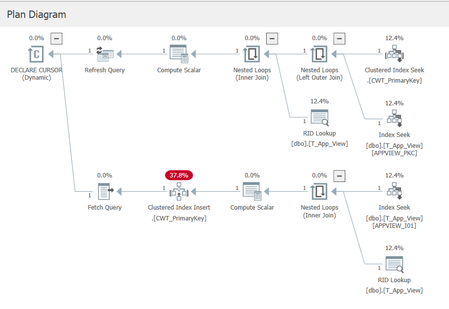
I am trying to troubleshoot a bizarre situation, and looking for either an explanation of the cause, or assistance in determining the cause. The situation is esoteric (to say the least), so I'll need to paint a picture. I am using SQL 2019 Enterprise for testing. Our database has Allow Snapshot Isolation set to true, and the Is Read Committed Snapshot On is also true. We have a table called T_App_View, with essentially these important fields (plus some audit fields not shown): CREATE TABLE T_App_View ( C_Id int not null, C_Type varchar( 20 ) not null, C_Entity varchar( 250 ) not null, C_Specialisation varchar( 250 ) null, CONSTRAINT APPVIEW_PKC PRIMARY KEY NONCLUSTERED( C_Id ) ) We have an index on (Type, Entity, Specialisation): create unique index APPVIEW_I01 on T_App_View( C_Type, C_Entity, C_Specialisation ) And from a historical hangover we have a view against the table that is used for queries: CREATE VIEW dbo.VS_App_View AS SELECT * FROM dbo.T_App_View WITH CHECK OPTION The table is used to define "UI views" for our application, and contains about 1000 records. As part of commissioning a new database, we use a tool to load data into this table, and then the data basically sits there unchanged. Each time the tool is run it deletes any old data in the table, before populating the new data. The tool deletes the old data row-by-row rather than using a truncate table statement or similar. When our web tier is asked to provide the "definition" of a view, it performs a query on VS_App_View using the three compound key components of Type, Entity, and Specialisation. A dynamic cursor is used (a historical hangover from many years ago). A typical query would look similar to this: SELECT appview.C_Id, appview.C_Entity_Id, appview.C_Specialisation, appview.C_View_Type FROM dbo.VS_App_View appview WHERE appview.C_View_Type = 'DETAIL' AND appview.C_Entity_Id = 'a' AND appview.C_Specialisation = 'Finance' We are using the standard isolation level of Read Committed (which means Read Committed Snapshot in reality). Notice the select statement is not using an option of READCOMMITTED in the query. The fun part Sometimes when we do a lookup in SQL Server, the above query finds no matching records. This bug is very evasive, we cannot reproduce it, and it appears maybe once or twice a month, and other months not at all. It is not limited to specific key values, it just appears to happen randomly (or the pattern is obscure enough that we cannot yet see it). Our QA team experienced the find failure the other day and one of our developers jumped into SSMS and ran the query manually and sure enough it came back with no records found. And now the bizarre bit: The developer ran the query directly against the T_App_View table, and the record appeared. He then re-ran the query against the View, and the record appeared. We have the Query Store enabled for this database and I can see two plans matching the above query (one for a null specialisation, and one for a non-null specialisation). The query plans look odd (due to the dynamic cursor presumably) because even though the index guarantees a maximum of one matching record, the query plan still shows a temporary table being constructed along with a clustered index for that table. I feel like I am reasonably proficient in SQL Server but this one has me stumped. ChatGpt suggested it is a query plan issue, but I'm skeptical as I've never heard of a query plan not finding a record. I've only experienced query plan issues in terms of performance impacts. Has anyone ever come across such a situation? Is Snapshot Isolation part of the problem here, or database statistics, or the fact we are deleting an entire table of records individually and then repopulating them (resulting in bad statistics)? Should we have used WITH( READCOMMITTEDLOCK ) for this query perhaps? Any suggestions on how to troubleshoot effectively, as in what to look at and for? Thanks in advance for any help.241Views0likes3CommentsDocumentation contradictory
Hi, ALL, Page https://learn.microsoft.com/en-us/sql/t-sql/statements/create-database-transact-sql?view=sql-server-ver17&tabs=sqlpool states [quote] SIZE, MAXSIZE, and FILEGROWTH parameters can be set when a UNC path is specified for the file. [/quote] However later on that same page it states [quote] SIZE can't be specified when the os_file_name is specified as a UNC path. [/quote] I think those 2 sentences contradicts each other.....89Views0likes1CommentKerberos double hop delegation on SQL Linked Server fails on AG listener after RC4 disablement
Environment 3 Node- SQL Server 2022 with Availability Group Windows Server 2022 - Linked Server configured with Kerberos delegation (double-hop scenario) - RC4 encryption recently disabled via GPO The Problem After disabling RC4 in the domain (not sure of this root cause), Kerberos delegation through a Linked Server stopped working — but only when connecting via the **AG listener name**. Connecting via the **node name** works fine. I try to migrate my service account to gMSA and I've recreate all SPN and all delegation for the new account, but the issue is the same: Authentication works if the linked server us the node name, if it use the Listener AG name the connection fail with ------------------------------ Login failed for user 'NT AUTHORITY\ANONYMOUS LOGON'. (Microsoft SQL Server, Error: 18456) Connection Id 6d654295-0538-4837-b900-ff65c9e86ee9 at 2026-04-29 11:59:25Z I Confirmed via Kerberos event logging (Event ID 4769 on DC)** On a healthy request (node name), ticket encryption type is `0x12` (AES256). - Confirmed SPN registration with `setspn -L` - Verified Kerberos events on the DC (4768/4769) - Confirmed forwardable flag (`0x40000000`) is present in ticket options — delegation is active - Confirmed pre-auth and session encryption are both `0x12` (AES256) for the working path set `msDS-SupportedEncryptionTypes = AES128+AES256` on the SQL service account and resetting its password rotete kdc key Are there any additional steps needed on the Linked Server or constrained delegation configuration side after the service account change? Any guidance appreciated. Thanks.142Views0likes0CommentsMS ODBC and OLE DB failed
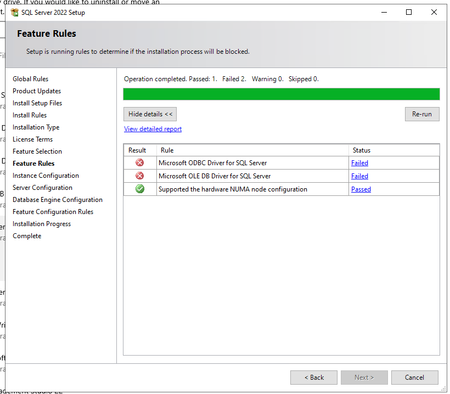
Hello, In SQL Server 2022 (16.0.4250.1) showed two fails and can´t continue (see screenshot) On system are installed those versions of ODBC and OLE DB System was previously working (not stopped on this window for fail). We did repair of both installation and restart pc, but not helpful. Whta and how to repair it, please? Thank you.95Views0likes1CommentIs there a way to check for ODBC driver UNICODE support
Hi, ALL, I'm writing a C++ code to talk to a different DBMSes and wonder if there is a way to check programmatically for the UNICODE support. I know its a year 2026 and 99.9999% of the programs are using UNICODE, but many drivers are still being shipped as ANSI counterparts as well. Thank you for any pointers.87Views0likes2CommentsHow does GitHub Copilot in SSMS 22 handle database context collection before generating a response?
Hello, I am trying to better understand the internal workflow of GitHub Copilot in SSMS 22, especially for database-specific questions. From the product descriptions, it seems that Copilot can use the context of the currently connected database, such as schema, tables, columns, and possibly other metadata, when answering questions or generating T-SQL. However, I could not find clear official documentation about the actual sequence of operations. My main questions are: Before generating a response, does Copilot first collect database context/metadata from the active connection and then send that context to the LLM as grounding information? Or does it first use the LLM to interpret the user’s request, decide what information is needed, and then retrieve database metadata before generating the final answer? In some explanations, I have seen the phrase "Core SQL Copilot Infrastructure", but I cannot find any official documentation for that term. Is this an official component name? If so, what does it specifically refer to in the SSMS Copilot architecture? When Copilot answers schema-related or data-related questions, what information is retrieved automatically from the connected database, and is any SQL executed as part of that process? Is there any official architectural documentation that explains: context collection, prompt grounding, LLM invocation order, and whether query execution can occur before the final response is generated? I am asking because I want to understand the feature from both an architecture and data governance/security perspective. Any clarification from the product team or documentation links would be greatly appreciated. Thank you.56Views1like0CommentsSQL logshipping
Hi Everyone, has any experience an issue whereby you setup log shopping from SQL 2014 to SQL 2022 , when you choose the paths for data and logs to be stored on destination server it defaults to store both files on the Data drive instead of it being seperate drives like you specified? The initial log setup completes with no errors. Would appreciate any help i can get. Thanks R95Views0likes3CommentsUnable to install SQL Server 2022 Express (installer glitch + SSMS error)
Hi, I recently purchased a new Lenovo laptop, and I am trying to install Microsoft SQL Server 2022 Express along with SSMS. SSMS installed successfully, but SQL Server installation fails, and sometimes the installer UI glitches or does not load properly. Because of this, I am getting connection errors in SSMS like "server not found" and "error 40". I am not very familiar with technical troubleshooting. Can someone guide me step-by-step in a simple way to install SQL Server correctly? Thank you.153Views0likes0CommentsMigrate SQL 2016 to SQL 2022 - Detail Work Breadown Structre (WBS)
Hi, We’ve started a project to migrate from SQL Server 2016 to SQL Server 2022, and I’m currently preparing a detailed Work Breakdown Structure (WBS). Has anyone in this community gone through a similar migration and been willing to share their project WBS, either in .mpp or Excel format? Regards, Subhasish Roy53Views0likes0Comments
SQL Server 2025 Log Shipping Fails with Missing Assembly (sqllogship.exe) on Split-Drive Install
Hello, I am testing SQL Server 2025 in a lab environment and have encountered an issue with log shipping that appears to be related to assembly resolution. Environment: SQL Server 2025 (fresh install, both unattended and manual tested) Windows Server 2022 and Windows Server 2025 (issue occurs on both) SQL binaries installed on E:\ Default system drive is C:\ Issue: When log shipping runs (via SQL Agent job or manually invoking sqllogship.exe), it fails with the following error: Unhandled Exception: System.IO.FileNotFoundException: Could not load file or assembly 'Microsoft.SqlServer.ConnectionInfo, Version=17.100.0.0... Observed Behavior: sqllogship.exe is located at:E:\Program Files\Microsoft SQL Server\170\Tools\Binn\ The required assemblies (e.g., Microsoft.SqlServer.ConnectionInfo.dll) are installed at:C:\Program Files\Microsoft SQL Server\170\Shared\MDS5xSMO\ The sqllogship.exe.config file in SQL Server 2025 includes explicit codeBase entries using relative paths:..\..\Shared\MDS5xSMO\Microsoft.SqlServer.ConnectionInfo.dll Because of this, the application attempts to resolve assemblies at:E:\Program Files\Microsoft SQL Server\170\Shared\MDS5xSMO\which does not exist by default. Workaround: Manually copying the shared SMO directory from C: to E: resolves the issue: C:\Program Files\Microsoft SQL Server\170\Shared\MDS5xSMO → E:\Program Files\Microsoft SQL Server\170\Shared\MDS5xSMO After doing this, log shipping works as expected. Comparison with SQL Server 2022: SQL Server 2022 sqllogship.exe.config is empty It does not rely on explicit codeBase paths Log shipping works without requiring any manual file copies Question: Is this expected behavior in SQL Server 2025, or a potential issue with how sqllogship.exe resolves shared assemblies when SQL is installed on a non-system drive? Specifically: Should Shared\MDS5xSMO also be installed on the same drive as the SQL binaries? Or should sqllogship.exe.config be updated to use absolute paths instead of relative ones? Would appreciate any confirmation or guidance from others who may have encountered this. Thanks!212Views1like1CommentSQL Migration from SQL2017 to SQL2022
AG1: Win OS 2016, SQL 2017 AG2: Win OS 2019, SQL 2022 We are trying to migrate database from AG1 to AG2 via distributed AG. As the database is on different version, the status of the db on AG2 will be in Synchronized/In Recovery mode which is not readable. Are there any ways to verify the data integrity of the database as its not readable?84Views0likes3Comments
Best Practices for Connecting Internal SQL Server Financial Systems to Online Payment Platforms
I currently have an internal enterprise system used for purchasing, payments, and finance operations. The system runs on an on-premises database using Microsoft SQL Server and stores all financial transactions and internal workflow data. We now have a new requirement to enable online payment services for customers. These services will be exposed externally (likely in the cloud) and must interact with the same financial system so that transactions are reflected in our internal database. My main concerns are related to architecture, security, and data synchronization. Key points about the current setup: The core system and database are hosted internally (on-premises). The database contains sensitive finance and payment data. Internal processes depend on the current database structure and workflows. The new requirements: Develop an online payment service accessible over the internet. Ensure transactions from the online service update the internal system. Maintain data integrity and security. Avoid performance issues for the internal system. I’m evaluating a few possible approaches but I’m unsure which is best practice: Allow the cloud payment service to connect directly to the internal SQL Server database through secure networking. Maintain a replicated or read/write copy of the database in the cloud. Use SQL Server replication (transactional or snapshot) between on-prem and cloud. Introduce an API or middleware layer that handles all transactions and updates the internal database. Maintain separate databases and synchronize transactions asynchronously. My main questions: Is it recommended to expose the internal SQL Server database directly to cloud services? Should I use replication, a secondary database, or a service/API layer? What architecture pattern is commonly used for integrating on-prem financial systems with online payment platforms? How can we ensure consistency between internal transactions and online payments? Are there recommended SQL Server features or patterns for this scenario (replication, service broker, CDC, etc.)? Any advice on best practices, architecture patterns, or real-world implementations would be greatly appreciated.111Views0likes0Comments
Events
Recent Blogs
- 3 MIN READThis release is about removing friction in real production paths. It fixes transaction handling in with blocks, restores clean-machine imports on Apple Silicon, improves NULL binary parameter binding...Jul 10, 202657Views0likes0Comments
- 2 MIN READWe have released mssql-python 1.10.0 with improvements focused on authentication flexibility, cross-platform text reliability, and bulk load stability. Highlights 1) Bulk Copy now supports Active...Jun 26, 2026160Views0likes0Comments