Recent Discussions

Any word on exposing additional Planner triggers in Power Automate?
Right now, the ONLY triggers I can see are "when a new task is created", "when a task is completed", and "when a task is assigned to me". To make matters worse, even when using those I cannot read/write to custom fields using on Premium Planner boards. Its really frustrating as it feels like we're paying more and getting less when it comes to the "premium" plans.63Views1like1Comment
Planner Agent does not work with Premium Plans
I have been toying around with Microsoft Planner Agent, and I am in love with the potential and the idea as to what it can help us do. It can help take meeting transcripts of weekly catch-up meetings and auto-populate/update different kanban cards and tasks and many other really cool and helpful features that will help DRASTICALLY reduce the time on menial admin work. However, these functionalities only work on basic plans, my team all have premium licenses and use a premium plan, and you would think planner agent would be able to work with premium plans, however, every time I try and leverage planner agent to create a task in our premium plan I keep getting the same response along the lines of: "this feature is not available for premium plans yet". You would think the opposite would be true, but I have chalked it up to the thought that since premium plans have more features, Microsoft haven't completely configured Microsoft Planner Agent to them yet. I would love to see if anyone else is dealing with this same problem, and if so, can share their experience to drive some visibility and SOU to this topic. I would also love to hear and see if anyone has any updates or timelines of when this feature would be available.65Views2likes1CommentPlanner Not Loading (Blank Page) - Grid View Crashing On Chrome
Hi all I use Chrome and in just the last 24hrs, Planner stopped working as it was giving me a blank page when I loaded the URL. After investigating the console and trying Edge, incognito mode, deleting cookies/cache/data etc., we saw that the Chrome Developer Console reports "Uncaught ReferenceError: Cannot access 'B' before initialization at Module.CanvasUserTasksGridView" specifically within the "planner-canvasusertasksgridview component" We've confirmed that Board view works normally in Chrome, and the same plan and Grid view work correctly in Microsoft Edge. Additionally, Chrome is attempting to load some Microsoft Office font resources using malformed URLs containing a duplicated protocol, such as "https://https//res.cdn.office.net/..." which then fails with "ERR_NAME_NOT_RESOLVED" This makes it look like an issue with the Planner Grid component or its Chrome-specific resource loading rather than the plan or account itself. I will continuing using Edge for the meantime, but if there is a fix or workaround as we mainly discuss tasks in grid mode in meetings so it would be great to get this back working in my preferred browser. Any help would be great!49Views0likes1Comment
Bulk task changes
Does anyone know how am I able to add dates to tasks in bulk if it's the same due date? How do I assign tasks in bulk to a specific person? These used to easily be done by selecting the sections and right clicking to change but many settings updated today and I am no longer able to do this.33Views0likes0CommentsPlanner Template (.plat) Files
I've been testing the new Planner capability that allows you to publish a Basic Plan as a template. After publishing a plan as a template, I can see that Planner creates a .plat file in the SharePoint site associated with the Team (under the General channel document library). I also found the Microsoft documentation explaining that Planner templates are stored as .plat files in SharePoint. While experimenting with this feature, I started looking at governance and reuse scenarios and found several areas that don't seem to be clearly documented. I'm curious to know if anyone has explored these scenarios in more depth: How can a Planner template stored as a .plat file actually be reused outside of the standard Planner experience? Can a .plat file be moved to another Team / Microsoft 365 Group while remaining usable as a Planner template? Is it possible to build an organization-wide library or catalog of Planner templates using .plat files? Microsoft documentation mentions that .plat files can be edited outside of Planner, but I haven't found any documentation describing the format, supported tools, or editing procedure. Has anyone successfully modified a .plat file manually? I'm interested in both documented guidance and real-world experience from anyone who has tested these scenarios.88Views0likes1Comment
Planner tasks from premium projects not updating dates
Hi all, I've been experiencing problems with tasks in premium projects for almost a week now. I'm updating the due dates in the premium project that are assigned to me but the dates don't update in My Tasks. This is the case in both the desktop app and the web app. Any advice? View from premium project: View from My Tasks:147Views0likes4Comments
Frustration with Microsoft’s Task Ecosystem
Why is planner development so slow. Is missing no brainer features that a 12 year old program manager or junior developer would even know what is needed at a very basic level. I’m not going to mention what these features are because this community is full of posts about this. You killed off ToDo which was an incredibly good app and had huge potential now left rotten away. Despite no development for years it’s still a great app and would be up there with the best of them - Todoist, Tick Tick, Apple Reminders, Things. Don’t get me started on Loop. What is the point of it. Planner in Teams is still slow. you have ruined Microsoft Project trying to get it integrated with Planner. Planner licensing is a mess. Planner agent currently doesn’t see premium projects. I know it’s coming. M365 Copilot can only see the default Task list in ToDo but no other list. Who thought that one up? You allow people create multiple lists in Todo but ignore them for Copilot query. I would post a really good convo with Copilot about all of this and even Copilot is scratching its head as to why Microsoft is so crap offering up half baked apps and then drop them for something else thus creating an ecosystem that barely functions and leaves people so frustrated. I could go on but I won’t. Rant over but no wonder people are opting to move to dedicated applications like Asana or Monday.com or Todoist for stuff like this. 🥸🤔😳🤦♂️🤷♂️💋186Views6likes1Comment
Custom Template Creation from Premium Plan
I have been excitedly waiting for the custom template feature to roll out. My PMO group heavily utilizes Premium Plans only because of the need to have Dependencies tracked. I'm unable to create a template from a premium plan- basic only- which does not have the features that my team needs to use in Planner. Is there an estimated rollout date for custom template creation from Premium Plans?176Views1like3Commentslicense to access Planner Premium from Power Apps
We want to create a Power Apps that connect to those main sources:- 1) SharePoint 2) Premium Planner now i know that connects Power Apps to Premium Planner will make the Power Apps as premium app, and users will need premium power apps license to access it. and also accessing Premium Planner will need atleast Planner Plan1. so what is the minimum license for those 3 groups of users:- 1) normal users will be accessing SharePoint lists only through the Power Apps 2) Admin users will be accessing SharePoint lists and Premium Planner through the Power Apps + Premium Planner through the Premium Planner UI. 3) Senior user will be accessing SharePoint lists and Premium Planner through the Power Apps only. does Planner Plan1 is enough for Senior user? and does Power Apps Premium is enough for admins? Thanks96Views0likes1CommentMicrosoft Planner should stop embarrassing me in front of my colleagues
Hi - I created a new project today, and Planner - without my input, notification, or acknowledgement - emailed EVERYONE I WORK WITH to let them know they had been added. This is one of the worst software design choices I have ever seen, and we're talking about Microsoft Office here. Then I learned that Planner has no way to import tasks from Excel or Asana or any other project management platform. So Planner, without warning or notification or approval, emailed EVERYONE I WORK WITH to show them an empty task list. How is it possible for this software to be this bad on the default setting? How do I get a trillion-dollar company to stop embarrassing me at work?136Views3likes1CommentImprove Resource Capacity and Baseline Governance in Planner Premium
Microsoft Planner Premium works well for assigning individual users to tasks within a single plan. However, significant limitations appear when organizations move from managing isolated plans to managing programs and portfolios. For Planner Premium to become a truly enterprise-ready project and portfolio management solution, Microsoft should urgently address the following three areas. 1. Cross-plan resource capacity management When a person is assigned to several tasks or multiple plans, Planner Premium can accumulate more work than the person’s actual daily, weekly, or monthly capacity. Although effort can be adjusted manually in the Assignments view, this becomes extremely difficult when managing many tasks, resources, projects, and concurrent assignments. Organizations need a consolidated capacity management capability across all plans, programs, and portfolios. Planner Premium should allow organizations to: Define each person’s available capacity. Allocate people using percentages, such as 20%, 50%, or 75%. Consolidate assignments across multiple plans. Detect overallocations before they affect delivery. Compare demand versus capacity by day, week, and month. Consider vacations, absences, calendars, and reduced availability. Generate warnings or optionally prevent assignments that exceed capacity. Support resource-leveling and workload redistribution. The People view is useful within an individual plan, but portfolio managers need visibility across the entire portfolio. Without cross-plan capacity management, portfolio planning remains incomplete because organizations cannot reliably determine whether they have enough available resources to deliver their commitments. 2. Generic resources and role-based planning Project plans are often created before the final team members are known. At the planning stage, organizations may know that they need a SAP consultant, solution architect, developer, business analyst, or infrastructure specialist, but they may not yet know the specific person who will perform the work. Planner Premium should support generic resources or role-based placeholders that can be assigned to tasks before a named person is confirmed. These resources should include information such as: Required role or profile. Skills and experience level. Required capacity. Planned participation period. Estimated cost or rate. Business unit or location. Staffing status. Once the appropriate person is identified, the generic resource should be replaceable without losing the planned tasks, dates, effort distribution, cost information, or dependencies. This is essential for resource forecasting, staffing requests, project approval, and early-stage portfolio planning. 3. Baseline security and separation of duties The project baseline is the approved reference used to measure schedule and effort deviations. For this reason, baseline creation, replacement, and deletion should not remain freely available to every user who can edit the plan. In many organizations, the project manager maintains the schedule, while the PMO, portfolio administrator, sponsor, or governance committee controls baseline approval. Allowing the same person to modify both the current schedule and the baseline against which performance is measured creates a clear conflict of interest. Planner Premium should introduce optional baseline governance capabilities, including: A dedicated Portfolio Administrator or PMO role. Separate permissions to create, replace, or delete baselines. A baseline change request and approval workflow. Mandatory justification for baseline changes. Complete audit history. Protection or locking of approved baselines. Comparison between the original baseline, current approved baseline, and current schedule. Integration with formal project change-management processes. This should be configurable. Smaller organizations may prefer a simple model, while organizations with mature governance processes need stronger controls and separation of duties. Why this is urgent Microsoft Planner Premium is increasingly being positioned as a solution for project and portfolio management. However, portfolio management requires more than consolidating project status, dates, and progress. It also requires: Visibility of resource demand and availability across multiple plans. The ability to plan resources before individual people are confirmed. Governance controls that protect approved project baselines. These are not minor enhancements. They are foundational capabilities for enterprise project, program, and portfolio management. Microsoft has a major opportunity to make Planner Premium considerably more valuable for PMOs and organizations managing multiple concurrent projects. I strongly encourage the Microsoft Planner product team to prioritize: Enterprise resource capacity management. Percentage-based allocation. Generic resources. Cross-plan workload consolidation. Portfolio-level resource forecasting. Controlled baseline permissions and approvals. These improvements would significantly reduce manual work, prevent resource overcommitment, strengthen governance, and make Planner Premium a much more credible enterprise PPM platform.112Views2likes0CommentsIncrease the maximum number of Goals in Microsoft Planner Premium
Hi Microsoft Planner community, In the new Microsoft Planner Premium, it seems that a plan can currently have a maximum of 10 Goals. For our team, this limit is too low. We use Goals to structure our work around multiple sprint objectives, epics, deliverables, and larger initiatives. Since our Planner board supports several workstreams at the same time, 10 Goals is not sufficient for proper planning and reporting. Could Microsoft please explain why the limit is set to 10 Goals? And is there any possibility to increase this limit, for example to 30 Goals per plan? This would make the Goals feature much more useful for teams that manage multiple initiatives, projects, or quarterly deliverables within one Planner Premium plan. Thanks in advance!210Views0likes1CommentLinks in Tasks assignments emails not working (Named environment)
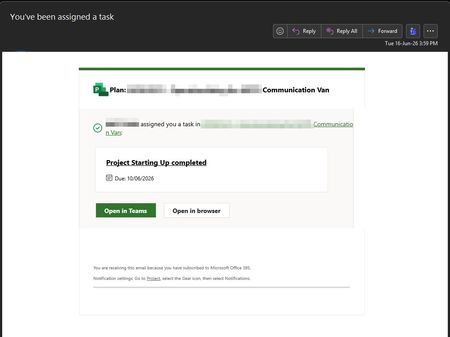
Hello! We have implemented Project for the web accelerator in a named environment (non-default). In a Plan the Project Manager assigns a task to a member of the O365 Group for that Project (Email notifications do not work if there is no O365 Group associated with the Project beforehand). The assignee receives the email with 4 links: Only the "Open in Teams" works, the rest linking to the Plan or the Task does not have the appid in the named environment so it fails with a correlation error that we cannot investigate further. Is the missing appid in the links a BUG in the Project Service Core managed solution provided by Microsoft (1.0.0.87 / 1.0.166.34262)? Is there a way to get the links working correctly with no errors? Thanks152Views2likes2Comments
Is using Planner for tracking OKRs a good idea?
So our team has been trying to use Planner to track OKRs. We set up buckets for each objective and tasks for key results. It kinda works for a small team but now that leadership wants to roll it out company wide, its getting messy. Theres no way to show progress rollups from team-level OKRs to company-level ones, no percentage tracking on key results, and managers cant see a consolidated view across teams. Has anyone found a decent way to make Planner work for OKR tracking at scale?195Views1like2CommentsImprove refresh fidelity in Planner Portfolios
Planner Portfolio currently appears to refresh new items from connected premium plans, but changes to existing items like renamed summary tasks / roadmap items do not reliably propagate into the portfolio after refresh. This makes Portfolio difficult to use as a trusted roll-up view because the source plan and portfolio view can diverge. The issue is especially problematic during early planning, when workstreams and summary tasks are frequently renamed as the plan matures. Requested improvement: Refresh should update task, summary task and milestone names from the source plan. Portfolio should offer a “full resync” option for a connected plan. Portfolio should show last refresh time and any sync exceptions. Users should be able to rebuild roadmap items from the source plan without removing and re-adding the plan. Current behaviour makes Planner Portfolio feel more like a partial snapshot than a reliable portfolio view.67Views1like2CommentsCannot see Task Chat for Planner app on iPhone
Hi, I am testing using the Planner app and have added a message in the Task Chat area via the web browser on a PC. I cannot see the message on the Planner app on the iPhone. I cannot see Task Chat anywhere on the iPhone. I can create a new message in the Comments section on the iPhone (in the Planner app), but cannot add comments using the web browser on a PC. The web browser wants me to use Task Chat, but cannot see that on the iPhone. Am I missing something simple here? Thanks Matt384Views3likes4Comments
Notifications settings missing
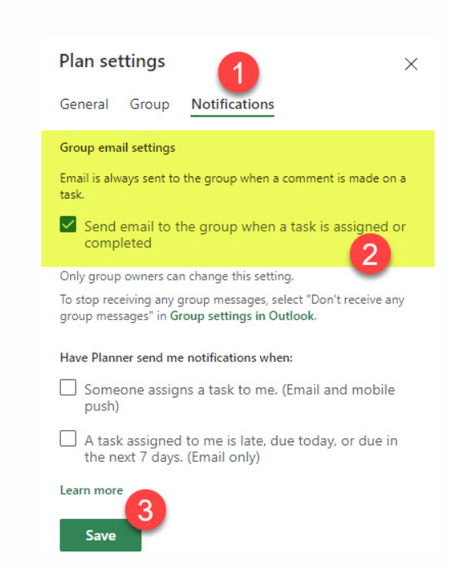
Hello, M365 Business Standard, global admin I've created a couple of plans in Planner for a couple of users, however we don't receive any notification when a new task is created or completed. Let's say I create a task - I assign this task to another user - the users completes the task - I don't get any notification. How come? It's like basic functionality, so I assume there must be something wrong with the set up. In the web I found a couple of screenshots of the setttings but they are not available in my view: My view: What am I missing ? Is it possible to check/change the setting via powershell ?125Views3likes1CommentPlanner Plan 3 Subscription Cancelation and refund.
Hello. I have Microsoft planner plan 3 subscription which expired and has been automatically renewed which is against my intention , I tried to communicate with Microsoft support through email , live chat , phone call but without any positive progress , on phone they have an AI agent which is wasting of time , in live chat they just pass you to another departments and share wrong email address . I have been trying to fix this issue since the first day of subscription renewal but so far nothing . The subscription is under a twin alias email which I don't have access to and there is no admin , the email is under onmicrosoft domain. I need a urgent quick help for this issue so that I can get refund .62Views0likes1Comment




Events
Recent Blogs
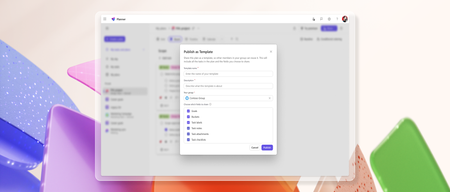
- Turn any basic plan in Microsoft Planner into a reusable, shareable template to speed up planning and ensure consistency across plans. Custom templates capture key plan elements such as tasks, goals,...Jul 14, 20266.3KViews3likes2Comments
- Learn how Microsoft Planner MCP Server helps agents automate routine work management and unlock intelligent workflows.Jun 23, 20265.4KViews2likes0Comments