app
52 Topics
Resource calendars
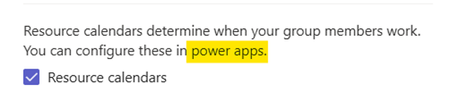
I have spent a couple days exploring this feature but I'm still not sure how it works. As a test, I created a new Premium Plan. Schedule mode is set by default to Fixed duration (I'm waiting for my IT dept to allow PM overrides so I can set future Plans to Fixed work or Fixed units.) The test plan has one task with a one-day duration (8 hrs) that I assigned to myself. In Planner Premium, I select the Resource calendars option. Then I go over to Power Apps and pull up the Project app. Inside the app, I open my plan and locate myself as an Active Bookable Resource. I open my Work Hours tab, limit my availability to four hours on the same day that the Planner task is scheduled, and click Save. (I can't enter a fractional capacity number; it apparently has to be "1"). Why doesn't the Planner task automatically adjust to a two-day duration in recognition of the fact that I'm only available for a 1/2 day? If I was guessing, I would say it's because the Plan is set to Fixed duration. But what that effectively means is that by default clicking the Resource calendars box does nothing, as far as I can see, unless the PM is allowed to override the default schedule mode. Is that a true statement? The other thing I'm confused about is whether it's possible to set different availabilities per project. In other words, do the hours I set on the Work Hours tab (incl. capacity setting of "1") apply simultaneously to all Planner Premium projects where I'm assigned? For example, can I not set this up to reflect that I'm available to work on Project A for 4 hours per day and Project B for 3 hours per day? Or Project A on M,W, & F and Project B on T & Th? If that could be configured, assigning me to a 5-hour Thursday task on Project A would cause a duration adjustment or an overallocation flag, or something. I have read about this forthcoming (GA Oct 2026) "Capacity View", but even with that it's not clear that it will recognize capacity of less than one on a given project. If the short answer to these questions is that I'm expecting Planner Premium to do things intended for Dynamics 365 Project Operations, that's fine. But then I just don't understand what this "Resource calendars" option in Planner Premium is supposed to enable unless it's strictly tied to the PM's ability to override fixed duration schedule mode.47Views0likes1Comment
Is using Planner for tracking OKRs a good idea?
So our team has been trying to use Planner to track OKRs. We set up buckets for each objective and tasks for key results. It kinda works for a small team but now that leadership wants to roll it out company wide, its getting messy. Theres no way to show progress rollups from team-level OKRs to company-level ones, no percentage tracking on key results, and managers cant see a consolidated view across teams. Has anyone found a decent way to make Planner work for OKR tracking at scale?550Views1like3Comments
license to access Planner Premium from Power Apps
We want to create a Power Apps that connect to those main sources:- 1) SharePoint 2) Premium Planner now i know that connects Power Apps to Premium Planner will make the Power Apps as premium app, and users will need premium power apps license to access it. and also accessing Premium Planner will need atleast Planner Plan1. so what is the minimum license for those 3 groups of users:- 1) normal users will be accessing SharePoint lists only through the Power Apps 2) Admin users will be accessing SharePoint lists and Premium Planner through the Power Apps + Premium Planner through the Premium Planner UI. 3) Senior user will be accessing SharePoint lists and Premium Planner through the Power Apps only. does Planner Plan1 is enough for Senior user? and does Power Apps Premium is enough for admins? Thanks473Views0likes1Comment
2026.02.20 - Planner UI update is worse
The UI changes to Planner within the latest Teams desktop app update (version 26032.208.4399.5) has regressed in its functionality and is worse than before. Previously, all of the contents of an item in the Planner were visible at the same time. Now I have to tab between Task Details, Attachments and Checklist, and am unable to view these at once, which has become a critical workflow for me. It is extremely irritating, as I've developed a workflow around how Planner was presented (which was that everything within a task was visible at once), and now it has been compartmentalised. Please unwind this - it is a regressive update and provides less information and requires more interaction to work through the detail of a task.4.3KViews31likes22Comments
Can GUESTS access t Premium Plan in Teams?
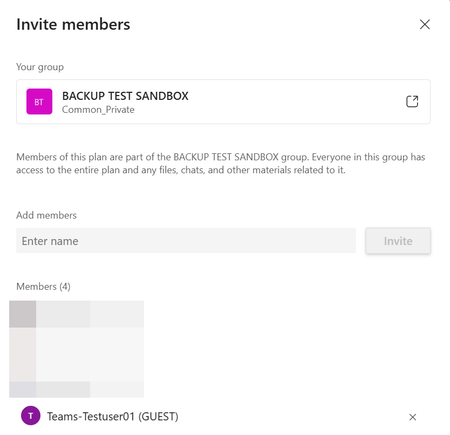
I created a Teams Team and want to manage a premium plan project therein. I have the Planner-Plan 1 license. One external supplier is a guest in my Team but he cannot see the Premium plan. Is this by design or is there any wrong setting in my system? I could not find any information on this in the Microsoft documentation. Facts The guest user is part of the team379Views1like3Comments
[BUG] msdyn_project silently renamed from "Plan/Plans" to "Project/Projects" in new environments
We need clarification from Microsoft on whether this is a bug or an intentional breaking change. Overnight and without any announcement, the msdyn_project table now ships with display name Project / Projects in newly provisioned environments. Dev and UAT environments provisioned a few months ago have Plan / Plans out of the box. All environments are running the exact same PSCore version: 1.0.163.730. The entity is as expected, marked non-renameable — read-only in the maker portal — so there is no way to align environments manually. Solution import from an existing environment (where msdyn_project = "Plan") into a newly provisioned Production environment fails with: 0x8004023B: Entity 44286cce-2389-4532-ac04-7a18a2818e9a is not a renamable entity. Hence Entity Display Name cannot be modified The only workaround — and why it is not acceptable It is technically possible to manually edit customizations.xml inside the solution ZIP before importing, removing the <DisplayName> node for msdyn_project. The import will then succeed, but Production will permanently show "Project" while Dev and UAT show "Plan" — a broken inconsistency across environments. More importantly, this is not how ALM is supposed to work. Developers should never have to manually patch solution artifacts to work around a platform-level inconsistency introduced silently by Microsoft. This is incompatible with automated CI/CD pipelines and unsustainable for any team managing multiple environments. The question for Microsoft Is this a bug or a planned change? If it is a bug: when will it be fixed, and is there a supported workaround in the meantime? If it is a planned change: why was it not communicated, and what is the supported migration path for teams with existing environments and solutions? [UPDATE]: After 3 attempts of resetting and reprovisioning the Production environment, msdyn_project finally came up with Plan / Plans — same process, same PSCore version each time. The behavior is non-deterministic. The only workaround currently available is to keep resetting your environment until you get lucky, which is not an acceptable answer for any type of deployment.255Views1like0CommentsFiltering tasks based on custom columns in Microsoft Planner?
In Microsoft Planner, I can add a custom column, and it appears in the table view. However, I do not see an option to filter tasks based on the new column. Is this a supported feature, or is there any workaround to enable filtering on custom fields?Solved470Views3likes2Comments