Recent Discussions
Sentinel - Defender XDR KQL Queries Library
Hello all, I’ve been building something over the past few weeks that I think the security community might find useful. https://goxdr.fyi is a searchable KQL query library for Microsoft Sentinel and Defender XDR. The name comes from a nickname my colleagues gave me (GoX) combined with XDR. I also picked up https://goxdr.fyi as a short and easy to remember domain for it. You can check it out here: https://goxdr.fyi The idea came from my own day to day work as someone working in IAM and SOC operations. I constantly find myself writing and refining KQL queries for threat hunting, detection engineering and incident investigation. Over time I realized I had a growing collection of queries that I kept going back to and I thought why not make these available to others? It currently has 117 queries covering identity security, BEC/AiTM detection, NTLM and LDAP attack hunting, OAuth governance, AI/Copilot security, Sentinel alert trending, SOC performance metrics and more. Some of these queries are ones I wrote from scratch based on real scenarios I encountered in production environments. Others are community queries I tested and validated in my own setup. Only the ones I found genuinely useful and that actually worked against real data made it in. Each query comes with a description explaining what it detects and why it matters, along with severity levels, platform tags (Sentinel, XDR or both) and a copy button so you can paste it directly into Advanced Hunting or use it as the basis for an Analytics Rule. The site is open source, hosted on GitHub Pages and licensed under CC BY 4.0. No sign-up, no paywall, no tracking. The source is available. I’ll keep adding queries as new scenarios come up. If there’s enough interest I’m also considering adding Cortex XQL queries for Palo Alto environments. Suggestions, feedback or ideas for new detections are always welcome. Feel free to reach out. Thanks104Views0likes0CommentsReminder: Next Tuesday 6/23 at 9AM PST we will be hosting an 'Ask Microsoft Anything' session on Tech Community for the Sentinel SIEM Migration Experience!
Join us for a live demo and AMA on the Microsoft Sentinel SIEM migration experience. We’ll show how the experience helps teams move from legacy SIEMs like Splunk and QRadar into Microsoft Sentinel with a more guided, lower-friction path. We’ll cover what it does today, how it works, and the questions customers ask most, then open it up for live Q&A. Link here: Ask Microsoft Anything: The Microsoft Sentinel SIEM Migration Experience Hope to see you there!54Views0likes0CommentsDetecting AI agents and non-human identities in Microsoft Sentinel: the classic-agent blind spot
Build 2026 made the direction official. The industry is moving from the app era into the agent era, and Microsoft spent a real share of the keynote on securing agents across their lifecycle, from discovering what is exploitable to governing what is running in production. On the identity side the centerpiece is Microsoft Entra Agent ID, now generally available, which gives AI agents first-class identities and extends Conditional Access, Identity Protection, and full audit logging to them. That is good news for agents you build the new way. It is not the whole picture, and the gap is where most SOCs will get hurt first. Modern agents are covered. Classic agents are not. Entra Agent ID draws a hard line between two kinds of agent. Modern agents are created through the Agent ID platform, each backed by an agent identity blueprint. They carry a proper Agent ID, a full audit trail, and the complete set of governance capabilities, including Identity Protection for Agents, which establishes a baseline for an agent's normal activity and flags anomalies automatically. Classic agents are everything that came before, or that gets built outside the platform: AI agents implemented as ordinary service principals or app registrations, for example Copilot Studio agents created before Agent ID was enabled, or any home-grown automation calling Graph with client credentials. In the Entra agent registry they appear with "Has Agent ID: No," and that flag matters, because the Agent ID protections apply to identities that actually hold an Agent ID. Classic agents sit outside Identity Protection for Agents and Conditional Access for Agents. Here is the uncomfortable part. The non-human identities you already run, the service principals behind your pipelines, your integrations, your scripts, your pre-platform Copilot Studio bots, are almost all classic agents. They tend to outnumber your human accounts, they have no MFA in any meaningful sense, and a credential added to one does not show up in the Azure portal. The new platform protections do not reach them. Until you migrate them, the only place you get detection coverage on that population is your SIEM. So this is the job Sentinel does that Agent ID does not: detect risky behavior on the classic, service-principal-backed agents that the platform cannot yet protect. The telemetry you have, and the one switch people forget Three tables carry most of the signal. AADServicePrincipalSignInLogs records service principal authentications, the client-credentials sign-ins your agents and automation use. No user, no MFA, just an app proving it holds a secret or certificate. AADManagedIdentitySignInLogs does the same for managed identities. AuditLogs records directory changes, including the one that matters most for persistence: a new credential added to an application or service principal. One practical warning before any of this works. Service principal and managed identity sign-in logs are not streamed by default. You have to enable those categories explicitly in the Entra diagnostic settings feeding your workspace. Plenty of teams write the detection, never check, and never notice the table is empty. Verify that first. Detection 1: a new credential on a service principal or app Adding a secret or certificate to an existing service principal is one of the cleanest persistence techniques in a Microsoft cloud. The attacker compromises a privileged user or app, drops a fresh credential on a service principal that already holds useful Graph permissions, and now has access that survives password resets and session revocation. It maps to MITRE T1098.001, Account Manipulation: Additional Cloud Credentials. For a classic agent it is especially nasty, because there is no Identity Protection baseline watching it. // Detection 1: new secret or certificate added to an application or service principal // MITRE T1098.001 - Account Manipulation: Additional Cloud Credentials AuditLogs | where OperationName has_any ("Add service principal", "Certificates and secrets management") | where Result =~ "success" | extend Initiator = coalesce( tostring(InitiatedBy.user.userPrincipalName), tostring(InitiatedBy.app.displayName)) | extend InitiatorIp = tostring(InitiatedBy.user.ipAddress) | mv-apply Target = TargetResources on ( where Target.type =~ "Application" | extend TargetName = tostring(Target.displayName), TargetId = tostring(Target.id), KeyChanges = Target.modifiedProperties ) | mv-apply Prop = KeyChanges on ( where tostring(Prop.displayName) =~ "KeyDescription" | extend NewKeys = parse_json(tostring(Prop.newValue)), OldKeys = parse_json(tostring(Prop.oldValue)) ) | extend AddedKeys = set_difference(NewKeys, OldKeys) | where array_length(AddedKeys) > 0 | project TimeGenerated, Initiator, InitiatorIp, TargetName, TargetId, AddedKeys | order by TimeGenerated desc The operation filter catches the three shapes this event takes in the log: "Add service principal," "Add service principal credentials," and "Update application - Certificates and secrets management." The modifiedProperties parsing isolates the KeyDescription change, and set_difference confirms a key was actually added rather than removed, so rotating out an old credential does not, on its own, fire the rule. False positives come from legitimate rotation and from automation that provisions app credentials (CI/CD, infrastructure as code). The initiator is the discriminant. A credential added by your deployment pipeline's service account at the usual time is routine. The same change initiated by an interactive admin out of hours, or by an account that never normally touches app credentials, is what you want to surface. Allow-list the expected initiators, not the targets. Detection 2: a classic agent signing in from a first-seen IP A service principal that has only ever authenticated from your Azure regions and suddenly signs in from somewhere new is a strong signal that its credential has been lifted and is being used elsewhere. Service principals have stable, boring network behavior, which makes a first-seen IP a far cleaner indicator for them than it is for roaming human users. This is the behavioral baseline Identity Protection gives you for free on modern agents, rebuilt in KQL for the classic ones it ignores. MITRE T1078.004, Valid Accounts: Cloud Accounts. // Detection 2: classic-agent service principal signing in from a previously unseen IP // MITRE T1078.004 - Valid Accounts: Cloud Accounts let baseline = 14d; let detection = 1d; let KnownIPs = AADServicePrincipalSignInLogs | where TimeGenerated between (ago(baseline + detection) .. ago(detection)) | where tostring(ResultType) == "0" | summarize KnownIPSet = make_set(IPAddress) by AppId; AADServicePrincipalSignInLogs | where TimeGenerated > ago(detection) | where tostring(ResultType) == "0" | lookup kind=leftouter KnownIPs on AppId | where set_has_element(KnownIPSet, IPAddress) == false | summarize FirstSeen = min(TimeGenerated), Resources = make_set(ResourceDisplayName, 10) by ServicePrincipalName, AppId, IPAddress | order by FirstSeen desc The query builds a per-application baseline of source IPs over the previous two weeks, then flags any successful sign-in today from an address outside that set. Two tuning notes. Brand-new service principals have no baseline, so they surface on first use. That is usually worth seeing once, but you can exclude AppIds younger than the baseline window if it gets noisy. And if your agents egress through shifting cloud IP ranges, widen the comparison from an exact IP to the autonomous system number or a known-range allow-list, otherwise you will chase your own infrastructure. This complements Agent ID, it does not replace it! The endgame is not to run these rules forever. It is to shrink the population they apply to. Inventory your tenant for agents marked "Has Agent ID: No," prioritize the ones holding sensitive Graph permissions, and migrate them onto the Agent ID platform, where Identity Protection and Conditional Access take over the baselining you are doing here by hand. Microsoft has signaled a migration path from classic to modern agents. Treat these two detections as the coverage you need in the meantime, and as a permanent safety net for anything that never makes the move. If you do one thing this week: enable the service principal sign-in log category, deploy detection 1, and pull a list of every service principal that had a credential added in the last 90 days. That list alone tends to be more interesting than people expect. Cheers, Marcel493Views0likes0CommentsSecurity Copilot Integration with Microsoft Sentinel - Why Automation matters now
Security Operations Centers face a relentless challenge - the volume of security alerts far exceeds the capacity of human analysts. On average, a mid-sized SOC receives thousands of alerts per day, and analysts spend up to 80% of their time on initial triage. That means determining whether an alert is a true positive, understanding its scope, and deciding on next steps. With Microsoft Security Copilot now deeply integrated into Microsoft Sentinel, there is finally a practical path to automating the most time-consuming parts of this workflow. So I decided to walk you through how to combine Security Copilot with Sentinel to build an automated incident triage pipeline - complete with KQL queries, automation rule patterns, and practical scenarios drawn from common enterprise deployments. Traditional triage workflows rely on analysts manually reviewing each incident - reading alert details, correlating entities across data sources, checking threat intelligence, and making a severity assessment. This is slow, inconsistent, and does not scale. Security Copilot changes this equation by providing: Natural language incident summarization - turning complex, multi-alert incidents into analyst-readable narratives Automated entity enrichment - pulling threat intelligence, user risk scores, and device compliance state without manual lookups Guided response recommendations - suggesting containment and remediation steps based on the incident type and organizational context The key insight is that Copilot does not replace analysts - it handles the repetitive first-pass triage so analysts can focus on decision-making and complex investigations. Architecture - How the Pieces Fit Together The automated triage pipeline consists of four layers: Detection Layer - Sentinel analytics rules generate incidents from log data Enrichment Layer - Automation rules trigger Logic Apps that call Security Copilot Triage Layer - Copilot analyzes the incident, enriches entities, and produces a triage summary Routing Layer - Based on Copilot's assessment, incidents are routed, re-prioritized, or auto-closed (Forgive my AI-painted illustration here, but I find it a nice way to display dependencies.) +-----------------------------------------------------------+ | Microsoft Sentinel | | | | Analytics Rules --> Incidents --> Automation Rules | | | | | v | | Logic App / Playbook | | | | | v | | Security Copilot API | | +-----------------+ | | | Summarize | | | | Enrich Entities | | | | Assess Risk | | | | Recommend Action| | | +--------+--------+ | | | | | v | | +-----------------------------+ | | | Update Incident | | | | - Add triage summary tag | | | | - Adjust severity | | | | - Assign to analyst/team | | | | - Auto-close false positive| | | +-----------------------------+ | +-----------------------------------------------------------+ Step 1 - Identify High-Volume Triage Candidates Not every incident type benefits equally from automated triage. Start with alert types that are high in volume but often turn out to be false positives or low severity. Use this KQL query to identify your top candidates: SecurityIncident | where TimeGenerated > ago(30d) | summarize TotalIncidents = count(), AutoClosed = countif(Classification == "FalsePositive" or Classification == "BenignPositive"), AvgTimeToTriageMinutes = avg(datetime_diff('minute', FirstActivityTime, CreatedTime)) by Title | extend FalsePositiveRate = round(AutoClosed * 100.0 / TotalIncidents, 1) | where TotalIncidents > 10 | order by TotalIncidents desc | take 20 This query surfaces the incident types where automation will deliver the highest ROI. Based on publicly available data and community reports, the following categories consistently appear at the top: Impossible travel alerts (high volume, around 60% false positive rate) Suspicious sign-in activity from unfamiliar locations Mass file download and share events Mailbox forwarding rule creation Step 2 - Build the Copilot-Powered Triage Playbook Create a Logic App playbook that triggers on incident creation and leverages the Security Copilot connector. The core flow looks like this: Trigger: Microsoft Sentinel Incident - When an incident is created Action 1 - Get incident entities: let incidentEntities = SecurityIncident | where IncidentNumber == <IncidentNumber> | mv-expand AlertIds | join kind=inner (SecurityAlert | extend AlertId = SystemAlertId) on $left.AlertIds == $right.AlertId | mv-expand Entities | extend EntityData = parse_json(Entities) | project EntityType = tostring(EntityData.Type), EntityValue = coalesce( tostring(EntityData.HostName), tostring(EntityData.Address), tostring(EntityData.Name), tostring(EntityData.DnsDomain) ); incidentEntities Note: The <IncidentNumber> placeholder above is a Logic App dynamic content variable. When building your playbook, select the incident number from the trigger output rather than hardcoding a value. Action 2 - Copilot prompt session: Send a structured prompt to Security Copilot that requests: Analyze this Microsoft Sentinel incident and provide a triage assessment: Incident Title: {IncidentTitle} Severity: {Severity} Description: {Description} Entities involved: {EntityList} Alert count: {AlertCount} Please provide: 1. A concise summary of what happened (2-3 sentences) 2. Entity risk assessment for each IP, user, and host 3. Whether this appears to be a true positive, benign positive, or false positive 4. Recommended next steps 5. Suggested severity adjustment (if any) Action 3 - Parse and route: Use the Copilot response to update the incident. The Logic App parses the structured output and: Adds the triage summary as an incident comment Tags the incident with copilot-triaged Adjusts severity if Copilot recommends it Routes to the appropriate analyst tier based on the assessment Step 3 - Enrich with Contextual KQL Lookups Security Copilot's assessment improves dramatically when you feed it contextual data. Before sending the prompt, enrich the incident with organization-specific signals: // Check if the user has a history of similar alerts (repeat offender vs. first time) let userAlertHistory = SecurityAlert | where TimeGenerated > ago(90d) | mv-expand Entities | extend EntityData = parse_json(Entities) | where EntityData.Type == "account" | where tostring(EntityData.Name) == "<UserPrincipalName>" | summarize PriorAlertCount = count(), DistinctAlertTypes = dcount(AlertName), LastAlertTime = max(TimeGenerated) | extend IsRepeatOffender = PriorAlertCount > 5; userAlertHistory // Check user risk level from Entra ID Protection AADUserRiskEvents | where TimeGenerated > ago(7d) | where UserPrincipalName == "<UserPrincipalName>" | summarize arg_max(TimeGenerated, RiskLevel), RecentRiskEvents = count() | project RiskLevel, RecentRiskEvents Including this context in the Copilot prompt transforms generic assessments into organization-aware triage decisions. A "suspicious sign-in" for a user who travels internationally every week is very different from the same alert for a user who has never left their home country. Step 4 - Implement Feedback Loops Automated triage is only as good as its accuracy over time. Build a feedback mechanism by tracking Copilot's assessments against analyst final classifications: SecurityIncident | where Tags has "copilot-triaged" | where TimeGenerated > ago(30d) | where Classification != "" | mv-expand Comments | extend CopilotAssessment = extract("Assessment: (True Positive|False Positive|Benign Positive)", 1, tostring(Comments)) | where isnotempty(CopilotAssessment) | summarize Total = dcount(IncidentNumber), Correct = dcountif(IncidentNumber, (CopilotAssessment == "False Positive" and Classification == "FalsePositive") or (CopilotAssessment == "True Positive" and Classification == "TruePositive") or (CopilotAssessment == "Benign Positive" and Classification == "BenignPositive") ) by bin(TimeGenerated, 7d) | extend AccuracyPercent = round(Correct * 100.0 / Total, 1) | order by TimeGenerated asc For this query to work reliably, the automation playbook must write the assessment in a consistent format within the incident comments. Use a structured prefix such as Assessment: True Positive so the regex extraction remains stable. According to Microsoft's published benchmarks and community feedback, Copilot-assisted triage typically achieves 85-92% agreement with senior analyst classifications after prompt tuning - significantly reducing the manual triage burden. A Note on Licensing and Compute Units Security Copilot is licensed through Security Compute Units (SCUs), which are provisioned in Azure. Each prompt session consumes SCUs based on the complexity of the request. For automated triage at scale, plan your SCU capacity carefully - high-volume playbooks can accumulate significant usage. Start with a conservative allocation, monitor consumption through the Security Copilot usage dashboard, and scale up as you validate ROI. Microsoft provides detailed guidance on SCU sizing in the official Security Copilot documentation. Example Scenario - Impossible Travel at Scale Consider a typical enterprise that generates over 200 impossible travel alerts per week. The SOC team spends roughly 15 hours weekly just triaging these. Here is how automated triage addresses this: Detection - Sentinel's built-in impossible travel analytics rule flags the incidents Enrichment - The playbook pulls each user's typical travel patterns from sign-in logs over the past 90 days, VPN usage, and whether the "impossible" location matches any known corporate office or VPN egress point Copilot Analysis - Security Copilot receives the enriched context and classifies each incident Expected Result - Based on common deployment patterns, around 70-75% of impossible travel incidents are auto-closed as benign (VPN, known travel patterns), roughly 20% are downgraded to informational with a triage note, and only about 5% are escalated to analysts as genuine suspicious activity This type of automation can reclaim over 10 hours per week - time that analysts can redirect to proactive threat hunting. Getting Started - Practical Recommendations For teams ready to implement automated triage with Security Copilot and Sentinel, here is a recommended approach: Start small. Pick one high-volume, high-false-positive incident type. Do not try to automate everything at once. Run in shadow mode first. Have the playbook add triage comments but do not auto-close or re-route. Let analysts compare Copilot's assessment with their own for two to four weeks. Tune your prompts. Generic prompts produce generic results. Include organization-specific context - naming conventions, known infrastructure, typical user behavior patterns. Monitor accuracy continuously. Use the feedback loop KQL above. If accuracy drops below 80%, pause automation and investigate. Maintain human oversight. Even at 90%+ accuracy, keep a human review step for high-severity incidents. Automation handles volume - analysts handle judgment. The combination of Security Copilot and Microsoft Sentinel represents a genuine step forward for SOC efficiency. By automating the initial triage pass - summarizing incidents, enriching entities, and providing classification recommendations - analysts are freed to focus on what humans do best: making nuanced security decisions under uncertainty. Feel free to like or/and connect :)477Views1like0CommentsWebinar Cancellation
Hi everyone! The webinar originally scheduled for April 14th on "Using distributed content to manage your multi-tenant SecOps" has unfortunately been cancelled for now. We apologize for the inconvenience and hope to reschedule it in the future. Please find other available webinars at: http://aka.ms/securitycommunity All the best, The Microsoft Security Community Team140Views0likes0CommentsWebinar Rescheduled: AI-Powered Entity Analysis in Sentinel's MCP Server
Hi folks! The webinar: AI-Powered Entity Analysis in Sentinel's MCP Server which was previously scheduled for: January 13th, 2026, has been rescheduled to: January 27th, 2026, at 9:00 AM PT. Please delete the old invite from your calendar and find the new one at aka.ms/securitycommunity. We apologize for the inconvenience and hope to see you there!208Views0likes0CommentsSentinel to Defender webinar series CANCELLED, will be rescheduled at a later date.
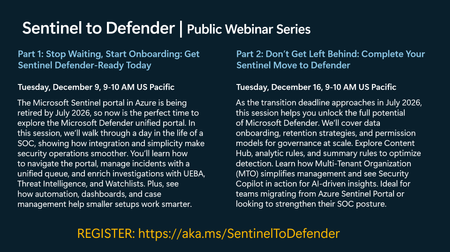
The Sentinel to Defender webinar series has been cancelled. Please visit aka.ms/securitycommunity to sign up for upcoming Microsoft Security webinars and to join the mailing list to be notified of future sessions. We apologize for any inconvenience.1KViews0likes0CommentsModernize security operations to secure agentic AI—Microsoft Sentinel at Ignite 2025
Security is a core focus at Microsoft Ignite this year, with the Security Forum on November 17, deep dive technical sessions, theater talks, and hands-on labs designed for security leaders and practitioners. Join us in San Francisco, November 17–21, or online, November 18–20, to learn what’s new and what’s next across SecOps, data, cloud, and AI—and how to get more from the Microsoft capabilities you already use. This year, Microsoft Sentinel takes center stage with sessions and labs designed to help you unify data, automate response, and leverage AI-powered insights for faster, more effective threat detection. Featured sessions: BRK235: Power agentic defense with Microsoft Sentinel Explore Microsoft Sentinel’s platform architecture, graph intelligence, and agentic workflows to automate, investigate, and respond with speed and precision. BRK246: Blueprint for building the SOC of the future Learn how to architect a modern SOC that anticipates and prevents threats using predictive shielding, agentic AI, and graph-powered reasoning. LAB543: Perform threat hunting in Microsoft Sentinel Dive deep into advanced threat hunting, KQL queries, and proactive investigation workflows to sharpen your security operations. Explore and filter the full security catalog by topic, format, and role: aka.ms/Ignite/SecuritySessions. Why attend: Ignite is your opportunity to see the latest innovations in Microsoft Sentinel, connect with experts, and gain hands-on experience. Sessions will also touch on future directions for agentic AI and unified SOC operations, as outlined in Microsoft’s broader security roadmap. Security Forum (November 17): Kick off with an immersive, in‑person pre‑day focused on strategic security discussions and real‑world guidance from Microsoft leaders and industry experts. Select Security Forum during registration. Connect with peers and security leaders through these signature security experiences: Security Leaders Dinner—CISOs and VPs connect with Microsoft leaders. CISO Roundtable—Gain practical insights on secure AI adoption. Secure the Night Party—Network in a relaxed, fun setting. Register for Microsoft Ignite >294Views0likes0Comments
Single Rule for No logs receiving (Global + Per-device Thresholds)
Hi everyone, I currently maintain one Analytics rule per table to detect when logs stop coming in. Some tables receive data from multiple sources, each with a different expected interval (for example, some sources send every 10 minutes, others every 30 minutes). In other SIEM platforms there’s usually: A global threshold (e.g., 60 minutes) for all sources. Optional per-device/per-table thresholds that override the global value. Is there a recommended way to implement one global rule that uses a default threshold but allows per-source overrides when a particular device or log table has a different expected frequency? Also, if there are other approaches you use to manage “logs not received” detection, I’d love to hear your suggestions as well. This is a sample of my current rule let threshold = 1h; AzureActivity | summarize LastHeartBeat = max(TimeGenerated) | where LastHeartBeat < ago(threshold)78Views1like0CommentsSecurity in Hybrid & Multi-Cloud Environments
Just completed a project on securing hybrid and multi-cloud environments. I explored the challenges of managing security across Azure, AWS, GCP, and on-prem, and how tools like Microsoft Sentinel help bring centralized visibility. Security isn’t one-and-done — it’s a continuous process of monitoring, automation, and enforcing least privilege.26Views0likes0Comments
Multi-trigger Playbooks & Renamed Triggers
Hello Sentinel enthusiasts, In some cases, deploying a playbook with multiple triggers is a much easier solution than having 9 playbooks which do the same thing. In the specific example I'm going for I have developed a playbook which requires the user to change their password within a certain amount of time. We want to have the ability to have three triggers for the playbook - incident, entity and http (for external orchestration platforms) - then we also want to have the option for it to be instant, or within a configurable number of days/hours (1day, 7days). In this situation the native way would be to have 9 playbooks in total - seems like a big amount for a simple action. I attempted to initially develop these playbooks with all three triggers in a base template which is deployed using bicep - success. But what do you know, at first, I could only see the playbook in the automation playbook list saying "Sentinel Action" but I couldn't trigger it from an actual incident or entity. Turns out this was because I had given the trigger a different display name than the default. This specific case seems a bit odd to me because the underlying data is the same, nonetheless - not a huge issue, change the display name to the default and voila. My next surprise was when I realised that the Sentinel UI will only pick up the first trigger to run a playbook. i.e. if I define an entity trigger first then an incident trigger, I cannot see it appear to trigger for an incident and vice versa. So, I set on a mission and was able to create a chromium extension which will modify the resource response - to duplicate a playbook once for every trigger it has (only in the azure portal PWA) and what do I know - everything works perfectly as if it was fully supported. It would be great if these UI bugs could be fixed as they seem pretty trivial and don't seem to require a major change, considering it is solely a frontend bug - especially if I can create an extension which resolves the issue. Obviously, this is not an ideal scenario in production. Garnering some support to have this rectified would be great and it would also be cool to hear people's opinions on this ~Seb97Views0likes0CommentsS1 Data Connector malfunctioning?
I am utilizing the S1 codeless data connector available in the content hub. It would seem that only a few tables are actually populating with data now. Threats and Alerts are no longer being captured. Is anyone else experiencing this? Any work arounds available? Any suggestions would be much appreciated!65Views0likes0Comments
CCP ProofPoint and Zscaler
Hi, I have ProofPoint and Zscaler Data Connector which appear to show as Deprecated. Logs are still flowing via native Azure Function uninterrupted. Per PP - CCP is suggested approach to replace Zscaler - No replacement method but I assume this will also require CCP Has anyone created CCP for these and successfully deployed these solutions?81Views0likes0Comments
Retrieving MailAddress from Entity for Logic App
I'm trying to put together a logic app that will reset a users password and also send them an email notifying them why their password was reset. The logic app triggers off a sentinel incident. The users email address I need to send to is from the Entities properties of the Sentinel incident. How can I extract the users email address? Its in the "MailAddress" property of each Entity. I believe Im going to have to parse it out of the JSON result but need some guidance if that is the case. Appreciate any help.87Views0likes0Comments
Log Analytics Workspace - ThreatIntelIndicators
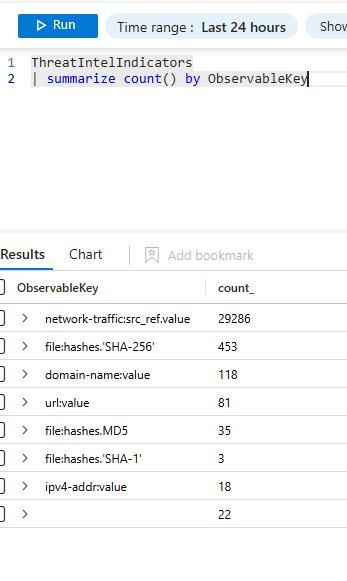
Morning! I have been working on migrating some of our tenant analytic rules to use the new TI ThreatIntelIndicators table. However, I noticed the following: When querying against the new table, I get these values in a tenant log workspace When I do the same query in another tenant logs workspace, I get this result back If I expand the query to grab last 7 days, I get results back but they are wildly different from what I see from one tenant to another. I can find big and small discrepancies in the logs I see. I still can't find the connector on the connectors page (When I filter them out by data type). I can see the one that is being used for the soon to be decommissioned table. As far as I understand, the connector is not going to be changed per se, just how we access the logs from any given log analytics workspace. I'm expecting to see the same values across my log workspaces since it comes from the same connector, and provided by MS, or is this ingestion of TI logs tenant scope and each one has different settings? I couldn't find something that tells me this in the docs. Or is this part of the rollout problems we are expecting to see? Thanks!164Views0likes0Comments
Unknown Behaviour Involving GroupsService in OfficeActivity
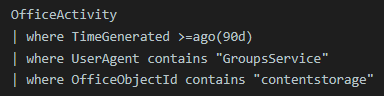
I have spotted a few hundred events with the following KQL query in my environment. This is the result of one of the entries. It looks like a regular legitimate behaviour by Microsoft but I don't seem to find any documentation about it. Can anyone share the insight of it? Thank you!62Views0likes0Comments
AMPLS Restrictions Preventing Outbound API Calls in Logic Apps – Any Workarounds?
Hi everyone, I’m encountering an issue where Azure Monitor Private Link Scope (AMPLS) restrictions are preventing Azure Logic Apps from making any outbound API calls, even to Microsoft-owned outbound IP addresses. One specific problem is that when running KQL queries inside a Logic App, the Azure Monitor connector fails because it attempts to access Microsoft outbound IPs, which are blocked by AMPLS restrictions. Since this is happening within Logic Apps itself, I don’t have direct control over these outbound calls. Has anyone found a workaround to allow Logic Apps to function correctly while keeping AMPLS in place? Would Private Endpoints, VNET Integration, or any other configuration help resolve this? Any insights or solutions would be greatly appreciated!63Views0likes0CommentsJuniper SRX 340 logs not read by rsyslog
I have configured Juniper SRX 340 Junos logs to be forwarded to a centralized syslog server before reaching Microsoft Sentinel. I can see the Juniper logs on the syslog server while doing a TCPDUMP but, the same logs are not ready by rsyslog. The same syslog server is also receiving the logs from Cisco ASA. The rsyslog is able to read the ASA logs with no issues and further forward them to Sentinel through AMA agent. I don't have any filters applied in rsyslog.conf file and I'm capturing everything (*.*) all syslog facility and severity to a log file but, still the Juniper logs are not recognized by rsyslog. Please help on resolving this issue114Views0likes0Comments







Events
Recent Blogs
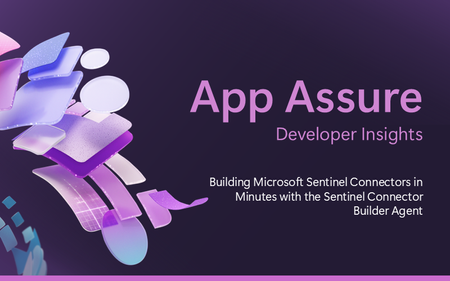
- 8 MIN READOverview We previously announced the public preview of the Microsoft Sentinel connector builder agent via VS code extension, that helps developers build Microsoft Sentinel codeless connectors faste...Aug 11, 2026665Views0likes0Comments
- We’re excited to announce we’re making it easier than ever to go from intent to action with the AI-powered playbook generator now available to more customers. What’s new All Microsoft Sentinel ...Aug 06, 20261.5KViews0likes0Comments