investigation
166 TopicsWhat’s new in Microsoft Sentinel: September 2026
Welcome back to What's new in Microsoft Sentinel. In September, Case Management brings investigation and collaboration together in Microsoft Defender, with a shared workspace to track work through resolution. Defender unified RBAC custom roles for granular delegated admin privileges (GDAP) give you finer control over what managed security service providers (MSSPs) and other partners can access. In Sentinel data lake, a single Codeless Connector Framework (CCF) connector can bring in data from many accounts, and our connector catalog has passed 500 data connectors. Read on for the details. Sentinel innovations: Sentinel SIEM Sentinel data lake Sentinel SIEM Case Management (Public Preview) Starting September 23, 2026, Case Management brings investigation and collaboration together in one experience in Defender. With Incident Cases, you can investigate, coordinate response, assign work, capture notes, and track progress through resolution, all from a shared workspace that holds investigation context alongside tasks and workflow tracking. Your existing Sentinel automation, playbooks, workbooks, and integrations carry over unchanged. This builds on the integrated security operations (ISOC) vision of bringing the context and workflows practitioners need to investigate and respond together in Defender. Read our Case Management blog, see the documentation, and watch the demo to learn more. Unified RBAC custom roles (Public Preview) If you work with a managed security service provider (MSSP) or manage multiple tenants, giving partners the right level of access is simpler. Granular delegated admin privileges (GDAP) sets which partner groups can be delegated access to your tenant, and Defender unified role-based access control (RBAC) sets what they can see and do once delegated. You can assign unified RBAC custom roles to GDAP remote tenant groups and scope each role down to specific security products, data sources, and data collections so partners receive only the access they need. GDAP previously only supported Microsoft Entra directory roles, which often meant handing partners more access than the job needed. Anyone who is a member of a remote tenant group receives its permissions. Your partner manages who belongs to the group, while you keep control of the role and its scope. Learn more. Sentinel data lake Multi-account support for codeless connectors (Public Preview) A single connector built on the Codeless Connector Framework (CCF) can bring data from many accounts, tenants, or environments into one Sentinel workspace. A unified connections list shows each account as its own row, labeled so you can tell them apart by account name, tenant ID, or environment. An “Add connection” experience walks you through setting up each one, and an independent lifecycle per connection means you can edit or remove any account without affecting the rest. Shared, efficient ingestion sends all of it to the same table, so you have one place to investigate instead of a separate connector for every account. This helps if you run separate production and development accounts, segment by region or business unit, or manage several customers in one workspace. Learn more. Sentinel data connectors pass the 500 mark Sentinel has reached an exciting milestone of more than 500 data connectors. Our connectors bring security signals from Microsoft services, non-Microsoft solutions, multicloud environments, applications, infrastructure, and custom sources into Sentinel, where they can be correlated and analyzed to help teams detect threats, investigate incidents, hunt across their digital estate, and automate response. With 500+ connectors and growing, Sentinel makes it easier for organizations to unify their security ecosystem and give the security operations center (SOC) broader visibility where it matters most. Find your connector. Additional resources Blogs and documentation: Integrated Security Operations Center in Microsoft Defender ISOC in Microsoft Defender (preview) Activate Microsoft Defender unified role-based access control (URBAC) Support multiple connections in a codeless connector Upcoming webinars: Oct 6: Security Immersion Event: Into the Breach Oct 14: Microsoft Security Immersion Event: Shadow Hunter Upcoming events: Oct 19: Microsoft Security Days Summit: Dallas Edition (In Person) ISOC: What's new with the Defenders Capture the Flag: Agent Wars (Hands-on) Nov 17–20: Microsoft Ignite at Moscone Center in San Francisco, CA, USA. See what's next in Microsoft Security. Register now. Stay connected Check back each month for the latest innovations, updates, and events to ensure you’re getting the most out of Microsoft Sentinel. We’ll see you in the next edition!1KViews2likes1Comment
Monitoring work from home
My boss has asked me if there is a way to see just how "busy" people who are working from home are. I have this data in Sentinel: Entra sign-in logs Defender for Endpoint logs Office 365 logs Most, if not all, on premise AD login events Netskope (current ZTNA solution) logs I have my known office location IPs so i could just exclude those and look for activity from other IPs however many times people will work in the morning or on the way to work appearing from a non corporate IP, come into the office appearing to come from a corporate IP, and then from home again in the evening. I need a way to query Sentinel looking for people who appear to be working but not coming from Corp IP. If they came from different IPs on the same day including Corp check to see if those non Corp are before and after business hours and exclude those. Anyone know of a good query to achieve this? Or maybe a tool that can extract and generate a report?227Views0likes0CommentsHunting AI Agent Configuration Drift with Microsoft Sentinel
Four KQL patterns for detecting instruction changes, new MCP servers, ownership changes, and organization-wide sharing I recently authored and contributed four new Microsoft Sentinel hunting queries for detecting security-relevant configuration drift in AI agents. They have been reviewed, approved, and merged into Microsoft's public Azure-Sentinel repository. I built the queries around four changes that can materially affect an agent's behavior, access, or exposure: instructions being modified, MCP servers being connected, owners being added, and sharing being expanded to the entire organization. Each modification may be legitimate, but each deserves enough context for a security team to verify that it was expected and authorized. For a security operations team, the difficult question is often not what does this agent look like now? It is what changed since the last known state? Microsoft Sentinel's AgentsInfo table provides inventory-style snapshots of AI agents and their associated configuration. That makes it useful for more than posture reporting. By comparing a recent snapshot with an earlier baseline, we can hunt for configuration drift that deserves investigation. This post walks through four practical hunting scenarios: Instructions changed on a previously published agent A newly observed MCP server on an existing agent An owner added to an MCP-enabled agent Sharing expanded from a restricted scope to the entire organization The complete hunting queries are available in Microsoft's public https://github.com/Azure/Azure-Sentinel/tree/master/Hunting%20Queries/AI%20Agents. The focus here is the detection design behind them, the KQL patterns they share, and the investigation questions they help answer. What I contributed I wrote the four standalone hunting queries discussed in this article and submitted them to Azure/Azure-Sentinel in https://github.com/Azure/Azure-Sentinel/pull/14702: AI Agents - Instructions changed on previously published agent AI Agents - Newly observed MCP server on existing agent AI Agents - Owner added to MCP-enabled agent AI Agents - Sharing expanded to organization-wide The contribution went through several rounds of technical review. Across six commits, I aligned the queries with the unified AgentsInfo schema, added schema-tolerant IdentityInfo enrichment, improved entity mappings, bounded the identity lookback, expanded all owner values, and kept the ATT&CK mappings limited to scenarios where a precise technique could be defended. Repository collaborator v-atulyadav approved the final revision, and the four queries were merged into master on July 20, 2026. This article explains the detection logic and engineering decisions behind that contribution rather than simply reproducing the final YAML files. Why current-state queries are not enough A current-state query can answer questions such as: Which agents are published? Which agents have MCP servers configured? Which agents are shared with the organization? Who owns a particular agent? Those are important posture questions, but they do not tell us whether the state is new. An agent with an MCP server might have been reviewed and approved months ago. The same MCP server appearing for the first time today is a different security signal. Configuration-drift hunting adds the missing time dimension. Instead of treating a risky-looking property as an event, it compares two states of the same agent and reports only meaningful transitions. The common detection pattern I used the same basic time model across all four hunts: let lookback = 14d; let recent = 2d; The latest snapshot observed during the last two days becomes the current state. The latest snapshot from the preceding portion of the 14-day lookback becomes the baseline. Conceptually, the comparison looks like this: let CurrentState = AgentsInfo | where Timestamp > ago(recent) | summarize arg_max(Timestamp, *) by AgentId | where LifecycleStatus != "Deleted"; let BaselineState = AgentsInfo | where Timestamp between (ago(lookback) .. ago(recent)) | where LifecycleStatus != "Deleted" | summarize arg_max(Timestamp, *) by AgentId; CurrentState | join kind=inner BaselineState on AgentId Several details matter here: arg_max(Timestamp, *) by AgentId selects the latest available state for each agent in the relevant time range. The inner join restricts results to agents that exist in both periods. A newly created agent is therefore not automatically treated as configuration drift on an existing agent. Deleted lifecycle snapshots are excluded so that a deletion record does not become the effective baseline or current configuration. The two-day current window is operationally significant. To retain coverage, these hunts should run within two days of a change. The 14-day and two-day values are practical defaults, not universal constants. Environments with different ingestion cadence or retention requirements can adjust them, but the current and baseline windows must remain non-overlapping. Scenario 1: Instructions changed on a published agent An agent's instructions define its default behavior, persona, and operating boundaries. Changing them can be part of normal development, but it can also weaken restrictions, redirect the agent's behavior, or modify how it uses connected capabilities. The first hunt compares the current and previous instruction values only when the agent was published in both snapshots: CurrentState | join kind=inner BaselineState on AgentId | where CurrentInstructions != PreviousInstructions | extend PreviousInstructionsHash = hash_sha256(PreviousInstructions), CurrentInstructionsHash = hash_sha256(CurrentInstructions), InstructionsLengthDelta = strlen(CurrentInstructions) - strlen(PreviousInstructions) I deliberately chose to expose hashes and a length delta rather than returning both instruction bodies in plaintext. This confirms that a change occurred without unnecessarily spreading potentially sensitive prompts through query results, exports, or screenshots. Useful investigation questions include: Was the change associated with an approved development or release process? Did the agent remain published while the instructions changed? Were guardrails, declared tools, permissions, or sharing settings modified around the same time? Do audit records identify an expected actor and change path? The query maps well to an integrity-focused investigation. Its MITRE ATT&CK mapping is T1565.001 (Stored Data Manipulation), but the result is still a hunting lead rather than proof of malicious manipulation. https://github.com/Azure/Azure-Sentinel/blob/master/Hunting%20Queries/AI%20Agents/AgentsInfoInstructionsChangedOnPublishedAgent.yaml Scenario 2: A newly observed MCP server Model Context Protocol servers can extend an agent with external tools, data sources, or actions. From a defender's perspective, the important transition is not simply that an MCP server exists. It is that a server name appears in the current configuration but was absent from the baseline. The query expands the dynamic McpServers array and builds a set of server names for each agent: let CurrentMcp = CurrentRaw | mv-expand Mcp = McpServers | extend McpName = tostring(Mcp.name) | where isnotempty(McpName) | summarize CurrentMcpServers = make_set(McpName) by AgentI It performs the same normalization for the baseline, then calculates the difference: | extend AddedMcpServers = set_difference(CurrentMcpServers, BaselineMcpServers) | where array_length(AddedMcpServers) > 0 Using set_difference() avoids raising a result merely because the order of array elements changed. The hunt reports only MCP server names present in the current set and absent from the previous set. An analyst should validate more than the displayed name: Is the MCP integration part of the approved inventory? What endpoint, authentication method, and permissions are associated with it? Which tools or data can the server expose to the agent? Was the integration introduced through an expected deployment path? Did ownership, instructions, or sharing change in the same period? I did not assign an ATT&CK technique to this query. Adding an MCP server does not, by itself, prove command execution, persistence, or a specific attacker behavior. Avoiding an overly broad mapping keeps the signal honest. https://github.com/Azure/Azure-Sentinel/blob/master/Hunting%20Queries/AI%20Agents/AgentsInfoNewlyObservedMcpServer.yaml Scenario 3: An owner added to an MCP-enabled agent Ownership is a control-plane relationship. A newly added owner may be able to modify an agent's configuration, instructions, integrations, or publication state. The risk becomes more interesting when the agent already has MCP servers configured. The hunt first limits the current state to MCP-enabled agents: | where array_length(coalesce(McpServers, dynamic([]))) > 0 | project AgentId, Timestamp, Name, Platform, CreatedDateTime, CurrentOwners = coalesce(Owners, dynamic([])), McpServers It then compares the owner arrays as sets: | extend AddedOwners = set_difference(CurrentOwners, PreviousOwners) | where array_length(AddedOwners) > 0 | mv-expand AddedOwnerId = AddedOwners to typeof(string) Expanding AddedOwners produces one row per newly observed owner. This is more useful than returning one opaque dynamic array because every added identity can be enriched, mapped, and investigated independently. I kept the raw object identifier in the result even when identity enrichment fails: | extend AddedOwnerUpn = AccountUpn, UnresolvedAddedOwnerId = iff(isempty(AccountUpn), AddedOwnerId, "") That fallback matters. A missing UPN should not hide the underlying ownership change. Investigation should establish: Is the added owner an expected person, service identity, or administrative group? Does the identity's role and business function justify control of this agent? Was the owner added before other configuration changes? Does the identity appear in related sign-in, audit, or privileged-access activity? Should ownership be removed while the change is reviewed? This query maps to T1098 (Account Manipulation) under Persistence and Privilege Escalation. As with the instruction-change hunt, the mapping frames an investigation hypothesis; it does not label every ownership change as malicious. https://github.com/Azure/Azure-Sentinel/blob/master/Hunting%20Queries/AI%20Agents/AgentsInfoOwnerAddedToMcpAgent.yaml Scenario 4: Sharing expanded to the entire organization An agent can move from a limited audience to organization-wide availability without changing its underlying tools or instructions. That transition can materially increase exposure, especially when the agent has MCP integrations or declared tools. The hunt treats "*" in SharedWith as the organization-wide state. The current snapshot must contain it, while the baseline must not: // Current state | where set_has_element(coalesce(SharedWith, dynamic([])), "*") // Baseline state | where not(set_has_element(coalesce(SharedWith, dynamic([])), "*")) The result also counts MCP servers and declared tools: | extend McpServerCount = array_length(coalesce(McpServers, dynamic([]))), DeclaredToolCount = array_length(coalesce(DeclaredTools, dynamic([]))) | extend HasElevatedCapabilities = McpServerCount > 0 or DeclaredToolCount > 0 | sort by HasElevatedCapabilities desc, Timestamp desc I use HasElevatedCapabilities as a prioritization field, not a verdict. It brings agents with connected capabilities to the top of the result set so analysts can review the potentially larger blast radius first. Questions for triage include: Was organization-wide publication explicitly approved? Is the agent intended for every user, or was a group-based scope expected? What data sources, tools, and MCP servers can organization-wide users reach through it? Do the instructions contain assumptions that were safe only for a restricted audience? Were access reviews or user-acceptance tests completed before the expansion? No ATT&CK mapping is assigned because a broader sharing scope is a security-relevant exposure change, but not a sufficiently precise adversary technique on its own. https://github.com/Azure/Azure-Sentinel/blob/master/Hunting%20Queries/AI%20Agents/AgentsInfoSharingExpandedToOrgWide.yaml Resolving owners without making the hunt schema-fragile The Owners field contains identifiers. Human-readable identity context makes results easier to triage, and entity mappings make those identities more useful in Sentinel investigations. I built a small, materialized IdentityInfo lookup that is shared by the four hunts: let IdentityIdtoUPN = materialize( IdentityInfo | extend ResolvedAccountUpn = tostring( column_ifexists("AccountUpn", column_ifexists("AccountUPN", ""))), IdentityTimestamp = todatetime( column_ifexists("Timestamp", column_ifexists("TimeGenerated", datetime(null)))) | where IdentityTimestamp >= ago(lookback) | where isnotempty(AccountObjectId) and isnotempty(ResolvedAccountUpn) | summarize arg_max(IdentityTimestamp, ResolvedAccountUpn) by AccountObjectId | project AccountObjectId = tostring(AccountObjectId), AccountUpn = ResolvedAccountUpn); There are three design choices worth noting: column_ifexists() accommodates observed IdentityInfo naming variants without maintaining separate query versions. The lookup is bounded by the same lookback period instead of scanning unbounded identity history. arg_max() keeps the latest usable identity record for each object ID. After enrichment, the queries map the account using the UPN components and the Entra object ID: entityMappings: - entityType: Account fieldMappings: - identifier: Name columnName: OwnerAccountName - identifier: UPNSuffix columnName: OwnerAccountUPNSuffix - identifier: AadUserId columnName: OwnerId The strong AadUserId identifier remains valuable even when display information changes. Microsoft Sentinel can use mapped entities in bookmarks and investigation experiences, so mapping the changed owner is more than cosmetic enrichment. Turning a result into an investigation These queries intentionally stop at the configuration transition. AgentsInfo tells us that two snapshots differ; it does not necessarily tell us who performed the change, through which interface, or whether the action was authorized. A practical investigation workflow is: Confirm that the two snapshots represent the expected agent and time period. Review the exact changed property and the agent's current capabilities. Identify the owner or newly added owner through IdentityInfo and Entra ID context. Correlate the transition with the relevant audit source for actor attribution. Check for related changes to permissions, tools, data sources, publication state, and sharing. Validate the change against an approved request, release, or ownership process. Restrict, unpublish, or revert the agent if the exposure cannot be justified. Expected changes can still be useful findings. Repeated legitimate results may reveal that a deployment process lacks a stable change window, that ownership is managed through noisy automation, or that the hunt's timing needs to be aligned with release activity. Tuning the hunts for your environment Before operational use, consider the following adjustments: Run cadence: Execute within the two-day current window. A daily cadence provides overlap without blending current and baseline periods. Lookback: Increase the 14-day lookback only if snapshot history and query cost support it. A longer lookback does not compensate for missing the current window. Known change windows: Add watchlists or environment-specific suppression logic for well-controlled automated deployments, while retaining enough context to audit the change. Agent scope: Filter by platform, business unit, agent naming convention, or owner if different teams require separate triage queues. Risk prioritization: Raise agents with sensitive declared data sources, powerful tools, privileged owners, or broad availability to the top of the result set. Audit correlation: Keep attribution logic separate unless the audit source and join keys are stable in your environment. This makes the configuration-drift hunt reusable while allowing each organization to attach its own control-plane evidence. Test with representative snapshots before treating any hunt as an operational control. In particular, validate array shapes for Owners, McpServers, and SharedWith, confirm the identity fields present in your workspace, and exercise both changed and unchanged states. Using the queries The four YAML definitions have been merged into the Hunting Queries/AI Agents folder of Microsoft's Azure-Sentinel repository. Each file contains the complete KQL, description, entity mappings, and ATT&CK mappings where a precise technique applies. https://github.com/Azure/Azure-Sentinel/blob/master/Hunting%20Queries/AI%20Agents/AgentsInfoInstructionsChangedOnPublishedAgent.yaml https://github.com/Azure/Azure-Sentinel/blob/master/Hunting%20Queries/AI%20Agents/AgentsInfoNewlyObservedMcpServer.yaml https://github.com/Azure/Azure-Sentinel/blob/master/Hunting%20Queries/AI%20Agents/AgentsInfoOwnerAddedToMcpAgent.yaml https://github.com/Azure/Azure-Sentinel/blob/master/Hunting%20Queries/AI%20Agents/AgentsInfoSharingExpandedToOrgWide.yaml The broader pattern is reusable beyond these four scenarios: select a stable current snapshot, select a non-overlapping baseline, normalize dynamic properties into comparable sets, calculate the transition, and enrich only after the drift has been identified. That keeps the core detection explainable and gives the analyst the before-and-after context needed for a defensible investigation. References https://learn.microsoft.com/en-us/azure/azure-monitor/reference/tables/agentsinfo https://learn.microsoft.com/en-us/azure/azure-monitor/reference/queries/agentsinfo https://learn.microsoft.com/en-us/azure/azure-monitor/reference/tables/identityinfo https://learn.microsoft.com/en-us/azure/sentinel/entities-reference https://github.com/Azure/Azure-Sentinel/pull/14702 I authored the four hunting queries discussed in this article and contributed them to Microsoft's Azure-Sentinel repository as https://github.com/Azure/Azure-Sentinel/pull/14702. The complete implementations and review history are publicly available through the links above.887Views1like2CommentsSentinel - Defender XDR KQL Queries Library
Hello all, I’ve been building something over the past few weeks that I think the security community might find useful. https://goxdr.fyi is a searchable KQL query library for Microsoft Sentinel and Defender XDR. The name comes from a nickname my colleagues gave me (GoX) combined with XDR. I also picked up https://goxdr.fyi as a short and easy to remember domain for it. You can check it out here: https://goxdr.fyi The idea came from my own day to day work as someone working in IAM and SOC operations. I constantly find myself writing and refining KQL queries for threat hunting, detection engineering and incident investigation. Over time I realized I had a growing collection of queries that I kept going back to and I thought why not make these available to others? It currently has 117 queries covering identity security, BEC/AiTM detection, NTLM and LDAP attack hunting, OAuth governance, AI/Copilot security, Sentinel alert trending, SOC performance metrics and more. Some of these queries are ones I wrote from scratch based on real scenarios I encountered in production environments. Others are community queries I tested and validated in my own setup. Only the ones I found genuinely useful and that actually worked against real data made it in. Each query comes with a description explaining what it detects and why it matters, along with severity levels, platform tags (Sentinel, XDR or both) and a copy button so you can paste it directly into Advanced Hunting or use it as the basis for an Analytics Rule. The site is open source, hosted on GitHub Pages and licensed under CC BY 4.0. No sign-up, no paywall, no tracking. The source is available. I’ll keep adding queries as new scenarios come up. If there’s enough interest I’m also considering adding Cortex XQL queries for Palo Alto environments. Suggestions, feedback or ideas for new detections are always welcome. Feel free to reach out. Thanks316Views0likes0CommentsMicrosoft Sentinel data lake FAQ
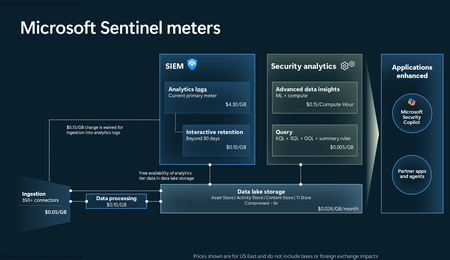
Microsoft Sentinel data lake (generally available) is a purpose‑built, cloud‑native security data lake. It centralizes all security data in an open format, serving as the foundation for agentic defense, enhanced security insights, and graph-based enrichment. It offers cost‑effective ingestion, long‑term retention, and advanced analytics. In this blog we offer answers to many of the questions we’ve heard from our customers and partners. General questions What is the Microsoft Sentinel data lake? Microsoft has expanded its industry-leading SIEM solution, Microsoft Sentinel, to include a unified, security data lake, designed to help optimize costs, simplify data management, and accelerate the adoption of AI in security operations. This modern data lake serves as the foundation for the Microsoft Sentinel platform. It has a cloud-native architecture and is purpose-built for security—bringing together all security data for greater visibility, deeper security analysis, contextual awareness and agentic defense. It provides affordable, long-term retention, allowing organizations to maintain robust security while effectively managing budgetary requirements. What are the benefits of Sentinel data lake? Microsoft Sentinel data lake is purpose built for security offering flexible analytics, cost management, and deeper security insights. Sentinel data lake: Centralizes security data delta parquet and open format for easy access. This unified data foundation accelerates threat detection, investigation, and response across hybrid and multi-cloud environments. Enables data federation by allowing customers to access data in external sources like Microsoft Fabric, ADLS and Databricks from the data lake. Federated data appears alongside native Sentinel data, enabling correlated hunting, investigation, and custom graph analysis across a broader digital estate. Offers a disaggregated storage and compute pricing model, allowing customers to store massive volumes of security data at a fraction of the cost compared to traditional SIEM solutions. Allows multiple analytics engines like Kusto, Spark, and ML to run on a single data copy, simplifying management, reducing costs, and supporting deeper security analysis. Integrates with GitHub Copilot and VS Code empowering SOC teams to automate enrichment, anomaly detection, and forensic analysis. Supports AI agents via the MCP server, allowing tools like GitHub Copilot to query and automate security tasks. The MCP Server layer brings intelligence to the data, offering Semantic Search, Query Tools, and Custom Analysis capabilities that make it easier to extract insights and automate workflows. Provides streamlined onboarding, intuitive table management, and scalable multi-tenant support, making it ideal for MSSPs and large enterprises. The Sentinel data lake is designed for security workloads, ensuring that processes from ingestion to analytics meet evolving cybersecurity requirements. Is Microsoft Sentinel SIEM going away? No. Microsoft is expanding Sentinel into an AI powered end-to-end security platform that includes SIEM and new platform capabilities - Security data lake, graph-powered analytics and MCP Server. SIEM remains a core component and will be actively developed and supported. Getting started What are the prerequisites for Sentinel data lake? To get started: Connect your Sentinel workspace to Microsoft Defender prior to onboarding to Sentinel data lake. Once in the Defender experience see data lake onboarding documentation for next steps. Note: Sentinel is moving to the Microsoft Defender portal and the Sentinel Azure portal will be retired by March 31, 2027. I am a Sentinel-only customer, and not a Defender customer. Can I use the Sentinel data lake? Yes. You must connect Sentinel to the Defender experience before onboarding to the Sentinel data lake. Microsoft Sentinel is generally available in the Microsoft Defender portal, with or without Microsoft Defender XDR or an E5 license. If you have created a log analytics workspace, enabled it for Sentinel and have the right Microsoft Entra roles (e.g. Global Administrator + Subscription Owner, Security Administrator + Sentinel Contributor), you can enable Sentinel in the Defender portal. For more details on how to connect Sentinel to Defender review these sources: Microsoft Sentinel in the Microsoft Defender portal In what regions is Sentinel data lake available? For supported regions see: Geographical availability and data residency in Microsoft Sentinel | Azure Docs. Is there an expected release date for Microsoft Sentinel data lake in GCC, GCC-H, and DoD? While the exact date is not yet finalized, we plan to expand Sentinel data lake to the US Government environments. . How will URBAC and Entra RBAC work together to manage the data lake given there is no centralized model? Entra RBAC will provide broad access to the data lake (URBAC maps the right permissions to specific Entra role holders: GA/SA/SO/GR/SR). URBAC will become a centralized pane for configuring non-global delegated access to the data lake. For today, you will use this for the “default data lake” workspace. In the future, this will be enabled for non-default Sentinel workspaces as well – meaning all workspaces in the data lake can be managed here for data lake RBAC requirements. Azure RBAC on the Log Analytics (LA) workspace in the data lake is respected through URBAC as well today. If you already hold a built-in role like log analytics reader, you will be able to run interactive queries over the tables in that workspace. Or, if you hold log analytics contributor, you can read and manage table data. For more details see: Roles and permissions in the Microsoft Sentinel platform | Microsoft Learn Data ingestion and storage How do I ingest data into the Sentinel data lake? To ingest data into the Sentinel data lake, you can use existing Sentinel data connectors or custom connectors to bring data from Microsoft and third-party sources. Data can be ingested into the analytics tier or the data lake tier. Data ingested into the analytics tier is automatically mirrored to the lake (at no additional cost). Alternatively, data that is not needed in the analytics tier can be ingested directly into the data lake. Data retention is configured directly in table management, for both analytics retention and data lake storage. Note: Certain tables do not support data lake-only ingestion via either API or data connector UI. See here for more information: Custom log tables. What is Microsoft’s guidance on when to use analytics tier vs. the data lake tier? Sentinel data lake offers flexible, built-in data tiering (analytics and data lake tiers) to effectively meet diverse business use cases and achieve cost optimization goals. Analytics tier: Is ideal for high-performance, real-time, end-to-end detections, enrichments, investigation and interactive dashboards. Typically, high-fidelity data from EDRs, email gateways, identity, SaaS and cloud logs, threat intelligence (TI) should be ingested into the analytics tier. Data in the analytics tier is best monitored proactively with scheduled alerts and scheduled analytics to enable security detections Data in this tier is retained at no cost for up to 90 days by default, extendable to 2 years. A copy of the data in this tier is automatically available in the data lake tier at no extra cost, ensuring a unified copy of security data for both tiers. Data lake tier: Is designed for cost-effective, long-term storage. High-volume logs like NetFlow logs, TLS/SSL certificate logs, firewall logs and proxy logs are best suited for data lake tier. Customers can use these logs for historical analysis, compliance and auditing, incident response (IR), forensics over historical data, build tenant baselines, TI matching and then promote resulting insights into the analytics tier. Customers can run full Kusto queries, Spark Notebooks and scheduled jobs over a single copy of their data in the data lake. Customers can also search, enrich and promote data from the data lake tier to the analytics tier for full analytics. For more details see documentation. What does it mean that a copy of all new analytics tier data will be available in the data lake? When Sentinel data lake is enabled, a copy of all new data ingested into the analytics tier is automatically duplicated into the data lake tier. This means customers don’t need to manually configure or manage this process, every new log or telemetry added to the analytics tier becomes instantly available in the data lake. This allows security teams to run advanced analytics, historical investigations, and machine learning models on a single, unified copy of data in the lake, while still using the analytics tier for real-time SOC workflows. It’s a seamless way to support both operational and long-term use cases—without duplicating effort or cost. What is the guidance for customers using data federation capability in Sentinel data lake? Starting April 1, 2026, federate data from Microsoft Fabric, ADLS, and Azure Databricks into Sentinel data lake. Use data federation when data is exploratory, infrequently accessed, or must remain at source due to governance, compliance, sovereignty, or contractual requirements. Ingest data directly into Sentinel to unlock full SIEM capabilities, always-on detections, advanced automation, and AI‑driven defense at scale. This approach lets security teams start where their data already lives — preserving governance, then progressively ingest data into Sentinel for full security value. Is there any cost for retention in the analytics tier? Analytics ingestion includes 90 days of interactive retention, at no additional cost. Simply set analytics retention to 90 days or less. Analytics retention beyond 90 days will incur a retention cost. Data can be retained longer within the data lake by using the “total retention” setting. This allows you to extend retention within the data lake for up to 12 years. While data is retained within the analytics tier, there is no charge for the mirrored data within the lake. Retaining data in the lake beyond the analytics retention period incurs additional storage costs. See documentation for more details: Manage data tiers and retention in Microsoft Sentinel | Microsoft Learn What is the guidance for Microsoft Sentinel Basic and Auxiliary Logs customers? If you previously enabled Basic or Auxiliary Logs plan in Sentinel: You can view Basic Logs in the Defender portal but manage it from the Log Analytics workspace. To manage it in the Defender portal, you must change the plan from Basic to Analytics. Once the table is transitioned to the analytics tier, if desired, it can then be transitioned to the data lake. Existing Auxiliary Log tables will be available in the data lake tier for use once the Sentinel data lake is enabled. Billing for these tables will automatically switch to the Sentinel data lake meters. Microsoft Sentinel customers are recommended to start planning their data management strategy with the data lake. While Basic and Auxiliary Logs are still available, they are not being enhanced further. Sentinel data lake offers more capabilities at a lower price point. Please plan on onboarding your security data to the Sentinel data lake. Azure Monitor customers can continue to use Basic and Auxiliary Logs for observability scenarios. What happens to customers that already have Archive logs enabled? If a customer has already configured tables for Archive retention, existing retention settings will not change and will be automatically inherited by the Sentinel data lake. All data, including existing data in archive retention will be billed using the data lake storage meter, benefiting from 6x data compression. However, the data itself will not move. Existing data in archive will continue to be accessible through Sentinel search and restore experiences: o Data will not be backfilled into the data lake. o Data will be billed using the data lake storage meter. New data ingested after enabling the data lake: o Will be automatically mirrored to the data lake and accessible through data lake explorer. o Data will be billed using the data lake storage meter. Example: If a customer has 12 months of total retention enabled on a table, 2 months after enabling ingestion into the Sentinel data lake, the customer will still have access to 10 months of archived data (through Sentinel search and restore experiences), but access to only 2 months of data in the data lake (since the data lake was enabled). Key considerations for customers that currently have Archive logs enabled: The existing archive will remain, with new data ingested into the data lake going forward; previously stored archive data will not be backfilled into the lake. Archive logs will continue to be accessible via the Search and Restore tab under Sentinel. If analytics and data lake mode are enabled on table, which is the default setting for analytics tables when Sentinel data lake is enabled, all new data will be ingested into the Sentinel data lake. There will only be one storage meter (which is data lake storage) going forward. Archive will continue to be accessible via Search and Restore. If Sentinel data lake-only mode is enabled on table, new data will be ingested only into the data lake; any data that’s not already in the Sentinel data lake won’t be migrated/backfilled. Only data that was previously ingested under the archive plan will be accessible via Search and Restore. What is the guidance for customers using Azure Data Explorer (ADX) alongside Microsoft Sentinel? Some customers might have set up ADX cluster for their DIY lake setup. Customers can choose to continue using that setup and gradually migrate to Sentinel data lake for new data that they want to manage. The lake explorer will support federation with ADX to enable the customers to migrate gradually and simplify their deployment. What happens to the Defender XDR data after enabling Sentinel data lake? By default, Defender XDR tables are available for querying in advanced hunting, with 30 days of analytics tier retention included with the XDR license. To retain data beyond this period, an explicit change to the retention setting is required, either by extending the analytics tier retention or the total retention period. You can extend the retention period of supported Defender XDR tables beyond 30 days and ingest the data into the analytics tier. For more information see Manage XDR data in Microsoft Sentinel. You can also ingest XDR data directly into the data lake tier. See here for more information. A list of XDR advanced hunting tables supported by Sentinel are documented here: Connect Microsoft Defender XDR data to Microsoft Sentinel | Microsoft Learn. KQL queries and jobs Is KQL and Notebook supported over the Sentinel data lake? Yes, via the data lake KQL query experience along with a fully managed Notebook experience which enables spark-based big data analytics over a single copy of all your security data. Customers can run queries across any time range of data in their Sentinel data lake. In the future, this will be extended to enable SQL query over lake as well. Note: Triggering a KQL job directly via an API or Logic App is not yet supported but is on the roadmap. Why are there two different places to run KQL queries in Sentinel experience? Advanced hunting queries both XDR and analytics tables, with compute cost included. Data lake explorer only queries data in the lake and incurs a separate compute cost. Consolidating advanced hunting and KQL explorer user interfaces is on the roadmap. This will provide security analysts a unified query experience across both analytics and data lake tiers. Where is the output from KQL jobs stored? KQL jobs are written into existing or new custom tables in the analytics tier. Is it possible to run KQL queries on multiple data lake tables? Yes, you can run KQL interactive queries and jobs using operators like join or union. Can KQL queries (either interactive or via KQL jobs) join data across multiple workspaces? Security teams can run multi-workspace KQL queries for broader threat correlation Pricing and billing How does a customer pay for Sentinel data lake? Billing is automatically enabled at the time of onboarding based on Azure Subscription and Resource Group selections. Customers are then charged based on the volume of data ingested, retained, and analyzed (e.g. KQL Queries and Jobs). See Sentinel pricing page for more details. 2. What are the pricing components for Sentinel data lake? Sentinel data lake offers a flexible pricing model designed to optimize security coverage and costs. At a high level, pricing is based on the volume of data ingested/processed, the volume of data retained, and the volume of data processed. For specific meter definitions, see documentation. 3. How does the business model for Sentinel SIEM change with the introduction of the data lake? There is no change to existing Sentinel analytics tier ingestion business model. Sentinel data lake has separate meters for ingestion, storage and analytics. 4. What happens to the existing Sentinel SIEM and related Azure Monitor billing meters when a customer onboards to Sentinel data lake? When a customer onboards to the Sentinel data lake, nothing changes with analytic ingestion or retention. Customers using data archive and Auxiliary Logs will automatically transition to the new data lake meters. How does data lake storage affect cost efficiency for high volume data retention? Sentinel data lake offers cost-effective, long-term storage with uniform data compression of 6:1 across all data sources, applicable only to data lake storage. Example: For 600GB of data stored, you are only billed for 100GB compressed data. This approach allows organizations to retain greater volumes of security data over extended periods cost-effectively, thereby reducing security risks without compromising their overall security posture. here How “Data Processing” billed? To support the ingestion and standardization of diverse data sources, the Data Processing feature applies a $0.10 per GB (US East) charge for all data ingested into the data lake. This feature enables a broad array of transformations like redaction, splitting, filtering and normalization. The data processing charge is applied per GB of uncompressed data Note: For regional pricing, please refer to the “Data processing” meter within the Microsoft Sentinel Pricing official documentation. Does “Data processing” meter apply to analytics tier data mirrored in the data lake? No. Data processing charge will not be applied to mirrored data. Data mirrored from the analytic tier is not subject to either data ingestion or processing charges. How is retention billed for tables that use data lake-only ingestion & retention? Sentinel data lake decouples ingestion, storage, and analytics meters. Customers have the flexibility to pay based on how data is retained and used. For tables that use data lake‑only ingestion, there is no included free retention—unlike the analytics tier, which includes 90 days of analytics retention. Retention charges begin immediately once data is stored in the data lake. Data lake storage billing is based on compressed data size rather than raw ingested volume, which significantly reduces storage costs and delivers lower overall retention spend for customers. Does data federation incur charges? Data federation does not generate any ingestion or storage fees in Sentinel data lake. Customers are billed only when they run analytics or queries on federated data, with charges based on Sentinel data lake compute and analytics meters. This means customers pay solely for actual data usage, not mere connectivity. How do I understand Sentinel data lake costs? Sentinel data lake costs driven by three primary factors: how much data is ingested, how long that data is retained, and how the data is used. Customers can flexibly choose to ingest data into the analytics tier or data lake tier, and these architectural choices directly impact cost. For example, data can be ingested into the analytics tier—where commitment tiers help optimize costs for high data volumes—or ingested data directly into the Sentinel data lake for lower‑cost ingestion, storage, and on‑demand analysis. Customers are encouraged to work with their Microsoft account team to obtain an accurate cost estimate tailored to their environment. See Sentinel pricing page to understand Sentinel pricing. How do I manage Sentinel data lake costs? Built-in cost management experiences help customers with cost predictability, billing transparency, and operational efficiency. Reports provide customers with insights into usage trends over time, enabling them to identify cost drivers and optimize data retention and processing strategies. Set usage-based alerts on specific meters to monitor and control costs. For example, receive alerts when query or notebook usage passes set limits, helping avoid unexpected expenses and manage budgets. See our Sentinel cost management documentation to learn more. If I’m an Auxiliary Logs customer, how will onboarding to the Sentinel data lake affect my billing? Once a workspace is onboarded to Sentinel data lake, all Auxiliary Logs meters will be replaced by new data lake meters. Do we charge for data lake ingestion and storage for graph experiences? Microsoft Sentinel graph-based experiences are included as part of the existing Defender and Purview licenses. However, Sentinel graph requires Sentinel data lake and specific data sources to build the underlying graph. Enabling these data sources will incur ingestion and data lake storage costs. Note: For Sentinel SIEM customers, most required data sources are free for analytics ingestion. Non-entitled sources such as Microsoft Entra ID logs will incur ingestion and data lake storage costs. How is Entra asset data and ARG data billed? Data lake ingestion charges of $0.05 per GB (US EAST) will apply to Entra asset data and ARG data. Note: This was previously not billed during public preview and is billed since data lake GA. To learn more, see: https://learn.microsoft.com/azure/sentinel/datalake/enable-data-connectors When a customer activates Sentinel data lake, what happens to tables with archive logs enabled? To simplify billing, once the data lake is enabled, all archive data will be billed using the data lake storage meter. This provides consistent long-term retention billing and includes automatic 6x data compression. For most customers, this change results in lower long‑term retention costs. However, customers who previously had discounted archive retention pricing will not automatically receive the same discounts on the new data lake storage meters. In these cases, customers should engage their Microsoft account team to review pricing implications before enabling the Sentinel data lake. Thank you Thank you to our customers and partners for your continued trust and collaboration. Your feedback drives our innovation, and we’re excited to keep evolving Microsoft Sentinel to meet your security needs. If you have any questions, please don’t hesitate to reach out—we’re here to support you every step of the way. Learn more: Get started with Sentinel data lake today: https://aka.ms/Get_started/Sentinel_datalake Microsoft Sentinel AI-ready platform: https://aka.ms/Microsoft_Sentinel Sentinel data lake videos: https://aka.ms/Sentineldatalake_videos Latest innovations and updates on Sentinel: https://aka.ms/msftsentinelblog Sentinel pricing page: https://aka.ms/MicrosoftSentinel_Pricing7.9KViews1like9CommentsTutorial: Get started with Azure WAF investigation Notebook
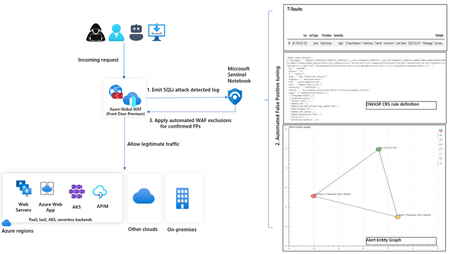
In this blog, we introduce you to the Azure WAF guided investigation Notebook using Microsoft Sentinel, which lets you investigate an Azure WAF triggered SQL injection attack event log. This Azure WAF Notebook queries incidents related to Azure WAF SQL injection events in your Microsoft Sentinel workspace. In addition to guiding you through the Azure WAF SQL injection incidents, the Notebook correlates the incidents with Threat Intelligence, maps them to the Sentinel entity graph, and gives you a complete picture of the attack landscape. Furthermore, it will guide you through an investigation experience to determine if the incident is a true positive, false positive or benign positive using Azure WAF raw logs. Upon confirmation of a false positive, the Azure WAF exclusions are applied automatically using Azure WAF APIs.11KViews2likes2Comments
Agent 365 connector: Monitor, hunt, and investigate AI agent activity in Microsoft Sentinel
As enterprises scale the use of AI agents, SOC teams need visibility into AI agent behavior. The Agent 365 connector, now in public preview, streams rich agent telemetry from Agent 365 into Microsoft Sentinel data lake. Agent activity, such as agent data exposure or access drift, is surfaced alongside other security data, giving SOC teams a unified view across digital environments. AI Agent actions are correlated with agent identity, endpoint, and cloud signals, enabling analysts to run end‑to‑end investigations using KQL, graph, and MCP-powered workflows. Why this matters for organizations By centralizing security and AI agent telemetry in Sentinel data lake, organizations establish a unified control plane for securing AI agents. This enables security teams to analyze agent activity in context with broader signals and investigate using familiar Sentinel tools. This unlocks the ability for SOCs to detect risky or anomalous agent behavior early, understand impact quickly, and respond with speed and confidence. As AI agents take on real operational responsibility, this level of visibility is critical to prevent blind spots, reduce risk, and ensure agents operate safely at enterprise scale. End‑to‑end visibility into AI agent behavior: A centralized view of AI agent behavior allows AI agents to be treated as first-class entities alongside users, identities, endpoints, and workloads. Advanced hunting with KQL: Hunt using KQL to proactively uncover unusual AI agent execution patterns, sensitive actions, or activity without clear human context. These hunts help surface potential risk early using the same workflows already used for other security data. Analyzing blast radius and impact with Sentinel graph: Security teams can correlate AI agent activity with identities, endpoints, and cloud resources to understand blast radius and potential impact during an investigation. By pivoting across related entities in Sentinel, analysts can assess how agent actions connect to the broader environment and support deeper, end‑to‑end investigations. Querying agent data through MCP: Use MCP to surface agent observability data through AI assistants, letting analysts pull agent telemetry into investigation workflows alongside other Sentinel data. Agent 365 connector key capabilities Install the Agent 365 connector with a single click using Sentinel Content Hub in the Defender portal. Once enabled, two capabilities come online automatically: Unified agent telemetry across Agent 365 agent experiences: Rich Agent 365 agent telemetry streams into Sentinel data lake, ready to analyze alongside identity, endpoint, and cloud signals using familiar SOC workflows. ASIM unified schema for AI agent observability: Agent 365 agent observability data is normalized into an ASIM-aligned schema so it is consistent, queryable, and ready for analytics and detections. With the connector in place, Sentinel data lake becomes the system of record and the control plane for Agent 365 agent security—turning agent behavior into first-class security signals across SecOps workflows like hunting, investigation, detection engineering, and response. Use cases Prevent sensitive data exposure from misconfigured agents When an AI agent is granted broader access than intended, a crafted prompt could override safeguards and expose confidential data. With agent telemetry, security teams can trace the full execution path—from prompt to tools to data access—to quickly identify the root cause and contain the exposure. Detect and control agent access drift over time As agents take on new tasks, their permissions can expand beyond the original scope, often without clear visibility. Agent telemetry enables continuous behavioral baselining, making it easier to spot abnormal access patterns early and prevent privilege misuse before it escalates. Uncover hidden lateral movement across agent workflows Agents often collaborate and delegate tasks across systems, creating complex chains of execution that are difficult to track. Agent telemetry provides visibility into these interactions, mapping delegation paths and helping teams understand and limit the potential blast radius. Defend against prompt injection and manipulation attacks Attackers can craft prompts to override agent instructions and manipulate behavior. By capturing prompts and reasoning flows, agent telemetry enables detection of these attacks and provides the context needed to investigate and remediate quickly. Accelerate SOC investigations with end-to-end visibility When an agent is involved in a security alert, understanding its actions can be challenging. Agent telemetry correlates prompts, identities, tools, and data access into a unified timeline, giving SOC teams the clarity needed to investigate faster and respond with confidence. Strengthen governance and compliance for AI agents Organizations need visibility into what agents exist and what data they can access. Agent telemetry provides a comprehensive audit trail of agent activity and access patterns, supporting compliance reporting and policy enforcement. Enable proactive threat hunting on agent behavior Security teams need to stay ahead of emerging risks as agent usage grows. Agent telemetry enables advanced hunting across agent activity, helping detect anomalies, uncover patterns, and identify threats before they impact the organization. Get started with Agent 365 connector Getting started is straightforward. In the Microsoft Defender portal, navigate to Microsoft Sentinel Open Content hub and search for Agent 365 Install the Agent 365 Connector (if not already installed) Open the connector page and select Connect to begin ingestion Once connected, AI agent telemetry starts flowing into Sentinel, ready for hunting, investigation, and response. Data ingestion and analytics are billed using existing Sentinel meters. Learn more Find the Agent 365 data connector | Microsoft Learn Discover and manage Sentinel out-of-the-box content | Microsoft Learn Connect data sources to Sentinel by using data connectors | Microsoft Learn Sample KQL queries for Sentinel data lake | Microsoft Learn Watch the Sentinel data lake video playlist | Microsoft Security Get started with Sentinel data lake | Microsoft Learn3KViews1like0Comments
Understand New Sentinel Pricing Model with Sentinel Data Lake Tier
Introduction on Sentinel and its New Pricing Model Microsoft Sentinel is a cloud-native Security Information and Event Management (SIEM) and Security Orchestration, Automation, and Response (SOAR) platform that collects, analyzes, and correlates security data from across your environment to detect threats and automate response. Traditionally, Sentinel stored all ingested data in the Analytics tier (Log Analytics workspace), which is powerful but expensive for high-volume logs. To reduce cost and enable customers to retain all security data without compromise, Microsoft introduced a new dual-tier pricing model consisting of the Analytics tier and the Data Lake tier. The Analytics tier continues to support fast, real-time querying and analytics for core security scenarios, while the new Data Lake tier provides very low-cost storage for long-term retention and high-volume datasets. Customers can now choose where each data type lands—analytics for high-value detections and investigations, and data lake for large or archival types—allowing organizations to significantly lower cost while still retaining all their security data for analytics, compliance, and hunting. Please flow diagram depicts new sentinel pricing model: Now let's understand this new pricing model with below scenarios: Scenario 1A (PAY GO) Scenario 1B (Usage Commitment) Scenario 2 (Data Lake Tier Only) Scenario 1A (PAY GO) Requirement Suppose you need to ingest 10 GB of data per day, and you must retain that data for 2 years. However, you will only frequently use, query, and analyze the data for the first 6 months. Solution To optimize cost, you can ingest the data into the Analytics tier and retain it there for the first 6 months, where active querying and investigation happen. After that period, the remaining 18 months of retention can be shifted to the Data Lake tier, which provides low-cost storage for compliance and auditing needs. But you will be charged separately for data lake tier querying and analytics which depicted as Compute (D) in pricing flow diagram. Pricing Flow / Notes The first 10 GB/day ingested into the Analytics tier is free for 31 days under the Analytics logs plan. All data ingested into the Analytics tier is automatically mirrored to the Data Lake tier at no additional ingestion or retention cost. For the first 6 months, you pay only for Analytics tier ingestion and retention, excluding any free capacity. For the next 18 months, you pay only for Data Lake tier retention, which is significantly cheaper. Azure Pricing Calculator Equivalent Assuming no data is queried or analyzed during the 18-month Data Lake tier retention period: Although the Analytics tier retention is set to 6 months, the first 3 months of retention fall under the free retention limit, so retention charges apply only for the remaining 3 months of the analytics retention window. Azure pricing calculator will adjust accordingly. Scenario 1B (Usage Commitment) Now, suppose you are ingesting 100 GB per day. If you follow the same pay-as-you-go pricing model described above, your estimated cost would be approximately $15,204 per month. However, you can reduce this cost by choosing a Commitment Tier, where Analytics tier ingestion is billed at a discounted rate. Note that the discount applies only to Analytics tier ingestion—it does not apply to Analytics tier retention costs or to any Data Lake tier–related charges. Please refer to the pricing flow and the equivalent pricing calculator results shown below. Monthly cost savings: $15,204 – $11,184 = $4,020 per month Now the question is: What happens if your usage reaches 150 GB per day? Will the additional 50 GB be billed at the Pay-As-You-Go rate? No. The entire 150 GB/day will still be billed at the discounted rate associated with the 100 GB/day commitment tier bucket. Azure Pricing Calculator Equivalent (100 GB/ Day) Azure Pricing Calculator Equivalent (150 GB/ Day) Scenario 2 (Data Lake Tier Only) Requirement Suppose you need to store certain audit or compliance logs amounting to 10 GB per day. These logs are not used for querying, analytics, or investigations on a regular basis, but must be retained for 2 years as per your organization’s compliance or forensic policies. Solution Since these logs are not actively analyzed, you should avoid ingesting them into the Analytics tier, which is more expensive and optimized for active querying. Instead, send them directly to the Data Lake tier, where they can be retained cost-effectively for future audit, compliance, or forensic needs. Pricing Flow Because the data is ingested directly into the Data Lake tier, you pay both ingestion and retention costs there for the entire 2-year period. If, at any point in the future, you need to perform advanced analytics, querying, or search, you will incur additional compute charges, based on actual usage. Even with occasional compute charges, the cost remains significantly lower than storing the same data in the Analytics tier. Realized Savings Scenario Cost per Month Scenario 1: 10 GB/day in Analytics tier $1,520.40 Scenario 2: 10 GB/day directly into Data Lake tier $202.20 (without compute) $257.20 (with sample compute price) Savings with no compute activity: $1,520.40 – $202.20 = $1,318.20 per month Savings with some compute activity (sample value): $1,520.40 – $257.20 = $1,263.20 per month Azure calculator equivalent without compute Azure calculator equivalent with Sample Compute Conclusion The combination of the Analytics tier and the Data Lake tier in Microsoft Sentinel enables organizations to optimize cost based on how their security data is used. High-value logs that require frequent querying, real-time analytics, and investigation can be stored in the Analytics tier, which provides powerful search performance and built-in detection capabilities. At the same time, large-volume or infrequently accessed logs—such as audit, compliance, or long-term retention data—can be directed to the Data Lake tier, which offers dramatically lower storage and ingestion costs. Because all Analytics tier data is automatically mirrored to the Data Lake tier at no extra cost, customers can use the Analytics tier only for the period they actively query data, and rely on the Data Lake tier for the remaining retention. This tiered model allows different scenarios—active investigation, archival storage, compliance retention, or large-scale telemetry ingestion—to be handled at the most cost-effective layer, ultimately delivering substantial savings without sacrificing visibility, retention, or future analytical capabilities.Solved3.9KViews2likes6Comments
Missing details in Azure Activity Logs – MICROSOFT.SECURITYINSIGHTS/ENTITIES/ACTION
The Azure Activity Logs are crucial for tracking access and actions within Sentinel. However, I’m encountering a significant lack of documentation and clarity regarding some specific operation types. Resources consulted: https://learn.microsoft.com/en-us/azure/sentinel/audit-sentinel-data https://learn.microsoft.com/en-us/rest/api/securityinsights/entities?view=rest-securityinsights-2024-01-01-preview https://learn.microsoft.com/en-us/rest/api/securityinsights/operations/list?view=rest-securityinsights-2024-09-01&tabs=HTTP My issue: I observed unauthorized activity on our Sentinel workspace. The Azure Activity Logs clearly indicate the user involved, the resource, and the operation type: "MICROSOFT.SECURITYINSIGHTS/ENTITIES/ACTION" But that’s it. No detail about what the action was, what entity it targeted, or how it was triggered. This makes auditing extremely difficult. It's clear the person was in Sentinel and perform an activity through it, from search, KQL, logs to find an entity from a KQL query. But, that's all... Strangely, this operation is not even listed in the official Sentinel Operations documentation linked above. My question: Has anyone encountered this and found a way to interpret this operation type properly? Any insight into how to retrieve more meaningful details (action context, target entity, etc.) from these events would be greatly appreciated.604Views0likes3Comments