Recent Discussions

Sentinel RBAC in the Unified portal: who has activated Unified RBAC, and how did it go?
Following the RSAC 2026 announcements last month, I have been working through the full permission picture for the Unified portal and wanted to open a discussion here given how much has shifted in a short period. A quick framing of where things stand. The baseline is still that Azure RBAC carries across for Sentinel SIEM access when you onboard, no changes required. But there are now two significant additions in public preview: Unified RBAC for Sentinel SIEM itself (extending the Defender Unified RBAC model to cover Sentinel directly), and a new Defender-native GDAP model for non-CSP organisations managing delegated access across tenants. The GDAP piece in particular is worth discussing carefully, because I want to be precise about what has and has not changed. The existing limitation from Microsoft's onboarding documentation, that GDAP with Azure Lighthouse is not supported for Sentinel data in the Defender portal, has not changed. What is new is a separate, Defender-portal-native GDAP mechanism announced at RSAC, which is a different thing. These are not the same capability. If you were using Entra B2B as the interim path based on earlier guidance, that guidance was correct and that path remains the generally available option today. A few things I would genuinely like to hear from practitioners: For those who have activated Unified RBAC for a Sentinel workspace in the Defender portal: what did the migration from Azure RBAC roles look like in practice? Did the import function bring roles across cleanly, or did you find gaps particularly around custom roles? For environments using Playbook Operator, Automation Contributor, or Workbook Contributor role assignments: how are you handling the fact those three roles are not yet in Unified RBAC and still require Azure portal management? Is the dual-management posture creating operational friction? For MSSPs evaluating the new Defender-native GDAP model against their existing Entra B2B setup: what factors are driving the decision either way at your scale? Writing this up as Part 3 of the migration series and the community experience here is directly useful for making sure the practitioner angle is grounded.Solved481Views0likes3Comments
Stuck looking up a watchlist value
Hiya, I get stuck working with watchlists sometimes. In this example, I'm wanting to focus on account activity from a list of UPNs. If I split the elements up, I get the individual results, but can't seem to pull it all together. ===================================================== In its entirety, the query returns zero results: let ServiceAccounts=(_GetWatchlist('ServiceAccounts_Monitoring'))| project SearchKey; let OpName = dynamic(['Reset password (self-service)','Reset User Password','Change user password','User reset password','User started password reset','Enable Account','Change password (self-service)','Update PasswordProfile','Self-service password reset flow activity progress']); AuditLogs | where OperationName has_any (OpName) | extend upn = TargetResources.[0].userPrincipalName | where upn in (ServiceAccounts) //<=This is where I think I'm wrong | project upn ===================================================== This line on its own, returns the user on the list: let ServiceAccounts=(_GetWatchlist('ServiceAccounts_Monitoring'))| project SearchKey; ===================================================== This section on its own, returns all the activity let OpName = dynamic(['Reset password (self-service)','Reset User Password','Change user password','User reset password','User started password reset','Enable Account','Change password (self-service)','Update PasswordProfile','Self-service password reset flow activity progress']); AuditLogs | where OperationName has_any (OpName) | extend upn = TargetResources.[0].userPrincipalName | where upn contains "username" //This is the name on the watchlistlist - so I know the activity exists) ==================================================== I'm doing something wrong when I'm trying to use the watchlist cache (I think) Any help\guidance or wisdom would be greatly appreciated! Many thanksSolved114Views0likes2CommentsWhat caught you off guard when onboarding Sentinel to the Defender portal?
Following on from a previous discussion around what actually changes versus what doesn't in the Sentinel to Defender portal migration, I wanted to open a more specific conversation around the onboarding moment itself. One thing I have been writing about is how much happens automatically the moment you connect your workspace. The Defender XDR connector enables on its own, a bi-directional sync starts immediately, and if your Microsoft incident creation rules are still active across Defender for Endpoint, Identity, Office 365, Cloud Apps, and Entra ID Protection, you are going to see duplicate incidents before you have had a chance to do anything about it. That is one of the reasons I keep coming back to the inventory phase as the most underestimated part of this migration. Most of the painful post-migration experiences I hear about trace back to things that could have been caught in a pre-migration audit: analytics rules with incident title dependencies, automation conditions that assumed stable incident naming, RBAC gaps that only become visible when someone tries to access the data lake for the first time. A few things I would genuinely love to hear from practitioners who have been through this: - When you onboarded, what was the first thing that behaved unexpectedly that you had not anticipated from the documentation? - For those who have reviewed automation rules post-onboarding: did you find conditions relying on incident title matching that broke, and how did you remediate them? - For anyone managing access across multiple tenants: how are you currently handling the GDAP gap while Microsoft completes that capability? I am writing up a detailed pre-migration inventory framework covering all four areas and the community experience here is genuinely useful for making sure the practitioner angle covers the right ground. Happy to discuss anything above in more detail.Solved332Views2likes3CommentsRSAC 2026: What the Sentinel Playbook Generator actually means for SOC automation
RSAC 2026 brought a wave of Sentinel announcements, but the one I keep coming back to is the playbook generator. Not because it's the flashiest, but because it touches something that's been a real operational pain point for years: the gap between what SOC teams need to automate and what they can realistically build and maintain. I want to unpack what this actually changes from an operational perspective, because I think the implications go further than "you can now vibe-code a playbook." The problem it solves If you've built and maintained Logic Apps playbooks in Sentinel at any scale, you know the friction. You need a connector for every integration. If there isn't one, you're writing custom HTTP actions with authentication handling, pagination, error handling - all inside a visual designer that wasn't built for complex branching logic. Debugging is painful. Version control is an afterthought. And when something breaks at 2am, the person on call needs to understand both the Logic Apps runtime AND the security workflow to fix it. The result in most environments I've seen: teams build a handful of playbooks for the obvious use cases (isolate host, disable account, post to Teams) and then stop. The long tail of automation - the enrichment workflows, the cross-tool correlation, the conditional response chains - stays manual because building it is too expensive relative to the time saved. What's actually different now The playbook generator produces Python. Not Logic Apps JSON, not ARM templates - actual Python code with documentation and a visual flowchart. You describe the workflow in natural language, the system proposes a plan, asks clarifying questions, and then generates the code once you approve. The Integration Profile concept is where this gets interesting. Instead of relying on predefined connectors, you define a base URL, auth method, and credentials for any service - and the generator creates dynamic API calls against it. This means you can automate against ServiceNow, Jira, Slack, your internal CMDB, or any REST API without waiting for Microsoft or a partner to ship a connector. The embedded VS Code experience with plan mode and act mode is a deliberate design choice. Plan mode lets you iterate on the workflow before any code is generated. Act mode produces the implementation. You can then validate against real alerts and refine through conversation or direct code edits. This is a meaningful improvement over the "deploy and pray" cycle most of us have with Logic Apps. Where I see the real impact For environments running Sentinel at scale, the playbook generator could unlock the automation long tail I mentioned above. The workflows that were never worth the Logic Apps development effort might now be worth a 15-minute conversation with the generator. Think: enrichment chains that pull context from three different tools before deciding on a response path, or conditional escalation workflows that factor in asset criticality, time of day, and analyst availability. There's also an interesting angle for teams that operate across Microsoft and non-Microsoft tooling. If your SOC uses Sentinel for SIEM but has Palo Alto, CrowdStrike, or other vendors in the stack, the Integration Profile approach means you can build cross-vendor response playbooks without middleware. The questions I'd genuinely like to hear about A few things that aren't clear from the documentation and that I think matter for production use: Security Copilot dependency: The prerequisites require a Security Copilot workspace with EU or US capacity. Someone in the blog comments already flagged this as a potential blocker for organizations that have Sentinel but not Security Copilot. Is this a hard requirement going forward, or will there be a path for Sentinel-only customers? Code lifecycle management: The generated Python runs... where exactly? What's the execution runtime? How do you version control, test, and promote these playbooks across dev/staging/prod? Logic Apps had ARM templates and CI/CD patterns. What's the equivalent here? Integration Profile security: You're storing credentials for potentially every tool in your security stack inside these profiles. What's the credential storage model? Is this backed by Key Vault? How do you rotate credentials without breaking running playbooks? Debugging in production: When a generated playbook fails at 2am, what does the troubleshooting experience look like? Do you get structured logs, execution traces, retry telemetry? Or are you reading Python stack traces? Coexistence with Logic Apps: Most environments won't rip and replace overnight. What's the intended coexistence model between generated Python playbooks and existing Logic Apps automation rules? I'm genuinely optimistic about this direction. Moving from a low-code visual designer to an AI-assisted coding model with transparent, editable output feels like the right architectural bet for where SOC automation needs to go. But the operational details around lifecycle, security, and debugging will determine whether this becomes a production staple or stays a demo-only feature. Would be interested to hear from anyone who's been in the preview - what's the reality like compared to the pitch?Solved244Views0likes1CommentThe Sentinel migration mental model question: what's actually retiring vs what isn't?
Something I keep seeing come up in conversations with other Sentinel operators lately, and I think it's worth surfacing here as a proper discussion. There's a consistent gap in how the migration to the Defender portal is being understood, and I think it's causing some teams to either over-scope their effort or under-prepare. The gap is this: the Microsoft comms have consistently told us *what* is happening (Azure portal experience retires March 31, 2027), but the question that actually drives migration planning, what is architecturally changing versus what is just moving to a different screen, doesn't have a clean answer anywhere in the community right now. The framing I've been working with, which I'd genuinely like to get other practitioners to poke holes in: What's retiring: The Azure portal UI experience for Sentinel operations. Incident management, analytics rule configuration, hunting, automation management: all of that moves to the Defender portal. What isn't changing: The Log Analytics workspace, all ingested data, your KQL rules, connectors, retention config, billing. None of that moves. The Defender XDR data lake is a separate Microsoft-managed layer, not a replacement for your workspace. Where it gets genuinely complex: MSSP/multi-tenant setups, teams with meaningful SOAR investments, and anyone who's built tooling against the SecurityInsights API for incident management (which now needs to shift to Microsoft Graph for unified incidents). The deadline extension from July 2026 to March 2027 tells its own story. Microsoft acknowledged that scale operators needed more time and capabilities. If you're in that camp, that extra runway is for proper planning, not deferral. A few questions I'd genuinely love to hear about from people who've started the migration or are actively scoping it: For those who've done the onboarding already: what was the thing that caught you most off guard that isn't well-documented? For anyone running Sentinel across multiple tenants: how are you approaching the GDAP gap while Microsoft completes that capability? Are you using B2B authentication as the interim path, or Azure Lighthouse for cross-workspace querying? I've been writing up a more detailed breakdown of this, covering the RBAC transition, automation review, and the MSSP-specific path, and the community discussion here is genuinely useful for making sure the practitioner perspective covers the right edge cases. Happy to share more context on anything above if useful.Solved594Views2likes7CommentsClarification on UEBA Behaviors Layer Support for Zscaler and Fortinet Logs
I would like to confirm whether the new UEBA Behaviors Layer in Microsoft Sentinel currently supports generating behavior insights for Zscaler and Fortinet log sources. Based on the documentation, the preview version of the Behaviors Layer only supports specific vendors under CommonSecurityLog (CyberArk Vault and Palo Alto Threats), AWS CloudTrail services, and GCP Audit Logs. Since Zscaler and Fortinet are not listed among the supported vendors, I want to verify: Does the UEBA Behaviors Layer generate behavior records for Zscaler and Fortinet logs, or are these vendors currently unsupported for behavior generation? As logs from Zscaler and Fortinet will also be get ingested in CommonSecurityLog table only.Solved240Views0likes1Comment
Dedicated cluster for Sentinels in different tenants
Hello I see that there is a possibility to use a dedicated cluster for a workspace in the same Azure region. What about workspaces that reside in different tenants but are in the same Azure region? Is that possible? We are utilizing multiple tenants, and we want to keep this operational model. However, there is a central SOC, and we wonder if there is a possibility to utilize a dedicated cluster for cost optimization.Solved127Views0likes1Comment
How do I import Purview Unified Audit Log data related to the use of the Audit Log into Sentinel?
Dear Community, I would like to implement the following scenario on an environment with Microsoft 365 E5 licenses: Scenario: I want to import audit activities into an Azure Log Analytics workspace linked to Sentinel to generate alerts/incidents as soon as a search is performed in the Microsoft 365 Purview Unified Audit Log (primarily for IRM purposes). Challenge: Neither the "Microsoft 365" connector, nor the "Defender XDR" or "Purview" (which appear to be exclusively Azure Purview) connectors are importing the necessary data. Question: Which connector do I have to use in order to obtain Purview Unified Audit Log activities about the use of the Purview Unified Audit Log so that I can identify... ...which user conducted when an audit log search and with what kind of search query. Thank you!Solved444Views0likes2CommentsI'm stuck!
Logically, I'm not sure how\if I can do this. I want to monitor for EntraID Group additions - I can get this to work for a single entry using this: AuditLogs | where TimeGenerated > ago(7d) | where OperationName == "Add member to group" | where TargetResources[0].type == "User" | extend GroupName = tostring(parse_json(tostring(parse_json(tostring(TargetResources[0].modifiedProperties))[1].newValue))) | where GroupName == "NameOfGroup" <-- This returns the single entry | extend User = tostring(TargetResources[0].userPrincipalName) | summarize ['Count of Users Added']=dcount(User), ['List of Users Added']=make_set(User) by GroupName | sort by GroupName asc However, I have a list of 20 Priv groups that I need to monitor. I can do this using: let PrivGroups = dynamic[('name1','name2','name3'}); and then call that like this: blahblah | where TargetResources[0].type == "User" | extend GroupName = tostring(parse_json(tostring(parse_json(tostring(TargetResources[0].modifiedProperties))[1].newValue))) | where GroupName has_any (PrivGroup) But that's a bit dirty to update - I wanted to call a watchlist. I've tried defining with: let PrivGroup = (_GetWatchlist('TestList')); and tried calling like: blahblah | where TargetResources[0].type == "User" | extend GroupName = tostring(parse_json(tostring(parse_json(tostring(TargetResources[0].modifiedProperties))[1].newValue))) | where GroupName has_any ('PrivGroup') I've tried dropping the let and attempted to lookup the watchlist directly: | where GroupName has_any (_GetWatchlist('TestList')) The query runs but doesn't return any results (Obvs I know the result exists) - How do I lookup that extracted value on a Watchlist. Any ideas or pointers why I'm wrong would be appreciated! Many thanksSolved267Views0likes3Comments
Understand New Sentinel Pricing Model with Sentinel Data Lake Tier
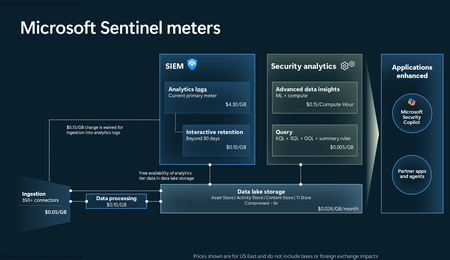
Introduction on Sentinel and its New Pricing Model Microsoft Sentinel is a cloud-native Security Information and Event Management (SIEM) and Security Orchestration, Automation, and Response (SOAR) platform that collects, analyzes, and correlates security data from across your environment to detect threats and automate response. Traditionally, Sentinel stored all ingested data in the Analytics tier (Log Analytics workspace), which is powerful but expensive for high-volume logs. To reduce cost and enable customers to retain all security data without compromise, Microsoft introduced a new dual-tier pricing model consisting of the Analytics tier and the Data Lake tier. The Analytics tier continues to support fast, real-time querying and analytics for core security scenarios, while the new Data Lake tier provides very low-cost storage for long-term retention and high-volume datasets. Customers can now choose where each data type lands—analytics for high-value detections and investigations, and data lake for large or archival types—allowing organizations to significantly lower cost while still retaining all their security data for analytics, compliance, and hunting. Please flow diagram depicts new sentinel pricing model: Now let's understand this new pricing model with below scenarios: Scenario 1A (PAY GO) Scenario 1B (Usage Commitment) Scenario 2 (Data Lake Tier Only) Scenario 1A (PAY GO) Requirement Suppose you need to ingest 10 GB of data per day, and you must retain that data for 2 years. However, you will only frequently use, query, and analyze the data for the first 6 months. Solution To optimize cost, you can ingest the data into the Analytics tier and retain it there for the first 6 months, where active querying and investigation happen. After that period, the remaining 18 months of retention can be shifted to the Data Lake tier, which provides low-cost storage for compliance and auditing needs. But you will be charged separately for data lake tier querying and analytics which depicted as Compute (D) in pricing flow diagram. Pricing Flow / Notes The first 10 GB/day ingested into the Analytics tier is free for 31 days under the Analytics logs plan. All data ingested into the Analytics tier is automatically mirrored to the Data Lake tier at no additional ingestion or retention cost. For the first 6 months, you pay only for Analytics tier ingestion and retention, excluding any free capacity. For the next 18 months, you pay only for Data Lake tier retention, which is significantly cheaper. Azure Pricing Calculator Equivalent Assuming no data is queried or analyzed during the 18-month Data Lake tier retention period: Although the Analytics tier retention is set to 6 months, the first 3 months of retention fall under the free retention limit, so retention charges apply only for the remaining 3 months of the analytics retention window. Azure pricing calculator will adjust accordingly. Scenario 1B (Usage Commitment) Now, suppose you are ingesting 100 GB per day. If you follow the same pay-as-you-go pricing model described above, your estimated cost would be approximately $15,204 per month. However, you can reduce this cost by choosing a Commitment Tier, where Analytics tier ingestion is billed at a discounted rate. Note that the discount applies only to Analytics tier ingestion—it does not apply to Analytics tier retention costs or to any Data Lake tier–related charges. Please refer to the pricing flow and the equivalent pricing calculator results shown below. Monthly cost savings: $15,204 – $11,184 = $4,020 per month Now the question is: What happens if your usage reaches 150 GB per day? Will the additional 50 GB be billed at the Pay-As-You-Go rate? No. The entire 150 GB/day will still be billed at the discounted rate associated with the 100 GB/day commitment tier bucket. Azure Pricing Calculator Equivalent (100 GB/ Day) Azure Pricing Calculator Equivalent (150 GB/ Day) Scenario 2 (Data Lake Tier Only) Requirement Suppose you need to store certain audit or compliance logs amounting to 10 GB per day. These logs are not used for querying, analytics, or investigations on a regular basis, but must be retained for 2 years as per your organization’s compliance or forensic policies. Solution Since these logs are not actively analyzed, you should avoid ingesting them into the Analytics tier, which is more expensive and optimized for active querying. Instead, send them directly to the Data Lake tier, where they can be retained cost-effectively for future audit, compliance, or forensic needs. Pricing Flow Because the data is ingested directly into the Data Lake tier, you pay both ingestion and retention costs there for the entire 2-year period. If, at any point in the future, you need to perform advanced analytics, querying, or search, you will incur additional compute charges, based on actual usage. Even with occasional compute charges, the cost remains significantly lower than storing the same data in the Analytics tier. Realized Savings Scenario Cost per Month Scenario 1: 10 GB/day in Analytics tier $1,520.40 Scenario 2: 10 GB/day directly into Data Lake tier $202.20 (without compute) $257.20 (with sample compute price) Savings with no compute activity: $1,520.40 – $202.20 = $1,318.20 per month Savings with some compute activity (sample value): $1,520.40 – $257.20 = $1,263.20 per month Azure calculator equivalent without compute Azure calculator equivalent with Sample Compute Conclusion The combination of the Analytics tier and the Data Lake tier in Microsoft Sentinel enables organizations to optimize cost based on how their security data is used. High-value logs that require frequent querying, real-time analytics, and investigation can be stored in the Analytics tier, which provides powerful search performance and built-in detection capabilities. At the same time, large-volume or infrequently accessed logs—such as audit, compliance, or long-term retention data—can be directed to the Data Lake tier, which offers dramatically lower storage and ingestion costs. Because all Analytics tier data is automatically mirrored to the Data Lake tier at no extra cost, customers can use the Analytics tier only for the period they actively query data, and rely on the Data Lake tier for the remaining retention. This tiered model allows different scenarios—active investigation, archival storage, compliance retention, or large-scale telemetry ingestion—to be handled at the most cost-effective layer, ultimately delivering substantial savings without sacrificing visibility, retention, or future analytical capabilities.Solved3.3KViews2likes6Comments
Unable to Delete Threat Intelligence Indicator
Hi, For testing purposes, I added a TI indicator in Sentinel via the UI. When I deleted it, the indicator disappeared from the UI, but the record still exists in the ThreatIntelIndicators table. From what I’ve observed, every modification to a TI indicator leaves a record in the table, almost like an audit trail. So now I see two records: One for the original creation One for the deletion action The issue is that I’m building a rule based on this table, and it still matches the “created” record even though the indicator was deleted. I’ve already tried both: az sentinel threat-indicator delete module and REST API. But I got server errors. Is there any way to completely delete a TI record from the ThreatIntelIndicators table ? Thanks in advance.Solved265Views0likes3CommentsExtend sentinel/LAW table schema
Hi, we are working on migrating from a SIEM solution to sentinel and for users to migrate easily, we want to have some custom fields to LAW/Sentinel tables (eg) a filed named brand_CF needs to be added to common security log, syslog, etc tables … we can do vi a UI, but just wondering if it can be done via api/terraform , as we want to put it in code than UI… did anyone created custom columns via API? Further not all tables visible via UI under tables in LAW..Solved345Views0likes3CommentsPlaybook when incident trigger is not working
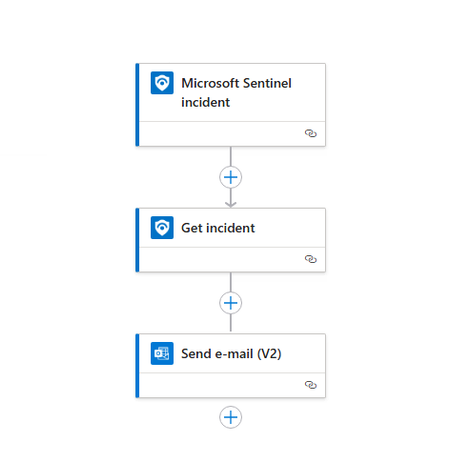
Hi I want to create a playbook to automatically revoke session user when incident with specifics title or gravity is created. But after some test the playbook is'nt run autimacally, it work when I run it manually. I did'nt find what I do wrong. See the image and the code bellow. Thanks in advance! { "definition": { "$schema": "https://schema.management.azure.com/providers/Microsoft.Logic/schemas/2016-06-01/workflowdefinition.json#", "contentVersion": "1.0.0.0", "triggers": { "Microsoft_Sentinel_incident": { "type": "ApiConnectionWebhook", "inputs": { "host": { "connection": { "name": "@parameters('$connections')['azuresentinel']['connectionId']" } }, "body": { "callback_url": "@{listCallbackUrl()}" }, "path": "/incident-creation" } } }, "actions": { "Get_incident": { "type": "ApiConnection", "inputs": { "host": { "connection": { "name": "@parameters('$connections')['azuresentinel-1']['connectionId']" } }, "method": "post", "body": { "incidentArmId": "@triggerBody()?['object']?['id']" }, "path": "/Incidents" }, "runAfter": {} }, "Send_e-mail_(V2)": { "type": "ApiConnection", "inputs": { "host": { "connection": { "name": "@parameters('$connections')['office365']['connectionId']" } }, "method": "post", "body": { "To": "email address removed for privacy reasons", "Subject": "Ceci est un test", "Body": "</p> <p class="\"editor-paragraph\"">@{body('Get_incident')?['id']}</p> <p class="\"editor-paragraph\"">@{body('Get_incident')?['properties']?['description']}</p> <p class="\"editor-paragraph\"">@{body('Get_incident')?['properties']?['incidentNumber']}</p> <p>", "Importance": "Normal" }, "path": "/v2/Mail" }, "runAfter": { "Get_incident": [ "Succeeded" ] } } }, "outputs": {}, "parameters": { "$connections": { "type": "Object", "defaultValue": {} } } }, "parameters": { "$connections": { "type": "Object", "value": { "azuresentinel": { "id": "/subscriptions/xxxx/providers/Microsoft.Web/locations/xxxxx/managedApis/xxxxxxx", "connectionId": "/subscriptions/xxxxxxx/resourceGroups/xxxxxx/providers/Microsoft.Web/connections/azuresentinel-Revoke-RiskySessions1", "connectionName": "azuresentinel-Revoke-RiskySessions1", "connectionProperties": { "authentication": { "type": "ManagedServiceIdentity" } } }, "azuresentinel-1": { "id": "/subscriptions/xxxxxx/providers/Microsoft.Web/locations/xxxx/managedApis/xxx", "connectionId": "/subscriptions/xxxxxxx/resourceGroups/xxxxx/providers/Microsoft.Web/connections/xxxx", "connectionName": "xxxxxx", "connectionProperties": { "authentication": { "type": "ManagedServiceIdentity" } } }, "office365": { "id": "/subscriptions/xxxxxx/providers/Microsoft.Web/locations/xxxxx/managedApis/office365", "connectionId": "/subscriptions/xxxxx/resourceGroups/xxxxxx/providers/Microsoft.Web/connections/o365-Test_Send-email-incident-to-xxxx", "connectionName": "o365-Test_Send-email-incident-to-xxxxx" } } } } }Solved2.4KViews0likes2CommentsSentinel Log Volume vs Defender Log Volume
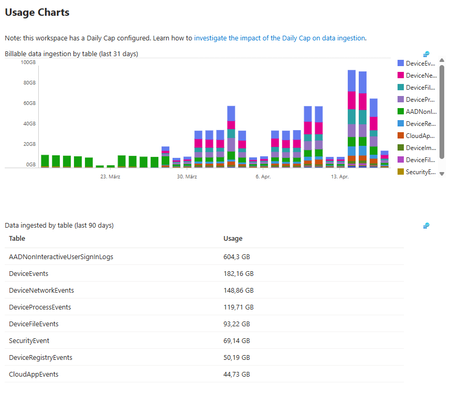
Dear community, we're currently building up our first SOC service and wondering about the costs (not realy, we know that SIEM is expencive, but we don't understand the log volumes). We started with sentinel and enabled the XDR connector with all log sources (Device information, Defender for Identity etc). If we take a look into the LAW and log volumes for those tables, we've an ingest as shown in the following exibit: BUT, in comparison, we did a cost analysis with the real defender information (from Defender portal). We come to an estimated log volume from approx. 45GB (and usually billable around 25GB, because the customer has E5 licenses, which should include the AADNonInteractiveUserSignInLogs table (5MB/user/day for free) We're asking ourself why we got this differences in comparison to the last few days, shown in the exibit (attention: we started with a daily ingest cap, so the daily ingest would be around 90 - 100GB/day). Where is our mistake/lag of knowledge? Here are the KQL, sent wihtin the Defender portal to get the volumes from there AlertInfo | union AlertEvidence | summarize RecordCount = count(), AlertTotalSizeMB = round(sum(estimate_data_size(*))/pow(1024,2),2) EmailEvents | union EmailUrlInfo | union EmailAttachmentInfo | union EmailPostDeliveryEvents | union UrlClickEvents | summarize RecordCount = count(), MDOTotalSizeMB = round(sum(estimate_data_size(*))/pow(1024,2),2) IdentityLogonEvents | union IdentityQueryEvents | union IdentityDirectoryEvents | summarize RecordCount = count(), IDTotalSizeMB = round(sum(estimate_data_size(*))/pow(1024,2),2) DeviceInfo | union DeviceNetworkInfo | union DeviceProcessEvents | union DeviceNetworkEvents | union DeviceFileEvents | union DeviceRegistryEvents | union DeviceLogonEvents | union DeviceImageLoadEvents | union DeviceEvents | union DeviceFileCertificateInfo | summarize RecordCount = count(), MDETotalSizeMB = round(sum(estimate_data_size(*))/pow(1024,2),2) CloudAppEvents | summarize RecordCount = count(), CAppsTotalSizeMB = round(sum(estimate_data_size(*))/pow(1024,2),2) Thanks a lot! Best & have nice a nice easter :-)Solved657Views0likes2Comments
Logic app - Escaped Characters and Formatting Problems in KQL Run query and list results V2 action
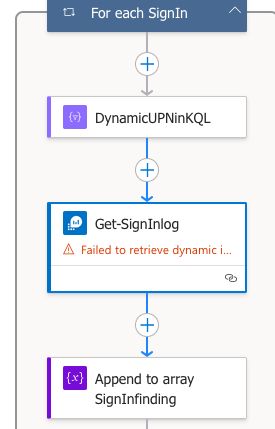
I’m building a Logic App to detect sign-ins from suspicious IP addresses. The logic includes: Retrieving IPs from incident entities in Microsoft Sentinel. Enriching each IP using an external API. Filtering malicious IPs based on their score and risk level. Storing those IPs in an array variable (MaliciousIPs). Creating a dynamic KQL query to check if any of the malicious IPs were used in sign-ins, using the in~ operator. Problem: When I use a Select and Join action to build the list of IPs (e.g., "ip1", "ip2"), the Logic App automatically escapes the quotes. As a result, the KQL query is built like this: IPAddress in~ ([{"body":"{\"\":\"\\\"X.X.X.X\\\"\"}"}]) Instead of the expected format: IPAddress in~ ("X.X.X.X", "another.ip") This causes a parsing error when the Run Query and List Results V2 action is executed against Log Analytics. ------------------------ Here's the For Each action loop who contain the following issue: Dynamic compose to formulate the KQL query in a concat, since it's containing the dynamic value above : concat('SigninLogs | where TimeGenerated > ago(3d) | where UserPrincipalName == \"',variables('CurrentUPN'),'\" | where IPAddress in~ (',outputs('Join_MaliciousIPs_KQL'),') | project TimeGenerated, IPAddress, DeviceDetail, AppDisplayName, Status') The Current UPN is working as expected, using the same format in a Initialize/Set variable above (Array/String(for IP's)). The rest of the loop : Note: Even if i have a "failed to retrieve" error on the picture don't bother with that, it's just about the dynamic value about the Subscription, I've entered it manually, it's working fine. What I’ve tried: Using concat('\"', item()?['ip'], '\"') inside Select (causes extra escaping). Removing quotes and relying on Logic App formatting (resulted in object wrapping). Flattening the array using a secondary Select to extract only values. Using Compose to debug outputs. Despite these attempts, the query string is always malformed due to extra escaping or nested JSON structure. I would like to know if someone has encountered or have the solution to this annoying problem ? Best regardsSolved284Views0likes1CommentUpdate content package Metadata
Hello Sentinel community and Microsoft. Ive been working on a script where i use this command: https://learn.microsoft.com/en-us/rest/api/securityinsights/content-package/install?view=rest-securityinsights-2024-09-01&tabs=HTTP Ive managed to successfully create everything from retrieving whats installed, uninstalling, reinstalling and lastly updating (updating needed to be "list, delete, install" however :'), there was no flag for "update available"). However, now to my issue. As this work like a charm through powershell, the metadata and hyperlinking is not being deployed - at all. So i have my 40 content packages successfully installed through the REST-api, but then i have to visit the content hub in sentinel in the GUI, filter for "installed" and mark them all, then press "install". When i do this the metadata and hyperlinking is created. (Its most noticeable that the analytic rules for the content hubs are not available under analytic rules -> Rule templates after installing through the rest api). But once you press install button in the GUI, they appear. So i looked in to the request that is made when pressing the button. It uses another API version, fine, i can add that to my script. But it also uses 2 variables that are not documented and encrypted-data. they are called c and t: Im also located in EU and it makes a request to SentinelUS. im OK with that, also as mentioned, another API version (2020-06-01) while the REST APi to install content packages above has 2024-09-01. NP. But i can not simulate this last request as the variables are encrypted and not available through the install rest api. They are also not possible to simulate. it ONLY works in the GUI when pressing install. Lastly i get another API version back when it successfully ran through install in GUI, so in total its 3 api versions. Here is my code snippet i tried (it is basically a mimic of the post request in the network tab of the browser then pressing "install" on the package in content hub, after i successfully installed it through the official rest api). function Refresh-WorkspaceMetadata { param ( [Parameter(Mandatory = $true)] [string]$SubscriptionId, [Parameter(Mandatory = $true)] [string]$ResourceGroup, [Parameter(Mandatory = $true)] [string]$WorkspaceName, [Parameter(Mandatory = $true)] [string]$AccessToken ) # Use the API version from the portal sample $apiVeri = "?api-version=" $RefreshapiVersion = "2020-06-01" # Build the batch endpoint URL with the query string on the batch URI $batchUri = "https://management.azure.com/\$batch$apiVeri$RefreshapiVersion" # Construct a relative URL for the workspace resource. # Append dummy t and c parameters to mimic the portal's request. $workspaceUrl = "/subscriptions/$SubscriptionId/resourceGroups/$ResourceGroup/providers/Microsoft.OperationalInsights/workspaces/$WorkspaceName$apiVeri$RefreshapiVersion&t=123456789&c=dummy" # Create a batch payload with several GET requests $requests = @() for ($i = 0; $i -lt 5; $i++) { $requests += @{ httpMethod = "GET" name = [guid]::NewGuid().ToString() requestHeaderDetails = @{ commandName = "Microsoft_Azure_SentinelUS.ContenthubWorkspaceClient/get" } url = $workspaceUrl } } $body = @{ requests = $requests } | ConvertTo-Json -Depth 5 try { $response = Invoke-RestMethod -Uri $batchUri -Method Post -Headers @{ "Authorization" = "Bearer $AccessToken" "Content-Type" = "application/json" } -Body $body Write-Host "[+] Workspace metadata refresh triggered successfully." -ForegroundColor Green } catch { Write-Host "[!] Failed to trigger workspace metadata refresh. Error: $_" -ForegroundColor Red } } Refresh-WorkspaceMetadata -SubscriptionId $subscriptionId -ResourceGroup $resourceGroup -WorkspaceName $workspaceName -AccessToken $accessToken (note: i have variables higher up in my script for subscriptionid, resourcegroup, workspacename and token etc). Ive tried with and without mimicing the T and C variable. none works. So for me, currently, installing content hub packages for sentinel is always: Install through script to get all 40 packages Visit webpage, filter for 'Installed', mark them and press 'Install' You now have all metadata and hyperlinking available to you in your Sentinel (such as hunting rules, analytic rules, workbooks, playbooks -templates). Anyone else manage to get around this or is it "GUI" gated ? Greatly appreciated.Solved705Views1like6CommentsAffected rows stateful anomaly on database vs. Response rows stateful anomaly on database
Is there a difference between the two scheduled rules, "Affected rows stateful anomaly on database" and "Response rows stateful anomaly on database"? I can see that they have different descriptions: - Affected rows stateful anomaly on database - To detect anomalous data change/deletion. This query detects SQL queries that changed/deleted a large number of rows. - Response rows stateful anomaly on database - To detect anomalous data exfiltration. This query detects SQL queries that accessed a large number of rows. This tells me the alerts query should be different. However, when I compare the two they are exactly the same.Solved197Views0likes2CommentsKQL to match URL FW LOGS and Threatfox URL feeds
Hi all, I try to match RequestURL field (in CommonSecurityLog) from a Fortigate FW with URL Haus live feeds. The query does not produce any errors but it doesn't match anything. let ThreatFox = externaldata(URL: string ) ["https://threatfox.abuse.ch/export/csv/recent/"] with (format="txt", ignoreFirstRecord=True); let ThreatFoxUrl = ThreatFox | where URL contains "url" | extend URL = replace_string(URL, "\"", "") | extend parse_csv(URL) | extend URL = URL[2]; CommonSecurityLog | where RequestURL has_any (ThreatFoxUrl) The following query is working fine with HASH let MalwareBazaarMISP = externaldata(SHA256: string) ["https://bazaar.abuse.ch/export/txt/sha256/recent"] with (format="txt", ignoreFirstRecord=True); let SHA256Regex = '[a-f0-9]{64}'; let MaliciousSHA256 = materialize ( MalwareBazaarMISP | where SHA256 matches regex SHA256Regex | distinct SHA256 ); DeviceProcessEvents | where SHA256 has_any (MaliciousSHA256) Rehards, HASolved303Views0likes7Comments
SecurityIncident access from Sentinel tenants
Hello, My company's business model follows the Sentinel MSP with visibility to Customer Sentinel via Lighthouse. All the incidents from across the Customer Sentinels are located on the Sentinel MSP (since the detection rules reside on the Sentinel MSP). Although it might not be the usual MSP model (hosting incidents in the MSP Sentinel), we want to provide visibility to our Customers regarding their Incidents (with all updates) in a dashboard. Is there a possibility we can have a solution for this?Solved357Views0likes5Comments


Events
Recent Blogs
- 8 MIN READOverview We previously announced the public preview of the Microsoft Sentinel connector builder agent via VS code extension, that helps developers build Microsoft Sentinel codeless connectors faste...Aug 11, 2026663Views0likes0Comments
- We’re excited to announce we’re making it easier than ever to go from intent to action with the AI-powered playbook generator now available to more customers. What’s new All Microsoft Sentinel ...Aug 06, 20261.5KViews0likes0Comments