Forum Widgets
Latest Discussions
Custom Detection Rules as Code in Sentinel Repositories: What Your Pipeline Owns Now
While going through the June Sentinel updates I almost scrolled past this one, and I think that would have been a mistake: custom detection rules can now be managed as code in Sentinel Repositories, the same way analytics rules, playbooks, parsers and workbooks already are. You connect a GitHub or Azure DevOps repo, enable the Custom Detection Rules content type, and rules are synced on every commit. There is also a standalone path via the Bicep CLI for teams running their own pipelines. The feature is in preview per the Learn documentation, and in my view it matters more than the low-key rollout suggests. Microsoft has been positioning custom detections as the unified experience for building rules over both Defender XDR and Sentinel data since late 2025. If custom detections are becoming the primary detection type, then this preview is the moment your primary detection type becomes pipeline-managed. I spent some time in the documentation to understand what that actually means, and there is one implication I have not seen anyone talk about yet. How it works Custom detection rules use a different mechanism than every other content type in Repositories. Analytics rules deploy as Microsoft.OperationalInsights/workspaces/providers/alertRules resources, with the Microsoft.SecurityInsights provider sitting in the resource name. Custom detection rules instead use a dedicated Bicep extension. You declare it in a `bicepconfig.json` at the repo root: { "extensions": { "MicrosoftSecurity": "br:mcr.microsoft.com/bicep/extensions/microsoftsecurity:v1.0.1" } } The rule itself is a `Microsoft.Security/detectionRules` resource. This is the structure from the Microsoft documentation: extension MicrosoftSecurity resource detectionRule 'Microsoft.Security/detectionRules@2026-06-01-preview' = { id: 'custom-rule-id' displayName: 'Custom Rule Display Name' status: 'enabled' queryCondition: { queryText: 'DeviceProcessEvents | take 10 | project DeviceId, Timestamp, FileName' } schedule: { frequency: 'PT1H' } detectionAction: { alertTemplate: { title: '<ruleTitle>' description: 'Custom detection rule' severity: 'medium' tactics: [ { tactic: 'Execution' techniques: [ { technique: 'T1059' } ] } ] entityMappings: { hosts: [ { id: 'h' deviceIdColumn: 'DeviceId' } ] } } } } Rules are uniquely identified by the `id` property, which you provide in the template. Deployment is either the automatic Repositories sync or a plain `az deployment group create` against a resource group. That last part is what I like most about the design: any CI/CD system that can run Azure CLI can ship these rules. Prerequisites beyond the standard Repositories setup: a Microsoft 365 E5 license or equivalent that includes Defender XDR, and a Sentinel workspace onboarded to the Defender portal. Two preview limitations are documented: custom frequency for Sentinel-only data is not supported yet, and neither are custom details. The part that made me stop reading and think Repositories are designed as the single source of truth. The documentation is explicit that content in your repo overwrites changes made through the portal. That is the whole point of the feature, and for analytics rules it has been mostly harmless. For custom detections I see a wrinkle. When Microsoft renames tables or columns in the advanced hunting schema, those naming changes are applied automatically to queries saved in Microsoft Defender, including the queries inside custom detection rules. The docs are equally explicit that this automatic migration does not cover queries run via API or saved anywhere outside Defender. A Git repo is outside Defender. Play that forward with a current example. The `AIAgentsInfo` table stopped being accessible on July 1, 2026, replaced by the unified `AgentsInfo` table with a changed column set. A portal-managed custom detection referencing the old table got migrated automatically. The same rule managed as code did not, because the authoritative copy of the query now lives in your repo, and nothing in the sync path rewrites your Bicep files. Your repo is now the thing standing between Microsoft's server-side fix and your production detection. Either the sync starts failing, or the stale query gets reasserted over the migrated rule. The documentation does not say which of the two happens, and honestly, neither is good. No alert fires for either. And if smart deployments, which skip files that have not changed since the last deployment, apply to this content type the same way they do to the rest of Repositories, it gets slightly worse in a way I find almost funny: a stale rule would sit untouched until someone happens to edit it. What I would put in front of the merge To be clear, none of this is an argument against the feature. I want detections in Git, and I suspect most people reading this do too. It is an argument that moving custom detections into a repo moves the schema lifecycle responsibility into your review process, because the portal safety net explicitly does not reach into source control. Concretely, a PR touching detection content should be checked for references to deprecated or transitioning advanced hunting tables, for the result columns the custom detection docs recommend (`Timestamp` or `TimeGenerated`, plus `DeviceId` or `DeviceName` for Defender for Endpoint tables, plus `Timestamp` and `ReportId` from the same event for the other Defender tables), and for complete entity mappings, since entities drive how alerts group into incidents. One more detail from the custom detection docs that I suspect will trip up people coming from analytics rules, because it goes against years of muscle memory: avoid filtering on `Timestamp` or `TimeGenerated` in the query itself. The service prefilters data based on the detection lookback using ingestion time. The scheduled-analytics-rule reflex of always pinning a time window works against you here. Whether you enforce these checks with a homegrown script or a linting step in the pipeline matters less than doing it before merge rather than discovering it in the alert queue. The deployment mechanics are now solved. The content governance is yours. Full transparency: I have worked through the documentation and the sample content, but I have not yet run a retired-table scenario through the sync myself. So if you are testing the preview, I would genuinely like to hear how it behaves in your environment when a repo-managed rule references a table like `AIAgentsInfo`. That failure mode is the one I want to understand before this reaches GA. Beyond that specific case, I am curious where you all stand: are you moving custom detections into Git now, or waiting for GA? And if you already run detections as code for analytics rules, what checks have earned a permanent place in your PR pipeline? My used references: Manage content as code with Microsoft Sentinel repositories: https://learn.microsoft.com/en-us/azure/sentinel/ci-cd-custom-content Advanced hunting schema naming changes: https://learn.microsoft.com/en-us/defender-xdr/advanced-hunting-schema-changes Create custom detection rules in Microsoft Defender XDR: https://learn.microsoft.com/en-us/defender-xdr/custom-detection-rules Custom detections as the unified detection experience: https://techcommunity.microsoft.com/t5/microsoft-defender-threat-protection/custom-detections-are-now-the-unified-experience-for-creating/ba-p/4463875SolvedMarcel_GraewerJul 12, 2026Brass Contributor356Views0likes3Comments
Passkey Sign in Method (Entra Account) missing in Security
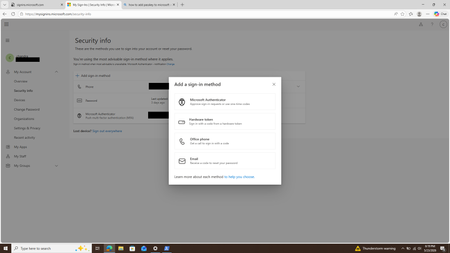
Hi BANNEDUSERNAMESupport we enable FIDO2 passkey in entraId. However, when we try to register the FIDO2 passkey on myaccount.microsoft.com -> Security -> Add a Sign-in Method -> Passkey is missing. Attached screenshot. For a personal account, the Passkey method is available at the same location, even though interface is slightly different than an Entra Id account. Attached screenshot for the personal account as well. Kindly guide us on where to register the passkey or if we need to enable certain settings in EntraId for the passkey to show up in sign-in methods. We have Auth Strengths enabled in EntraId for the particular user in question and this reflects in the Device Lockscreen during login on Entra Registred Device. Thanks ChandraSolvedchandraOMay 25, 2026Copper Contributor616Views0likes3Comments
URL Hyperlinking phishing training
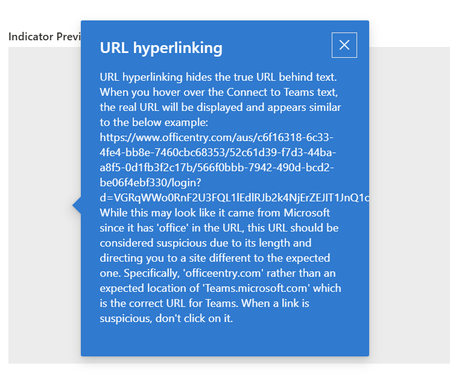
Mi using the Defender phishing simulations to perform testing. When creating a positive reinforcement email that goes to the person you have the option to use default text or put in your own text. When I put in my own text I have lines in the text, but when it renders the lines are not displayed so it looks like a bunch of text crammed together. Any idea how to get these lines to display?Solvedlfk73Feb 19, 2026Brass Contributor235Views0likes3Comments
URL rewriting does not apply during Attack Simulation (Credential Harvesting)
I’m running a credential-harvesting attack simulation in Microsoft Defender for Office 365, but the URL rewriting does not work as expected. In the final confirmation screen, the phishing link is shown as rewritten to something like: https://security.microsoft.com/attacksimulator/redirect?... However, during the actual simulation, the link is NOT rewritten. It stays as the original domain (e.g., www.officentry.com), which causes the simulation to fail with an error. I’m not sure whether this behavior is related to Safe Links or something else within Defender. Why is the URL not rewritten at runtime, and how can I ensure that the redirect link is applied correctly in the actual simulation?SolvedHOhtaniJan 28, 2026Copper Contributor291Views0likes1CommentWhat are the prerequisites to see Microsoft Secure Score?
My teammate says that even Basic or Standard M365 license provides Secure Score. Which is kind of right as you can see a basic score when opening a tenant in Lighthouse. But if you try to go to Defender console and then Exposure menu and press on Secure Score, it won't load with just Standard/Basic licenses assigned to users. I have tried to find a definitive list, but i can't. Copilot said you need at least Premium Business or E3/E5 or Defender P1. Which seems to make sense. But i need a confirmation. And also why do i see some score on tenant's page in Lighthouse?Solved1.3KViews0likes11CommentsDefender email audit - sensitive info in subject line
We are doing security auditing of emails. I'm familiar with the Defender portal, not too in-depth though (have not had time to play around) and not so with Sentinel or KQL yet. In the course of my audits, I have been finding people may encrypt emails but still have sensitive information in the subject line. Common understanding that internal emails would not leave the org so encryption is not mandatory (though I have disagreement on that). So auditing emails going external. In M365 Defender >> Email & Collaboration >> Explorer section, I did a search: keyword: "SSN" sender domain: equals my org recipient domain: equals non of my org What are some sensitive information keywords or phrases in the subject line searches in M365 Defender (security.microsoft.com)? So far I have compiled this list to (sucks M365 Defender does not allow searching with wildcards or patterns): SSN social security TIN DOB account acct passport license DLSolvedHathMHSep 08, 2025Tin Contributor163Views0likes1CommentWant to earn an Exclusive Security Tech Community Badge? Take our quick survey!
Hey there Security Tech Community! As we prepare for Microsoft Ignite, we’re building a focused, practitioner-led security roundtable and we want your input to ensure it reflects the most relevant and pressing topics in the field. We invite you to take a short survey and share the security topics, trends, and technical questions you want to see covered. Your input will directly influence the structure and substance of the Ignite Security Roundtable. The first 5 people to post a screenshot for proof of survey completion in the comments below will receive this "Microsoft Security Star" Badge to add to their Tech Community profile! TAKE THE SURVEY NOW: https://aka.ms/IgniteSecurityRoundtableSurvey2025SolvedTrevorRusherAug 15, 2025Community Manager378Views4likes6Comments
Anonymous IP address involving one user
Hello, I get security messages from M365 Defender: Sign-in from an anonymous IP address (e.g. Tor browser, anonymizer VPNs) one service user (only SMTP Auth user) is attacking by one ip address and its allways the same IPV4 address from outside. It is possible to block this ip address? I've tried with conditional access, Connection filter policy (Default) under antispam policy, but nothing helps. I've set my own public ip in conditional access and connection filter policy and try if i can use this smtp account to send mails from 3rd party tools and still works. I have no idea how can i block/reject incoming inquire from public ip adresses. Somebody can help? PeterSolvedGodCordialAug 13, 2025Tin Contributor361Views0likes2Comments
Email notifications for risky sign-ins when user confirmed MFA
We had an incident where user's credentials were compromised, attacker logged in from another country and the user accepted MFA notification (Microsoft Authenticator). We didn't see alert in Defender, most likely because the user confirmed MFA prompt and we would like to receive email alerts in cases like this. So, interactive logins from an unfamiliar/foreign IP where user is tricked into accepting MFA prompt. Is this possible?SolvedMightyJay44Jul 01, 2025Copper Contributor125Views0likes1CommentLow reputation
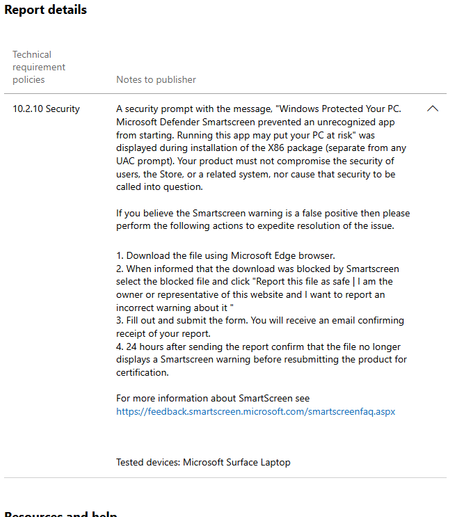
I am an independent developer, and I've been unable to publish https://github.com/teamatica on the Microsoft Store for about https://teamatica.org/history-en.txt — it keeps getting rejected due to "10.2.10 Security": I realize this is because I'm not well-known, but how can I build a reputation when it’s impossible? Microsoft blocks the download: Microsoft even prevents it from being opened: Sure, I could provide a step-by-step guide on https://teamatica.org/check-digital-signature-dark-en.gif my app, but, as experience has shown, users don’t trust unfamiliar apps (and rightly so!), because Microsoft has conditioned them for years to avoid running unknown software: "Make sure you trust before you open it" and "Running this app might put your PC at risk". Don't get me wrong: as a regular user, I fully support these security measures because they truly work and help. But as an independent developer, I don’t know what to do :( My app doesn't engage in cryptojacking, doesn't initiate unauthorized network activity, and https://app.any.run/tasks/0faaf878-0f1f-49fc-a6a4-2c197bd9ac48 to users — it doesn't transmit any data to me and/or third parties, doesn't use telemetry and/or monitoring tools, doesn't track actions and/or location, doesn't have built-in diagnostics and/or analytics, doesn't request privilege escalation, doesn't collect statistics and doesn't learn from personal data. My app passes all the necessary https://www.microsoft.com/en-us/wdsi/filesubmission: And I can’t afford an https://ssl.com/faqs/which-code-signing-certificate-do-i-need-ev-ov/ since I’m an individual, not an organization: But my app gets blocked anyway. So... does anyone have any ideas on what I can do in my situation?SolvedknMar 23, 2025Brass Contributor552Views0likes3Comments





Tags
- cloud security989 Topics
- security785 Topics
- microsoft information protection520 Topics
- azure499 Topics
- information protection and governance486 Topics
- microsoft 365421 Topics
- microsoft sentinel347 Topics
- azure active directory240 Topics
- data loss prevention218 Topics
- microsoft 365 defender174 Topics