azure
499 TopicsKerberos and the End of RC4: Protocol Hardening and Preparing for CVE‑2026‑20833
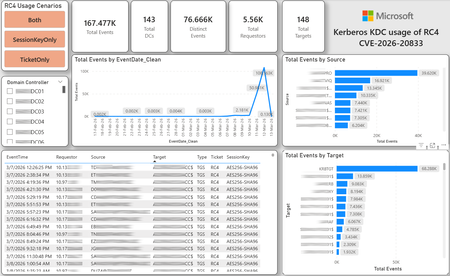
CVE-2026-20833 addresses the continued use of the RC4‑HMAC algorithm within the Kerberos protocol in Active Directory environments. Although RC4 has been retained for many years for compatibility with legacy systems, it is now considered cryptographically weak and unsuitable for modern authentication scenarios. As part of the security evolution of Kerberos, Microsoft has initiated a process of progressive protocol hardening, whose objective is to eliminate RC4 as an implicit fallback, establishing AES128 and AES256 as the default and recommended algorithms. This change should not be treated as optional or merely preventive. It represents a structural change in Kerberos behavior that will be progressively enforced through Windows security updates, culminating in a model where RC4 will no longer be implicitly accepted by the KDC. If Active Directory environments maintain service accounts, applications, or systems dependent on RC4, authentication failures may occur after the application of the updates planned for 2026, especially during the enforcement phases introduced starting in April and finalized in July 2026. For this reason, it is essential that organizations proactively identify and eliminate RC4 dependencies, ensuring that accounts, services, and applications are properly configured to use AES128 or AES256 before the definitive changes to Kerberos protocol behavior take effect. Official Microsoft References CVE-2026-25177 - Security Update Guide - Microsoft - Active Directory Domain Services Elevation of Privilege Vulnerability Microsoft Support – How to manage Kerberos KDC usage of RC4 for service account ticket issuance changes related to CVE-2026-20833 (KB 5073381) Microsoft Learn – Detect and Remediate RC4 Usage in Kerberos AskDS – What is going on with RC4 in Kerberos? Beyond RC4 for Windows authentication | Microsoft Windows Server Blog So, you think you’re ready for enforcing AES for Kerberos? | Microsoft Community Hub Risk Associated with the Vulnerability When RC4 is used in Kerberos tickets, an authenticated attacker can request Service Tickets (TGS) for valid SPNs, capture these tickets, and perform offline brute-force attacks, particularly Kerberoasting scenarios, with the goal of recovering service account passwords. Compared to AES, RC4 allows significantly faster cracking, especially for older accounts or accounts with weak passwords. Technical Overview of the Exploitation In simplified terms, the exploitation flow occurs as follows: The attacker requests a TGS for a valid SPN. The KDC issues the ticket using RC4, when that algorithm is still accepted. The ticket is captured and analyzed offline. The service account password is recovered. The compromised account is used for lateral movement or privilege escalation. Official Timeline Defined by Microsoft Important clarification on enforcement behavior Explicit account encryption type configurations continue to be honored even during enforcement mode. The Kerberos hardening associated with CVE‑2026‑20833 focuses on changing the default behavior of the KDC, enforcing AES-only encryption for TGS ticket issuance when no explicit configuration exists. This approach follows the same enforcement model previously applied to Kerberos session keys in earlier security updates (for example, KB5021131 related to CVE‑2022‑37966), representing another step in the progressive removal of RC4 as an implicit fallback. January 2026 – Audit Phase Starting in January 2026, Microsoft initiated the Audit Phase related to changes in RC4 usage within Kerberos, as described in the official guidance associated with CVE-2026-20833. The primary objective of this phase is to allow organizations to identify existing RC4 dependencies before enforcement changes are applied in later phases. During this phase, no functional breakage is expected, as RC4 is still permitted by the KDC. However, additional auditing mechanisms were introduced, providing greater visibility into how Kerberos tickets are issued in the environment. Analysis is primarily based on the following events recorded in the Security Log of Domain Controllers: Event ID 4768 – Kerberos Authentication Service (AS request / Ticket Granting Ticket) Event ID 4769 – Kerberos Service Ticket Operations (Ticket Granting Service – TGS) Additional events related to the KDCSVC service These events allow identification of: the account that requested authentication the requested service or SPN the source host of the request the encryption algorithm used for the ticket and session key This information is critical for detecting scenarios where RC4 is still being implicitly used, enabling operations teams to plan remediation ahead of the enforcement phase. If these events are not being logged on Domain Controllers, it is necessary to verify whether Kerberos auditing is properly enabled. For Kerberos authentication events to be recorded in the Security Log, the corresponding audit policies must be configured. The minimum recommended configuration is to enable Success auditing for the following subcategories: Kerberos Authentication Service Kerberos Service Ticket Operations Verification can be performed directly on a Domain Controller using the following commands: auditpol /get /subcategory:"Kerberos Service Ticket Operations" auditpol /get /subcategory:"Kerberos Authentication Service" In enterprise environments, the recommended approach is to apply this configuration via Group Policy, ensuring consistency across all Domain Controllers. The corresponding policy can be found at: Computer Configuration - Policies - Windows Settings - Security Settings - Advanced Audit Policy Configuration - Audit Policies - Account Logon Once enabled, these audits record events 4768 and 4769 in the Domain Controllers’ Security Log, allowing analysis tools—such as inventory scripts or SIEM/Log Analytics queries—to accurately identify where RC4 is still present in the Kerberos authentication flow. April 2026 – Enforcement with Manual Rollback With the April 2026 update, the KDC begins operating in AES-only mode (0x18) when the msDS-SupportedEncryptionTypes attribute is not defined. This means RC4 is no longer accepted as an implicit fallback. During this phase, applications, accounts, or computers that still implicitly depend on RC4 may start failing. Manual rollback remains possible via explicit configuration of the attribute in Active Directory. July 2026 – Final Enforcement Starting in July 2026, audit mode and rollback options are removed. RC4 will only function if explicitly configured—a practice that is strongly discouraged. This represents the point of no return in the hardening process. Official Monitoring Approach Microsoft provides official scripts in the repository: https://github.com/microsoft/Kerberos-Crypto/tree/main/scripts The two primary scripts used in this analysis are: Get-KerbEncryptionUsage.ps1 The Get-KerbEncryptionUsage.ps1 script, provided by Microsoft in the Kerberos‑Crypto repository, is designed to identify how Kerberos tickets are issued in the environment by analyzing authentication events recorded on Domain Controllers. Data collection is primarily based on: Event ID 4768 – Kerberos Authentication Service (AS‑REQ / TGT issuance) Event ID 4769 – Kerberos Service Ticket Operations (TGS issuance) From these events, the script extracts and consolidates several relevant fields for authentication flow analysis: Time – when the authentication occurred Requestor – IP address or host that initiated the request Source – account that requested the ticket Target – requested service or SPN Type – operation type (AS or TGS) Ticket – algorithm used to encrypt the ticket SessionKey – algorithm used to protect the session key Based on these fields, it becomes possible to objectively identify which algorithms are being used in the environment, both for ticket issuance and session establishment. This visibility is essential for detecting RC4 dependencies in the Kerberos authentication flow, enabling precise identification of which clients, services, or accounts still rely on this legacy algorithm. Example usage: .\Get-KerbEncryptionUsage.ps1 -Encryption RC4 -Searchscope AllKdcs | Export-Csv -Path .\KerbUsage_RC4_All_ThisDC.csv -NoTypeInformation -Encoding UTF8 Data Consolidation and Analysis In enterprise environments, where event volumes may be high, it is recommended to consolidate script results into analytical tools such as Power BI to facilitate visualization and investigation. The presented image illustrates an example dashboard built from collected results, enabling visibility into: Total events analyzed Number of Domain Controllers involved Number of requesting clients (Requestors) Most frequently involved services or SPNs (Targets) Temporal distribution of events RC4 usage scenarios (Ticket, SessionKey, or both) This type of visualization enables rapid identification of RC4 usage patterns, remediation prioritization, and progress tracking as dependencies are eliminated. Additionally, dashboards help answer key operational questions, such as: Which services still depend on RC4 Which clients are negotiating RC4 for sessions Which Domain Controllers are issuing these tickets Whether RC4 usage is decreasing over time This combined automated collection + analytical visualization approach is the recommended strategy to prepare environments for the Microsoft changes related to CVE‑2026‑20833 and the progressive removal of RC4 in Kerberos. Visualizing Results with Power BI To facilitate analysis and monitoring of RC4 usage in Kerberos, it is recommended to consolidate script results into a Power BI analytical dashboard. 1. Install Power BI Desktop Download and install Power BI Desktop from the official Microsoft website 2. Execute data collection After running the Get-KerbEncryptionUsage.ps1 script, save the generated CSV file to the following directory: C:\Temp\Kerberos_KDC_usage_of_RC4_Logs\KerbEncryptionUsage_RC4.csv 3. Open the dashboard in Power BI Open the file RC4-KerbEncryptionUsage-Dashboards.pbix using Power BI Desktop. If you are interested, please leave a comment on this post with your email address, and I will be happy to share with you. 4. Update the data source If the CSV file is located in a different directory, it will be necessary to adjust the data source path in Power BI. As illustrated, the dashboard uses a parameter named CsvFilePath, which defines the path to the collected CSV file. To adjust it: Open Transform Data in Power BI. Locate the CsvFilePath parameter in the list of Queries. Update the value to the directory where the CSV file was saved. Click Refresh Preview or Refresh to update the data. Click Home → Close & Apply. This approach allows rapid identification of RC4 dependencies, prioritization of remediation actions, and tracking of progress throughout the elimination process. List-AccountKeys.ps1 This script is used to identify which long-term keys are present on user, computer, and service accounts, enabling verification of whether RC4 is still required or whether AES128/AES256 keys are already available. Interpreting Observed Scenarios Microsoft recommends analyzing RC4 usage by jointly considering two key fields present in Kerberos events: Ticket Encryption Type Session Encryption Type Each combination represents a distinct Kerberos behavior, indicating the source of the issue, risk level, and remediation point in the environment. In addition to events 4768 and 4769, updates released starting January 13, 2026, introduce new Kdcsvc events in the System Event Log that assist in identifying RC4 dependencies ahead of enforcement. These events include: Event ID 201 – RC4 usage detected because the client advertises only RC4 and the service does not have msDS-SupportedEncryptionTypes defined. Event ID 202 – RC4 usage detected because the service account does not have AES keys and the msDS-SupportedEncryptionTypes attribute is not defined. Event ID 203 – RC4 usage blocked (enforcement phase) because the client advertises only RC4 and the service does not have msDS-SupportedEncryptionTypes defined. Event ID 204 – RC4 usage blocked (enforcement phase) because the service account does not have AES keys and msDS-SupportedEncryptionTypes is not defined. Event ID 205 – Detection of explicit enablement of insecure algorithms (such as RC4) in the domain policy DefaultDomainSupportedEncTypes. Event ID 206 – RC4 usage detected because the service accepts only AES, but the client does not advertise AES support. Event ID 207 – RC4 usage detected because the service is configured for AES, but the service account does not have AES keys. Event ID 208 – RC4 usage blocked (enforcement phase) because the service accepts only AES and the client does not advertise AES support. Event ID 209 – RC4 usage blocked (enforcement phase) because the service accepts only AES, but the service account does not have AES keys. https://support.microsoft.com/en-gb/topic/how-to-manage-kerberos-kdc-usage-of-rc4-for-service-account-ticket-issuance-changes-related-to-cve-2026-20833-1ebcda33-720a-4da8-93c1-b0496e1910dc They indicate situations where RC4 usage will be blocked in future phases, allowing early detection of configuration issues in clients, services, or accounts. These events are logged under: Log: System Source: Kdcsvc Below are the primary scenarios observed during the analysis of Kerberos authentication behavior, highlighting how RC4 usage manifests across different ticket and session encryption combinations. Each scenario represents a distinct risk profile and indicates specific remediation actions required to ensure compliance with the upcoming enforcement phases. Scenario A – RC4 / RC4 In this scenario, both the Kerberos ticket and the session key are issued using RC4. This is the worst possible scenario from a security and compatibility perspective, as it indicates full and explicit dependence on RC4 in the authentication flow. This condition significantly increases exposure to Kerberoasting attacks, since RC4‑encrypted tickets can be subjected to offline brute-force attacks to recover service account passwords. In addition, environments remaining in this state have a high probability of authentication failure after the April 2026 updates, when RC4 will no longer be accepted as an implicit fallback by the KDC. Events Associated with This Scenario During the Audit Phase, this scenario is typically associated with: Event ID 201 – Kdcsvc Indicates that: the client advertises only RC4 the service does not have msDS-SupportedEncryptionTypes defined the Domain Controller does not have DefaultDomainSupportedEncTypes defined This means RC4 is being used implicitly. This event indicates that the authentication will fail during the enforcement phase. Event ID 202 – Kdcsvc Indicates that: the service account does not have AES keys the service does not have msDS-SupportedEncryptionTypes defined This typically occurs when: legacy accounts have never had their passwords reset only RC4 keys exist in Active Directory Possible Causes Common causes include: the originating client (Requestor) advertises only RC4 the target service (Target) is not explicitly configured to support AES the account has only legacy RC4 keys the msDS-SupportedEncryptionTypes attribute is not defined Recommended Actions To remediate this scenario: Correctly identify the object involved in the authentication flow, typically: a service account (SPN) a computer account or a Domain Controller computer object Verify whether the object has AES keys available using analysis tools or scripts such as List-AccountKeys.ps1. If AES keys are not present, reset the account password, forcing generation of modern cryptographic keys (AES128 and AES256). Explicitly define the msDS-SupportedEncryptionTypes attribute to enable AES support. Recommended value for modern environments: 0x18 (AES128 + AES256) = 24 As illustrated below, this configuration can be applied directly to the msDS-SupportedEncryptionTypes attribute in Active Directory. AES can also be enabled via Active Directory Users and Computers by explicitly selecting: This account supports Kerberos AES 128 bit encryption This account supports Kerberos AES 256 bit encryption These options ensure that new Kerberos tickets are issued using AES algorithms instead of RC4. Temporary RC4 Usage (Controlled Rollback) In transitional scenarios—during migration or troubleshooting—it may be acceptable to temporarily use: 0x1C (RC4 + AES) = 28 This configuration allows the object to accept both RC4 and AES simultaneously, functioning as a controlled rollback while legacy dependencies are identified and corrected. However, the final objective must be to fully eliminate RC4 before the final enforcement phase in July 2026, ensuring the environment operates exclusively with AES128 and AES256. Scenario B – AES / RC4 In this case, the ticket is protected with AES, but the session is still negotiated using RC4. This typically indicates a client limitation, legacy configuration, or restricted advertisement of supported algorithms. Events Associated with This Scenario During the Audit Phase, this scenario may generate: Event ID 206 Indicates that: the service accepts only AES the client does not advertise AES in the Advertised Etypes In this case, the client is the issue. Recommended Action Investigate the Requestor Validate operating system, client type, and advertised algorithms Review legacy GPOs, hardening configurations, or settings that still force RC4 For Linux clients or third‑party applications, review krb5.conf, keytabs, and Kerberos libraries Scenario C – RC4 / AES Here, the session already uses AES, but the ticket is still issued using RC4. This indicates an implicit RC4 dependency on the Target or KDC side, and the environment may fail once enforcement begins. Events Associated with This Scenario This scenario may generate: Event ID 205 Indicates that the domain has explicit insecure algorithm configuration in: DefaultDomainSupportedEncTypes This means RC4 is explicitly allowed at the domain level. Recommended Action Correct the Target object Explicitly define msDS-SupportedEncryptionTypes with 0x18 = 24 Revalidate new ticket issuance to confirm full migration to AES / AES Conclusion CVE‑2026‑20833 represents a structural change in Kerberos behavior within Active Directory environments. Proper monitoring is essential before April 2026, and the msDS-SupportedEncryptionTypes attribute becomes the primary control point for service accounts, computer accounts, and Domain Controllers. July 2026 represents the final enforcement point, after which there will be no implicit rollback to RC4.35KViews4likes16Comments
WAF custom rule for bock others cookie and permit only a specific cookie name and value
Hello all, I need to create a custom WAF rule that only allows traffic for a specific request URI (/example-path) if it contains a particular cookie, Cookie=abc123, and blocks all other requests. Additionally, could someone clarify the difference between configuring the policy this way: RequestHeaders['Cookie'], Operator=DoesNotEqual, Values="Cookie=abc123" RequestCookie, Values="CookieName", Operator=Equal, valueOfTheCookie="abc123" I hope I explained myself clearly. Thanks in advance for your responses!Azure Cloud HSM: Secure, Compliant & Ready for Enterprise Migration
Azure Cloud HSM is Microsoft’s single-tenant, FIPS 140-3 Level 3 validated hardware security module service, designed for organizations that need full administrative control over cryptographic keys in the cloud. It’s ideal for migration scenarios, especially when moving on-premises HSM workloads to Azure with minimal application changes. Onboarding & Availability No Registration or Allowlist Needed: Azure Cloud HSM is accessible to all customers no special onboarding or monetary policy required. Regional Availability: Private Preview: UK West Public Preview (March 2025): East US, West US, West Europe, North Europe, UK West General Availability (June 2025): All public, US Gov, and AGC regions where Azure Managed HSM is available Choosing the Right Azure HSM Solution Azure offers several key management options: Azure Key Vault (Standard/Premium) Azure Managed HSM Azure Payment HSM Azure Cloud HSM Cloud HSM is best for: Migrating existing on-premises HSM workloads to Azure Applications running in Azure VMs or Web Apps that require direct HSM integration Shrink-wrapped software in IaaS models supporting HSM key stores Common Use Cases: ADCS (Active Directory Certificate Services) SSL/TLS offload for Nginx and Apache Document and code signing Java apps needing JCE provider SQL Server TDE (IaaS) via EKM Oracle TDE Deployment Best Practices 1. Resource Group Strategy Deploy the Cloud HSM resource in a dedicated resource group (e.g., CHSM-SERVER-RG). Deploy client resources (VM, VNET, Private DNS Zone, Private Endpoint) in a separate group (e.g., CHSM-CLIENT-RG) 2. Domain Name Reuse Policy Each Cloud HSM requires a unique domain name, constructed from the resource name and a deterministic hash. Four reuse types: Tenant, Subscription, ResourceGroup, and NoReuse choose based on your naming and recovery needs. 3. Step-by-Step Deployment Provision Cloud HSM: Use Azure Portal, PowerShell, or CLI. Provisioning takes ~10 minutes. Register Resource Provider: (Register-AzResourceProvider -ProviderNamespace Microsoft.HardwareSecurityModules) Create VNET & Private DNS Zone: Set up networking in the client resource group. Create Private Endpoint: Connect the HSM to your VNET for secure, private access. Deploy Admin VM: Use a supported OS (Windows Server, Ubuntu, RHEL, CBL Mariner) and download the Azure Cloud HSM SDK from GitHub. Initialize and Configure Edit azcloudhsm_resource.cfg: Set the hostname to the private link FQDN for hsm1 (found in the Private Endpoint DNS config). Initialize Cluster: Use the management utility (azcloudhsm_mgmt_util) to connect to server 0 and complete initialization. Partition Owner Key Management: Generate the PO key securely (preferably offline). Store PO.key on encrypted USB in a physical safe. Sign the partition cert and upload it to the HSM. Promote Roles: Promote Precrypto Officer (PRECO) to Crypto Officer (CO) and set strong password Security, Compliance, and Operations Single-Tenant Isolation: Only your organization has admin access to your HSM cluster. No Microsoft Access: Microsoft cannot access your keys or credentials. FIPS 140-3 Level 3 Compliance: All hardware and firmware are validated and maintained by Microsoft and the HSM vendor. Tamper Protection: Physical and logical tamper events trigger key zeroization. No Free Tier: Billing starts upon provisioning and includes all three HSM nodes in the cluster. No Key Sharing with Azure Services: Cloud HSM is not integrated with other Azure services for key usage. Operational Tips Credential Management: Store PO.key offline; use environment variables or Azure Key Vault for operational credentials. Rotate credentials regularly and document all procedures. Backup & Recovery: Backups are automatic and encrypted; always confirm backup/restore after initialization. Support: All support is through Microsoft open a support request for any issues. Azure Cloud HSM vs. Azure Managed HSM Feature / Aspect Azure Cloud HSM Azure Managed HSM Deployment Model Single-tenant, dedicated HSM cluster (Marvell LiquidSecurity hardware) Multi-tenant, fully managed HSM service FIPS Certification FIPS 140-3 Level 3 FIPS 140-2 Level 3 Administrative Control Full admin control (Partition Owner, Crypto Officer, Crypto User roles) Azure manages HSM lifecycle; customers manage keys and RBAC Key Management Customer-managed keys and partitions; direct HSM access Azure-managed HSM; customer-managed keys via Azure APIs Integration PKCS#11, OpenSSL, JCE, KSP/CNG, direct SDK access Azure REST APIs, Azure CLI, PowerShell, Key Vault SDKs Use Cases Migration from on-prem HSMs, legacy apps, custom PKI, direct cryptographic ops Cloud-native apps, SaaS, PaaS, Azure-integrated workloads Network Access Private VNET only; not accessible by other Azure services Accessible by Azure services (e.g., Storage, SQL, Disk Encryption) Key Usage by Azure Services Not supported (no integration with Azure services) Supported (can be used for disk, storage, SQL encryption, etc.) BYOK/Key Import Supported (with key wrap methods) Supported (with Azure Key Vault import tools) Key Export Supported (if enabled at key creation) Supported (with exportable keys) Billing Hourly fee per cluster (3 HSMs per cluster); always-on Consumption-based (per operation, per key, per hour) Availability High availability via 3-node cluster; automatic failover and backup Geo-redundant, managed by Azure Firmware Management Microsoft manages firmware; customer cannot update Fully managed by Azure Compliance Meets strictest compliance (FIPS 140-3 Level 3, single-tenant isolation) Meets broad compliance (FIPS 140-2 Level 3, multi-tenant isolation) Best For Enterprises migrating on-prem HSM workloads, custom/legacy integration needs Cloud-native workloads, Azure service integration, simplified management When to Choose Each? Azure Cloud HSM is ideal if you: Need full administrative control and single-tenant isolation. Are migrating existing on-premises HSM workloads to Azure. Require direct HSM access for legacy or custom applications. Need to meet the highest compliance standards (FIPS 140-3 Level 3). Azure Managed HSM is best if you: Want a fully managed, cloud-native HSM experience. Need seamless integration with Azure services (Storage, SQL, Disk Encryption, etc.). Prefer simplified key management with Azure RBAC and APIs. Are building new applications or SaaS/PaaS solutions in Azure. Scenario Recommended Solution Migrating on-prem HSM to Azure Azure Cloud HSM Cloud-native app needing Azure service keys Azure Managed HSM Custom PKI or direct cryptographic operations Azure Cloud HSM SaaS/PaaS with Azure integration Azure Managed HSM Highest compliance, single-tenant isolation Azure Cloud HSM Simplified management, multi-tenant Azure Managed HSM Azure Cloud HSM is the go-to solution for organizations migrating HSM-backed workloads to Azure, offering robust security, compliance, and operational flexibility. By following best practices for onboarding, deployment, and credential management, you can ensure a smooth and secure transition to the cloud.
Hunting for MFA manipulations in Entra ID tenants using KQL
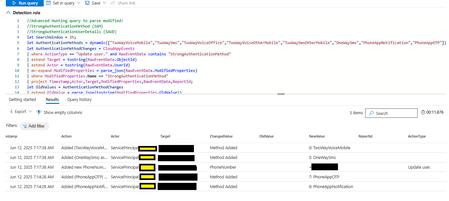
The following article, Hunting for MFA manipulations in Entra ID tenants using KQL proved to be an invaluable resource in my search for an automated way to notify users of MFA modifications. I've adapted the KQL query to function within Defender Advanced Hunting or Azure Entra, my objective is to establish an alert that directly E-Mails the affected user, informing them of the MFA change and advising them to contact security if they did not initiate it. While the query runs correctly under Defender Advanced Hunting, I'm currently unable to create a workable custom alert because no "ReportId" is being captured. Despite consulting with Copilot, Gemini, CDW Support, and Microsoft Support, no workable solution has been achieved. Any insight would be greatly appreciated - Thank You! //Advanced Hunting query to parse modified: //StrongAuthenticationUserDetails (SAUD) //StrongAuthenticationMethod (SAM) let SearchWindow = 1h; let AuthenticationMethods = dynamic(["TwoWayVoiceMobile","TwoWaySms","TwoWayVoiceOffice","TwoWayVoiceOtherMobile","TwoWaySmsOtherMobile","OneWaySms","PhoneAppNotification","PhoneAppOTP"]); let AuthenticationMethodChanges = CloudAppEvents | where ActionType == "Update user." and RawEventData contains "StrongAuthenticationMethod" | extend Target = tostring(RawEventData.ObjectId) | extend Actor = tostring(RawEventData.UserId) | mv-expand ModifiedProperties = parse_json(RawEventData.ModifiedProperties) | where ModifiedProperties.Name == "StrongAuthenticationMethod" | project Timestamp,Actor,Target,ModifiedProperties,RawEventData,ReportId; let OldValues = AuthenticationMethodChanges | extend OldValue = parse_json(tostring(ModifiedProperties.OldValue)) | mv-apply OldValue on (extend Old_MethodType=tostring(OldValue.MethodType),Old_Default=tostring(OldValue.Default) | sort by Old_MethodType); let NewValues = AuthenticationMethodChanges | extend NewValue = parse_json(tostring(ModifiedProperties.NewValue)) | mv-apply NewValue on (extend New_MethodType=tostring(NewValue.MethodType),New_Default=tostring(NewValue.Default) | sort by New_MethodType); let RemovedMethods = AuthenticationMethodChanges | join kind=inner OldValues on ReportId | join kind=leftouter NewValues on ReportId,$left.Old_MethodType==$right.New_MethodType | where Old_MethodType != New_MethodType | extend Action = strcat("Removed (" , AuthenticationMethods[toint(Old_MethodType)], ") from Authentication Methods.") | extend ChangedValue = "Method Removed"; let AddedMethods = AuthenticationMethodChanges | join kind=inner NewValues on ReportId | join kind=leftouter OldValues on ReportId,$left.New_MethodType==$right.Old_MethodType | where Old_MethodType != New_MethodType | extend Action = strcat("Added (" , AuthenticationMethods[toint(New_MethodType)], ") as Authentication Method.") | extend ChangedValue = "Method Added"; let DefaultMethodChanges = AuthenticationMethodChanges | join kind=inner OldValues on ReportId | join kind=inner NewValues on ReportId | where Old_Default != New_Default and Old_MethodType == New_MethodType and New_Default == "true" | join kind=inner OldValues on ReportId | where Old_Default1 == "true" and Old_MethodType1 != New_MethodType | extend Old_MethodType = Old_MethodType1 | extend Action = strcat("Default Authentication Method was changed to (" , AuthenticationMethods[toint(New_MethodType)], ").") | extend ChangedValue = "Default Method"; let AuthenticationMethodReport = union RemovedMethods,AddedMethods,DefaultMethodChanges | project Timestamp,Action,Actor,Target,ChangedValue,OldValue=case(isempty(Old_MethodType), "",strcat(Old_MethodType,": ", AuthenticationMethods[toint(Old_MethodType)])),NewValue=case(isempty( New_MethodType),"", strcat(New_MethodType,": ", AuthenticationMethods[toint(New_MethodType)])); let AuthenticationDetailsChanges = CloudAppEvents | where ActionType == "Update user." and RawEventData contains "StrongAuthenticationUserDetails" | extend Target = tostring(RawEventData.ObjectId) | extend Actor = tostring(RawEventData.UserId) | extend ReportId= tostring(RawEventData.ReportId) | mvexpand ModifiedProperties = parse_json(RawEventData.ModifiedProperties) | where ModifiedProperties.Name == "StrongAuthenticationUserDetails" | extend NewValue = parse_json(replace_string(replace_string(tostring(ModifiedProperties.NewValue),"[",""),"]","")) | extend OldValue = parse_json(replace_string(replace_string(tostring(ModifiedProperties.OldValue),"[",""),"]","")) | mv-expand NewValue | mv-expand OldValue | where (tostring( bag_keys(OldValue)) == tostring(bag_keys(NewValue))) or (isempty(OldValue) and tostring(NewValue) !contains ":null") or (isempty(NewValue) and tostring(OldValue) !contains ":null") | extend ChangedValue = tostring(bag_keys(NewValue)[0]) | extend OldValue = tostring(parse_json(OldValue)[ChangedValue]) | extend NewValue = tostring(parse_json(NewValue)[ChangedValue]) | extend OldValue = case(ChangedValue == "PhoneNumber" or ChangedValue == "AlternativePhoneNumber", replace_strings(OldValue,dynamic([' ','(',')']), dynamic(['','',''])), OldValue ) | extend NewValue = case(ChangedValue == "PhoneNumber" or ChangedValue == "AlternativePhoneNumber", replace_strings(NewValue,dynamic([' ','(',')']), dynamic(['','',''])), NewValue ) | where tostring(OldValue) != tostring(NewValue) | extend Action = case(isempty(OldValue), strcat("Added new ",ChangedValue, " to Strong Authentication."),isempty(NewValue),strcat("Removed existing ",ChangedValue, " from Strong Authentication."),strcat("Changed ",ChangedValue," in Strong Authentication.")); union AuthenticationMethodReport, AuthenticationDetailsChanges | extend AccountUpn = Target | where Timestamp > ago(SearchWindow) //| summarize count() by Timestamp, Action, Actor, Target, ChangedValue, OldValue, NewValue, ReportId, AccountDisplayName, AccountId, AccountUpn | summarize arg_max(Timestamp, *) by Action | project Timestamp, Action, Actor, Target, ChangedValue, OldValue, NewValue, ReportId, AccountDisplayName, AccountId, AccountUpn | sort by Timestamp descCannot login to Service Trust Portal
Hi, I'm trying to get some certificates from the service trust portal, but I keep getting "Service Trust Portal no longer support Microsoft Account (MSA) access." I'm using an account registered on Azure and I checked the Azure Active Directory, and the user exists (seeing it's the owner of the account). What am I missing here?Anomalies with Conditional Access Policy "Terms of Use" Failures
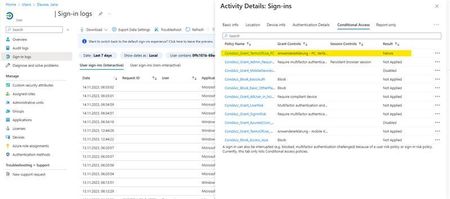
Hello Microsoft Community, I'm reaching out with a bit of a puzzle regarding our "Terms of Use" Conditional Access policy, and I'm eager to tap into the collective wisdom here for some insights. In our Entra ID User Sign-In logs, we've identified intermittent "failure" entries associated with the "Terms of Use" Conditional Access policy. Interestingly, even for users who had previously accepted the "Terms of Use". There appears to be no discernible impact, and they continue their tasks without interruption. This observation became apparent during the troubleshooting of unrelated Surface Hub and Edge Sync issues at some client sites. What adds to the complexity of the situation is that for the same users, both before and after these "failure" entries, the Conditional Access policy is marked as "success". Hence, it doesn't seem to be a straightforward case of the policy erroneously detecting non-acceptance of the "Terms of Use". The mystery lies in understanding why these intermittent "failure" entries occur for users who have already accepted the terms, especially when the policy consistently reports "success" for the same users. Furthermore, the Insights for the "Terms of Use" Conditional Access policy show around 1.48k successes and 1.43k failures in the last 90 days, yet there's no discernible impact on user functionality. Observations: "Failure" entries in Sign-In logs don't seem to disrupt users' day-to-day activities. The ratio of successes to failures is balanced, yet users experience no noticeable problems. The issue complicates troubleshooting efforts but doesn't significantly affect the user experience. I'm turning to the community for guidance on interpreting and resolving this discrepancy between "failure" entries in the Conditional Access policy logs and the seemingly unaffected user experience. Any insights into why these failures occur without user impact would be greatly appreciated. For additional context, I've attached screenshots of a user's Sign-In log entry and the insight chart from the Conditional Access policy. Sign-In log of a user (failure): Sign-In log of same user (success): Current Conditional Access insights: Thank you in advance for your time and assistance. I look forward to any guidance or solutions you can provide. Best regards, Leon Tüpker
RSS feeds to security blogs?
Hello, After the update of blogs here i no longer see any RSS feeds or links. Where can those RSS feed be found now? It was the only newsfeed where blogs could be aggregated. perhaps im just blind :) but i cant find the new RSS feeds. Thank you! Previously (before this weeks update) the links to those RSS feed was as follows: https://techcommunity.microsoft.com/gxcuf89792/rss/board?board.id=MicrosoftSecurityandCompliance https://techcommunity.microsoft.com/gxcuf89792/rss/board?board.id=Identity https://techcommunity.microsoft.com/gxcuf89792/rss/board?board.id=CoreInfrastructureandSecurityBlog https://techcommunity.microsoft.com/gxcuf89792/rss/board?board.id=AzureNetworkSecurityBlog https://techcommunity.microsoft.com/gxcuf89792/rss/board?board.id=IdentityStandards https://techcommunity.microsoft.com/gxcuf89792/rss/board?board.id=MicrosoftThreatProtectionBlog https://techcommunity.microsoft.com/gxcuf89792/rss/board?board.id=MicrosoftDefenderCloudBlog https://techcommunity.microsoft.com/gxcuf89792/rss/board?board.id=MicrosoftDefenderATPBlog https://techcommunity.microsoft.com/gxcuf89792/rss/board?board.id=MicrosoftDefenderIoTBlog https://techcommunity.microsoft.com/gxcuf89792/rss/board?board.id=DefenderExternalAttackSurfaceMgmtBlog https://techcommunity.microsoft.com/gxcuf89792/rss/board?board.id=Vulnerability-Management https://techcommunity.microsoft.com/gxcuf89792/rss/board?board.id=DefenderThreatIntelligence https://techcommunity.microsoft.com/gxcuf89792/rss/board?board.id=MicrosoftSecurityExperts https://techcommunity.microsoft.com/gxcuf89792/rss/board?board.id=Microsoft-Security-Baselines https://techcommunity.microsoft.com/gxcuf89792/rss/board?board.id=MicrosoftSentinelBlog https://techcommunity.microsoft.com/gxcuf89792/rss/board?board.id=MicrosoftDefenderforOffice365Blog
SMTP XOAuth authentication and Microsoft authentication libraries
Due to the upcoming deprecation of basic authentication our company is looking to move all our products to modern authentication protocols for sending emails but we have some unusual usage scenarios that have me running in circles. I have been through all available documentation multiple times and I'm stuck. The problem is that we have on premise web applications that are running on multiple client servers and not a central location. This creates a problem when using standard OAuth flows since there is no fixed URL to use as a redirect URI. Because of this I have created a separate API on a fixed URL that will serve as the redirect URI for all clients and instances of our web applications. This breaks the standard usage of MSAL library and I had to go around chasing my tail to even be able to implement something that could possibly work. I have been able to do it using Microsoft.Identity.Client MSAL library but I hit a problem since I need to use the ConfidentialClientApp.AcquireTokenByAuthorizationCode call to redeem the access code obtained after user login but apparently SMTP does not allow confidential clients to login. We need the application to be able to send emails from any account any tenant or personal accounts. I have obtained the access token for a personal account but SMTP rejects it with this error: 535: 5.7.3 Authentication unsuccessful [AM8P251CA0016.EURP251.PROD.OUTLOOK.COM]. If I switch to PublicClientApplication then there is no AcquireTokenByAuthorizationCode method and I can't even use client secret so I'm not even sure how this works in redeeming a code. I am going by instructions on this page: https://docs.microsoft.com/en-us/exchange/client-developer/legacy-protocols/how-to-authenticate-an-imap-pop-smtp-application-by-using-oauth and it mentions no requirement of a public client application. It states I can use authorization code flow and the documentation on authorization code flow states it can be used by web apps and desktop apps. Well how am I supposed to use it when SMTP won't accept a confidential app and the PublicClientApplication does not have a method to redeem it? If I drop the authentication library and go for pure REST API call implementation, which application credentials should I use that the acquired tokens will be accepted by the SMTP server? Also I would like to know if office 365 users still have to disable security defaults and enable STMP Authentication to use SMTP with OAuth 2? This would defeat the whole purpose of migrating to OAuth 2 and the blog about deprecation states that moving to OAuth 2 is the way to prepare your app for this deprecation, but I've seen instructions on SMTP OAuth that state SMTP Authentication still needs to be enabled.2.9KViews0likes3CommentsAzure OpenAI FedRAMP High + M365 Copilot Targeting Sept 2025 for GCC High/DOD
We’re excited to share two major updates for our public sector and defense customers: Azure OpenAI Service is now FedRAMP High authorized for Azure Government. This approval allows government agencies to securely leverage advanced AI capabilities, including GPT-4o, within their Azure Government environment. For the first time, we’re targeting a General Availability (GA) of September 2025 for Microsoft 365 Copilot in GCC High and DOD environments (pending government authorization). Copilot will deliver powerful AI tools tailored for decision-making, automation, and enhanced collaboration, all while meeting the strict compliance and security needs of our defense and government customers. For more information on these updates and how they can impact your workflows, check out the full blog post Let’s discuss how you’re planning to use these AI advancements in your environments!
Block standard C:\Users\%User%\AppData\Local\Microsoft\WindowsApps Path environment variable
Hello togehter, for security reasons I like to block (GPO?) / delete the standard Windows-path-enviroment variable: C:\Users\%User%\AppData\Local\Microsoft\WindowsApps First of all: Does it make sense to do this? I want to exclude a case that some user / unwanted software are copied here by attackers. Thanks a lot Kevin