microsoft purview
157 Topics
Feature Request: Extend Security Copilot inclusion (M365 E5) to M365 A5 Education tenants
Background At Ignite 2025, Microsoft announced that Security Copilot is included for all Microsoft 365 E5 customers, with a phased rollout starting November 18, 2025. This is a significant step forward for security operations. The gap Microsoft 365 A5 for Education is the academic equivalent of E5 — it includes the same core security stack: Microsoft Defender, Entra, Intune, and Purview. However, the Security Copilot inclusion explicitly covers only commercial E5 customers. There is no public roadmap or timeline for extending this benefit to A5 education tenants. Why this matters Education institutions face the same cybersecurity threats as commercial organizations — often with fewer dedicated security resources. The A5 license was positioned as the premium security offering for education. Excluding it from Security Copilot inclusion creates an inequity between commercial and education customers holding functionally equivalent license tiers. Request We would like Microsoft to: Confirm whether Security Copilot inclusion will be extended to M365 A5 Education tenants If yes, provide an indicative timeline If no, clarify the rationale and what alternative paths exist for education customers Are other EDU admins in the same situation? Would appreciate any upvotes or comments to help raise visibility with the product team.1.5KViews16likes4Comments
From “No” to “Now”: A 7-Layer Strategy for Enterprise AI Safety
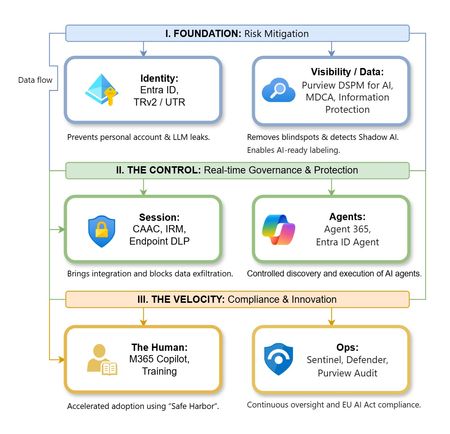
The “block” posture on Generative AI has failed. In a global enterprise, banning these tools doesn't stop usage; it simply pushes intellectual property into unmanaged channels and creates a massive visibility gap in corporate telemetry. The priority has now shifted from stopping AI to hardening the environment so that innovation can run at velocity without compromising data sovereignty. Traditional security perimeters are ineffective against the “slow bleed” of AI leakage - where data moves through prompts, clipboards, and autonomous agents rather than bulk file transfers. To secure this environment, a 7-layer defense-in-depth model is required to treat the conversation itself as the new perimeter. 1. Identity: The Only Verifiable Perimeter Identity is the primary control plane. Access to AI services must be treated with the same rigor as administrative access to core infrastructure. The strategy centers on enforcing device-bound Conditional Access, where access is strictly contingent on device health. To solve the "Account Leak" problem, the deployment of Tenant Restrictions v2 (TRv2) is essential to prevent users from signing into personal tenants using corporate-managed devices. For enhanced coverage, Universal Tenant Restrictions (UTR) via Global Secure Access (GSA) allows for consistent enforcement at the cloud edge. While TRv2 authentication-plane is GA, data-plane protection is GA for the Microsoft 365 admin center and remains in preview for other workloads such as SharePoint and Teams. 2. Eliminating the Visibility Gap (Shadow AI) You can’t secure what you can't see. Microsoft Defender for Cloud Apps (MDCA) serves to discover and govern the enterprise AI footprint, while Purview DSPM for AI (formerly AI Hub) monitors Copilot and third-party interactions. By categorizing tools using MDCA risk scores and compliance attributes, organizations can apply automated sanctioning decisions and enforce session controls for high-risk endpoints. 3. Data Hygiene: Hardening the “Work IQ” AI acts as a mirror of internal permissions. In a "flat" environment, AI acts like a search engine for your over-shared data. Hardening the foundation requires automated sensitivity labeling in Purview Information Protection. Identifying PII and proprietary code before assigning AI licenses ensures that labels travel with the data, preventing labeled content from being exfiltrated via prompts or unauthorized sharing. 4. Session Governance: Solving the “Clipboard Leak” The most common leak in 2025 is not a file upload; it’s a simple copy-paste action or a USB transfer. Deploying Conditional Access App Control (CAAC) via MDCA session policies allows sanctioned apps to function while specifically blocking cut/copy/paste. This is complemented by Endpoint DLP, which extends governance to the physical device level, preventing sensitive data from being moved to unmanaged USB storage or printers during an AI-assisted workflow. Purview Information Protection with IRM rounds this out by enforcing encryption and usage rights on the files themselves. When a user tries to print a "Do Not Print" document, Purview triggers an alert that flows into Microsoft Sentinel. This gives the SOC visibility into actual policy violations instead of them having to hunt through generic activity logs. 5. The “Agentic” Era: Agent 365 & Sharing Controls Now that we're moving from "Chat" to "Agents", Agent 365 and Entra Agent ID provide the necessary identity and control plane for autonomous entities. A quick tip: in large-scale tenants, default settings often present a governance risk. A critical first step is navigating to the Microsoft 365 admin center (Copilot > Agents) to disable the default “Anyone in organization” sharing option. Restricting agent creation and sharing to a validated security group is essential to prevent unvetted agent sprawl and ensure that only compliant agents are discoverable. 6. The Human Layer: “Safe Harbors” over Bans Security fails when it creates more friction than the risk it seeks to mitigate. Instead of an outright ban, investment in AI skilling-teaching users context minimization (redacting specifics before interacting with a model) - is the better path. Providing a sanctioned, enterprise-grade "Safe Harbor" like M365 Copilot offers a superior tool that naturally cuts down the use of Shadow AI. 7. Continuous Ops: Monitoring & Regulatory Audit Security is not a “set and forget” project, particularly with the EU AI Act on the horizon. Correlating AI interactions and DLP alerts in Microsoft Sentinel using Purview Audit (specifically the CopilotInteraction logs) data allows for real-time responses. Automated SOAR playbooks can then trigger protective actions - such as revoking an Agent ID - if an entity attempts to access sensitive HR or financial data. Final Thoughts Securing AI at scale is an architectural shift. By layering Identity, Session Governance, and Agentic Identity, AI moves from being a fragmented risk to a governed tool that actually works for the modern workplace.Why “Data in Switzerland” Is Not Enough
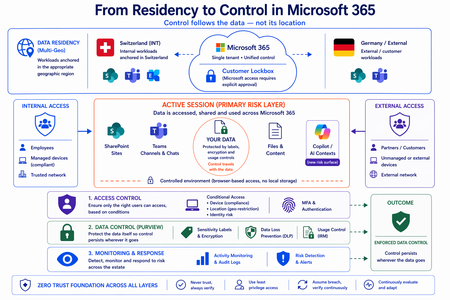
Moving from Residency to Control in Microsoft 365 Every conversation about data sovereignty in regulated industries tends to start the same way: “We use Multi-Geo. The data stays in Switzerland.” It’s the right starting point. Microsoft 365 Multi-Geo allows organizations to place selected workloads - SharePoint sites, OneDrive accounts, Teams data, or Exchange mailboxes - into specific regions, including Switzerland, while maintaining a single global tenant. This makes it possible to align sensitive data with regulatory or customer requirements without fragmenting the overall environment. But it only answers one question: Where is the data stored? It does not answer who accessed the data, from where, under which conditions, or what happened after access. That is where the real problem begins. A scenario that happens every day A Swiss engineering firm stores sensitive project documentation in Switzerland using Multi-Geo. An external contractor - working from an unmanaged device outside Switzerland - is granted access to review a file. The document opens. The data is now on a screen in an unknown location, on a device with no compliance posture, in a session with no restrictions. From the platform’s perspective, residency was enforced. From a sovereignty perspective, control was lost the moment access was granted without conditions. The file never left Switzerland. But sovereignty did. Residency is static. Control is not. The moment a document is opened, storage location stops being the relevant boundary. The file is no longer just “in Switzerland.” It moves instantly across endpoints and browsers, collaboration tools like Teams, external users and partners, and increasingly AI-driven contexts. The infrastructure remains unchanged. The data does not. From the platform’s perspective, everything is working as designed - access was granted, residency was enforced - and control was lost. Most “data in Switzerland” strategies fail at exactly this moment: when the data is used. The shift: from location to conditions If data sovereignty is the goal, the question must change. Not “Where is the data stored?” but: Under which conditions can data be accessed and used? This shift fundamentally changes the architecture. Control must be applied across three distinct layers - and all three must be connected. Layer 1: Access is conditional, not static Conditional Access extends control beyond authentication and turns it into continuous evaluation. Access decisions can depend on: Device compliance Location (geo-restriction) Identity and risk signals Multi-Geo ensures data is placed correctly. Conditional Access ensures it is reachable only under defined conditions. The two must work together - residency without access governance is an incomplete control. Layer 2: The session is the real risk surface Even with strict access controls, risk remains. A session is an exposure surface by design. During an active session, data is viewed, copied, shared, processed by applications, and connected to AI prompts. The gap does not appear at storage or authentication. It appears during active usage - inside the session. This is the layer most architectures do not explicitly address. Controls must extend into the session itself: limiting data transfer and replication, restricting interaction patterns, and enforcing policies in real time. Access is no longer a one-time event. It becomes continuously governed. This becomes even more critical as AI assistants consume content across SharePoint, Teams, Exchange, and other Microsoft 365 services. The question is no longer only where the source document resides - but whether the AI interaction itself is governed by the same access and protection controls as direct access. Layer 3: The document becomes the control point The most durable control does not sit in the network or in the session. It sits in the data itself. In regulated industries, organizations often arrive at this architecture having first evaluated sovereign or national encryption solutions. The decision to rely on native Microsoft 365 Purview encryption rather than a separate layer comes down to integration: AES-256 protection operating natively at file, user, and SharePoint level - including geo-based access restrictions - without an additional system to maintain. When protection is applied directly to the document through Microsoft Purview: Sensitivity labels define classification - automatically assigned based on content Encryption enforces access - AES-256, bound to the file itself IRM controls usage - view, copy, print, share, and presentation rights DLP governs movement across services - preventing data from leaving defined boundaries Dynamic watermarking tracks exposure - applied on open, view, or print At that point, access is enforced by the file, usage restrictions travel with it, and control persists regardless of location. The document becomes the perimeter. Platform control: limiting provider access One dimension often overlooked in sovereignty discussions is platform access itself. Even a perfectly configured tenant is only as sovereign as the controls placed on the operator. Customer Lockbox ensures that even Microsoft support cannot access customer data without explicit, logged, time-bound approval. Every access request is visible, auditable, and subject to customer veto. Data control applies not only to users - but also to the platform operating the service. Enforcement requires an integrated architecture Most organizations already have the required capabilities: Multi-Geo, Conditional Access, session control, Purview (labels, encryption, DLP, IRM), and monitoring. The issue is not capability. It is fragmentation. In practice, fragmentation looks like this: residency is configured in one project, Conditional Access policies are managed by a different team, and Purview labels were applied during a compliance initiative that never connected to the access layer. The tools exist. The signals do not flow between them. When designed as a single architecture: Data is placed intentionally - residency aligned to regulatory requirements Access is governed by context - device, location, and identity evaluated continuously Usage is controlled dynamically - session-level restrictions enforced in real time Protection is embedded in the document - encryption and IRM travel with the file Signals are connected across the platform - monitoring feeds access policy, not just audit logs “Data in Switzerland” becomes not just a statement - but an enforceable system property. Closing thought Placing data in Switzerland is the right first step. Multi-Geo makes it possible, even in global environments. But residency alone is not control. Data residency answers where information is stored. Data sovereignty requires proving who can access it, under which conditions, and what controls remain in place after access is granted. In Microsoft 365, sovereignty is no longer defined by geography alone. It is defined by the ability to enforce control wherever the data travels.
Short survey: Feedback on Sensitivity Label Suggestions in Microsoft 365 Apps
Hi everyone, I’m looking to gather feedback on user experiences with Sensitivity Label suggestions in Microsoft 365 apps. This short survey aims to understand how label recommendations are working in practice and where improvements may be needed. Your responses will help identify common challenges and opportunities to make the label recommendation process more accurate, useful, and seamless for users. Survey link: Experience with Recommended Sensitivity Labels in Microsoft 365 – Fill out form The survey takes around 3 minutes to complete. Your feedback will directly help us better understand real-world experiences with label suggestions. Thank you very much for taking the time to contribute.
Email alerts for sharepoint action "DownloadedFile"
Hi, We are trying setup alerts for files being downloaded on specific executive sharepoint sites. We have created a custom alert policy in security.microsoft.com for that specific site and did few test downloads. We have not received any notifications for these activities. Tried searching the audit logs manually and there are no entries for these activities. Is there any specific setting that needs to be turned on in order to trigger the alert policy? We have activated "Reporting" in Site collection features. Thanks in advance!!
Adaptive Scope Sytntax
Hi. I have a requirement to scope only "UserMailbox" data in an Adaptive scope to ensure only user mailbox data is retained and deleted > 7years and shared mailbox is not in scope and retained forever. This scope will then be used in Adaptive Exchange Online Retention policy to Retain and then delete email > 7years old. Could anyone help me define the syntax to use in the query please? I have used the following but am not sure if this is correct even though it never failed when I completed the Adaptive Scope RecipientTypeDetails -eq 'UserMailbox' Thanks in Advance Chris
Scaling Data Governance- Does a Purview in a Day Framework Exist?
Hello Purview Community, I’ve been exploring the available acceleration resources for Microsoft Purview, and one thing I noticed is a potential gap in the "In a Day" workshop series. While we have excellent programs like Power BI in a Day or Fabric in a Day, I haven't yet seen a formalized Purview in a Day framework designed to help organizations jumpstart their governance journey in a single, cohesive session. I am reaching out because my team is currently preparing something in this area that we believe will be very useful to the community and Microsoft in the future. Rather than working in isolation, we want to ensure we are aligned with the official roadmap. I wanted to reach out to the community and the Microsoft product team to ask: Is there an official "In a Day" initiative for Purview currently in the works? If not, who would be the best point of contact to discuss alignment? Looking forward to hearing your thoughts and seeing if we can build something impactful together! #MicrosoftPurview #PurviewEnterprise Strategy for Secure Agentic AI: From Compliance to Implementation
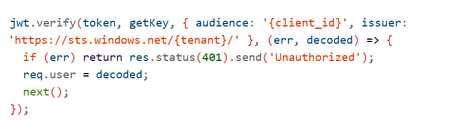
Imagine an AI system that doesn’t just answer questions but takes action querying your databases, updating records, triggering workflows, even processing refunds without human intervention. That’s Agentic AI and it’s here. But with great power comes great responsibility. This autonomy introduces new attack surfaces and regulatory obligations. The Model Context Protocol (MCP) Server the gateway between your AI agent and critical systems becomes your Tier-0 control point. If it fails, the blast radius is enormous. This is the story of how enterprises can secure Agentic AI, stay compliant and implement Zero Trust architectures using Azure AI Foundry. Think of it as a roadmap a journey with three milestones - Milestone 1: Securing the Foundation Our journey starts with understanding the paradigm shift. Traditional AI with RAG (Retrieval-Augmented Generation) is like a librarian: It retrieves pre-indexed data. It summarizes information. It never changes the books or places orders. Security here is simple: protect the index, validate queries, prevent data leaks. But Agentic AI? It’s a staffer with system access. It can: Execute tools and business logic autonomously. Chain operations: read → analyze → write → notify. Modify data and trigger workflows. Bottom line: RAG is a “smart librarian.” Agentic AI is a “staffer with system access.” Treat the security model accordingly. And that means new risks: unauthorized access, privilege escalation, financial impact, data corruption. So what’s the defense? Ten critical security controls your first line of protection: Here’s what a production‑grade, Zero Trust MCP gateway needs. Its intentionally simplified in the demo (e.g., no auth) to highlight where you must harden in production. (https://github.com/davisanc/ai-foundry-mcp-gateway) Authentication Demo: None Prod: Microsoft Entra ID, JWT validation, Managed Identity, automatic credential rotation Authorization & RBAC Demo: None Prod: Tool‑level RBAC via Entra; least privilege; explicit allow‑lists per agent/capability Input Validation Demo: Basic (ext whitelist, 10MB, filename sanitize) Prod: JSON Schema validation, injection guards (SQL/command), business‑rule checks Rate Limiting Demo: None Prod: Multi‑tier (per‑agent, per‑tool, global), adaptive throttling, backoff Audit Logging Demo: Console → App Service logs Prod: Structured logs w/ correlation IDs, compliance metadata, PII redaction Session Management Demo: In‑memory UUID sessions Prod: Encrypted distributed storage (Redis/Cosmos DB), tenant isolation, expirations File Upload Security Demo: Ext whitelist, size limits, memory‑only Prod: 7‑layer defense (validate, MIME, malware scanning via Defender for Storage), encryption at rest, signed URLs Network Security Demo: Public App Service + HTTPS Prod: Private Endpoints, VNet integration, NSGs, Azure Firewall no public exposure Secrets Management Demo: App Service env vars (not in code) Prod: Azure Key Vault + Managed Identity, rotation, access audit Observability & Threat Detection (5‑Layer Stack) Layer 1: Application Insights (requests, dependencies, custom security events) Layer 2: Azure AI Content Safety (harmful content, jailbreaks) Layer 3: Microsoft Defender for AI (prompt injection incl. ASCII smuggling, credential theft, anomalous tool usage) Layer 4: Microsoft Purview for AI (PII/PHI classification, DLP on outputs, lineage, policy) Layer 5: Microsoft Sentinel (SIEM correlation, custom rules, automated response) Note: Azure AI Content Safety is built into Azure AI Foundry for real‑time filtering on both prompts and completions. Picture this as an airport security model: multiple checkpoints, each catching what the previous missed. That’s defense-in-depth. Zero Trust in Practice ~ A Day in the Life of a Prompt Every agent request passes through 8 sequential checkpoints, mapped to MITRE ATLAS tactics/mitigations (e.g., AML.M0011 Input Validation, AML.M0004 Output Filtering, AML.M0015 Adversarial Input Detection). The design goal is defense‑in‑depth: multiple independent controls, different detection signals, and layered failure modes. Checkpoints 1‑7: Enforcement (deny/contain before business systems) Checkpoint 8: Monitoring (detect/respond, hunt, learn, harden) AML.M0009 – Control Access to ML Models AML.M0011 – Validate ML Model Inputs AML.M0000 – Limit ML Model Availability AML.M0014 – ML Artifact Logging AML.M0004 – Output Filtering AML.M0015 – Adversarial Input Detection If one control slips, the others still stand. Resilience is the product of layers. Milestone 2: Navigating Compliance Next stop: regulatory readiness. The EU AI Act is the world’s first comprehensive AI law. If your AI system operates in or impacts the EU market, compliance isn’t optional, it’s mandatory. Agentic AI often falls under high-risk classification. That means: Risk management systems. Technical documentation. Logging and traceability. Transparency and human oversight. Fail to comply? Fines up to €30M or 6% of global turnover. Azure helps you meet these obligations: Entra ID for identity and RBAC. Purview for data classification and DLP. Defender for AI for prompt injection detection. Content Safety for harmful content filtering. Sentinel for SIEM correlation and incident response. And this isn’t just about today. Future regulations are coming US AI Executive Orders, UK AI Roadmap, ISO/IEC 42001 standards. The trend is clear: transparency, explainability, and continuous monitoring will be universal. Milestone 3: Implementation Deep-Dive Now, the hands-on part. How do you build this strategy into reality? Step 1: Entra ID Authentication Register your MCP app in Entra ID. Configure OAuth2 and JWT validation. Enable Managed Identity for downstream resources. Step 2: Apply the 10 Controls RBAC: Tool-level access checks. Validation: JSON schema + injection prevention. Rate Limiting: Express middleware or Azure API Management. Audit Logging: Structured logs with correlation IDs. Session Mgmt: Redis with encryption. File Security: MIME checks + Defender for Storage. Network: Private Endpoints + VNet. Secrets: Azure Key Vault. Observability: App Insights + Defender for AI + Purview + Sentinel. Step 3: Secure CI/CD Pipelines Embed compliance checks in Azure DevOps: Pre-build: Secret scanning. Build: RBAC & validation tests. Deploy: Managed Identity for service connections. Post-deploy: Compliance scans via Azure Policy. Step 4: Build the 5-Layer Observability Stack App Insights → Telemetry. Content Safety → Harmful content detection. Defender for AI → Prompt injection monitoring. Purview → PII/PHI classification and lineage. Sentinel → SIEM correlation and automated response. The Destination: A Secure, Compliant Future By now, you’ve seen the full roadmap: Secure the foundation with Zero Trust and layered controls. Navigate compliance with EU AI Act and prepare for global regulations. Implement the strategy using Azure-native tools and CI/CD best practices. Because in the world of Agentic AI, security isn’t optional, compliance isn’t negotiable, and observability is your lifeline. Resources https://learn.microsoft.com/en-us/azure/ai-foundry/what-is-azure-ai-foundry https://learn.microsoft.com/en-us/azure/defender-for-cloud/ai-threat-protection https://learn.microsoft.com/en-us/purview/ai-microsoft-purview https://atlas.mitre.org/ https://digital-strategy.ec.europa.eu/en/policies/european-approach-artificial-intelligence https://techcommunity.microsoft.com/blog/microsoft-security-blog/microsoft-sentinel-mcp-server---generally-available-with-exciting-new-capabiliti/4470125Survey: Microsoft Purview Retention Labels in Outlook Mobile (iOS/Andriod)
We need your input! Today, in Outlook for Windows, Outlook for the Web, and (currently rolling out) Outlook for Mac, end-users can manually apply Microsoft Purview retention labels and MRM personal tags to individual emails and non-default (user-created) folders. The Outlook and Data Lifecycle Management product groups are interested in learning from our customers how important that same functionality would be in Outlook for Mobile (iOS/Android). Please consider filling out and sharing the following survey to let us know how this feature would or would not be useful to you and your organization: https://aka.ms/RetentionLabels-OutlookMobile Please note that your responses will remain anonymous unless you choose to provide contact information at the end of the survey.