microsoft 365
421 Topics
Feature Request: Extend Security Copilot inclusion (M365 E5) to M365 A5 Education tenants
Background At Ignite 2025, Microsoft announced that Security Copilot is included for all Microsoft 365 E5 customers, with a phased rollout starting November 18, 2025. This is a significant step forward for security operations. The gap Microsoft 365 A5 for Education is the academic equivalent of E5 — it includes the same core security stack: Microsoft Defender, Entra, Intune, and Purview. However, the Security Copilot inclusion explicitly covers only commercial E5 customers. There is no public roadmap or timeline for extending this benefit to A5 education tenants. Why this matters Education institutions face the same cybersecurity threats as commercial organizations — often with fewer dedicated security resources. The A5 license was positioned as the premium security offering for education. Excluding it from Security Copilot inclusion creates an inequity between commercial and education customers holding functionally equivalent license tiers. Request We would like Microsoft to: Confirm whether Security Copilot inclusion will be extended to M365 A5 Education tenants If yes, provide an indicative timeline If no, clarify the rationale and what alternative paths exist for education customers Are other EDU admins in the same situation? Would appreciate any upvotes or comments to help raise visibility with the product team.1.5KViews16likes4Comments
From “No” to “Now”: A 7-Layer Strategy for Enterprise AI Safety
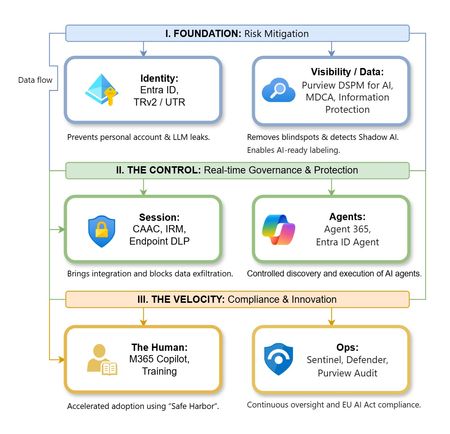
The “block” posture on Generative AI has failed. In a global enterprise, banning these tools doesn't stop usage; it simply pushes intellectual property into unmanaged channels and creates a massive visibility gap in corporate telemetry. The priority has now shifted from stopping AI to hardening the environment so that innovation can run at velocity without compromising data sovereignty. Traditional security perimeters are ineffective against the “slow bleed” of AI leakage - where data moves through prompts, clipboards, and autonomous agents rather than bulk file transfers. To secure this environment, a 7-layer defense-in-depth model is required to treat the conversation itself as the new perimeter. 1. Identity: The Only Verifiable Perimeter Identity is the primary control plane. Access to AI services must be treated with the same rigor as administrative access to core infrastructure. The strategy centers on enforcing device-bound Conditional Access, where access is strictly contingent on device health. To solve the "Account Leak" problem, the deployment of Tenant Restrictions v2 (TRv2) is essential to prevent users from signing into personal tenants using corporate-managed devices. For enhanced coverage, Universal Tenant Restrictions (UTR) via Global Secure Access (GSA) allows for consistent enforcement at the cloud edge. While TRv2 authentication-plane is GA, data-plane protection is GA for the Microsoft 365 admin center and remains in preview for other workloads such as SharePoint and Teams. 2. Eliminating the Visibility Gap (Shadow AI) You can’t secure what you can't see. Microsoft Defender for Cloud Apps (MDCA) serves to discover and govern the enterprise AI footprint, while Purview DSPM for AI (formerly AI Hub) monitors Copilot and third-party interactions. By categorizing tools using MDCA risk scores and compliance attributes, organizations can apply automated sanctioning decisions and enforce session controls for high-risk endpoints. 3. Data Hygiene: Hardening the “Work IQ” AI acts as a mirror of internal permissions. In a "flat" environment, AI acts like a search engine for your over-shared data. Hardening the foundation requires automated sensitivity labeling in Purview Information Protection. Identifying PII and proprietary code before assigning AI licenses ensures that labels travel with the data, preventing labeled content from being exfiltrated via prompts or unauthorized sharing. 4. Session Governance: Solving the “Clipboard Leak” The most common leak in 2025 is not a file upload; it’s a simple copy-paste action or a USB transfer. Deploying Conditional Access App Control (CAAC) via MDCA session policies allows sanctioned apps to function while specifically blocking cut/copy/paste. This is complemented by Endpoint DLP, which extends governance to the physical device level, preventing sensitive data from being moved to unmanaged USB storage or printers during an AI-assisted workflow. Purview Information Protection with IRM rounds this out by enforcing encryption and usage rights on the files themselves. When a user tries to print a "Do Not Print" document, Purview triggers an alert that flows into Microsoft Sentinel. This gives the SOC visibility into actual policy violations instead of them having to hunt through generic activity logs. 5. The “Agentic” Era: Agent 365 & Sharing Controls Now that we're moving from "Chat" to "Agents", Agent 365 and Entra Agent ID provide the necessary identity and control plane for autonomous entities. A quick tip: in large-scale tenants, default settings often present a governance risk. A critical first step is navigating to the Microsoft 365 admin center (Copilot > Agents) to disable the default “Anyone in organization” sharing option. Restricting agent creation and sharing to a validated security group is essential to prevent unvetted agent sprawl and ensure that only compliant agents are discoverable. 6. The Human Layer: “Safe Harbors” over Bans Security fails when it creates more friction than the risk it seeks to mitigate. Instead of an outright ban, investment in AI skilling-teaching users context minimization (redacting specifics before interacting with a model) - is the better path. Providing a sanctioned, enterprise-grade "Safe Harbor" like M365 Copilot offers a superior tool that naturally cuts down the use of Shadow AI. 7. Continuous Ops: Monitoring & Regulatory Audit Security is not a “set and forget” project, particularly with the EU AI Act on the horizon. Correlating AI interactions and DLP alerts in Microsoft Sentinel using Purview Audit (specifically the CopilotInteraction logs) data allows for real-time responses. Automated SOAR playbooks can then trigger protective actions - such as revoking an Agent ID - if an entity attempts to access sensitive HR or financial data. Final Thoughts Securing AI at scale is an architectural shift. By layering Identity, Session Governance, and Agentic Identity, AI moves from being a fragmented risk to a governed tool that actually works for the modern workplace.Why “Data in Switzerland” Is Not Enough
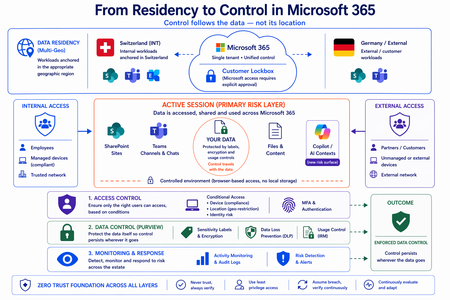
Moving from Residency to Control in Microsoft 365 Every conversation about data sovereignty in regulated industries tends to start the same way: “We use Multi-Geo. The data stays in Switzerland.” It’s the right starting point. Microsoft 365 Multi-Geo allows organizations to place selected workloads - SharePoint sites, OneDrive accounts, Teams data, or Exchange mailboxes - into specific regions, including Switzerland, while maintaining a single global tenant. This makes it possible to align sensitive data with regulatory or customer requirements without fragmenting the overall environment. But it only answers one question: Where is the data stored? It does not answer who accessed the data, from where, under which conditions, or what happened after access. That is where the real problem begins. A scenario that happens every day A Swiss engineering firm stores sensitive project documentation in Switzerland using Multi-Geo. An external contractor - working from an unmanaged device outside Switzerland - is granted access to review a file. The document opens. The data is now on a screen in an unknown location, on a device with no compliance posture, in a session with no restrictions. From the platform’s perspective, residency was enforced. From a sovereignty perspective, control was lost the moment access was granted without conditions. The file never left Switzerland. But sovereignty did. Residency is static. Control is not. The moment a document is opened, storage location stops being the relevant boundary. The file is no longer just “in Switzerland.” It moves instantly across endpoints and browsers, collaboration tools like Teams, external users and partners, and increasingly AI-driven contexts. The infrastructure remains unchanged. The data does not. From the platform’s perspective, everything is working as designed - access was granted, residency was enforced - and control was lost. Most “data in Switzerland” strategies fail at exactly this moment: when the data is used. The shift: from location to conditions If data sovereignty is the goal, the question must change. Not “Where is the data stored?” but: Under which conditions can data be accessed and used? This shift fundamentally changes the architecture. Control must be applied across three distinct layers - and all three must be connected. Layer 1: Access is conditional, not static Conditional Access extends control beyond authentication and turns it into continuous evaluation. Access decisions can depend on: Device compliance Location (geo-restriction) Identity and risk signals Multi-Geo ensures data is placed correctly. Conditional Access ensures it is reachable only under defined conditions. The two must work together - residency without access governance is an incomplete control. Layer 2: The session is the real risk surface Even with strict access controls, risk remains. A session is an exposure surface by design. During an active session, data is viewed, copied, shared, processed by applications, and connected to AI prompts. The gap does not appear at storage or authentication. It appears during active usage - inside the session. This is the layer most architectures do not explicitly address. Controls must extend into the session itself: limiting data transfer and replication, restricting interaction patterns, and enforcing policies in real time. Access is no longer a one-time event. It becomes continuously governed. This becomes even more critical as AI assistants consume content across SharePoint, Teams, Exchange, and other Microsoft 365 services. The question is no longer only where the source document resides - but whether the AI interaction itself is governed by the same access and protection controls as direct access. Layer 3: The document becomes the control point The most durable control does not sit in the network or in the session. It sits in the data itself. In regulated industries, organizations often arrive at this architecture having first evaluated sovereign or national encryption solutions. The decision to rely on native Microsoft 365 Purview encryption rather than a separate layer comes down to integration: AES-256 protection operating natively at file, user, and SharePoint level - including geo-based access restrictions - without an additional system to maintain. When protection is applied directly to the document through Microsoft Purview: Sensitivity labels define classification - automatically assigned based on content Encryption enforces access - AES-256, bound to the file itself IRM controls usage - view, copy, print, share, and presentation rights DLP governs movement across services - preventing data from leaving defined boundaries Dynamic watermarking tracks exposure - applied on open, view, or print At that point, access is enforced by the file, usage restrictions travel with it, and control persists regardless of location. The document becomes the perimeter. Platform control: limiting provider access One dimension often overlooked in sovereignty discussions is platform access itself. Even a perfectly configured tenant is only as sovereign as the controls placed on the operator. Customer Lockbox ensures that even Microsoft support cannot access customer data without explicit, logged, time-bound approval. Every access request is visible, auditable, and subject to customer veto. Data control applies not only to users - but also to the platform operating the service. Enforcement requires an integrated architecture Most organizations already have the required capabilities: Multi-Geo, Conditional Access, session control, Purview (labels, encryption, DLP, IRM), and monitoring. The issue is not capability. It is fragmentation. In practice, fragmentation looks like this: residency is configured in one project, Conditional Access policies are managed by a different team, and Purview labels were applied during a compliance initiative that never connected to the access layer. The tools exist. The signals do not flow between them. When designed as a single architecture: Data is placed intentionally - residency aligned to regulatory requirements Access is governed by context - device, location, and identity evaluated continuously Usage is controlled dynamically - session-level restrictions enforced in real time Protection is embedded in the document - encryption and IRM travel with the file Signals are connected across the platform - monitoring feeds access policy, not just audit logs “Data in Switzerland” becomes not just a statement - but an enforceable system property. Closing thought Placing data in Switzerland is the right first step. Multi-Geo makes it possible, even in global environments. But residency alone is not control. Data residency answers where information is stored. Data sovereignty requires proving who can access it, under which conditions, and what controls remain in place after access is granted. In Microsoft 365, sovereignty is no longer defined by geography alone. It is defined by the ability to enforce control wherever the data travels.
Windows Hello passkeys dialog appearing and cannot remove or suppress it.
Hi everyone, I’m dealing with a persistent Windows Hello and passkey issue in Chrome and Brave and yes this is relevant as they're the only browsers having this issue whilst Edge for example is fine, and at this point I’m trying to understand whether this is expected behavior, a bug, or a design oversight. PS. Yes, I'm in contact with related browser support teams but since they seem utterly hopeless i'm asking here, since its at least partially Windows Hello issue. Problem description Even with: Password managers disabled in browser settings, Windows Hello disabled in Chrome/Brave settings, Windows Hello PIN enabled only for device login, Passkeys still stored under chrome://settings/passkeys (which I cannot delete since its used for logging on the device), The devices are connected to Entra ID but this is not required to reproduce the issue although a buisness account configuration creates a Passkey with Windows Hello afaik. Observed behavior When I attempt to sign in on office.com, Windows Hello automatically triggers a dialog offering authentication via passkeys, even though: I don’t want passkeys used for browser logins, passkeys are turned off everywhere they can be, Windows Hello is intended only for local device authentication. The dialog cannot be suppressed, disabled, or hidden(trust me, i tried for weeks). It effectively forces the Windows Hello prompt as a primary option, which causes problems both personally and in business contexts (wrong credential signaling, misleading users that are supposed to use a dedicated password manager solution insted of browser password managers, enforcing an unwanted authentication flow, etc.). What I already verified Many, many, (too many) Windows registry workarounds that never worked. Dug through almost all flags on those browsers. Chrome/Brave → Password Manager: disabled Chrome/Brave → Windows Hello toggle: off Looked through what feels like almost every related option in Windows Settings. Tried gpedit.msc local rules System up to date Windows Hello configured to use PIN, but stores "passkeys used to log on to this device" Why this is a problem Windows Hello automatically assumes that the device-level Windows Hello credentials should always be available as a WebAuthn authenticator. This feels like a big security and UX issue due to: unexpected authentication dialogs, Inability to controll where and how passkey credential are shared to applications, inability to turn the feature off, no administrative or local option to disable Hello for WebAuthn separately from device login. Buisness users either having issues with keeping passwords in order (our buissnes uses a dedicated Password Manager but this behaviour covers its dialog option) or not having PIN to their devices (when I disable windows hello entierly, since when there is no passkeys the option doesn't appear) Questions Is there any supported way to disable Windows Hello as a WebAuthn/passkey option in browsers, while keeping Hello enabled for local device login? Is this expected behavior from the Windows Hello, or is it considered a bug? Are there registry/policy settings (documented or upcoming) that allow disabling the Windows platform authenticator specifically for browsers like Chrome and Brave? Is Microsoft aware of this issue? If so, is it tracked anywhere? Additional notes This issue replicates 100% across (as long as there are passkeys configured): Windows 11 devices i've managed to get my hands on, Chrome and Brave (latest versions), multiple Microsoft accounts and tenants, multiple clean installations. Any guidance or clarification from the Windows security or identity teams would be greatly appreciated. And honestly if there is any more info i could possibly provide PLEASE ask away.3.9KViews1like3CommentsSent email cannot be viewed by sender when encrypted.
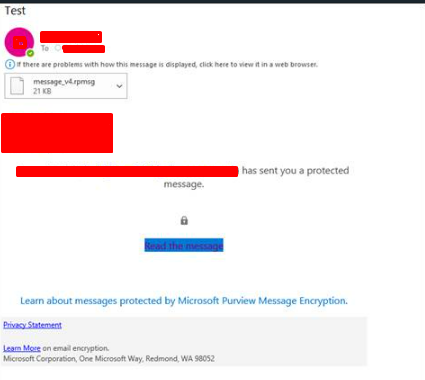
Emails that are sent in outlook are not viewable in the sent items folder of the outlook desktop app but work fine in the outlook web app. The error that shows is the same as the one for when recipients cannot view the email in the email client but if they click on the link it still does not let them view the email. Seems to be affecting only certain members of the organisation but there does not seems to be a pattern of software/admin rights/plugins/etc. Does anyone have any ideas as to what is likely to cause this? Thanks.3.6KViews0likes4Comments
Moving Microsoft 365 authentication to Entra ID Cloud Auth from On-Prem ADFS
Hi Identity Brain Trust, Assuming this would be the right place for my question as I couldn't find any other hub more relevant for this one. We have several applications configured to be authenticated via ADFS. We are looking to move these gradually to Entra ID Cloud auth and decommission ADFS, eventually. I would like to test out how Microsoft 365 can be moved to Cloud Auth from ADFS for a certain group of people. I have tried to use ADFS migration wizard in Entra but 365 app is not showing in the ADFS Application Migration section of Entra ID. I've read this official guide but still couldn't find how this can be manually done when App Migration section won't have the app appearing there. - https://learn.microsoft.com/en-us/entra/identity/enterprise-apps/migrate-ad-fs-application-overview Appreciate any of your inputs on this one! Kev
MFA Issue blocks Global Admin / Data Protection Team disconnects calls
Hi. I have just learned that the Microsoft Authenticator app allows you to create MFA for multiple Global Administrator accounts, but those accounts will not properly transfer when you move to a new Smartphone. I have one tenant that has only one Global Admin Account secured using MFA and the Microsoft Authenticator App. The MFA is no longer working. I have been told to work with the Microsoft Data Protection Team by calling them at 800-865-9408. The weird thing is they keep disconnecting the call before the issue gets addressed. It has happened multiple times. Calling them back results in hold times averaging over 2 hours. Does anyone have ideas how I can get my MFA issue solved perhaps by reaching the proper group at Microsoft in another fashion? Is there some customer advocate resource at Microsoft I can contact?Survey: Microsoft Purview Retention Labels in Outlook Mobile (iOS/Andriod)
We need your input! Today, in Outlook for Windows, Outlook for the Web, and (currently rolling out) Outlook for Mac, end-users can manually apply Microsoft Purview retention labels and MRM personal tags to individual emails and non-default (user-created) folders. The Outlook and Data Lifecycle Management product groups are interested in learning from our customers how important that same functionality would be in Outlook for Mobile (iOS/Android). Please consider filling out and sharing the following survey to let us know how this feature would or would not be useful to you and your organization: https://aka.ms/RetentionLabels-OutlookMobile Please note that your responses will remain anonymous unless you choose to provide contact information at the end of the survey.Never Get Locked Out: The Importance of a Break Glass Admin Account
One of the simplest but most critical safeguards in Microsoft Entra ID is having a Break Glass Admin account. In my lab, I created a dedicated emergency account with: - Permanent Global Admin role (for emergencies only) - Excluded from Conditional Access policies - Strong password stored securely - Monitoring in place to detect any sign-in attempts This account is never used for daily operations — it exists only to guarantee access in case Conditional Access, MFA, or identity protection policies block all other admins. This setup prevents accidental lockouts and ensures continuity. Does your organization maintain a Break Glass Admin account, and how do you secure it?
Whitelisting domain in DLP policy
Does anyone know, if there is any way to whitelist a domain in DLP policy? The problem is that we are sharing documents from SPO site to a trusted partner domain and don't want to get the DLP warning messages for this, but at the same time don't want to take the whole site out of DLP's reach.Solved