Forum Widgets
Latest Discussions

Need information on generating sample events for Threat Intelligence" (both duplicate posts)
Two things are tripping this up, and they're common mix-ups: First — Attack Simulation Training doesn't generate Threat Intelligence events. If you used the built-in phishing simulator, its logs only show up under Email & collaboration → Attack simulation training → Simulations — they're intentionally excluded from real Threat Intelligence telemetry. That's likely why nothing's showing up even though you ran a campaign. Second — your EICAR test should actually work, but check the right place: not the generic Office 365 Management Activity API's AuditLogRecordType page in isolation — go specifically to the RecordType values used for Defender for Office 365 threat events: 28 = ThreatIntelligence (phishing/malware events) 41 = ThreatIntelligenceUrl (Safe Links time-of-click/block events) Plus ThreatIntelligenceAtpContent, ThreatFinder, MSTIC To reliably generate one: Confirm Purview audit logging is enabled for the tenant first — if it isn't, nothing downstream gets logged regardless of what you trigger. From an external mailbox, send a test user the EICAR string as a .txt attachment (exact 68-byte string, see Microsoft's anti-malware testing doc). Defender for Office 365 should detect and quarantine it. Verify it landed first in the portal UI: Email & collaboration → Explorer → Malware tab — if it's there, the underlying ThreatIntelligence record exists and the Management API call should return it (allow a short delay; these aren't instant). For the Safe Links side, send a known-safe-but-flagged test URL (Microsoft publishes test URLs for this) to trigger ThreatIntelligenceUrl. If it shows up in Explorer but still doesn't appear via the Management API, that's usually an API subscription/permission issue (you need an active subscription to the DLP.All or relevant Office 365 Management API content type, not just Graph permissions) — worth checking separately from the detection side.gokhantatarAug 11, 2026Copper Contributor123Views0likes0CommentsCan the Microsoft Defender portal show the server details as per security group?
Yes — this is exactly what Device Groups + RBAC are designed for in Microsoft Defender (assuming you're managing these servers through Defender for Endpoint, which is the typical path for cross-vendor server monitoring). The model: Device groups are the scoping unit (not Entra security groups directly) — create one per vendor/company (e.g., "Company A Servers", "Company B Servers"), using a matching rule (tag, OS, name pattern, etc.) to auto-assign devices. RBAC roles then get tied to an Entra security group and granted access to only specific device groups. So: Company A's people go in an Entra group → that group is assigned an MDE role scoped to "Company A Servers" only → they only ever see those devices, alerts, and incidents in the portal. You as admin keep your existing Global Admin/Security Admin role (or get added to both device groups' RBAC scope), so you retain visibility across both. Path: Settings → Endpoints → Permissions → Device groups to create the groups, then Permissions → Roles to create a role and tie it to your Entra security group with that device group as the scope. One thing to verify before committing to this design: this RBAC model affects what shows in alerts, incidents, advanced hunting (scoped automatically), and inventory — but make sure nobody from Company A/B also needs organization-wide Defender features like global threat analytics, since those aren't scopable the same way. If you're actually talking about servers monitored via Defender for Cloud (Azure subscription-based, not MDE-onboarded), the equivalent mechanism is Azure RBAC at the subscription/resource group level (assign Security Reader scoped to the RG containing Company A's VMs) — different mechanism, same outcome. Worth clarifying which portal/product this is so the right one gets recommended.gokhantatarAug 11, 2026Copper Contributor133Views0likes0Comments
New Blog | New Copilot for Security Plugin Name Reflects Broader Capabilities
By Michael Browning The Copilot for Security team is continuously enhancing threat intelligence (TI) capabilities in Copilot for Security to provide a more comprehensive and integrated TI experience for customers. We're excited to share that the Copilot for Security threat Intelligence plugin has broadened beyond just MDTI to now encapsulate data from other TI sources, including Microsoft Threat Analytics (TA) and SONAR, with even more sources becoming available soon. To reflect this evolution of the plugin, customers may notice a change in its name from "Microsoft Defender Threat Intelligence (MDTI) to "Microsoft Threat Intelligence," reflecting its broader scope and enhanced capabilities. Since launch in April, Copilot for Security customers have been able to access, operate on, and integrate the raw and finished threat intelligence from MDTI developed from trillions of daily security signals and the expertise of over 10 thousand multidisciplinary analysts through simple natural language prompts. Now, with the ability for Copilot for Security's powerful generative AI to reason over more threat intelligence, customers have a more holistic, contextualized view of the threat landscape and its impact on their organization. Read the full post here: New Copilot for Security Plugin Name Reflects Broader Capabilities350Views1like0CommentsNew Blog | Introducing the MDTI Premium Data Connector for Sentinel
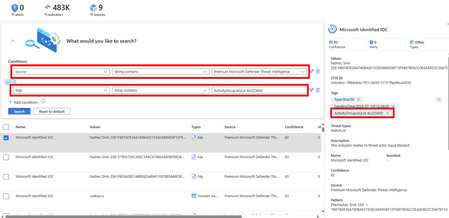
By Michael Browning The MDTI and Unified Security Operations Platform teams are excited to introduce an MDTI data connector available in the Unified Security Operations Platform and standalone Sentinel experiences. The connector enables customers to apply the powerful raw and finished threat intelligence in MDTI, including high-fidelity indicators of compromise (IoCs), across their security operations to detect and respond to the latest threats. Microsoft researchers, with the backing of interdisciplinary teams of thousands of experts spread across 77 countries, continually add new analysis of threat activity observed across more than 78 trillion threat signals to MDTI, including powerful indicators drawn directly from threat infrastructure. In Sentinel, this intelligence enables enhanced threat detection, enrichment of incidents for rapid triage, and the ability to launch investigations that proactively surface external threat infrastructure before it can be used in campaigns. This blog will highlight the exciting use cases for the MDTI premium data connector, including enhanced enrichment, threat detection, and hunting to ensure customer organizations are protected against the most critical threats. It will also cover how you can easily get started with this out-of-the-box connector. Read the full post here: Introducing the MDTI Premium Data Connector for Sentinel474Views0likes0CommentsNew Blog | More Threat Intelligence Content in MDTI, TA Enables Better Security Outcomes
By Michael Browning Microsoft threat intelligence empowers our customers to keep up with the global threat landscape and understand the threats and vulnerabilities most relevant to their organization. We are excited to announce that we have recently accelerated the speed and scale at which we publish threat intelligence, giving our customers more critical security insights, data, and guidance than ever before. This blog will show how our 10,000 interdisciplinary experts and applied scientists reason over more than 78 trillion daily threat signals to continuously add to our understanding of threat actors and activity. It will also show how this increased publishing cadence in Microsoft Defender Threat Intelligence (MDTI), Threat Analytics, and Copilot for Security helps enrich and contextualize hundreds of thousands of security alerts while enhancing customers' overall cybersecurity programs. Increased Intel Profiles Microsoft has published 270 new Intel profiles over the past year to help customers maintain situational awareness around the threat activity, techniques, vulnerabilities, and the more than 300 named actors Microsoft tracks. These digital compendiums of intelligence help organizations stay informed about potential threats, including Indicators of Compromise (IOCs), historical data, mitigation strategies, and advanced hunting queries. Intel profiles are continuously maintained and updated by Microsoft's threat intelligence team, which added 24 new Intel profiles in May alone, including 10 Activity Profiles, 4 Actor Profiles, 5 Technique Profiles, and 5 Vulnerability Profiles. Intel profiles are published to both MDTI and Threat Analytics, which can be found under the "Threat Intelligence" blade in the left-hand navigation menu in the Defender XDR Portal. In Threat Analytics, customers can understand how the content in Intel profiles relates to devices and vulnerabilities in their environment. In MDTI, Intel Profiles enhance security analyst triage, incident response, threat hunting, and vulnerability management workflows. In Copilot for Security, customers can quickly retrieve information from intel profiles to contextualize artifacts and correlate MDTI and Threat Analytics content and data with other security information from Defender XDR, such as incidents and hunting activities, to help customers assess their vulnerabilities and quickly understand the broader scope of an attack. For example, Copilot can reason over vulnerability intelligence in MDTI and Threat Analytics to deliver a customized, prioritized list based on a customer organization’s unique security posture. Read the full post here: More Threat Intelligence Content in MDTI, TA Enables Better Security Outcomes375Views2likes0CommentsNew Blog | Copilot for Security TI Embedded Experience in Defender XDR is now GA
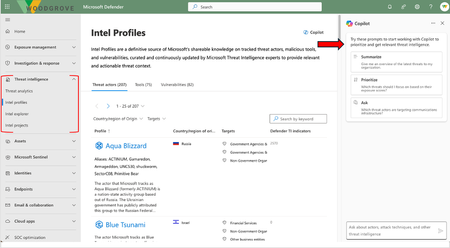
By Michael Browning he Microsoft Defender Threat Intelligence (MDTI) and Defender XDR teams are pleased to announce that the Copilot for Security threat intelligence embedded experience in the Defender XDR portal is now generally available. As of today, Defender XDR customers will see a handy AI-powered sidecar in the Threat Analytics, intel profiles, intel explorer, and intel projects tabs in the threat intelligence blade (in brackets below), which returns, contextualizes, and summarizes intelligence from across MDTI and Threat Analytics about threat actors, threat tooling, and indicators of compromise (IoCs) related to their vulnerabilities and security incidents. The embedded experience on the right hand side of the Defender XDR portal has an open prompt bar as well as a guided experience with three pre-populated prompts. Read the full post here: Copilot for Security TI Embedded Experience in Defender XDR is now GA312Views0likes0CommentsNew Blog | MDTI Achieves PCI DSS Certification: Elevating Security Standards
By Ash Luitel We are excited to announce that MDTI has successfully obtained the Payment Card Industry Data Security Standard (PCI DSS) certification, representing a significant milestone in our continuous pursuit of security excellence. This accomplishment follows closely after our ISO certification, highlighting our unwavering commitment to upholding the highest standards of data protection and our dedication to safeguarding information and proactively combating fraud. This certification not only strengthens our security measures but also reaffirms the trust our customers have in us to handle their most sensitive data with the utmost care and diligence. Why the PCI DSS certification matters PCI DSS is a renowned global standard for securing credit card data and preventing fraud. For organizations that handle sensitive payment information, compliance with PCI DSS is not just a requirement - it's a cornerstone of our promise to safeguard customer data. Read the full post here: MDTI Achieves PCI DSS Certification: Elevating Security Standards391Views0likes0CommentsNew Blog | A Copilot for Security Customer’s Guide to MDTI
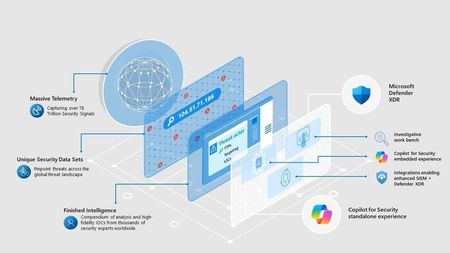
By Michael Browning With just one Security Compute Unit (SCU), Copilot for Security customers have unlimited access to the powerful operational, tactical, and strategic threat intelligence in Microsoft Defender Threat Intelligence (MDTI), a $50k per seat value, at no extra cost. This compendium of high-fidelity intelligence developed by Microsoft's team of more than 10,000 multidisciplinary security experts and informed by over 78 trillion security signals enables teams to unmask and neutralize adversaries quickly and efficiently. In this blog, we will review what MDTI is, what you get as a Copilot for Security customer, and how you can immediately tap into this powerful intelligence. What is MDTI? MDTI is a threat intelligence product that enables security professionals to directly access, ingest, and act upon trillions of daily security signals in Microsoft's telemetry. MDTI's finished intelligence, including threat articles and intel profiles, provides the latest on cyber threat actors and their tools, tactics, and procedures. Its unique security data sets enable advanced investigations that uncover malicious infrastructure connections across the global cyberthreat landscape to highlight where an organization is vulnerable and address the tools and systems used in cyberattacks. MDTI is a powerful complement to Microsoft's SIEM, XDR, and AI solutions. Copilot for Security customers can use the incredible depth and breadth of Microsoft threat intelligence in MDTI with Generative AI to quickly understand the full scope of attacks, anticipate the next steps of an ongoing campaign, and drive an optimal security plan for their organizations. They can immediately begin using MDTI in the Copilot for Security standalone experience or embedded experience in Defender XDR. They can also use MDTI directly via the MDTI' analyst workbench' experience in the Threat Intelligence blade in Defender XDR. Copilot for Security customers can tap into MDTI’s powerful threat intelligence in a variety of ways Read the full post here: A Copilot for Security Customer’s Guide to MDTI782Views0likes0Comments
New Blog Post | New at Secure: MDTI in Defender XDR Global Search
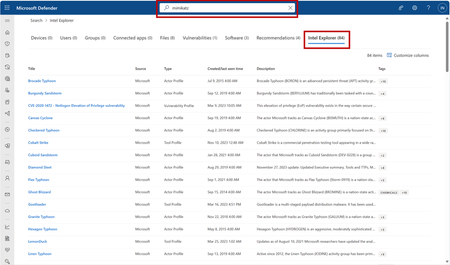
On the heels of introducing Microsoft Defender Threat Intelligence (MDTI) premium and standard editions into the Microsoft Defender XDR portal, we are thrilled to introduce an even greater integrated threat intelligence experience by making results for MDTI content available within Defender XDR’s global search bar. Users will notice that they can now use the top-level Defender XDR search to discover results from MDTI on indicators of compromise (IOCs), common vulnerabilities and exposures (CVEs), articles, threat actors and more. From anywhere in the portal, customers now can readily find MDTI raw intelligence including IPs, domains, hashes, and URLs as well as finished intelligence in the form of articles, intel profiles, and CVEs alongside their other content from Defender XDR when conducting searches, helping to accelerate investigations with critical threat intelligence context. Results from MDTI and Threat Analytics will appear within the “Intel Explorer” list in the results page: MDTI results are now available under the “Intel Explorer” tab when searching via Defender XDR’s global search bar. You may search and see results for indicators such as IP addresses or file hashes, intel profiles, CVEs, threat articles and more. Read the full post here: New at Secure: MDTI in Defender XDR Global Search - Microsoft Tech CommunityTonyOPSAug 11, 2026Former Employee477Views0likes0CommentsNew Blog | New at Secure: Enhanced Vulnerability Profiles and CVE Search within MDTI
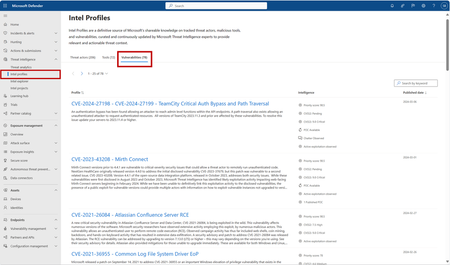
The Microsoft Defender Threat Intelligence (MDTI) team revamped vulnerability profiles to improve customers’ ability to access world-class intelligence on vulnerabilities and exposures within the Defender XDR portal. These exciting updates include: A new layout that mirrors the design of our Threat Actor and Tool intel profiles for a more consistent experience Vulnerability profiles sorted by published date by default in list view to display a steady feed of new, high importance CVEs The decoupling of Vulnerability Profiles from open-source Common Vulnerabilities and Exposures (CVEs) so customers can access all available information on vulnerabilities An enhanced CVE search experience: searches will return all content related to a vulnerability instead of directing a user to a CVE information page. These enhancements will provide a more intuitive experience for surfacing content related to CVEs, offering critical context on threats and information within alerts and incidents. What are Vulnerability Profiles? Vulnerability Profiles are MDTI’s newest intel profile type, launched at Microsoft Ignite in November. Building off our work to introduce intel profiles to MDTI, which has become the definitive source of Microsoft’s shareable knowledge on over 200 threat actors and 70 tools, MDTI now also contains over 75 extensive profiles of the CVEs deemed most critical and relevant by our dedicated security researchers. Amid the many vulnerabilities teams must keep track of — old and new, with varying degrees of prominence and impact as threat actors adjust their techniques, tactics, and procedures (TTPs) — Vulnerability Profiles tilt the advantage back in favor of defenders by delivering focused, actionable insights and recommendations on how to protect against the most critical CVEs, based on information garnered from Microsoft’s 65 trillion threat signals per day. By routinely visiting the “Vulnerabilities” tab on the Intel Profiles page in Defender XDR, customers will see a steady stream of new profiles, sorted by published date, indicating CVEs that are considered pressing by Microsoft’s security researchers. This enables CISOs, Vulnerability Managers, SOC Analysts and Cyber Threat Intelligence Analysts alike to remain informed on these CVEs to prioritize detections and implement patching on endpoints and other recommendations in their environment for the vulnerabilities which are most relevant to their organization. Vulnerability Profiles are accessible from the “Intel profiles” page within the “Threat intelligence” blade in the left navigation. See these profiles by clicking on the “Vulnerabilities” tab: Vulnerability Profiles are accessible from the “Vulnerabilities” tab on the Intel Profiles page, which is contained under the threat intelligence blade in the left navigation. On the Vulnerability Profiles list view, the “Profile” column displays the CVE number, title, and summary of the profile, whereas the right-most column displays the published date, indicating how recently Microsoft wrote about the vulnerability. Under the “Intelligence” column in the Vulnerability Profiles list view, customers will see priority and CVSS scores as well as indications of active exploitation (“Active exploitation observed”), dark web chatter (“Chatter Observed”), and available public proof of concept exploits (“POC Available”, "1 Published POC") for these vulnerabilities. Vulnerability Profiles are decorated with proprietary information from Microsoft’s own research and telemetry that can only be found in our intel profiles. This includes original research such as observations of active exploitation in the wild; detailed analysis of the methods used to exploit these CVEs by malicious actors; detections and Advanced Hunting queries that will indicate or alert on related activity in an organization’s network; and recommendations to protect against the threat. Read the full post here: New at Secure: Enhanced Vulnerability Profiles and CVE Search within MDTI - Microsoft Tech CommunityTonyOPSAug 11, 2026Former Employee500Views0likes0Comments
Tags
- microsoft defender for endpoint378 Topics
- microsoft defender for office 365236 Topics
- threat hunting132 Topics
- alerts120 Topics
- investigation118 Topics
- incident management88 Topics
- automation78 Topics
- microsoft sentinel72 Topics
- learning57 Topics
- threat intelligence55 Topics