threat intelligence
55 Topics
Graph API Endpoint for the Vulnerability Profile
I can use this endpoint to get threat reports via the graph api GET https://graph.microsoft.com/beta/security/threatIntelligence/article but threat Analytics reports that come in from defender that are category: vulnerability, aren't in there However they are written up in an article style. What endpoint do I need to hit to get these types of reports.248Views0likes1Comment
Pending Approval/Provisioning for Microsoft Defender XDR Lab/Trial Environment
Hello Microsoft Community Team, On June 26, 2026, our organization applied for a Microsoft 365 Developer Environment / Free Trial to support evaluation of the Microsoft Defender XDR Lab environment. To date, the environment has not been provisioned, and we have not received any status updates or confirmation. Impact: Current Status: We are currently utilizing our production environment to test project capabilities, which poses risks and limitations. Future Intent: Our organization plans to transition to a full, paid Business/Enterprise purchase immediately upon proving the platform’s benefits. Urgency: This delay is stalling our evaluation phase. We urgently need this environment onboarded and activated so we can proceed with deployment tests and subsequent procurement. Request: Please review the status of our registration and expedite the onboarding/provisioning of this developer environment. Thank you for your prompt assistance.394Views0likes1Comment
Microsoft Defender Incident – Handling incident severity change
There's no dedicated history/audit endpoint for field-level transitions (like "this incident went from Low → High at timestamp X") in the /security/incidents Graph API — the incident object only exposes the current severity plus a lastUpdateDateTime, not a change log. So this isn't something you're missing; it genuinely doesn't exist as a queryable history today. Also worth knowing before you build around it: Graph change notifications (webhooks) are not documented as supported for /security/incidents — subscription/webhook support is only documented for the legacy /security/alerts resource, and that resource is deprecated with removal expected around April 2026. So polling is currently the only supported pattern for incidents specifically, not a limitation of your approach — there's no webhook alternative to fall back to yet. Given that, the fix is in your polling strategy, not in finding a hidden feature: instead of filtering once at creation time and then ignoring the incident, poll using $filter=lastUpdateDateTime gt {last_poll_timestamp}. Since lastUpdateDateTime bumps on any property change — including a severity escalation — this catches incidents that started as Low/Informational and later got escalated, without re-fetching everything. A pattern that works well in practice: GET /security/incidents?$filter=lastUpdateDateTime gt {last_poll_time}&$orderby=lastUpdateDateTime asc Then in your own store, diff the incoming severity against what you last recorded for that id to detect the transition yourself — you're effectively reconstructing the history client-side since the API won't give it to you natively. Store (incidentId, severity, lastUpdateDateTime) on each poll and compare. One gotcha: this still won't tell you the exact moment the severity changed if multiple fields changed between polls — only that it changed sometime between your last two poll timestamps. If you need second-level precision on transition timing, you'd need to poll more frequently (your 5-minute interval is probably fine for SOC triage purposes, but not for precise SLA timestamping).289Views0likes0CommentsDefender for Endpoints - Domain Controllers
Hi What is the correct process for managing and deploying policies for Windows server 2019 domain controllers. I know that Security settings management doesn't work on and isn't supported on 2019 DCs as per (https://learn.microsoft.com/en-us/mem/intune/protect/mde-security-integration?view=o365-worldwide#configure-your-tenant-to-support-microsoft-defender-for-endpoint-security-configuration-management So how do I manage and get policies to a 2019 DC ThanksSolved11KViews2likes8CommentsOperational Notes on Microsoft Security Copilot Agents in Defender XDR and Microsoft Entra ID
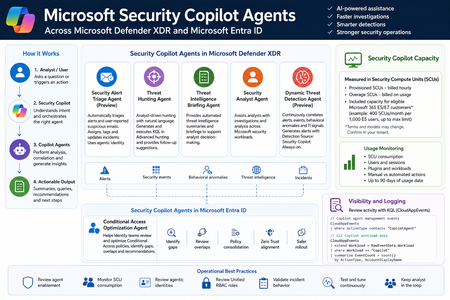
Microsoft Security Copilot is now becoming more visible inside day-to-day security operations, especially through embedded experiences and agent-based workflows across Microsoft Defender XDR, Microsoft Entra ID, Microsoft Intune, and Microsoft Purview. Instead of looking at Security Copilot only as a standalone prompt interface, SOC and identity teams should also understand how Security Copilot agents are deployed, how they consume Security Compute Units, how they appear in operational workflows, and where activity can be monitored. This post summarizes practical observations from a security operations perspective, with a focus on Microsoft Defender XDR, Microsoft Entra ID, usage monitoring, and KQL-based activity review. Licensing & Capacity Units Requirements Requires eligible Microsoft security licensing, typically: Microsoft 365 E5 Microsoft 365 E7 Security Compute Units (SCUs) Security Copilot capacity is measured using Security Compute Units (SCUs). SCUs are billed based on provisioned capacity. Indicative pricing: $4 per Provisionied SCU/hour $6 per Overage SCU/hour Billing is calculated hourly, based on the amount of SCUs provisioned. Included Capacity Organizations with: 1,000 Microsoft 365 E5 licenses Receive: 400 included SCUs Included SCUs are shared across the tenant within a common capacity pool. Scaling SCU capacity can be scaled dynamically based on operational requirements and workload demand. Data Retention Security Copilot session and interaction data without active SCU-backed retention is typically retained for: 90 days Security Copilot Agents - Microsoft Defender This section outlines the Microsoft Security Copilot agents currently available in the Microsoft Defender portal. NameKey characteristics Security Alert Triage Agent (Preview) Manual setup from Defender portal Automatically creates Unified RBAC custom role Runs automatically when a user reports a suspicious email or when a new supported alert is generated, supported alert sources: MDI, MDC, MDO If an alert tuning rule is enabled, it will be automatically disabled when the agent is deployed. Creates and connects with agentic user account: Phishing Triage Agent (Security Copilot) Automatic alert assignment to SecurityCopilotAgentUser-db16fec3-f1fb-4632-843e-46d07408c584@<tenant-domain>Alert was assigned to Phishing Triage Agent (Security Copilot). Adds Tag Agent to the created Incidents Threat Hunting Agent Manual setup from Defender portal Automatically creates Unified RBAC custom role This agent runs manually. There isn't an automatic trigger. Creates and connects with agentic user account: Threat Hunting Agent (Security Copilot) Analyst Questions in natural language Generates and executed KQL queries in Advanced hunting Provides charts, dynamic follow-up questions and remediation actions recommendations No activity is identified from agent's identity during agent execution Threat Intelligence Briefing Agent Manual setup from Defender portal Provides automated TI briefing summary Configured from https://security.microsoft.com/securitysettings/defender/agent_configuration-threatintelligencebriefingagent Security Analyst Agent Manual setup from Defender portal Dynamic Threat Detection Agent (Preview) Automatically enabled always-on, runs continuously in the background Correlates: Alerts, Security events, Behavioral anomalies, TI signals Generates Alerts with Detection Source: Security Copilot The Alerts can be correlated with existing Multi-Stage Incidents No agentic user account identity is used by this agent Available free of charge during public preview, will begin consuming Security Compute Units (SCUs) once generally available (GA) Incidents handled by Security Alert Triage Agent: Alerts created by Dynamic Threat Detection Agent: Execution of Threat Hunting Agent: View agents in use: https://security.microsoft.com/security-copilot/agents View Unified RBAC custom roles: https://security.microsoft.com/mtp_roles View Security Copilot user identities in Microsoft Entra ID: Notes: CloudAppEvents activity logs only from the following agents: Phishing Triage Agent Conditional Access Optimization Agent Security Copilot Agents - Microsoft Entra ID Conditional Access Optimization Agent Usage Monitoring Sign-in to Security Copilot portal using Global Admin account and navigate to the following location: https://securitycopilot.microsoft.com/usage-monitoring Reference: https://learn.microsoft.com/en-us/copilot/security/manage-usage Logging Activity Copilot Agents Management: CloudAppEvents | where ActionType contains "CopilotAgent" | extend AgentName = RawEventData.AgentName | extend Workload = RawEventData.Workload | extend ResultStatus = RawEventData.ResultStatus | project TimeGenerated, ActionType, ResultStatus, AgentName, Application, Workload All Copilot Workload data: CloudAppEvents | extend Workload = RawEventData.Workload | where Workload == "Copilot" | summarize EventCount = count() by ActionType, AccountDisplayName694Views3likes1CommentIdentity Attack Graph in Microsoft Sentinel
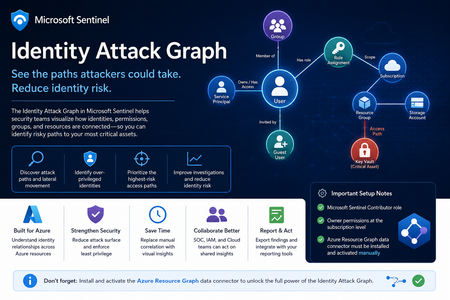
Identity is now one of the most important attack surfaces in cloud security. In many real-world incidents, attackers do not rely only on malware or network movement. Instead, they abuse identities, permissions, role assignments, group memberships, service principals, and misconfigured access paths to move from an initial compromise to high-value resources. This is why the new Identity Attack Graph in Microsoft Sentinel is an important capability. It helps security teams visualize how identities are connected to Azure resources and how an attacker could potentially move from one identity to another resource through permissions and relationships. What is the Identity Attack Graph? The Identity Attack Graph in Microsoft Sentinel provides a visual way to understand how identities, permissions, groups, and Azure resources are connected. Instead of manually checking multiple portals, logs, and role assignments, the graph helps analysts understand relationships such as: Which identities have access to specific Azure resources Which users or service principals are over-privileged Which groups provide indirect access to sensitive resources Which identities may have a path to critical assets What the potential blast radius of a compromised identity could be How attackers could move laterally through identity and permission relationships This is especially useful because identity risk is often not obvious when looking at a single user, group, or role assignment in isolation. The real risk usually appears when these relationships are connected together. A user may not directly have access to a sensitive resource, but the user may be a member of a group that has access to another resource, which then has permissions that create a path toward a high-value asset. The Identity Attack Graph helps expose these hidden relationships. Why this matters In many Azure environments, permissions grow over time. Users change roles, groups are reused, emergency access is granted, service principals are created, and temporary permissions are not always removed. As a result, organizations often end up with: Too many privileged identities Unused or stale permissions Service principals with excessive access Guest users with unnecessary permissions Groups that provide indirect access to sensitive resources Subscription-level roles that are broader than required Lack of visibility into who can reach critical assets Traditional investigation usually requires analysts to move between several places, including Microsoft Entra ID, Azure RBAC, Azure Activity logs, Sentinel queries, Defender XDR, and Azure Resource Graph. The Identity Attack Graph reduces this complexity by presenting identity relationships as a connected graph. This makes it easier to answer practical security questions such as: “What can this identity access?” “What happens if this user is compromised?” “Which identities have a path to critical resources?” “Which access path should we remediate first?” “Which permissions create the highest risk?” “Why does this identity have access to this asset?” Key use cases The feature can support several important identity security and cloud security scenarios. 1. Attack path discovery Security teams can use the graph to identify how an attacker could move from a compromised identity to a sensitive Azure resource. This is useful during both proactive assessments and active incident response. For example, if a user account is suspected to be compromised, the graph can help identify which resources may be reachable through that identity’s direct or indirect permissions. 2. Blast-radius analysis When an identity is compromised, one of the first questions is: What could the attacker access with this identity? The Identity Attack Graph can help analysts understand the potential impact of a compromised user, group, service principal, or managed identity. This can help with containment, prioritization, and communication with stakeholders. 3. Over-privileged identity detection The graph can help identify identities that have more permissions than they need. Include: Users with Owner or Contributor access at subscription level Service principals with broad permissions Guest users with privileged access Groups that grant access to sensitive resources Identities that have access to multiple critical assets This is useful for enforcing least privilege and reducing identity attack surface. 4. Privileged access review IAM and cloud security teams can use the graph to support access reviews. Instead of only reviewing a list of role assignments, teams can understand the real impact of those permissions. This helps answer: Is this role assignment still required? Does this group create unnecessary risk? Does this identity have access to critical resources? Is this access direct or inherited? Is this path expected or suspicious? 5. Incident response and threat hunting For SOC teams, the graph can support investigations involving: Suspicious sign-ins Compromised users Privilege escalation Suspicious role assignments Lateral movement Service principal abuse Unusual access to sensitive resources The graph does not replace logs or hunting queries, but it gives analysts a faster way to understand relationships and prioritize what to investigate next. Important prerequisites and setup notes During my evaluation, there were a few important setup requirements that should be clearly highlighted. Microsoft Sentinel permissions The environment must already be onboarded to Microsoft Sentinel, and the user testing or configuring the feature must have the appropriate Microsoft Sentinel permissions. The documented role requirement includes Microsoft Sentinel Contributor. However, in my experience, this is not always enough for the full onboarding and validation experience. Subscription-level Owner permission One important prerequisite that should be clearly mentioned is that Owner permissions at the Azure subscription level may be required. This is especially important during onboarding and activation, because the graph depends on access to Azure resource and permission relationships. If the user does not have sufficient subscription-level permissions, some setup steps or visibility into resources and relationships may not work as expected. Recommended permission note: In addition to Microsoft Sentinel permissions, ensure that the user configuring the preview has Owner permissions at the subscription level for the subscriptions that should be represented in the graph. This should be made very clear in the onboarding documentation to avoid confusion during deployment. Required data connector: Azure Resource Graph Another very important setup step is the Azure Resource Graph data connector. The Azure Resource Graph connector must be: Installed manually Activated manually Connected to the relevant Sentinel workspace This is a key point. The connector is not automatically enabled just because the Identity Attack Graph feature is available. Without this connector, Sentinel may not have the required Azure resource relationship data needed to build a useful graph. Why Azure Resource Graph is important Azure Resource Graph provides visibility across Azure resources, subscriptions, and relationships. For an identity attack graph, this data is essential. The graph needs to understand not only identities, but also the resources those identities can reach. This may include: Subscriptions Resource groups Storage accounts Key Vaults Virtual machines Managed identities Role assignments Resource relationships Resource hierarchy Critical assets Without Azure Resource Graph data, the attack graph may not provide the full picture of how identities connect to Azure resources. For this reason, I believe the onboarding instructions should explicitly state: The Azure Resource Graph data connector must be manually installed and activated before using the Identity Attack Graph. Recommended onboarding checklist Before using the Identity Attack Graph, I would recommend validating the following: Requirement Recommendation Microsoft Sentinel workspace Ensure the workspace is active and accessible Sentinel role Microsoft Sentinel Contributor or equivalent access Subscription permissions Owner permissions at subscription level Azure Resource Graph connector Manually install and activate the connector Azure RBAC visibility Ensure access to relevant role assignments Microsoft Entra ID visibility Ensure identity and group data is available Resource visibility Validate that relevant subscriptions and resources are visible Data freshness Allow enough time for data collection and graph population This checklist can help avoid issues where the feature appears available but does not show the expected relationships. How the Identity Attack Graph improves investigation Before using a graph-based approach, an analyst often needs to manually collect and correlate data from multiple sources. A typical investigation may include: Checking the user in Microsoft Entra ID Reviewing group memberships Reviewing Azure RBAC assignments Checking subscription-level access Looking at resource-level permissions Reviewing PIM activations Searching Sentinel logs Running KQL queries Checking Azure Activity logs Validating access with cloud or IAM teams This process can be time-consuming. The Identity Attack Graph helps reduce this effort by showing relationships visually. This allows the analyst to understand the possible path faster and decide where to focus. For example, instead of manually asking: “Does this user have access to this resource through any group, role, or inherited permission?” The graph can help show the relationship directly. This is valuable because many risky permissions are indirect. The user may not have direct access, but may inherit access through a group, role assignment, nested relationship, or service principal path. Where validation is still needed Although the graph provides strong visibility, I would still validate findings before taking remediation action. This is especially important because removing access can affect business operations or production systems. I would still validate with: Microsoft Sentinel KQL queries Microsoft Entra sign-in logs Microsoft Entra audit logs Azure Activity logs Azure RBAC role assignments PIM activation history Defender XDR signals Defender for Cloud recommendations Azure Resource Graph queries IAM team input Cloud platform team input Application owner confirmation The graph is very useful for discovery and prioritization, but final remediation decisions should still be validated. GQL and graph-based investigation One of the interesting aspects of this feature is the use of graph-based thinking. Security teams are already familiar with query languages such as KQL for log analytics. However, graph investigation is different. KQL is excellent for searching and analyzing events over time, such as sign-ins, alerts, audit logs, and activity logs. Graph Query Language, or GQL, is designed for querying connected data. Instead of only asking what happened at a specific time, graph queries help answer how entities are connected. In identity security, this is very powerful because the risk often exists in the relationship between objects. Graph entities include: Users Groups Service principals Managed identities Roles Subscriptions Resource groups Azure resources Permissions Sessions Attack paths Graph relationships include: User is member of group Group has role assignment Identity has access to resource Service principal owns application Managed identity can access Key Vault User can escalate privilege Identity can reach critical asset This allows analysts to ask more relationship-focused questions, such as: Which identities can reach this resource? What is the shortest path from this user to a critical asset? Which groups create privileged access? Which service principals have paths to sensitive resources? Which identities have indirect access through nested relationships? Which attack paths include subscription Owner or Contributor permissions? KQL vs GQL: why both are useful KQL and GQL serve different but complementary purposes. Area KQL GQL / Graph Querying Main purpose Analyze logs and events Analyze relationships and paths Best for Time-based investigation Connected identity/resource investigation question “Did this user sign in from a risky location?” “What resources can this user reach?” Data model Tables Nodes and edges Common use Detection, hunting, analytics Attack path discovery, relationship mapping Strength Event correlation Path discovery In practice, security teams need both. KQL can identify a suspicious sign-in. The Identity Attack Graph can show what the compromised identity could access. KQL can then be used again to validate whether the attacker interacted with those resources. This creates a strong workflow between event-based detection and relationship-based investigation. Graph investigation scenarios The following are conceptual are the types of graph questions that would be useful in identity attack path analysis. Find paths from a user to critical resources A useful graph query would help answer: Show me all paths from this user to critical Azure resources. This could help determine whether a compromised identity has a direct or indirect route to sensitive assets. Find identities with paths to Key Vaults Key Vaults often contain secrets, certificates, and keys. A graph query could help identify: Which users, groups, service principals, or managed identities have a path to Key Vault resources? This would be useful for prioritizing access review and remediation. Find subscription-level privileged identities Subscription-level roles are high-impact because they can provide broad access. A graph query could help find: Which identities have Owner or Contributor access at subscription level? This is especially important because subscription-level permissions can create wide attack paths. Find indirect access through groups Many access paths are created through group membership. A graph query could help answer: Which users have access to this resource through group membership? This can help IAM teams clean up excessive or unnecessary group-based access. Find service principals with broad access Service principals are often used for automation and applications, but they can become high-risk if over-privileged. A useful query would identify: Which service principals have broad access to subscriptions or critical resources? This is important because service principal compromise can lead to significant impact. How GQL can improve analyst workflows Adding strong GQL support to the graph explorer would make the feature more powerful for advanced users. You could use graph queries to: Search for specific paths Filter by identity type Filter by role Filter by resource type Find shortest paths Find high-risk paths Exclude known approved paths Focus on critical assets Query only privileged relationships Identify unexpected permission chains This would help both SOC analysts and cloud security engineers move from visual exploration to repeatable analysis. A SOC analyst may want a quick visual graph during an incident, while a cloud security engineer453Views3likes0CommentsMicrosoft Sentinel MCP Entity Analyzer: Explainable risk analysis for URLs and identities
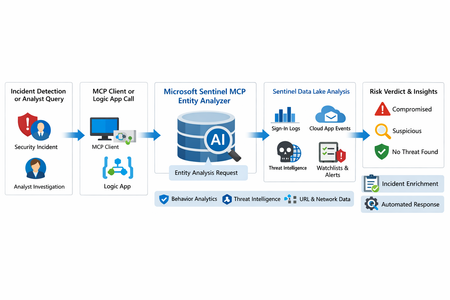
What makes this release important is not just that it adds another AI feature to Sentinel. It changes the implementation model for enrichment and triage. Instead of building and maintaining a chain of custom playbooks, KQL lookups, threat intel checks, and entity correlation logic, SOC teams can call a single analyzer that returns a reasoned verdict and supporting evidence. Microsoft positions the analyzer as available through Sentinel MCP server connections for agent platforms and through Logic Apps for SOAR workflows, which makes it useful both for interactive investigations and for automated response pipelines. Why this matters First, it formalizes Entity Analyzer as a production feature rather than a preview experiment. Second, it introduces a real cost model, which means organizations now need to govern usage instead of treating it as a free enrichment helper. Third, Microsoft’s documentation is now detailed enough to support repeatable implementation patterns, including prerequisites, limits, required tables, Logic Apps deployment, and cost behavior. From a SOC engineering perspective, Entity Analyzer is interesting because it focuses on explainability. Microsoft describes the feature as generating clear, explainable verdicts for URLs and user identities by analyzing multiple modalities, including threat intelligence, prevalence, and organizational context. That is a much stronger operational model than simple point-enrichment because it aims to return an assessment that analysts can act on, not just more raw evidence What Entity Analyzer actually does The Entity Analyzer tools are described as AI-powered tools that analyze data in the Microsoft Sentinel data lake and provide a verdict plus detailed insights on URLs, domains, and user entities. Microsoft explicitly says these tools help eliminate the need for manual data collection and complex integrations usually required for investigation and enrichment hat positioning is important. In practice, many SOC teams have built enrichment playbooks that fetch sign-in history, query TI feeds, inspect click data, read watchlists, and collect relevant alerts. Those workflows work, but they create maintenance overhead and produce inconsistent analyst experiences. Entity Analyzer centralizes that reasoning layer. For user entities, Microsoft’s preview architecture explains that the analyzer retrieves sign-in logs, security alerts, behavior analytics, cloud app events, identity information, and Microsoft Threat Intelligence, then correlates those signals and applies AI-based reasoning to produce a verdict. Microsoft lists verdict examples such as Compromised, Suspicious activity found, and No evidence of compromise, and also warns that AI-generated content may be incorrect and should be checked for accuracy. That warning matters. The right way to think about Entity Analyzer is not “automatic truth,” but “high-value, explainable triage acceleration.” It should reduce analyst effort and improve consistency, while still fitting into human review and response policy. Under the hood: the implementation model Technically, Entity Analyzer is delivered through the Microsoft Sentinel MCP data exploration tool collection. Microsoft documents that entity analysis is asynchronous: you start analysis, receive an identifier, and then poll for results. The docs note that analysis may take a few minutes and that the retrieval step may need to be run more than once if the internal timeout is not enough for long operations. That design has two immediate implications for implementers. First, this is not a lightweight synchronous enrichment call you should drop carelessly into every automation branch. Second, any production workflow should include retry logic, timeouts, and concurrency controls. If you ignore that, you will create fragile playbooks and unnecessary SCU burn. The supported access path for the data exploration collection requires Microsoft Sentinel data lake and one of the supported MCP-capable platforms. Microsoft also states that access to the tools is supported for identities with at least Security Administrator, Security Operator, or Security Reader. The data exploration collection is hosted at the Sentinel MCP endpoint, and the same documentation notes additional Entity Analyzer roles related to Security Copilot usage. The prerequisite many teams will miss The most important prerequisite is easy to overlook: Microsoft Sentinel data lake is required. This is more than a licensing footnote. It directly affects data quality, analyzer usefulness, and rollout success. If your organization has not onboarded the right tables into the data lake, Entity Analyzer will either fail or return reduced-confidence output. For user analysis, the following tables are required to ensure accuracy: AlertEvidence, SigninLogs, CloudAppEvents, and IdentityInfo. also notes that IdentityInfo depends on Defender for Identity, Defender for Cloud Apps, or Defender for Endpoint P2 licensing. The analyzer works best with AADNonInteractiveUserSignInLogs and BehaviorAnalytics as well. For URL analysis, the analyzer works best with EmailUrlInfo, UrlClickEvents, ThreatIntelIndicators, Watchlist, and DeviceNetworkEvents. If those tables are missing, the analyzer returns a disclaimer identifying the missing sources A practical architecture view An incident, hunting workflow, or analyst identifies a high-interest URL or user. A Sentinel MCP client or Logic App calls Entity Analyzer. Entity Analyzer queries relevant Sentinel data lake sources and correlates the findings. AI reasoning produces a verdict, evidence narrative, and recommendations. The result is returned to the analyst, incident record, or automation workflow for next-step action. This model is especially valuable because it collapses a multi-query, multi-tool investigation pattern into a single explainable decisioning step. Where it fits in real Sentinel operations Entity Analyzer is not a replacement for analytics rules, UEBA, or threat intelligence. It is a force multiplier for them. For identity triage, it fits naturally after incidents triggered by sign-in anomaly detections, UEBA signals, or Defender alerts because it already consumes sign-in logs, cloud app events, and behavior analytics as core evidence sources. For URL triage, it complements phishing and click-investigation workflows because it uses TI, URL activity, watchlists, and device/network context. Implementation path 1: MCP clients and security agents Microsoft states that Entity Analyzer integrates with agents through Sentinel MCP server connections to first-party and third-party AI runtime platforms. In practice, this makes it attractive for analyst copilots, engineering-side investigation agents, and guided triage experiences The benefit of this model is speed. A security engineer or analyst can invoke the analyzer directly from an MCP-capable client without building a custom orchestration layer. The tradeoff is governance: once you make the tool widely accessible, you need a clear policy for who can run it, when it should be used, and how results are validated before action is taken. Implementation path 2: Logic Apps and SOAR playbooks For SOC teams, Logic Apps is likely the most immediately useful deployment model. Microsoft documents an entity analyzer action inside the Microsoft Sentinel MCP tools connector and provides the required parameters for adding it to an existing logic app. These include: Workspace ID Look Back Days Properties payload for either URL or User The documented payloads are straightforward: { "entityType": "Url", "url": "[URL]" } And { "entityType": "User", "userId": "[Microsoft Entra object ID or User Principal Name]" } Also states that the connector supports Microsoft Entra ID, service principals, and managed identities, and that the Logic App identity requires Security Reader to operate. This makes playbook integration a strong pattern for incident enrichment. A high-severity incident can trigger a playbook, extract entities, invoke Entity Analyzer, and post the verdict back to the incident as a comment or decision artifact. The concurrency lesson most people will learn the hard way Unusually direct guidance on concurrency: to avoid timeouts and threshold issues, turn on Concurrency control in Logic Apps loops and start with a degree of parallelism of . The data exploration doc repeats the same guidance, stating that running multiple instances at once can increase latency and recommending starting with a maximum of five concurrent analyses. This is a strong indicator that the correct implementation pattern is selective analysis, not blanket analysis. Do not analyze every entity in every incident. Analyze the entities that matter most: external URLs in phishing or delivery chains accounts tied to high-confidence alerts entities associated with high-severity or high-impact incidents suspicious users with multiple correlated signals That keeps latency, quota pressure, and SCU consumption under control. KQL still matters Entity Analyzer does not eliminate KQL. It changes where KQL adds value. Before running the analyzer, KQL is still useful for scoping and selecting the right entities. After the analyzer returns, KQL is useful for validation, deeper hunting, and building custom evidence views around the analyzer’s verdict. For example, a simple sign-in baseline for a target user: let TargetUpn = "email address removed for privacy reasons"; SigninLogs | where TimeGenerated between (ago(7d) .. now()) | where UserPrincipalName == TargetUpn | summarize Total=count(), Failures=countif(ResultType != "0"), Successes=countif(ResultType == "0"), DistinctIPs=dcount(IPAddress), Apps=make_set(AppDisplayName, 20) by bin(TimeGenerated, 1d) | order by TimeGenerated desc And a lightweight URL prevalence check: let TargetUrl = "omicron-obl.com"; UrlClickEvents | where TimeGenerated between (ago(7d) .. now()) | search TargetUrl | take 50 Cost, billing, and governance GA is where technical excitement meets budget reality. Microsoft’s Sentinel billing documentation says there is no extra cost for the MCP server interface itself. However, for Entity Analyzer, customers are charged for the SCUs used for AI reasoning and also for the KQL queries executed against the Microsoft Sentinel data lake. Microsoft further states that existing Security Copilot entitlements apply The April 2026 “What’s new” entry also explicitly says that starting April 1, 2026, customers are charged for the SCUs required when using Entity Analyzer. That means every rollout should include a governance plan: define who can invoke the analyzer decide when playbooks are allowed to call it monitor SCU consumption limit unnecessary repeat runs preserve results in incident records so you do not rerun the same analysis within a short period Microsoft’s MCP billing documentation also defines service limits: 200 total runs per hour, 500 total runs per day, and around 15 concurrent runs every five minutes, with analysis results available for one hour. Those are not just product limits. They are design requirements. Limitations you should state clearly The analyze_user_entity supports a maximum time window of seven days and only works for users with a Microsoft Entra object ID. On-premises Active Directory-only users are not supported for user analysis. Microsoft also says Entity Analyzer results expire after one hour and that the tool collection currently supports English prompts only. Recommended rollout pattern If I were implementing this in a production SOC, I would phase it like this: Start with a narrow set of high-value use cases, such as suspicious user identities and phishing-related URLs. Confirm that the required tables are present in the data lake. Deploy a Logic App enrichment pattern for incident-triggered analysis. Add concurrency control and retry logic. Persist returned verdicts into incident comments or case notes. Then review SCU usage and analyst value before expanding coverage.1.3KViews8likes0Comments
Observed Automation Discrepancies
Hi Team ... I want to know the logic behind the Defender XDR Automation Engine . How it works ? I have observed Defender XDR Automation Engine Behavior contrary to expectations of identical incident and automation handling in both environments, discrepancies were observed. Specifically, incidents with high-severity alerts were automatically closed by Defender XDR's automation engine before reaching their SOC for review, raising concerns among clients and colleagues. Automation rules are clearly logged in the activity log, whereas actions performed by Microsoft Defender XDR are less transparent . A high-severity alert related to a phishing incident was closed by Defender XDR's automation, resulting in the associated incident being closed and removed from SOC review. Wherein the automation was not triggered by our own rules, but by Microsoft's Defender XDR, and sought clarification on the underlying logic.551Views2likes4Comments
Integrate Defender for Cloud Apps w/ Azure Firewall or VPN Gateway
Hello, Recently I have been tasked with securing our openAI implementation. I would like to marry the Defender for Cloud Apps with the sanctioning feature and the Blocking unsanctioned traffic like the Defender for Endpoint capability. To do this, I was only able to come up with: creating a windows 2019/2022 server, with RRAS, and two interfaces in Azure, one Public, and one private. Then I add Defender for Endpoint, Optimized to act as a traffic moderator, integrated the solution with Defender for cloud apps, with BLOCK integration enabled. I can then sanction each of the desired applications, closing my environment and only allowing sanctioned traffic to sanctioned locations. This solution seemed : difficult to create, not the best performer, and the solution didn't really take into account the ability of the router to differentiate what solution was originating the traffic, which would allow for selective profiles depending on the originating source. Are there any plans on having similar solutions available in the future from: VPN gateway (integration with Defender for Cloud Apps), or Azure Firewall -> with advanced profile. The Compliance interface with the sanctioning traffic feature seems very straight forward .366Views0likes1CommentEndpoint and EDR Ecosystem Connectors in Microsoft Sentinel
Most SOCs operate in mixed endpoint environments. Even if Microsoft Defender for Endpoint is your primary EDR, you may still run Cisco Secure Endpoint, WithSecure Elements, Knox, or Lookout in specific regions, subsidiaries, mobile fleets, or regulatory enclaves. The goal is not to replace any tool, but to standardize how signals become detections and response actions. This article explains an engineering-first approach: ingestion correctness, schema normalization, entity mapping, incident merging, and cross-platform response orchestration. Think of these connectors as four different lenses on endpoint risk. Two provide classic EDR detections (Cisco, WithSecure). Two provide mobile security and posture signals (Knox, Lookout). The highest-fidelity outcomes come from correlating them with Microsoft signals (Defender for Endpoint device telemetry, Entra ID sign-ins, and threat intelligence). Cisco Secure Endpoint Typical signal types include malware detections, exploit prevention events, retrospective detections, device isolation actions, and file/trajectory context. Cisco telemetry is often hash-centric (SHA256, file reputation) which makes it excellent for IOC matching and cross-EDR correlation. WithSecure Elements WithSecure Elements tends to provide strong behavioral detections and ransomware heuristics, often including process ancestry and behavioral classification. It complements hash-based detections by providing behavior and incident context that can be joined to Defender process events. Samsung Knox Asset Intelligence Knox is posture-heavy. Typical signals include compliance state, encryption status, root/jailbreak indicators, patch level, device model identifiers and policy violations. This data is extremely useful for identity correlation: it helps answer whether a successful sign-in came from a device that should be trusted. Lookout Mobile Threat Defense Lookout focuses on mobile threats such as malicious apps, phishing, risky networks (MITM), device compromise indicators, and risk scores. Lookout signals are critical for identity attack chains because mobile phishing is often the precursor to token theft or credential reuse. 2. Ingestion architecture: from vendor API to Sentinel tables Most third‑party connectors are API-based. In production, treat ingestion as a pipeline with reliability requirements. The standard pattern is vendor API → connector runtime (codeless connector or Azure Function) → DCE → DCR transform → Log Analytics table. Key engineering controls: Secrets and tokens should be stored in Azure Key Vault where supported; rotate and monitor auth failures. Use overlap windows (poll slightly more than the schedule interval) and deduplicate by stable event IDs. Use DCR transforms to normalize fields early (device/user/IP/severity) and to filter obviously low-value noise. Monitor connector health and ingestion lag; do not rely on ‘Connected’ status alone. Ingestion health checks (KQL) // Freshness & lag per connector table (adapt table names to your workspace) let lookback = 24h union isfuzzy=true (<CiscoTable> | extend Source="Cisco"), (<WithSecureTable> | extend Source="WithSecure"), (<KnoxTable> | extend Source="Knox"), (<LookoutTable> | extend Source="Lookout") | where TimeGenerated > ago(lookback) | summarize LastEvent=max(TimeGenerated), Events=count() by Source | extend IngestDelayMin = datetime_diff("minute", now(), LastEvent) | order by IngestDelayMin desc // Schema discovery (run after onboarding and after connector updates) Cisco | take 1 | getschema WithSecureTable | take 1 | getschema Knox | take 1 | getschema Lookout | take 1 | getschema 3. Normalization: make detections vendor-agnostic The most common failure mode in multi-EDR SOCs is writing separate rules per vendor. Instead, build one normalization function that outputs a stable schema. Then write rules once. Recommended canonical fields: Vendor, AlertId, EventTime, SeverityNormalized DeviceName (canonical), AccountUpn (canonical), SourceIP FileHash (when applicable), ThreatName/Category CorrelationKey (stable join key such as DeviceName + FileHash or DeviceName + AlertId) // Example NormalizeEndpoint() pattern. Replace column_ifexists(...) mappings after getschema(). let NormalizeEndpoint = () { union isfuzzy=true ( Cisco | extend Vendor="Cisco" | extend DeviceName=tostring(column_ifexists("hostname","")), AccountUpn=tostring(column_ifexists("user","")), SourceIP=tostring(column_ifexists("ip","")), FileHash=tostring(column_ifexists("sha256","")), ThreatName=tostring(column_ifexists("threat_name","")), SeverityNormalized=tolower(tostring(column_ifexists("severity",""))) ), ( WithSecure | extend Vendor="WithSecure" | extend DeviceName=tostring(column_ifexists("hostname","")), AccountUpn=tostring(column_ifexists("user","")), SourceIP=tostring(column_ifexists("ip","")), FileHash=tostring(column_ifexists("file_hash","")), ThreatName=tostring(column_ifexists("classification","")), SeverityNormalized=tolower(tostring(column_ifexists("risk_level",""))) ), ( Knox | extend Vendor="Knox" | extend DeviceName=tostring(column_ifexists("device_id","")), AccountUpn=tostring(column_ifexists("user","")), SourceIP="", FileHash="", ThreatName=strcat("Device posture: ", tostring(column_ifexists("compliance_state",""))), SeverityNormalized=tolower(tostring(column_ifexists("risk",""))) ), ( Lookout | extend Vendor="Lookout" | extend DeviceName=tostring(column_ifexists("device_id","")), AccountUpn=tostring(column_ifexists("user","")), SourceIP=tostring(column_ifexists("source_ip","")), FileHash="", ThreatName=tostring(column_ifexists("threat_type","")), SeverityNormalized=tolower(tostring(column_ifexists("risk_level",""))) ) | extend CorrelationKey = iff(isnotempty(FileHash), strcat(DeviceName, "|", FileHash), strcat(DeviceName, "|", ThreatName)) | project TimeGenerated, Vendor, DeviceName, AccountUpn, SourceIP, FileHash, ThreatName, SeverityNormalized, CorrelationKey, * } 4. Entity mapping and incident merging Sentinel’s incident experience improves dramatically when alerts include entity mapping. Map Host, Account, IP, and File (hash) where possible. Incident grouping should merge alerts by DeviceName and AccountUpn within a reasonable window (e.g., 6–24 hours) to avoid alert storms. 5. Correlation patterns that raise confidence High-confidence detections come from confirmation across independent sensors. These patterns reduce false positives while catching real compromise chains. 5.1 Multi-vendor confirmation (two EDRs agree) NormalizeEndpoint() | where TimeGenerated > ago(24h) | summarize Vendors=dcount(Vendor), VendorSet=make_set(Vendor, 10) by DeviceName | where Vendors >= 2 5.2 Third-party detection confirmed by Defender process telemetry let tp = NormalizeEndpoint() | where TimeGenerated > ago(6h) | where ThreatName has_any ("powershell","ransom","credential","exploit") | project TPTime=TimeGenerated, DeviceName, AccountUpn, Vendor, ThreatName tp | join kind=inner ( DeviceProcessEvents | where Timestamp > ago(6h) | where ProcessCommandLine has_any ("EncodedCommand","IEX","FromBase64String","rundll32","regsvr32") | project MDETime=Timestamp, DeviceName=tostring(DeviceName), Proc=ProcessCommandLine ) on DeviceName | where MDETime between (TPTime .. TPTime + 30m) | project TPTime, MDETime, DeviceName, Vendor, ThreatName, Proc 5.3 Mobile phishing signal followed by successful sign-in let mobile = NormalizeEndpoint() | where TimeGenerated > ago(24h) | where Vendor == "Lookout" and ThreatName has "phish" | project MTDTime=TimeGenerated, AccountUpn, DeviceName, SourceIP mobile | join kind=inner ( SigninLogs | where TimeGenerated > ago(24h) | where ResultType == 0 | project SigninTime=TimeGenerated, AccountUpn=tostring(UserPrincipalName), IPAddress, AppDisplayName ) on AccountUpn | where SigninTime between (MTDTime .. MTDTime + 30m) | project MTDTime, SigninTime, AccountUpn, DeviceName, SourceIP, IPAddress, AppDisplayName 5.4 Knox posture and high-risk sign-in let noncompliant = NormalizeEndpoint() | where TimeGenerated > ago(7d) | where Vendor=="Knox" and ThreatName has "NonCompliant" | project DeviceName, AccountUpn, KnoxTime=TimeGenerated noncompliant | join kind=inner ( SigninLogs | where TimeGenerated > ago(7d) | where RiskLevelDuringSignIn in ("high","medium") | project SigninTime=TimeGenerated, AccountUpn=tostring(UserPrincipalName), RiskLevelDuringSignIn, IPAddress ) on AccountUpn | where SigninTime between (KnoxTime .. KnoxTime + 2h) | project KnoxTime, SigninTime, AccountUpn, DeviceName, RiskLevelDuringSignIn, IPAddress 6. Response orchestration (SOAR) design Response should be consistent across vendors. Use a scoring model to decide whether to isolate a device, revoke tokens, or enforce Conditional Access. Prefer reversible actions, and log every automation step for audit. 6.1 Risk scoring to gate playbooks let SevScore = (s:string) { case(s=="critical",5,s=="high",4,s=="medium",2,1) } NormalizeEndpoint() | where TimeGenerated > ago(24h) | extend Score = SevScore(SeverityNormalized) | summarize RiskScore=sum(Score), Alerts=count(), Vendors=make_set(Vendor, 10) by DeviceName, AccountUpn | where RiskScore >= 8 | order by RiskScore desc High-severity playbooks typically execute: (1) isolate device via Defender (if onboarded), (2) revoke tokens in Entra ID, (3) trigger Conditional Access block, (4) notify and open ITSM ticket. Medium-severity playbooks usually tag the incident, add watchlist entries, and notify analysts.774Views8likes1Comment