threat intelligence
238 TopicsDeclutter and Defend: Reducing promotional mail noise with Microsoft Defender
Enterprise inboxes are overwhelmed with graymail — legitimate, bulk email like newsletters, vendor promotions, and product updates that isn't malicious but buries the messages that matter. When high volumes of these mails land in the inbox, it crowds out priority communications and can dull security vigilance. Employees conditioned to ignore repetitive emails may miss signs of a real threat. It also creates recurring work for admins and security teams who must continuously tune filters, manage exception requests, and chase noise from user reports for email that isn’t malicious. Because graymail passes every spam filter check, traditional defenses don't separate it — leaving this signal-to-noise gap unaddressed. Today we’re excited to announce that Microsoft Defender now includes built-in graymail filtering. It is delivered natively through a new Promotions experience in Outlook that automatically classifies and separates bulk email, so it no longer competes with business-critical communication in the inbox. Now in Public Preview, this capability learns from how users interact with graymail to become more accurate over time. Coupled with the existing Bulk Senders Insight report, Defender brings data-driven bulk classification and control into the security workflows you already use. What Is Graymail? Graymail is legitimate bulk email that isn't malicious—product newsletters, event announcements, marketing promotions, and software update notifications from reputable, authenticated senders. It is distinct from spam and from phishing - graymail comes from real organizations with proper authentication and traditional spam filters aren't designed to handle it. Graymail handling in Microsoft Defender Microsoft Defender's approach is built on three principles: classify intelligently, deliver natively, and learn continuously. Promotions Folder — Intelligent Inbox Organization A dedicated Promotions folder, natively provisioned in Outlook, now keeps legitimate bulk mail out of the primary inbox. Promotional content is separated from priority emails without being sent to Junk, which means users can still access and browse newsletters and updates at their own pace. The folder appears at the top level of the mailbox for easy discovery and is visible across all Outlook experiences. Non-spam bulk mail below the organization's configured Bulk Complaint Level threshold is automatically routed to the Promotions folder. Messages from senders the user has explicitly allowed continue to land in the Inbox. Messages identified as spam continue to go to Junk. To enable the Promotions folder administrators need to enable the "Bulk Moves Enabled" setting in their anti-spam policy. The Promotions folder is then created for all users and used for routing only when this setting is ON. Existing mail flow is unaffected. Promotional mail tagging and Mailbox Rule Support Messages classified as graymail will automatically be labeled with a "Promotions" system tag in Outlook. The tag provides instant visual context without requiring users to open each message and is visible in Outlook on the Web and the native Outlook desktop apps for Windows and Mac. During Public Preview, the tagging component is opt-in, requiring administrators to enable it by configuring an Exchange Transport Rule. Once generally available, it will be enabled by default. Because this classification is integrated at the client level, the Promotions tag can also be used as a condition in Outlook mailbox rules. This enables custom routing logic for advanced scenarios like moving all promotions-tagged messages from a specific sender to a custom folder, flagging certain promotional emails for follow-up, or auto-forwarding or deleting promotions that meet specific criteria. This transforms the Promotions classification from a one-way filter into a flexible building block for personal and organizational workflows—particularly valuable for power users and teams with compliance or archival requirements. Adaptive Learning Microsoft Defender's graymail filtering gets smarter with every interaction. The system learns directly from how users handle their mail. When a user moves a message out of the Promotions folder and back to the Inbox, future emails from that sender will no longer be placed in the Promotions folder. When a user moves a message from the Inbox into the Promotions folder, future emails from that sender will be routed to the Promotions folder automatically. This creates a personalized, self-improving experience that becomes more accurate over time - no manual rule configuration required, no safe-sender lists to maintain, and no filtering rules for IT teams to manage on behalf of individual employees. Built into existing Security Workflows Administrators also gain visibility through the Bulk Senders Insight report, which provides data-driven guidance on what your organization actually receives and can help tune your bulk mail filtering. Graymail has long been the unsolved middle ground of email security—too legitimate to block, too noisy to ignore. Microsoft Defender now handles it where it should be handled: inside the platform, inside the mailbox, and inside the security workflows your organization already relies on. No new portals, no new vendors, no compromise between security and user experience. Get Started Configure promotions tagging and the promotions folder today - Bulk email detection documentation on Microsoft Learn. Monitor the experience using the Bulk Senders Insight report.Planning your move to Microsoft Defender portal for all Microsoft Sentinel customers
In November 2023, Microsoft announced our strategy to unify security operations by bringing the best of XDR and SIEM together. Our first step was bringing Microsoft Sentinel into the Microsoft Defender portal, giving teams a single, comprehensive view of incidents, reducing queue management, enriching threat intel, streamlining response and enabling SOC teams to take advantage of Gen AI in their day-to-day workflow. Since then, considerable progress has been made with thousands of customers using this new unified experience; to enhance the value customers gain when using Sentinel in the Defender portal, multi-tenancy and multi-workspace support was added to help customers with more sophisticated deployments. Our mission is to unify security operations by bringing all your data, workflows, and people together to unlock new capabilities and drive better security outcomes. As a strong example of this, last year we added extended posture management, delivering powerful posture insights to the SOC team. This integration helps build a closed-loop feedback system between your pre- and post-breach efforts. Exposure Management is just one example. By bringing everything together, we can take full advantage of AI and automation to shift from a reactive to predictive SOC that anticipates threats and proactively takes action to defend against them. Beyond Exposure Management, Microsoft has been constantly innovating in the Defender experience, adding not just SIEM but also Security Copilot. The Sentinel experience within the Defender portal is the focus of our innovation energy and where we will continue to add advanced Sentinel capabilities going forward. Onboarding to the new unified experience is easy and doesn’t require a typical migration. Just a few clicks and permissions. Customers can continue to use Sentinel in the Azure portal while it is available even after choosing to transition. Today, we’re announcing that we are moving to the next phase of the transition with a target to retire the Azure portal for Microsoft Sentinel by July 1, 2026. Customers not yet using the Defender portal should plan their transition accordingly. “Really amazing to see that coming, because cross querying with tables in one UI is really cool! Amazing, big step forward to the unified [Defender] portal.” Glueckkanja AG “The biggest benefit of a unified security operations solution (Microsoft Sentinel + Microsoft Defender XDR) has been the ability to combine data in Defender XDR with logs from third party security tools. Another advantage developed has been to eliminate the need to switch between Defender XDR and Microsoft Sentinel portals, now having a single pane of glass, which the team has been wanting for some years.” Robel Kidane, Group Information Security Manager, Renishaw PLC Delivering the SOC of the future Unifying threat protection, exposure management and security analytics capabilities in one pane of glass not only streamlines the user experience, but also enables Sentinel customers to realize security outcomes more efficiently: Analyst efficiency: A single portal reduces context switching, simplifies workflows, reduces training overhead, and improves team agility. Integrated insights: SOC-focused case management, threat intelligence, incident correlation, advanced hunting, exposure management, and a prioritized incident queue enriched with business and sensitivity context—enabling faster, more informed detection and response across all products. SOC optimization: Security controls that can be adjusted as threats and business priorities change to control costs and provide better coverage and utilization of data, thus maximizing ROI from the SIEM. Accelerated response: AI-driven detection and response which reduces mean time to respond (MTTR) by 30%, increases security response efficiency by 60%, and enables embedded Gen AI and agentic workflows. What’s next: Preparing for the retirement of the Sentinel Experience in the Azure Portal Microsoft is committed to supporting every single customer in making that transition over the next 12 months. Beginning July 1, 2026, Sentinel users will be automatically redirected to the Defender portal. After helping thousands of customers smoothly make the transition, we recommend that security teams begin planning their migration and change management now to ensure continuity and avoid disruption. While the technical process is very straightforward, we have found that early preparation allows time for workflow validation, training, and process alignment to take full advantage of the new capabilities and experience. Tips for a Successful Migration to Microsoft Defender 1. Leverage Microsoft’s help: Leverage Microsoft documentation, instructional videos, guidance, and in-product support to help you be successful. A good starting point is the documentation on Microsoft Learn. 2. Plan early: Engage stakeholders early including SOC and IT Security leads, MSSPs, and compliance teams to align on timing, training and organizational needs. Make sure you have an actionable timeline and agreement in the organization around when you can prioritize this transition to ensure access to the full potential of the new experience. 3. Prepare your environment: Plan and design your environment thoroughly. This includes understanding the prerequisites for onboarding Microsoft Sentinel workspaces, reviewing and deciding on access controls, and planning the architecture of your tenant and workspace. Proper planning will ensure a smooth transition and help avoid any disruptions to your security operations. 4. Leverage Advanced Threat Detection: The Defender portal offers enhanced threat detection capabilities with advanced AI and machine learning for Microsoft Sentinel. Make sure to leverage these features for faster and more accurate threat detection and response. This will help you identify and address critical threats promptly, improving your overall security posture. 5. Utilize Unified Hunting and Incident Management: Take advantage of the enhanced hunting, incident, and investigation capabilities in Microsoft Defender. This provides a comprehensive view for more efficient threat detection and response. By consolidating all security incidents, alerts, and investigations into a single unified interface, you can streamline your operations and improve efficiency. 6. Optimize Cost and Data Management The Defender portal offers cost and data optimization features, such as SOC Optimization and Summary Rules. Make sure to utilize these features to optimize your data management, reduce costs, and increase coverage and SIEM ROI. This will help you manage your security operations more effectively and efficiently. Unleash the full potential of your Security team The unified SecOps experience available in the Defender portal is designed to support the evolving needs of modern SOCs. The Defender portal is not just a new home for Microsoft Sentinel - it’s a foundation for integrated, AI-driven security operations. We’re committed to helping you make this transition smoothly and confidently. If you haven’t already joined the thousands of security organizations that have done so, now is the time to begin. Resources AI-Powered Security Operations Platform | Microsoft Security Microsoft Sentinel in the Microsoft Defender portal | Microsoft Learn Shifting your Microsoft Sentinel Environment to the Defender Portal | Microsoft Learn Microsoft Sentinel is now in Defender | YouTube48KViews9likes22CommentsBringing Defender Experts protection and proactive hunting into focus
As threats move faster and security environments grow more complex, security teams need to quickly understand what matters, where potential risks may exist, and when action is needed. The value of Defender Experts MDR, which includes Defender Experts Hunting, extends beyond the incidents customers see. Across managed detection and response and managed threat hunting, Microsoft experts proactively investigate suspicious activity and emerging threats, helping provide earlier awareness of potential risk and greater confidence when investigations find no hidden activity. Now, new Defender Experts experiences in the Defender portal bring that ongoing work into focus. Customers can more easily discover Defender Experts MDR and Defender Experts Hunting, understand what experts are investigating and what they found, identify what requires attention, and know when action is needed. We’re introducing a more cohesive Defender Experts experience, including a dedicated homepage entry point, persistent left-navigation access, consolidated overview experiences, and a new Hunts experience with visibility into in-progress and completed hunts. Together, these experiences create a clearer, purpose-built home for customers to see expert activity, understand outcomes, and move from insight to action. Discover Defender Experts in your existing security workflows Defender Experts is now easier to discover and access within the Microsoft Defender portal. A dedicated card on the homepage provides visibility into the service as customers begin their security workflow, while a persistent Defender Experts section in the left navigation provides a consistent way to access the experience from across the portal. These entry points help make Defender Experts a more connected part of customers’ existing security operations workflows. Teams can move from a broader view of their security environment into the expert activity, investigations, findings, and actions relevant to them without losing context. Together, the homepage and navigation establish a consistent starting point for Defender Experts, making it easier for customers to discover the service, return to expert-led work, and move into the details that require their attention. Understand what matters and where attention is needed most The Defender Experts overview page brings service activity, outcomes, and next steps together in one connected view, helping customers quickly understand what Defender Experts is doing on their behalf and where their attention may be required. For Defender Experts MDR customers, the overview brings together managed responses and messages, operational service status, reports, and recent hunting outcomes. Customers can identify where attention may be needed and move directly to the supporting details. Defender Experts for Hunting customers receive an overview built on the same foundation and tailored to proactive managed hunting, providing visibility into expert-led investigations and hunting outcomes. This visibility is valuable even during periods with low incident volume. The absence of incidents does not mean an absence of expert activity. Customers can see the continuity of proactive hunting work and better understand how Defender Experts continues to investigate potential threats on their behalf, ensuring protection against threats. See proactive protection in action with the Hunts experience We’re also introducing a new Hunts experience that gives Defender Experts customers a centralized view of the hunts Microsoft experts are conducting in their environment. Customers can see investigations while they are in progress and return after a hunt is complete to review the outcome and supporting details. This creates a more continuous view of proactive hunting, from the questions experts are investigating to the conclusions they reach. When a noteworthy threat is circulating, customers can see that Defender Experts is investigating it on their behalf. The status-aware experience distinguishes work in progress from final conclusions, helping customers understand whether experts are still investigating, what they ultimately found, and whether follow-up action is required. The Hunts experience includes both intelligence-based and suspicious activity hunts. Intelligence-based hunts proactively investigate emerging threats, attacker techniques, campaigns, and other intelligence-driven hypotheses. Suspicious activity hunts begin when Defender Experts identifies behavior in a customer environment that warrants deeper investigation. Importantly, a hunt does not need to uncover a threat to provide value. Completed hunts create a durable record of proactive hunting activity, including investigations that do not result in an incident, giving customers greater visibility into the work performed on their behalf. From expert activity to action Together, these experiences create a more connected Defender Experts journey. The homepage and persistent navigation make Defender Experts easier to discover. The overview helps customers understand service activity, outcomes, and where attention may be needed. And the Hunts experience provides greater transparency into proactive investigations, from work underway to completed findings. For Defender Experts MDR customers, these experiences bring managed detection and response and proactive hunting into a more cohesive portal experience. For Defender Experts for Hunting customers, they give proactive hunting a dedicated experience that reflects how the service delivers ongoing value. Most importantly, the new experiences help security teams answer practical questions more quickly: What are Microsoft experts investigating? What did they find? What matters to my organization? And does my team need to act? As more Defender Experts capabilities and security insights come into the Microsoft Defender portal, this experience provides a foundation for customers to discover them, understand how they relate to their service, and move from insight to action. Get started Eligible Defender Experts customers can access these experiences in the Microsoft Defender portal, subject to their service entitlement and portal permissions. To learn more about Defender Experts MDR, visit the webpage and product documentation. You can also join the Microsoft Defender Experts community on Microsoft Tech Community to ask questions, participate in discussions, and share feedback.
Make system-generated LogARepublisher Threat Intelligence updates non-billable (_IsBillable = false)
Problem Statement: Currently, Microsoft Sentinel regularly reruns an internal background process called LogARepublisher. This process periodically republishes existing Threat Intelligence data into the ThreatIntelIndicators table on an ongoing 7-to-10 day cycle to maintain freshness. Because these system-generated updates write new records into the workspace, they are flagged as _IsBillable = true. This results in organizations paying multiple times for the exact same threat indicators over their lifecycle. In general, this is a small amount of data but can form a larger percentage of ingest/analytic cost for customers with low ingestion volumes, and becomes noticeable at scale when managing many Azure tenants. Why This Matters: Unintended Cost Allocation: Customers are being billed for automated, backend data-maintenance cycles triggered by Microsoft, rather than true new log ingestion or external feed consumption. Artificial Volume Inflation: Large TI datasets can exponentially inflate monthly data volume metrics solely due to repeating republication, making budget forecasting unpredictable. No Added Analytical Value: Rerunning the exact same indicators does not offer new security value or unique logs; it simply updates the timestamp metadata on a new row. Proposed Solution: Modify the backend pipeline so that when a record is ingested via LastUpdateMethod == "LogARepublisher", the system-generated metadata property _IsBillable is automatically set to false. Customers should only be billed for the initial ingestion of a threat indicator, not for the automated system maintenance required to keep it fresh within the Sentinel ecosystem.259Views0likes1CommentSentinel Foundry - MCP Server (Github Community Release)
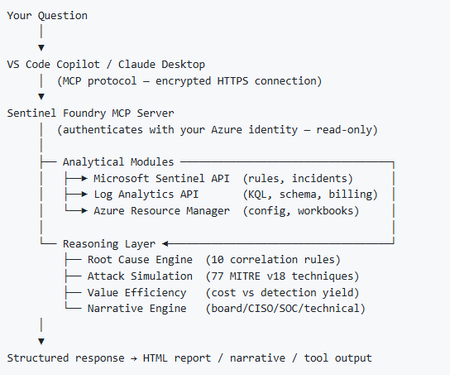
I’ve been cooking something that a lot of people in SOC have been struggling with — especially on the engineering side of Microsoft Sentinel. Thanks to the Microsoft Security team for shaping the capabilities of Sentinel even better with Sentinel Data Lake & Modern SecOps. Today’s the day I can finally share it. Note: This is not an official Microsoft product, but it is designed to make the Sentinel Build even better (complement) with much more intelligence. 🚀 Sentinel Foundry is now in public preview with 43 tools. (Sentinel Foundry - MCP Server) It’s an MCP server built to act like the brain of a strong Sentinel engineer — helping make building, improving, and operating Sentinel far more practical, faster, and honestly more enjoyable. For a lot of teams, the challenge is not understanding what Sentinel can do. The hard part is the engineering work around it: -> Deciding what data should actually be ingested -> Building a clean, scalable Sentinel foundation -> Writing useful detections instead of noisy ones -> Balancing security value with cost -> Turning ideas into deployable engineering outputs That is exactly why I built Sentinel Foundry to help communities grow stronger. It helps with the real engineering tasks behind Sentinel — from architecture thinking to detection design, deployment planning, ingestion strategy, automation ideas, and many of the workflows outlined in the GitHub project. How does it work? Here’s one of the flagship prompts I ran with it: “Give me a complete security posture report for our workspace. Score each pillar and tell me what to prioritise.” And within seconds, it produced a structured engineering blueprint that would normally take a lot longer to pull together manually. You can see the example prompts here in what it can do: https://github.com/prabhukiranveesam/Sentinel-Foundry#what-can-it-do I want building Sentinel to feel less like repetitive engineering overhead — and more like real security engineering that is fast, creative, and enjoyable. If you work with Sentinel as a SOC L2 analyst, engineer, detection engineer, consultant, or architect, I’d genuinely love for you to try it and tell me what you think. 🔗 Public Preview: https://github.com/prabhukiranveesam/Sentinel-Foundry This is just the start of an AI era — and I’m excited to keep shaping it with more powerful features over the coming days. This is very easy to set up and will be available to all of you at no cost during this month as part of the public preview, and your feedback is extremely valuable to shape this as a powerful solution.1.2KViews0likes2Comments
Graph API Endpoint for the Vulnerability Profile
I can use this endpoint to get threat reports via the graph api GET https://graph.microsoft.com/beta/security/threatIntelligence/article but threat Analytics reports that come in from defender that are category: vulnerability, aren't in there However they are written up in an article style. What endpoint do I need to hit to get these types of reports.272Views0likes1CommentYou may be right after all! Disputing Submission Responses in Microsoft Defender for Office 365
Introduction As a Microsoft MVP (Most Valuable Professional) specializing in SIEM, XDR, and Cloud Security, I have witnessed the rapid evolution of cybersecurity technologies, especially those designed to protect organizations from sophisticated threats targeting email and collaboration tools. Microsoft Defender for Office 365 introduced an LLM-based engine to help better classify phishing emails that, these days, are mostly written using AI anyways about a year ago. Today, I'm excited to spotlight a new place AI has been inserted into a workflow to make it better…a feature that elevates the transparency and responsiveness of threat management: the ability to dispute a submission response directly within Microsoft Defender for Office 365. Understanding the Challenge While the automated and human-driven analyses are robust in Defender for Office 365, there are occasions where the response—be it a verdict of "benign" or "malicious"— doesn’t fully align with the security team's context or threat intelligence. If you are a Microsoft 365 organization with Exchange Online mailboxes, you’re probably familiar with how admins can use the Submissions page in the Microsoft Defender portal to submit messages, URLs, and attachments to Microsoft for analysis. As a recent enhancement, now all the admin submissions use LLM based response for better explainability. In the past, disputing such verdicts required separate support channels, using Community support, or manual email processes, often delaying resolution and impacting the speed of cyber operations. Introducing the Dispute Submission Response Feature With the new dispute submission response feature, Microsoft Defender for Office 365 bridges a critical gap in the incident response workflow. Now, when a security analyst or administrator receives a verdict on a submitted item, they have the option to dispute the response directly within the Microsoft 365 Defender portal. This feature streamlines feedback, allowing teams to quickly flag disagreements and provide additional context for review at the speed of operations. How It Works Upon submission of a suspicious item, Microsoft Defender for Office 365 provides a response indicating its assessment—malicious, benign, or other categorizations. If the security team disagrees with the verdict, they can select the "Dispute" option and submit their rationale, including supporting evidence and threat intelligence. The disputed case is escalated directly to Microsoft’s threat research team for further review, and the team is notified of progress and outcomes. This direct feedback loop not only empowers security teams to advocate for their organization's unique context, but also enables Microsoft to continually refine detection algorithms and verdict accuracy based on real-world input, because security is a team sport. Benefits for Security Operations Faster Resolution: Streamlined dispute submission eliminates the need for external support tickets and escalations, reducing turnaround time for critical cases. Greater Transparency: The feature fosters a collaborative relationship between customers and Microsoft, ensuring that verdicts are not final judgments but points in an ongoing dialogue. Continuous Improvement: Feedback from disputes enhances Microsoft’s threat intelligence and improves detection for all Defender for Office 365 users. Empowerment: Security teams gain a stronger voice in the protection of their environment, reinforcing trust in automated defenses. MVP Insights: Real-World Impact Having worked with global enterprises, I’ve seen how nuanced and context-specific threats can be. Sometimes, what appears benign to one organization may be a targeted attack for another, a slight modification to a URL may catch one email, but not others, as slight changes are made as billions of emails are sent. We are only as good as the consortium. The ability to dispute submission responses creates a vital safety net, ensuring that security teams are not forced to accept verdicts that could expose them to risk. It’s a welcome step toward adaptive, user-driven security operations. Conclusion The dispute submission response feature in Microsoft Defender for Office 365 is one of the most exciting features for me, because it focuses on enabling organizations striving for agility and accuracy in threat management. By enabling direct, contextual feedback, Microsoft empowers security teams to play an active role in shaping their defenses. As an MVP, I encourage all users to leverage this feature, provide detailed feedback, and help drive the future of secure collaboration in the cloud. You may be right after all. _________ This blog has been generously and expertly authored by Microsoft Security MVP, Mona Ghadiri with support of the Microsoft Defender for Office 365 product team. Mona Ghadiri Microsoft Security MVP Learn More and Meet the Author 1) December 16th Ask the Experts Webinar: Microsoft Defender for Office 365 | Ask the Experts: Tips and Tricks (REGISTER HERE) DECEMBER 16, 8 AM US Pacific You’ve watched the latest Microsoft Defender for Office 365 best practices videos and read the blog posts by the esteemed Microsoft Most Valuable Professionals (MVPs). Now bring your toughest questions or unique situations straight to the experts. In this interactive panel discussion, Microsoft MVPs will answer your real-world scenarios, clarify best practices, and highlight practical tips surfaced in the recent series. We’ll kick off with a who’s who and recent blog/video series recap, then dedicate most of the time to your questions across migration, SOC optimization, fine-tuning configuration, Teams protection, and even Microsoft community engagement. Come ready with your questions (or pre-submit here) for the expert Security MVPs on camera, or the Microsoft Defender for Office 365 product team in the chat! REGISTER NOW for 12/16. 2) Additional MVP Tips and Tricks Blogs and Videos in this Four-Part Series: 1. Microsoft Defender for Office 365: Migration & Onboarding by Purav Desai 2. Safeguarding Microsoft Teams with Microsoft Defender for Office 365 by Pierre Thoor 3. (This blog post) You may be right after all! Disputing Submission Responses in Microsoft Defender for Office 365 by Mona Ghadiri 4. Microsoft Defender for Office 365: Fine-Tuning | Real-world Defender for Office 365 tuning that closes real attack paths by Joe Stocker Learn and Engage with the Microsoft Security Community Log in and follow this Microsoft Defender for Office 365 blog and follow/post in the Microsoft Defender for Office 365 discussion space. Follow = Click the heart in the upper right when you're logged in 🤍 Learn more about the Microsoft MVP Program. Join the Microsoft Security Community and be notified of upcoming events, product feedback surveys, and more. Get early access to Microsoft Security products and provide feedback to engineers by joining the Microsoft Customer Connection Community. Join the Microsoft Security Community LinkedIn
Pending Approval/Provisioning for Microsoft Defender XDR Lab/Trial Environment
Hello Microsoft Community Team, On June 26, 2026, our organization applied for a Microsoft 365 Developer Environment / Free Trial to support evaluation of the Microsoft Defender XDR Lab environment. To date, the environment has not been provisioned, and we have not received any status updates or confirmation. Impact: Current Status: We are currently utilizing our production environment to test project capabilities, which poses risks and limitations. Future Intent: Our organization plans to transition to a full, paid Business/Enterprise purchase immediately upon proving the platform’s benefits. Urgency: This delay is stalling our evaluation phase. We urgently need this environment onboarded and activated so we can proceed with deployment tests and subsequent procurement. Request: Please review the status of our registration and expedite the onboarding/provisioning of this developer environment. Thank you for your prompt assistance.462Views0likes1Comment
Microsoft Defender Incident – Handling incident severity change
There's no dedicated history/audit endpoint for field-level transitions (like "this incident went from Low → High at timestamp X") in the /security/incidents Graph API — the incident object only exposes the current severity plus a lastUpdateDateTime, not a change log. So this isn't something you're missing; it genuinely doesn't exist as a queryable history today. Also worth knowing before you build around it: Graph change notifications (webhooks) are not documented as supported for /security/incidents — subscription/webhook support is only documented for the legacy /security/alerts resource, and that resource is deprecated with removal expected around April 2026. So polling is currently the only supported pattern for incidents specifically, not a limitation of your approach — there's no webhook alternative to fall back to yet. Given that, the fix is in your polling strategy, not in finding a hidden feature: instead of filtering once at creation time and then ignoring the incident, poll using $filter=lastUpdateDateTime gt {last_poll_timestamp}. Since lastUpdateDateTime bumps on any property change — including a severity escalation — this catches incidents that started as Low/Informational and later got escalated, without re-fetching everything. A pattern that works well in practice: GET /security/incidents?$filter=lastUpdateDateTime gt {last_poll_time}&$orderby=lastUpdateDateTime asc Then in your own store, diff the incoming severity against what you last recorded for that id to detect the transition yourself — you're effectively reconstructing the history client-side since the API won't give it to you natively. Store (incidentId, severity, lastUpdateDateTime) on each poll and compare. One gotcha: this still won't tell you the exact moment the severity changed if multiple fields changed between polls — only that it changed sometime between your last two poll timestamps. If you need second-level precision on transition timing, you'd need to poll more frequently (your 5-minute interval is probably fine for SOC triage purposes, but not for precise SLA timestamping).337Views0likes0CommentsDefender for Endpoints - Domain Controllers
Hi What is the correct process for managing and deploying policies for Windows server 2019 domain controllers. I know that Security settings management doesn't work on and isn't supported on 2019 DCs as per (https://learn.microsoft.com/en-us/mem/intune/protect/mde-security-integration?view=o365-worldwide#configure-your-tenant-to-support-microsoft-defender-for-endpoint-security-configuration-management So how do I manage and get policies to a 2019 DC ThanksSolved12KViews2likes8Comments