Recent Discussions
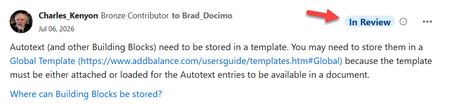
"In Review" means what? Can't message Allen"
I am a VM in Q&A (Office) and have been a participant here in the Word Community for some time. Recently I've notice the tag "In Review" on my posts. Here is an example: https://techcommunity.microsoft.com/discussions/word/dynamic-pages-in-mail-merge/4531584/ What does this mean? Am I doing something wrong? I tried to send a message to Allen but do not believe it went through. When I click on "Send Message" it seems to be processing and then "Send Message" comes back active. When I checked in my profile under sent messages, nothing shows up for this. Thanks in advance. Charles KenyonSolved206Views3likes21Comments
Xbox verification
Hello my xbox account is in the US but i get the UK age verification on my settings saying my account is not verified. How do I fix this? Not in any family groups nor is it a teen or child account.1View0likes0Comments
PowerPoint 2021 crashes when saving .ppsm files containing ActiveX controls
Hello, I believe I found a regression in recent Office 2021 builds. PowerPoint crashes every time I try to save a macro-enabled presentation as PowerPoint Show (*.ppsm) if the presentation contains Microsoft Forms (ActiveX) controls, such as: TextBox ComboBox CheckBox etc. Troubleshooting performed Microsoft Support already assisted me through two remote sessions. We tested: Office license validation Online Office Repair New Windows user account Registry checks Windows services None of these resolved the issue. Reproduction Create a new PowerPoint presentation. Insert an ActiveX TextBox or ComboBox from Developer → TextBox. Choose Save As → PowerPoint Show (*.ppsm). Result: PowerPoint crashes. Tested Office versions Office 2602 (19725.20172) — Windows 11 21H2 — ✅ Works Office 2606 (20131.20154) — Windows 11 25H2 — ❌ Crash Office 2607 (20228.20110) — Windows 11 21H2 — ❌ Crash Office 2607 (20228.20110) — Windows 11 23H2 — ❌ Crash I reproduced the issue on three different computers. The last known working build is 2602 (19725.20172). The first confirmed failing build is 2606 (20131.20154). Saving as .pptm works correctly. Previously created .ppsm files also open and save correctly. Only creating or converting a presentation to .ppsm triggers the crash. If needed, I can also provide a minimal sample presentation that reproduces the issue. Thank you!25Views0likes0Comments
Please remove Community Share Buttons at the left
Some time ago, Community Share Buttons started to appear on the left on the Tech Community Discussion Hubs. With normal zoom (100%), they overlap the text and are very annoying. Please get rid of these or give instructions on how to remove them. I found this article from 2018: Community Share Buttons | Microsoft Community Hub But I did not notice these buttons before, or they were not annoying. It seems they were meant to be on the right side, not the left side.387Views2likes9Comments
Root DFS and ntlm hardening
Hi all Recently we have tried to harden our NTLM. After applying some settings the access to the root of our domain has become intermittent \\domain.co.uk but all the namespaces as well as symbol etc I der the root are working fine and can be navigated to without an issue. DCs have now been applied the same settings which are send LM and ntlm and use V2 if negotiated. The issue is intermitted as it it will work on a DC and then stop and then work again. Similar is on the end user devices. We have on prem DCs and all devices are in tuned and entra joined. We are hybrid but we do not sync or write the devices to ad. Replication and DFS itself are healthy. Issue are some users who have AFS paths already mapped to their devices it fails to connect to them sometimes. But new mapping works. Any ideas or assistance will be appreciated.31Views0likes2CommentsMailbox automatically Pinning every new incoming email - Desktop and Mobile
I have a user that, whenever they receive a new email, that email will automatically pin to the top of their inbox. We have tried to recreate the outlook profile Adjust and create mail rules to not pin emails Modify settings within webmail Remove all flags and all disable all setting pertaining to flagging and pinning Reset customization reset nav panes reinstalled office Tested in the "new outlook" On the mobile side, Deleted all mail profiles Installed the outlook app instead of the ios mail app made sure he has no specific mailbox retention or policies that would apply a setting like this This issue has been going on for months with no sign of being fixed. pretty much nothing at all has stuck and the issue persists. I am a systems admin, so i have the ability work on this from the backend. My entire team is just at a loss with this issue.15Views0likes1Comment
How can we paste markdown into one of these posts, to get formatted text?
Pasting markdown into the text entry box does not create formatted text. It just puts in the characters that the markdown is using. Publishing does not convert it to formatted text. The Help icon in the formatting bar gives a pop up with three tabs, one of which is for Markdown Syntax. Which strongly implies that markdown is a supported format. Markdown is VERY commonly used and a straight paste is incredibly useful.33Views0likes4Comments
Outlook Groups: who can send an email?
In my personal Outlook email account, I created a Group, me as the Owner, everyone else as a Member without Trusted Sender rights. However, at least one of the Members is able to send emails to the Group? Why have a Trusted Sender category if a mere Member can send emails to the Group? Thanks.2Views0likes0CommentsMailbox automatically Pinning every new incoming email - Desktop and Mobile
I have a user that, whenever they receive a new email, that email will automatically pin to the top of their inbox. We have tried to recreate the outlook profile Adjust and create mail rules to not pin emails Modify settings within webmail Remove all flags and all disable all setting pertaining to flagging and pinning Reset customization reset nav panes reinstalled office Tested in the "new outlook" On the mobile side, Deleted all mail profiles Installed the outlook app instead of the ios mail app made sure he has no specific mailbox retention or policies that would apply a setting like this This issue has been going on for months with no sign of being fixed. pretty much nothing at all has stuck and the issue persists. I am a systems admin, so i have the ability work on this from the backend. My entire team is just at a loss with this issue.30Views0likes1Comment
Using a Proxy outlook address, but still got "too many times user name or password".
Hi all For months I was getting the dreaded "too many times user name or password" and a check of attempt "sign ins" showed numerous attempts to sign in from IP addresses all over the world. In other discussions and internet search it has been suggested A) Create a Proxy address only known to me (done) B) Make this new Proxy address the only way to sign into Hotmail Microsoft (done) C) Check to see if the original address is no longer recognized as a valid address, so that no attempt to sign in be even be attempted (done) Yesterday morning in my first attempt (previous successful attempts were during the day before) to sign in I got the "too many times user name or password" to an address nobody else knows exists? I tried several times yesterday to all receiving the dreaded "too many times etc" Obviously I have been successful to sign into Hotmail (and this community) today, though I don't know if it because of time passed and/or clearing of cookies and internet data? So my primary Questions A) How could I possibly be locked out to a Address no one else on the planet, except outlook knows about? B) If there was something my PC could have done to inadvertently trigger the "too many times etc" error by mistake? I am running the current up to date versions of Windows 11 and Norton 360.16Views0likes1CommentBadges & Achievements
Hi there, I got a notification, that I earned my 3 years' badge. This brings me to a page, which URL looks like this: techcommunity.microsoft.com/t5/badges/userbadgespage/... This page shows a number of badges. If I look on the achievements page in my profile, the number of achievements listed there differs from the number listed on the special badges page. Why? And, it seems that I can not access the badges page from my profile. Why? Best, Mourad2.9KViews1like8CommentsPower Automate
Good afternoon all, I am working with a non for-profit organization. I am slowly trying to implement processes to manage 365 for them as most of them are not tech savy. I have been playing around with power automate (not too familiar with it myself) in order to create a user and add it to certain teams' groups and mail distribution groups. So far I have managed to get it to create the account and add the user to the teams group. However, in doing my research I have found Microsoft has removed the functionality to add users to a mail distribution group. Is there a way around this that I can implement? I came across this article but am not sure from here https://damobird365.com/add-members-to-a-distribution-list/ Thanks all for your help.54Views0likes3CommentsAre there any tools recommended to respond to unanswered questions quickly?
Hello, I want to quickly and efficiently identify unanswered questions so I can help answer them. Are there any clients or tools that can filter on unanswered questions? Currently the web client is not that great for this because when I answer an unanswered questions, I then have to scroll all the way back down to where I left off which slows the whole process down. This makes it difficult for experts to use Tech Communities to help answer questions. Any other tips or advice for answering questions in the most efficient way possible is welcome and appreciated. Help me help you! Thanks, Joe569Views0likes1Commenthelp.microsoft.com talk to a person - now microsoft get live help
Frustrated with automated bots? Learn how to navigate help.microsoft.com, bypass virtual menus, and connect with a live Microsoft person instantly.Solved63Views0likes1Comment





Events
Recent Blogs
- We’re excited to share the latest updates to the Microsoft Tech Community! This release focuses on improving User Group management, along with a collection of behind‑the‑scenes updates and bug fixes...Feb 11, 2026539Views5likes5Comments
- We’re excited to share the latest updates designed to improve your experience on the Microsoft Tech Community! This quarter, we’ve focused on modernising the interface, enhancing event features, and ...Oct 08, 2025669Views3likes3Comments