Recent Discussions
 323Views0likes8Comments
Removal of old CA server stale data
Hi, I'm rebuilding some DC's and figured I'd tidy everything up before doing so as I've come into this with a messy environment. from this, I found an old Trusted Root CA, the certificate authority server was decommissioned in 2021 and all certificates have had an expiry date from 2021. its still being pushed out to domain devices such as servers and desktops. I tried running the 'certutil -dsdelca' command however this comes back with invalid command. I guess the best option is just to remove the class objects from the ADSI edit? as there is a class in AIA, CDP, Certification Authorities, KRA with the certificate nameSolved196Views0likes1CommentCannot Connect to VMs in Windows Admin Center
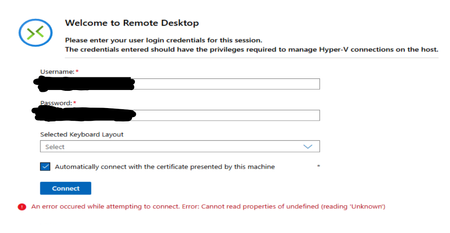
Hi all, I have 1 Server Cluster made up of 3 Server 2022 Hosts on which there is a large number of VMs running on Hyper-V. The typical process for accessing the VMs has been through Windows Admin Center, which is hosted on one of the VMs in the cluster. Around 1 week ago, it was no longer possible to connect to the VMs through Windows Admin Center as an infinite loading screen was presented. Sometimes, the following error shows up in VMConnect: The cluster and servers are still connected to WAC and all the VMs that are expected are present on WAC. Since then, the following things have been attempted: - Restart all servers - Rebuild WAC on Current VM - Build WAC on Fresh VM with the same and different network configuration, using current (2606) and previous (2511) versions of WAC - Build WAC on one of the hosts All these attempts result in the same error as seen before. Has anyone experienced this issue before? Or does anyone have any advice? Thank you in advance!Solved688Views2likes13CommentsWindows Server vNext cannot be activated
Error Code 0xC004F012 when trying to activate WS vNext Datacenter with Key 2KNJJ-33Y9H-2GXGX-KMQWH-G6H67. vbscript is removed, implying the future removal of this component from the OS. It appears that Windows Activation relies on vbscript. I would wish for a native PowerShell support / module instead of vbscript. Is this something that is on the roadmap?Solved250Views0likes4CommentsAD Replication Error 1908 (Source DSA)
Hi all, I’m troubleshooting an Active Directory replication issue (error 1908 – “Could not find the domain controller”) in a multi-site environment with 16 domain controllers across multiple locations. The problematic Domain Controller (Site A-DC) is displaying a 6% failure in the replication summary with the 1908 error code in the Source DSA but the Destination DSA do not display any errors. If I replsummary in other DCs, I will see the same result. However, If I run the showrepl command, the result displays all successful replications with no errors. A-DC is used as a replication path and holds the FSMOs roles (Site A is the main DC) and I believe it is also affecting DFSR replication from Site A-FS server to the other file servers. A-FS uses A-DC as its logon server. The below is what I have verified: I have verified that forward and reversed lookup zones have the correct DNS records (Checked SRV records _ldap._tcp.dc._msdcs, _kerberos._tcp, and IP addresses) All the DCs resolve correctly A and PTR records nltest /dsgetdc:domain.com successfully returns domain controller Confirmed Secure channel to be true in A-FS Verified KDC is running in A-DC (I have not trying purging the KDC tickets yet but doubt this will resolve the issue) Troubleshooting performed: flushed/re-registered DNS Restarted netlogon services Time sync wouldn't have a play here since all the other DCs are syncing with A-DC. Any guidance or similar experiences would be greatly appreciated. MiguelSolved290Views0likes7Comments
2026-04 Update Breaks Domain Logins
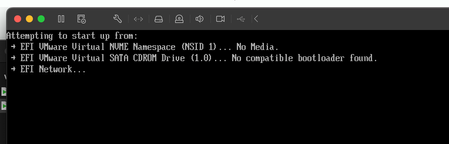
I have an Active Directory domain that is old (from 2000!) that has been upgraded and moved to newer versions of Windows Server and Active Directory. I have domain controller VMs running Windows Server 2025 Standard Edition. Unfortunately they installed the latest 2026-04 patches which my have changed the Kerberos encryption from RC4 to AES. This has resulted in my not being able to log into any Active Directory domain accounts and the domain controllers themselves. I can only log into workstations using the local account. Suffice to say this a nightmare. Any ideas how to fix it since I can't access the usual tools like Active Directory Users and Computers, Hyper-V won't connect to the VMs, etc. Thanks. SSolved5.5KViews2likes8Comments
Procedures to raise the functional level of AD 2008 r2 to 2019
Hello everyone, Our AD has the Windows Server 2008 functional level and the servers with Windows Server 2016 OS. I intend to raise the functional level to 2019 or 2025. I would like your help with tips and documentation to decide whether 2019 or 2025 would be best, what are the risks and procedures for successful migration. I have an isolated environment to carry out rehearsals and tests before actually going into production.Solved357Views0likes2Commentsdcdiag crash with incorrect /s parameter
Hello, I find a mistake in my script which cause DCDiag to crash : dcdiag /v /c /d /e /s:%computername% > C:\Temp\dcdiag.txt %computername% is the mistake. I replaced it by the real server name. Seems like input it not enough checked. VincentSolved55Views0likes1CommentWindows NVMe-oF Initiator
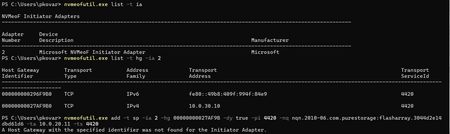
Hi everyone, I am trying to test the new Windows NVMe-oF Initiator within build 29550.1000 but I am not able to configure an I/O Subsystem Port, still getting the message " A Host Gateway with the specified identifier was not found for the Initiator Adapter." (see screenshot). Any idea what I am doing wrong?Solved181Views0likes2Comments
WMI Filter for non-Hyper-V Host
I have been struggling for several days trying to set a GPO WMI Filter that would apply settings to any server, virtual or physical, as long as it is not the Hyper-V Host. It should apply to any VM on VMWare or on Hyper-V hypervisors. I found many suggestions online but none of them really work, like looking for Hypervisorpresent, that is also set to TRUE on VMs so no help. I have many ways to find and apply to an Hyper-V but EXCLUDING Hyper-Vs seems to be a tough one, the WMI filters are designed to find something and apply if it finds it, not the opposite. I have tried queries on the OptionalFeatures class, again it helps me find the Hyper-V but not EXCLUDE it. Anyone have an idea about doing this. BTW, this is to apply a setting only to non-Hyper-V and ignore if it is an Hyper-V. I am also trying to avoid blocking GPOs at a specific OU and re-linking all but 1 GPO from that level, I have to assume that there is a way to target all servers except Hyper-V. Hopefully someone has succeeded in doing the same. Thank youSolved235Views0likes3Comments
Account blocked downloading any Insider ISO
Same basic message as the Google Fiber user, however, I know what caused my account to be blocked. I did not approve a Firewall request for Webview2 while using Server 2022 and Duck Browser (you know which one as I am not approving of nor recommending a non-MSFT issued browser here) to Download the ISO for Vnext on the Server Insider's Download page. I am still able to log into the page, select a build, choose my language, and I get the error after clicking Confirm. It also happened in Edge and on my cell phone using Cellular and it's proprietary browser. I installed 26534, and though it did allow me to attach my insider id to it, it would not dl a newer build, nor any Insider build for Windows 11 either. The page simply says to contact Microsoft support if you feel you got this in error. Of course, that would not accomplish anything except confuse some MSFT contacted Tech support and possibly incur a fee for me. You have my account info. Any help clearing it would be appreciated.Solved404Views3likes3CommentsGoogle fiber being blocked??
I’m on Google fiber and can't download the newest ISO. I get a msg that says some block of IPs is being blocked because they are not who they say they are. Likewise, I have no anonymizer running and my ip is my own on google fiber. error msg; message code 715-123130 and b64dd3c8-ed16-4d46-87ac-a871691f1c41.Solved1.3KViews5likes10Comments0x000003eb Windows cannot connect to the printer.
Hello fellow Windows administrators, I have installed Windows 2025 as a print server. I share Xerox network printers from there using the Xerox Gobal PostScript driver (requirement). When installing the shared printer from that server (\\2025server\ double-click the printer), file C:\Windows\system32\spool\DRIVERS\x64\3\PS5UI.DLL gets overwritten by the version from the server (a newer version 2026-02-11 that was pushed by monthly windows updates) which comes from "\\2025server\print$\x64\PCC\ntprint.inf_amd64_c9d56d0edd975df6.cab". It overwrites the version actually in the local server before the printer installation completes. This is normal behavior. On windows 2016 and 2019 the printer installation then fails with error "0x000003eb Windows cannot connect to the printer" and 2 eventlogs : "The print spooler failed to import the printer driver that was downloaded from "\\2025server\print$\x64\PCC\ntprint.inf_amd64_c9d56d0edd975df6.cab" into the driver store for driver Xerox Global Print Driver PS. Error code = 800702e4. This can occur if there is a problem with the driver or the digital signature of the driver." And : "The print spooler failed to load a plug-in module C:\Windows\system32\spool\DRIVERS\x64\3\PS5UI.DLL, error code 0x8007007F. See the event user data for context information." If I install the the exact same shared printer on any other OS than 2016/2019 servers , local Ps5ui.dll gets overwritten with the server 2025 (2026-02-11) version and printer installs and fine. I figured that if I go to my old print server (2022) and retrieve ps5ui.dll from there, put it in local folder on the 2016-2019 servers (overwriting the 2026-01-14 | 2026-02-11 version) and install the shared printer again, now it installs fine. (It does not retreive ps5ui.dll from the 2025 again and so it does not overwrite the local onel). I even re-installed 2025 in a vm without network (so no windows update) and extracted ps5ui.dll from there, and this one works too. This issue seems to be caused by recent windows update, the first culprit I'm aware of is dated 2026-01-14. The february update installed today also modifies ps5ui.dll on the 2025 server, but does not resolve the issue either. So, either there's something I have to change on the 2016/2019 servers, or there is a bug in that file… I'm thinking the later as the original file form the 2025 iso works fine. :\Solved2KViews0likes2CommentsTurning Off Tamper Protection on Workstations
How do I turn off Tamper Protection on a domain-joined Windows 11 workstation? The problem is a workstation has Windows Defender in Passive Mode instead of being in Not Running mode after installing a 3rd party antivirus. Windows Defender is making running network applications from the servers much slower because it's still real-time scanning. I also suspect Tamper Protection is also preventing network drive exclusions from working on this workstation and on the ones that use Windows Defender without a 3rd party antivirus. I've tried adding every registry entry, Group Policy, and PowerShell command on the local workstation I could find to disable Windows Defender, but nothing works. I'm assuming this is due to Tamper Protection ignoring everything? This is an on-premises domain and doesn't use Microsoft Intune or Microsoft Endpoint Configuration Manager.Solved1.1KViews0likes2CommentsAdmin Center choosing the wrong certificate
Windows Admin Center version 2410, build 2.4.2.1. We're encountering an issue following the instructions outlined https://learn.microsoft.com/en-us/windows-server/manage/windows-admin-center/configure/update-certificate?tabs=powershell when replacing the WAC certificate. We've installed a certificate from a third-party CA in the local machine store. The common name matches the DNS FQDN and hostname of the server. Despite specifying the thumbprint of the 3rd party CA cert with the "Set-WACCertificateSubjectName" cmdlet, WAC binds to a different certificate issued by our internal CA for WinRM. The WinRM cert shares the same common name, but it has a later expiration date. I suspect WAC is picking the certificate with the latest expiration date. This also happens when using the GUI, even when we specify the 3rd party cert during customization. We've confirmed that the NETWORK SERVICE account has rights to the private key on the cert as well. I tried deleting the binding using netsh and rebinding to the updated thumbprint. While this is successful, and the output from "netsh http show sslcert" shows the 3rd party CA cert on the port 443 binding, the browser still presents the Internal-CA cert on 443 even after restarting the WinRM and Windows Admin Center services (and rebooting). It seems like there is an issue when multiple valid certificates exist with the same common name in the machine store. Additionally, the "Set-WACCertificateAcl" seems to fail in this case. The Configuration log contains the error below whenever it is run. Set-WACCertificateAcl: Unable to find machine key path for certificate. Skipping setting access control list. We'd prefer to use the 3rd party cert for the HTTPS port and the internal CA cert for WinRM. Is this possible?Solved450Views0likes1CommentWINGET is not recognized as a commandlet on win 2k19 server fresh setup
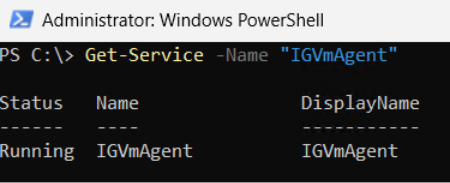
I have setup a new win2k19, I followed the instructions Install-PackageProvider -Name NuGet -Force | Out-Null Install-Module -Name Microsoft.WinGet.Client -Force -Repository PSGallery | Out-Null Repair-WinGetPackageManager When I try anu winget command I get winget is not recognized as a commandletSolved353Views0likes2Comments
Certificate authentication with SID not working
When trying to login to Windows (against AD) using a certificate with the SID extension present in the certificate, it will not work if the SAN UPN is missing in the certificate. The error message "Your credentials could not be verified" will be displayed. Changing the certificate template to include SAN UPN will make the login work as expected. Is it by design?Solved222Views0likes2Comments



Events
Recent Blogs
- Windows Server continues to be the foundation for many of the world's most critical business applications. As organizations modernize their infrastructure, extend management beyond the datacenter, an...Aug 12, 2026214Views1like0Comments
- Trusted Launch for virtual machines We are excited to announce Trusted Launch for virtual machines (TVMs) in Windows Server Insider Preview. Trusted Launch is a security feature you can enable whe...Jul 14, 2026833Views4likes5Comments