Recent Discussions

MS PROJECT 2019 UPDATE and Purchasing Options
HI We are currently using Microsoft Project Professional 2019 desktop version, but we are facing challenges with its reporting limitations. Specifically, the software can only display a maximum of 75 rows in its reports. As our weekly reports often exceed this limit, we find ourselves spending considerable time on manual entries. For our monthly reports, we can manage the filtering process to avoid this limitation, but the weekly reports require a hierarchical structure to display task statuses, and unfortunately, there is no workaround for this constraint. While researching this issue, I found discussions indicating that the 2025 version of Microsoft Project can display up to 150 rows, which would help us address our challenges. I have a couple of questions: 1. Does the new version of Microsoft Project 2025 indeed support the display of up to 150 rows? 2. What is the best approach for upgrading: subscription or standalone? 3. Could you provide pricing information and tell us where we can obtain it? Thank you! Best regards, Teshome HPU PMO Office89Views0likes1Comment
Embedded Object Keeps Returning
At some point, while working with Kidasa's Milestones Professional, I must have copied one of the charts I was working and pasted it into the Gantt section of my Project file as a drawing. I have deleted it countless times, but it always comes back whenever I close and reopen the program. It was initially attached to a timescale but I'm able to change the timescale or attach it to a task, with those changes remaining after closing and reopening the program. The chart is depicting an older version of the Milestones Professional file, rather than what it looks like currently, so it doesn't seem to be actively linked to the other file, if that's even possible with these embedded drawings. I've tried closing down the program and restarting the computer before reopening, and I've wanted to try to clear my cache, but the option to do so is greyed out. Any insights would be helpful. This isn't the end of the world, but it's annoying.92Views0likes1CommentProject Server Column Header/Gantt Chart misalignment
We are using On-Premises Project Server, and in all views (Project, Project Center, Resources, etc.), the Column Headers are larger than normal, so that the bar in the Gantt Chart does not align with the project/task/resource associated with it. The browser we are using is Edge but I switched to Chrome and had the same issue. Does anyone know what causes this and how to fix it?20Views0likes0CommentsSchedule Level of Detail for Metrics and Task Management in Project
What is a best practice for achieving the proper level of detail in MS Project Schedules? I work in a manufacturing environment, where most tasks are ultimately driven by product delivery dates, but with each product, there are multiple steps involving different trades and departments at each step. In a schedule, the lowest level of detail needs to have task dependencies and resources assigned, however, this is usually a Level 3 "middle ground" level of detail (not too broad and not too specific), representing a window of a few days or a few weeks in which a certain group of steps needs to be completed so we can move to the next stage in the process. Each of these steps/tasks often need to be broken down into daily (or sometimes portions of a day) for the actual assigning and managing of tasks in the organization. Each of these subtasks could have multiple people working on them at different points. Obviously, the dates for these detailed task management assignments should dynamically move as the schedule is updated, but including too much detail in MS Project schedules is problematic when trying to update progress, especially with multiple resources assigned to a short-duration task. It almost seems that you should be able to assign task dependencies and resources to tasks at a certain level, then you should be able to break those tasks down into subtasks for the day-to-day managment of tasks, but this will cause your scheduling metric tools to go haywire. Has anyone experienced this challenge and what did you do to be able to break down your schedule into task management-level detail while still maintaining a coherent schedule which people can understand, and which meets the industry-standard schedule metrics of task dependencies, resources, and critical path traceability?128Views0likes1Comment
Project Accelerator de Microsoft
I am running some tests with the Project Accelerator tool. I assigned a Planner Plan 1 trial license based on the documentation and previous guidance. At the beginning of February 2026 everything was working correctly, and I was able to view tasks inside the Project Accelerator application. However, as of today (February 25, 2026), the task view no longer loads, and I receive a Microsoft authentication error. It seems as if the system is now blocking access to the plan view even though the Planner Plan 1 license is still active. My question is: Have the licensing requirements changed recently?104Views0likes0CommentsProject Server Error when exporting to a Pivot Table using Visual Reports
Since migrating all our schedules to on-premises Project Server last year, we are getting an error message when trying to export a schedule to a pivot table using Viusal Reports. The error reads: "An error occurred and the requested action could not be completed at this time." This doesn't happen on 100% of our schedules, but the vast majority of them. What causes this error and how do we fix the issue?158Views0likes2CommentsIs there a way to graphically highlight all of the tasks under a summary?
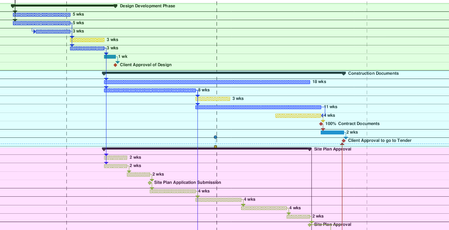
Looking to create what would essentially be a coloured background for all of the tasks in the gantt chart, under a summary. Been looking online and watching tutorials, but cant find what I am looking for. The image shows what I am trying to do (was done after the fact with a PDF reader, would prefer to do it straight in MS project).209Views0likes1CommentProject Changing % Complete when entered
Why does MS Project change the % Complete value entered? We have a task with a Start date of 11/12/25 and Finish date of 1/20/27. The duration is 223.9 days based on a 4 day/10 hrs per day calendar (it is a long lead time material procurement task). The status date is 1/5/26 and the task has an Actual Start of 11/12/25. When I enter 10 in the % complete column and hit enter, Project changes this to 0%. When I enter 15 in the % complete column and hit enter, Project changes this to 5%. When I enter 50 in the % complete column and hit enter, Project changes this to 44%. I believe % Complete is either calculated or entered, but it seems if you enter a value in this field, Project shouldn't change it. What causes Project to change your % Complete value entered, and how do you get Project to display the desired % Complete for a task like this?403Views0likes4CommentsLink Procurement Tasks to deliver Just-In-Time without using up slack?
In MS Project, what is the recommended way to link procurement tasks such that the duration is the lead time of the material, the task "finishes" (material delivers) when needed by the subsequent task, and we know when to "start" the task (order material)? If we link the procurement task to the subsequent task with Finish-Start and As Late As Possible, and the subsequent task has total slack (float), this will push the subsequent task back in the schedule and use up its float. If we use Start-Finish, the dates line up but the procurement task doesn't drive the subsequent task as it should (if procurement gets behind schedule, it won't push the subsequent task). If we use the "deadline" feature, we are still tying ourselves to a date rather than letting the schedule dynamically determine when we need to order materials. What is the correct way in MS Project to schedule the ordering of materials so that delivery occurs just-in-time as determined by the scheduled start of the subsequent task?272Views0likes11CommentsProject Online Updates & AI Integration
Hi all, Fairly new to this discussion board but I wanted to ask if anyone is aware of any upcoming project desktop updates and potential integration of AI? From what I understand, project has never really evolved significantly and its competitors have started to take some market share. Would love to know if there is something in the works or where I could even find any information on this? It always seems to be challenging finding information. Thanks,194Views0likes1CommentVisual report don’t work
Hi I am using msproject 2016 stand alone together with office365. And I get an "unknown error" when I try to use Visual Report. anyone knows how to solve this? I have read somewhere that I need to rollback MS Project to a specific build no. I don’t know if this is the solution. If so. How do I do this and to what build version? Br Rune76Views0likes0Comments
How to visualize data desktop projects after PWA retirement?
This questions is a follow-up to the discussion "Data access after Project Online (PWA) retirement". From the "Data access after Project Online (PWA) retirement" discussion it is clear that data will not be moved somewhere else. We are mainly using the PWA site to enable that the data from the desktop projects can be visualized in Power BI, so that we can create project and portfolio dashboards that summarize information from both desktop projects and planner projects. Any thoughts on how this could be achieved in the future?133Views0likes1CommentProject Server Power BI Content Pack - Connect to Billed Work Hours?
Is there a way to use the templates in the Project Server Power BI Content Pack and connect to an excel spreadsheet containing the hours billed/charged to a project? Since MS Project simply calculates Actual Work based on % complete status update, we want to compare the "Actual" hours billed to a project to the Remaining Work to get a better picture of whether labor hours are on track to be over/under budgeted hours. ("Actual" hours from an export from our accounting system + "Remaining Work" from the MS Project schedule = Estimated Work at Completion; compare this to Baseline Work). Has anyone done something like this in your organization, and if so, how did you connect these 2 sets of data and create a visual for people in your organization?104Views0likes1Comment
Planner and Projects 3 online - getting this onto desktop app
Hi, We have been using Planner and Projects 3 online for the last few months and we needed a bit more functionality, so we downloaded the Project Professional desktop app as per the instructions. Now I want to get all my plans/projects that is in my planner and Projects 3 online accessible or available in Project Professional on my desktop and I have no idea how to do this; please can you assist. I cannot find a way to download paths or files from online to a local drive to be able to open them in the desktop app.265Views0likes1Comment
Filter Creation
Hello, I'm hoping this community can help me. I want to create a filter that will dynamically show all in progress tasks as of today's date. I've built the filter as follows: Start is less than or equal to [Value] -AND- Finish is greater than or equal to [Value]. My issue is what to enter as the Value. Copilot said to use "Current Date," "Now()" and "Today," but none of them are dynamic. It even told me to create a new field titled "Today" using the following formula for the Custom Attribute: Today=Date(). Then, it said to reference the "Today" field as the filter Value (e.g. Start is > or = to Today). But that returns the following error: "The entry is not valid. The test value cannot be used with the field for the data you want to find or filter for." At this point I'm at a loss. This seems like it should be a very easy filter to set up; I'm surprised there isn't a built-in system filter for this already. There 's a built in filter titled "In Progress Tasks," but that only filters tasks with an Actual Start that is not blank, and an Actual Finish that is blank. Thanks in advance for any help you can provide!488Views0likes13Comments%Complete didnt change the Finish Duration
I have an issue on my Microsoft Project work, when I update the %Complete on a single task (tracking mode) the Finish duration didnt change (the task type is Fixed Units). For example: My task was Start 20 Nov 2025 and Finish 5 Dec 2025 The actual task Start 20 Nov 2025 (on schedule) The status date is 28 Nov 2025 The %complete until the status date is 10% From the example, the task should be delayed because I cant increase the works time and the manpower but the Finish Date still locked in 5 Dec 2025. any advice or solution how to solved it? Thanks for the time133Views0likes2Comments
Start to Finish Relationship - earliest start when connecting to two predecessors
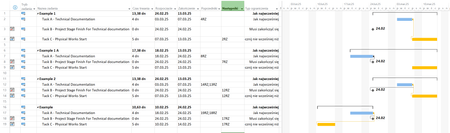
Hi I have a scenario. Three tasks Task A - Technical documentation (preparation of it) Taks B - Project Stage Finish For Technical documetation so A have to finish before B Task B have Constraint Type - Must Finish On Task B - can change its Start/Finish date Task C - Physical Works Start - Start of works for which Technical Doc. from task A is needed so A have to finish before C Task C - will move as in reality, it will also depend upon other "tings" in project which can and will change Task A is most "submissive" task It always have to be finished before Start of B and C (sorry to all Documentation designers out there) How to create proper connection between a/m taks that always will move finish of Task A before start of B and C independent of where B and C will be moved ? I've tried to use Start to Finish, but it works only if I connect one task Below a screen shoot form my MSP I'm sorry for Polish ... but can't switch it to English (entire Office suite will .. but not MSP.. ) RZ = SF Typ Ograniczenia -> Constraint Type Jak najwcześniej -> As Soon As Possible Musi zakończyć się -> Must Finish On Rozpocznij nie wcześniej niż -> Start No Earlier Than Rozpoczęcie -> START Zakończenie -> Finish Poprzedniki -> Predecessors Następniki -> Successors Example 1 and 1A - works.... but it A is connected to only one task (A or B) Example 2 - I've connected A to B and C, but A is moved beyond B Example - same problem as above but in this scenario I've moved C before B but A... stick itself for task furthrer in future I know that I can create connection like belowe Using "Standard" connection between A and B and in the moment when situation as above will happen (A will move past B), MPS will "Scream" at me with a message that he can't finish task A but that is not a solution for me.122Views0likes1Comment

Events
Recent Blogs
- Project 2016 and Project 2019 will reach end of support on October 14, 2025.Oct 14, 202415KViews4likes9Comments
- One of my favourite features in Project Online, and Project Server, has been the portfolio features that allow you do match your plan portfolio against your business drivers to ensure you are gaining...Sep 25, 20243.7KViews4likes8Comments