office 365
107 Topics
Generic Resources - Team Assignment Pool Yes or No?
Our On-Prem Project Server environment was set up with Generic Resources marked "No" for Team Assignment Pool. It seems we would want this to be a "Yes", so that tasks assigned to a Generic resource would be visible by Project Server users with the same role, and those users could then self-assign those tasks and provide updates. Our generic resources are meant to represent a "pool" of people in different labor categories, so that we can look at potential areas of under or over utilization. It seems that marking them as a Team Assignment Pool would reflect our intended use. For most of our generic resources, we don't plan to replace them with a specific person (such as production work). However, for some resources such as engineers, we would like them to be able to self-assign tasks and give updates in Project Server. Is there a particular reason to keep our Generic Resources marked "No" for Team Assignment Pool? Does changing to "Yes" affect their capacity, availability, or Work/Cost values?Solved488Views0likes3CommentsIs there a way to graphically highlight all of the tasks under a summary?
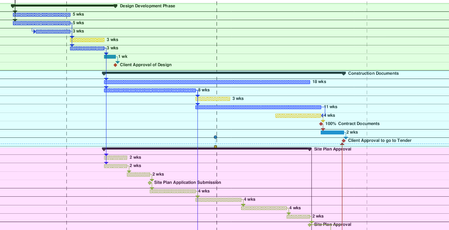
Looking to create what would essentially be a coloured background for all of the tasks in the gantt chart, under a summary. Been looking online and watching tutorials, but cant find what I am looking for. The image shows what I am trying to do (was done after the fact with a PDF reader, would prefer to do it straight in MS project).460Views0likes1Comment
Problems with Microsoft Project office 365 Visual reports MSOLAP$cubes
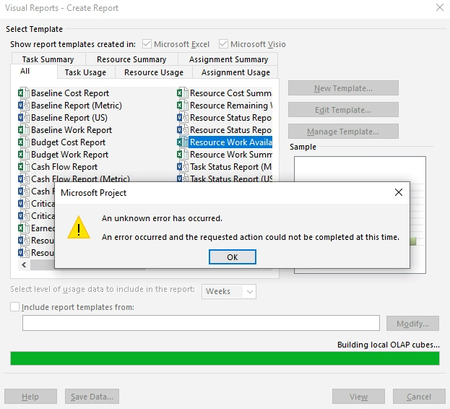
Problems with Microsoft Project office 365 Visual reports MSOLAP$cubes Hi We have some problems with our Microsoft Project while trying to generate a Visual report: When we check the event viewer, we find following informationals: We tried the following: Reinstall and update the office 365 applications (we are running Version 2102 Build 13801.20960) Installed https://docs.microsoft.com/en-us/analysis-services/client-libraries?view=asallproducts-allversions drivers. Tried to repair office installation Tried to update Visual C++ redistributables + tried to repair Informational: We are running a Horizon VDI setup W10 enterprise Build 19042.12377.1KViews0likes17Comments
Workload by week/ month export to Excel
I like to use Visual report, but that doesn’t work.. I have MSProject 2016 and office 365. so I have tried to use save as (export) as xls. But I can’t get the load or week or month. anyone that can help out setup in table format. I think… the I can build the rest in Excel if needed br runeSolved592Views0likes4CommentsVisual report don’t work
Hi I am using msproject 2016 stand alone together with office365. And I get an "unknown error" when I try to use Visual Report. anyone knows how to solve this? I have read somewhere that I need to rollback MS Project to a specific build no. I don’t know if this is the solution. If so. How do I do this and to what build version? Br Rune202Views0likes0Comments
A colored column representing holidays
I am looking for ideas as to how to create a transparent, colored visual column within an MS gantt chart representing a date range that correlates with the Christmas holidays. Basically, just a vertical bar crossing all tasks that visually indicates the holiday date range (say 12/22/25- 01/02/26) so that as you scroll through all your tasks, that bar remains constant in the gantt chart. I can do a single date bar using Status Date, but have not found a way to perform a similar function for a date range. Any ideas or tricks?Solved326Views0likes1CommentA new Project Online Content Pack for Power BI
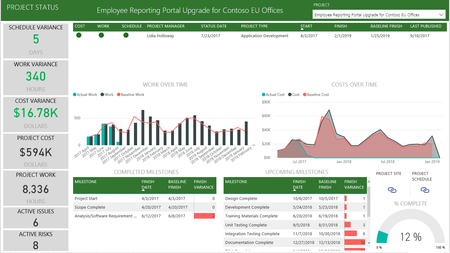
We are pleased to announce the release of a new Project Online Content Pack for Power BI. Starting October 26 2017, Project Online users will be able to download the new content pack directly from AppSource: https://app.powerbi.com/groups/me/getdata/services/project-online Comprising of 13 visually rich report pages, the new content pack is designed to support the management needs of project managers, portfolio managers and resource managers, by retrieving planning and execution data from Project Online and arranging the data to support timely decision making. The new content pack report includes reports in three key perspectives: Individual Projects, Portfolio of projects and the organization’s resources. Each perspective encompasses the following detailed report pages.42KViews8likes22Comments
Cannot Force Checkin: Project Web App
My team got project stuck in the queue and we can't publish any other projects as 2 jobs got stuck and causing other projects to continue to be in a wait. I tried to 1) Cancel the publish job (not successful) force checkin a project (not successful either) and it continues to stay in this state for several hours "Waiting To Be Processed" Please help!!1.6KViews0likes2CommentsCreating a Calendar Template
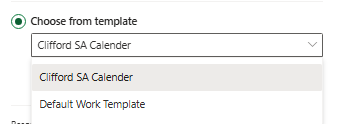
Good day MS Project Community, I am in need of some assistance, My question to the forum is: Could I create a custom calendar template that takes public holidays, weekends, and an annual shutdown into consideration? I would love to be able to use this in Project for the Web. The snapshot attached above are the 2 templates that were prepopulated in Project before I started working here and I do not have the admin rights to change these. Could I please get some assistance on how to create a new template that can be utilized within Project for the Web? Thank you in advance56Views0likes0CommentsProject accelerator deploy error
I need help with an error that occurs in the deployment of Project accelerator. The error is as follows: "Flow client error returned with status code "BadRequest" and details "{"error":{"code":"InvalidOpenApiFlow","message":" Flow saving failed with code 'OpenApiOperationParameterValidationFailed' and message 'Input parameter 'item' validation failed in workflow operation 'Create_a_new_record': The API operation 'CreateRecord' is missing required property 'item/msdyn_dayspermonth'.'."}} ". After the error occurs, reloading the page informs that the accelerator was implemented successfully. When working on the Accelerator we get an incomplete deploy, missing some features like "project suggestions" or some tab names, like the picture: Also we cannot edit the form, with the following message: This form is in a managed solution and cannot be edited862Views1like1Comment