online
291 TopicsData access after Project Online (PWA) retirement
As the retirement of Project Online (PWA) approaches, some questions have come up regarding what will happen to the data and related content. I’d like to ask if anyone has information or guidance on the following points: What happens to the data currently stored in Project Online after the retirement date? Will this data still be available for viewing, export, or migration after that date? If so, for how long? Regarding the SharePoint sites linked to PWA, will they remain available? Will it still be possible to access or modify their content? Does Microsoft plan to publish official guidance on this transition? Any references or practical experiences on this topic would be greatly appreciated.3.7KViews1like16Comments
How to download MS Project Plans along custom fileds including data
I have Project plans in project online. I am opening the plan in ms project, custom fields data is getting loaded. But when i try to save the file in local desktop, schedule data is saving but custom fields data is not coming only column names are coming. How to save the file along with task level custom fields with data in local desktop118Views0likes0Comments
People Picker in Project Detail Pages - Not Working for Already Created Projects
Hi, I have a non-mandatory field (say, "Expert") in PDP. When I create a new project, I can select the "Expert" using People Picker. When I try to open an existing project (to assign/reassign an "Expert") the People Picker feature does not work. Custom scripting is already activated. Any insight from users, as to what configuration changes should be made, would be much appreciated. Thanks329Views0likes5Comments
Project Server - All Project Deliverables in One View?
Using on-premises Project Server, there is a way to mark a task as a Deliverable in Project (thru Manage/Edit Deliverables button in Project Professional) and Project Server will display those deliverables on the PDP / Project Site page in Project Server. Is there a way to create a view or report which shows all deliverables for all projects that are currently in Project Server? This way, people do not have to go into each individual schedule or PDP to see all upcoming deliverables for the company.Solved205Views0likes1CommentCreating a Project through Graph API "msdyn_CreateProjectV1"
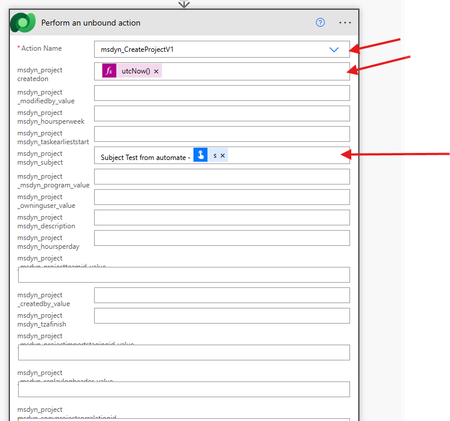
I want to create a new Project online plan using Microsoft Graph API, so i used this end point and action inside my flow:- now the action will run successfully, and it should have created a new Project with subject = "Subject Test from automate", as follow:- but i can not find the new project inside the UI:- any advice?220Views0likes1Comment
Cannot Force Checkin: Project Web App
My team got project stuck in the queue and we can't publish any other projects as 2 jobs got stuck and causing other projects to continue to be in a wait. I tried to 1) Cancel the publish job (not successful) force checkin a project (not successful either) and it continues to stay in this state for several hours "Waiting To Be Processed" Please help!!1.5KViews0likes2CommentsProject online REST API for Project Manager approval on Task status update
Hi all, I am currently working on a custom solution that integrates multiple functionalities interacting with Project Online data. As part of a new requirement, whenever a team member submits a task update in timesheet, I aim to provide Project Managers with the ability to approve task updates directly from a custom page. My initial approach was to utilize the Project REST API (_api/ProjectServer), but I have not been able to locate an appropriate endpoint that supports this functionality. Could anyone kindly guide me to the specific REST API endpoint (if available) that can be used to approve task updates? Any insights or alternative approaches would be greatly appreciated. Thanks in advance. Regards Shruti Vyas306Views0likes1CommentIntegrating ESS Utumishi with Microsoft 365 and SharePoint: Best Practices and Insights
I’m working on a project to integrate ESS Utumishi, the Tanzanian government’s Employee Self-Service platform, with modern content management solutions like Microsoft 365 and SharePoint. My goal is to improve document management, automate HR workflows, and enhance overall employee engagement through a seamless digital experience. Has anyone worked on similar integrations or faced challenges in connecting government HR systems with Microsoft tools? I’d love to hear about any best practices, lessons learned, or success stories that could help guide this project, especially in terms of improving system efficiency and user adoption in the public sector.123Views0likes0Comments
Project Online - Business Drivers matrix table in Power BI
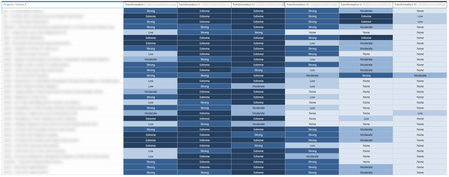
Hi! After classifying our ongoing projects we could get to this matrix table in Project Online: There are 6 Business Drivers where each project contributes on a rating scale (None, Low, Moderate, Strong, Extreme) I am stuck on Power BI to find the relation between each Project, the rating scale and each Business Driver to be able to build the same matrix table in Power BI: Any help would be much appreciated!607Views0likes6Comments
Querying Custom Text Fields from MS Project Online
I am trying to call custom text fields (Text1, Text2, ...., Text30) from MS Project Online using OData feed i PowerBI. When I use {pwaUrl}/_api/ProjectData I am able to get the default fields on top of the custom enterprise fields but not the custom Text fields. Is there any way to query these custom text fields?185Views0likes1Comment