Recent Discussions

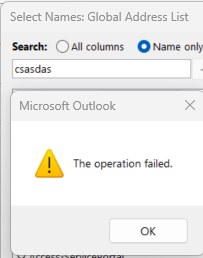
Outlook - Online mode address book search fails with "Operation failed" when Name only is ticked.
I hope you had this issue and managed to solve 😂 pulling my hair already. Symptom: In classic Outlook for Windows, open the Address Book → set Search to Name only → type any single character → "The address book operation failed." Switch to More columns and the exact same search works fine. Ctrl+K resolution in the To: field works. OWA people search works. Mail flow is fine. It's only the Name-only ANR seek in the dialog. Environment: Exchange hybrid, mailbox in Exchange Online, dir-syncedfrom on-prem AD via Entra Connect Classic Outlook for Windows, online mode (Cached Mode is not permitted here — this is the constraint, I can't just flip it) Affects all users, all machines What I've already ruled out: Test Result Other address lists (Contacts, All Users) Same failure Ctrl+K in To: field Works Safe mode (outlook.exe /safe) Same failure — not add-ins Multiple accounts / multiple machines Same failure Brand-new mail profile Same failure — not profile corruption Addressing order (Tools > Options) GAL set first, not "Choose automatically" Off corporate network (5G) Same failure AddressBookPolicy / OfflineAddressBook on mailbox Both blank (inherit defaults) Get-OfflineAddressBook Default OAB, IsDefault: True, web dist enabled Get-GlobalAddressList Default GAL, IsDefaultGlobalAddressList: True, stock default RecipientFilter13Views0likes0CommentsHVE for Microsoft 365: When to Use It, When Not To, and Who Should Be Allowed to Send at Scale
Microsoft recently announced the General Availability of High Volume Email for Microsoft 365, also known as HVE, in Exchange Online. This is an important and long-awaited capability for organizations that need to send large volumes of internal email from applications, devices, or line-of-business systems without using regular user mailboxes as bulk-sending engines. But HVE should not be misunderstood. It does not mean that every mailbox in Exchange Online should now be used for mass email. It does not mean Exchange Online has become a general-purpose marketing platform. And it does not remove the need for proper outbound email governance. Why HVE Matters For years, many organizations have used regular Exchange Online mailboxes, shared mailboxes, or service accounts to send automated messages from applications, scanners, monitoring platforms, ticketing platforms, and custom business applications. That approach creates several problems. Standard mailboxes are designed for human and business communication, not for sustained high-volume automated traffic. Exchange Online has recipient limits, message rate limits, outbound spam protections, and tenant-level controls to protect the service and reduce abuse. HVE introduces a more appropriate model for specific high-volume scenarios. Instead of using a normal mailbox for automated traffic, organizations can create dedicated HVE accounts and use specific SMTP endpoints, admin controls, reporting, and governance for approved high-volume internal messaging scenarios. What HVE Is Designed For HVE is designed for automated, operational, and transactional messaging at scale, primarily for internal recipients within the tenant. Examples include: Internal application notifications. Line-of-business system messages. Device-generated messages. Operational alerts. Security advisories. Internal workflow communications. Monitoring platform alerts. IT service notifications. Large-scale internal announcements generated by systems. This is especially relevant when the organization needs to send messages at scale but still wants to keep the workload within Microsoft 365 governance and Exchange Online mail flow. In practical terms, HVE is useful when the sender is not a human user, but a controlled business system. What HVE Is Not HVE is not a replacement for marketing platforms. HVE is not a general-purpose internet bulk email engine. HVE is not a way to bypass Exchange Online sending limits for external campaigns. HVE is not the correct platform for newsletters, promotional campaigns, large-scale customer communication, or high-volume external transactional email. For external transactional, marketing, or customer-facing bulk email, organizations should evaluate platforms designed for that purpose, such as Azure Communication Services Email, SendGrid, Amazon SES, Mailchimp, Brevo, or another specialized delivery platform. When to Use HVE Use HVE when the workload matches these characteristics: The sender is an application, device, service, or business system. The recipients are primarily internal users in the Microsoft 365 tenant. The volume is higher than what should be sent from a standard mailbox. The workload is operational, automated, or transactional. The organization needs centralized Microsoft 365 administration and reporting. The organization wants to avoid impacting user mailbox sending limits. The use case is approved, documented, monitored, and governed. Good examples: A security platform sending internal security advisories. A monitoring system sending infrastructure alerts to internal teams. A business workflow system sending high-volume approval or status notifications. An IT service platform sending internal notifications. A service management platform sending ticket updates to internal users. A device management system sending operational messages to internal teams. When Not to Use HVE Do not use HVE when the workload is external bulk email. Avoid HVE for: Marketing campaigns. Newsletters to customers. Promotional email. Mass external invitations. External transactional email at scale. Customer invoices and receipts in high volume. OTP or password reset flows for external users. External portal notifications. Any workload where deliverability, bounce handling, reputation management, unsubscribe handling, analytics, or customer consent management are required. Those workloads require a platform designed for external delivery, reputation management, suppression lists, opt-out, tracking, bounce handling, and compliance. Who Should Be Allowed to Use HVE HVE should not be enabled casually for every team or every application. It should be treated as a controlled platform capability. Recommended eligible senders: Approved line-of-business applications. Corporate systems owned by IT, Security, Operations, Facilities, or Service Management teams. Managed devices or services with a clear business purpose. Internal platforms that send operational messages to employees. Applications with documented ownership, authentication, monitoring, and expected volume. Recommended non-eligible senders: Normal users. Shared mailboxes used by humans. Marketing teams sending to external audiences. Unmanaged scripts. Legacy systems with no owner. Applications with unknown volume. Systems that send to external recipients at scale. Any application using HVE just to avoid standard mailbox limits. The core principle is simple: HVE should be enabled for workloads, not for convenience. Governance Model Before enabling HVE, organizations should define a governance model. At minimum, each HVE account should have: A named business owner. A technical owner. A documented purpose. Expected daily and monthly volume. Recipient scope. Authentication method. Monitoring process. Incident response path. Decommissioning criteria. Review frequency. HVE accounts should not become invisible service accounts that nobody owns. They should be treated as privileged communication identities. Security and Authentication HVE supports OAuth authentication, and Microsoft provides guidance for restricting OAuth authentication to specific Microsoft Entra ID applications. This is important because organizations should avoid broad, uncontrolled access. They should restrict which applications can send through each HVE account, monitor usage, and separate workloads by purpose. For example: One HVE account for security alerts. One HVE account for monitoring systems. One HVE account for IT service notifications. One HVE account for internal operational communications. This separation improves visibility, investigation, accountability, and risk containment. HVE vs Standard Exchange Online Mailboxes A standard Exchange Online mailbox should be used for normal human communication. A shared mailbox should be used for collaborative business processes. An HVE account should be used for approved high-volume internal system email. A dedicated external delivery platform should be used for marketing, bulk external communication, or high-volume transactional email. Scenario Recommended Platform Human business email Exchange Online mailbox Team or department mailbox Shared mailbox Low-volume application notifications Standard Exchange Online, if approved High-volume internal system notifications HVE Internal operational alerts at scale HVE Marketing campaigns Marketing platform External transactional email Transactional email service Customer newsletters Marketing automation platform OTP/password reset for external users Dedicated transactional platform External bulk email Dedicated bulk email provider HVE and the Mailbox External Recipient Rate Limit Cancellation Microsoft also announced that the Mailbox External Recipient Rate Limit in Exchange Online was cancelled indefinitely. However, that cancellation should not be interpreted as permission to use Exchange Online for uncontrolled bulk sending. Microsoft was clear that other limits remain unchanged, including the existing Recipient Rate Limit and the Tenant-level External Recipient Rate Limit. That distinction is important. The cancellation of one mailbox-level external recipient limit does not remove the need for proper architecture. Exchange Online still has service limits. Outbound spam controls still apply. Tenant-level protections still matter. And HVE is still not a marketing engine. Practical Architecture Decision Before enabling HVE, ask these questions: Who is sending? Is the sender a human, shared mailbox, application, or device? Who are the recipients? Are they internal or external? What is the expected volume? Is the workload operational, transactional, promotional, or human communication? Does the business need Microsoft 365 mail flow and governance? Does the use case require bounce handling, unsubscribe, tracking, or reputation management? Is the application properly authenticated and monitored? Who owns the account? Who approves the sending pattern? Who responds if the account is abused? If the workload is internal, automated, high-volume, and business-approved, HVE may be the right answer. If the workload is external, promotional, customer-facing, or marketing-driven, use a dedicated email delivery platform. Recommended Enablement Approach Organizations should enable HVE in phases. First, identify existing systems currently using user mailboxes, shared mailboxes, or SMTP AUTH for automated sending. Second, classify each workload as internal, external, operational, transactional, marketing, or human communication. Third, migrate only approved internal high-volume workloads to HVE. Fourth, move external high-volume workloads to dedicated email delivery platforms. Fifth, monitor usage and review HVE accounts regularly. This avoids turning HVE into another uncontrolled sending layer. Conclusion High Volume Email for Microsoft 365 is an important addition to Exchange Online. It gives organizations a native way to support high-volume internal system messaging without using standard mailboxes for automated high-volume traffic. But HVE is not a free pass for bulk email. It is not a marketing platform. It is not a replacement for transactional email services. And it should not be enabled for every mailbox or every application. The right approach is workload classification. Use Exchange Online for corporate communication. Use HVE for approved high-volume internal system messaging. Use dedicated platforms for external bulk, marketing, and transactional email. The question is not only: “Can this system send email through Microsoft 365?” The better architectural question is: “What type of email is this, who is the audience, and what is the correct platform for this workload?” That is where proper email architecture begins.392Views0likes3CommentsWill server to server migration work cross-domain/cross-active directory?
Back in 2016, I upgraded a client from Exchange 2008R2 to Exchange 2016. The way I did it was "the textbook way" I built the new Exchange 2016 server on the same network as the 2008R2 server, and migrated the mailboxes from the old server to the new server, using the migration tool in the ECP interface, then deinstalled the server. It was a pretty cake migration except for one problem - the internal AD domain name was "wonkulating.com" however the client had failed to maintain public registration for that domain, and had registered "wonkulatinggronkulator.com" for use on the Internet. So I set it up so that all internal and external access was to "email address removed for privacy reasons" User were happy, and the IT dept was able to kick the migration can down the road again. Well fast forward a decade. Now I'm an employee for the former client and worse I manage the IT group there - so my can-kicking bandaid has come back to haunt me now that it's time to update to exchange SE. (it also adds to the fun that there's a couple hundred more users on the network than there were a decade ago) I decided to cut the Gordion knot and kill off "wonkulating.com" since there's not a snowball's chance in hades we could afford to buy it now. So I built a new AD for wonkulatinggronkulator.com, and did the jiggery pokery with the DNS servers and setup trust between the forests and so on and now, servers on both domains are happy happy, I can apply both wonkulating.com and wonkulatinggronkulator.com security objects to server filesystems, users can login to either domain at any workstation regardless of what domain the workstation was joined to, and so on, and we are getting ready to migrate the users and workstations off the old AD and on to the new AD. My question to all of you is this. I'm planning on installing Exchange SE into the new AD forest wonkulatinggronkulator.com and we will move the users over in groups of 10 or 20 or so, so that staff can make sure everyone is happy, can login, get at their files, etc. But what I am wondering is if the exchange servers will cooperate with each other. I'm not using ADMT or any of that to move user objects over to the new server so userIDs will exist in parallel for some time to allow a gradual migration of file and application servers. (we are too big now for the come-in-on-weekend-and-hose-everything-up-in-a-mad-rush-migration-fueled-with-pizza-and-mountain-dew routine) It would be very nice to just kick off a migration job on one of the mailservers and have the inbox copied over, but if I have to I can tear out the mailbox on the old server into a PST file and jam it into the new server via import. Documentation on microsoft.com seems to say at some points the servers will cooperate with each other and at other points it seems to say each mailserver is atomic. Like most orgs we have a bastion host mailserver that touches the actual Internet, the exchange server is only allowed to provide OWA services to the Internet, while the bastion host server (running Linux, by the way) does the actual heavy lifting of spam scanning and filtering out scam mails. Only cleaned mail is passed to the on-prem exchange server. So if the servers -won't- cooperate cross-forest, then I can adjust mail routing on a per-user basis on the bastion host to send incoming mail to the server in wonkulating.com or the server in wonkulatinggronkulator.com depending on which server they are on. Technically, the ACTUAL user ID on the old AD is WONKULATING\exampleuser while on the new AD it will be WONKULATINGGRONKULATOR\exampleuser, so the servers SHOULD be smart enough to know they are different userIDs - except that the server on wonkulating.com was hacked up by me a decade ago to believe it was authoritative for BOTH "email address removed for privacy reasons" and "email address removed for privacy reasons" email addresses and that they were the same userID basically. So, I don't know what's going to happen until I try it and all of the documentation I can find on this matter is pretty fluffy, as it assumes you are moving from a domain name you own to a different domain name you own because you bought a company or something, or you are moving from one mailserver to the other inside of the same forest/domain. Lastly, suggestions to install Exchange SE into wonkulating.com then move it later into wonkulatinggronkulator.com will be /dev/nulled immediately, I'm done kicking the can down the road. There's more than 20 years of garbage in the wonkulating.com AD and the nonsense described here is just the tip of the iceberg. (you should see the GPO's in wonkulating.com, simply horrifying) Thanks!122Views0likes5CommentsImport Bulk PST to Office 365 Step by Step | Stellar Migrator for Outlook
Learn how to import bulk PST files to Office 365 (Exchange Online) step by step using Stellar Migrator for Outlook. This tutorial walks you through automating the migration of multiple PST mailboxes to Exchange Online — no manual uploads, no scripting. Stellar Migrator for Outlook automates bulk PST-to-Office 365 migration, letting you map source PSTs to target Office 365 mailboxes (Primary, Archive, or Public Folder), apply filters, and run the whole job with minimal effort — without worrying about duplicate emails. It's a reliable way to move legacy mailboxes into Office 365. Using a CSV file, you can migrate unlimited PST files to Office 365 users from the same system or across networked systems. The software also supports incremental migration, so you can resume or re-run a job and only new items get imported — no duplicates, no reprocessing what's already migrated. Learn more: https://www.stellarinfo.com/import-pst-to-office-365.php53Views0likes1CommentExchange Online PowerShell Updates to 3.10.1 to Fix CBA
Microsoft rushed out version 3.10.1 of the Exchange Online management PowerShell module to fix a problem with certificate-based authentication. It seems like a change in an internal Microsoft identity platform caused the tokens issued after a successful connection to Exchange Online to not authorize the execution of further cmdlets. To their credit, Microsoft fixed the issue, but is this the kind of thing that should be caught in testing? https://office365itpros.com/2026/07/27/exchange-online-management-3-10-1/56Views0likes0Comments
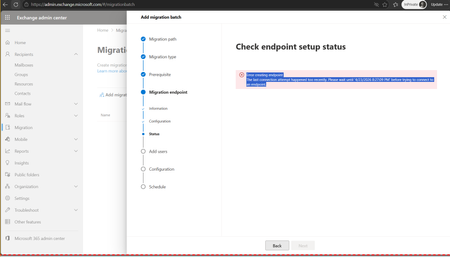
Gmail to Microsoft 365 Migration Issue Open for 7+ Days – Seeking Guidance or Escalation Path
I’m facing an issue with a Gmail to Microsoft 365 migration that has been open for more than 7 days, and I’m looking for guidance or an escalation path from the community. Scenario: Migration type: Gmail to Microsoft 365 Issue started: April 22 Current status: Stuck with no clear resolution What’s happening: The support ticket has been active since April 22. However, the updates I’ve been receiving are generic responses such as “we are working on it” and “this has been prioritized.” Despite multiple follow-ups, there has been: No clear root cause identified No ETA provided No technical breakdown of the issue I also requested a callback from the assigned manager and technical lead to better understand the situation, but the communication has remained email-only with repeated status updates. What I’m looking for: Has anyone faced similar issues during Gmail → Microsoft 365 migrations? Are there known blockers or common causes that could lead to this kind of delay? What is the recommended escalation path when support is unable to provide technical clarity or ETA? Any insights, workarounds, or guidance would be highly appreciated. Thank you in advance.314Views1like2Comments
Apple Mail EWS sync intermittent after EwsEnabled=True + AppID allow list
We're a small Microsoft 365 Business tenant (Exchange Online Plan 1/2 mix). One user's Apple Mail (macOS, Exchange/EWS account) intermittently stops syncing new mail — Connection Doctor shows a healthy green "Connection and login to server succeeded," but Get New Mail/manual fetch and forced Sync All Accounts return nothing new, while the same mail is already present via ActiveSync on the same user's iPhone/iPad. Symptoms recur every 1–3 days after temporarily resolving. Troubleshooting completed so far: - Confirmed autodiscover/External URL correctly resolves to outlook.office365.com/EWS/Exchange.asmx - Confirmed EWS enabled at the mailbox level (Manage email apps in admin center) - Found EwsEnabled was blank/null at the org level — set to $true via Set-OrganizationConfig - Configured EwsAllowedAppIDs to include Apple's app ID (f8d98a96-0999-43f5-8af3-69971c7bb423, "Apple Internet Accounts") - Fully removed and re-added the Mac Mail account after the above org-level change - Restarted the Mac, tried DNS changes (8.8.8.8/8.8.4.4), ruled out router-level filtering - Verified no antivirus/VPN/security software on this Mac's network Despite all this, the issue persists intermittently. Notably, a second mailbox on the same tenant, used with Apple Mail on a different Mac (different macOS version, different physical location/network), does NOT experience this issue — so it doesn't appear to be a blanket tenant-wide EWS disruption. Given Apple Mail's continued reliance on EWS ahead of the October 2026 phased disablement, and Microsoft's acknowledgment that Apple Mail for Mac is a heavy EWS consumer they're working with Apple to migrate to Graph, I'm wondering: 1. Could this be related to the ongoing "scream test" EWS disruption testing Microsoft has mentioned, and if so, is there a way to check whether a specific mailbox has been included in that testing? 2. Any known differences in EWS session/connection handling between macOS versions that could explain one Mac being affected and not the other? 3. Anything else worth checking tenant-side (throttling policies, CAS mailbox settings, conditional access rules) that could apply per-mailbox rather than tenant-wide? Happy to provide EWS usage report data or run any diagnostic commands if it helps others hitting the same thing before October.73Views0likes1Comment
account only remote wipe device
Hello, My o365 account is E3. My phone is android, I installed outlook on my phone. I tested to wipe the outlook on my phone with my admin account, but after I click the "account only remote wip1e device", it showed "Saving in progress", then showed a red "X". The client is Outlook for iOS and Android, client type is outlook not EAS. Do I need more steps to wipe outlook on my phone? or a role/permission is missed? Thanks and regards, Adsnow68Views0likes1CommentReference Architecture for an On-Premises AI Assistant for Microsoft Exchange.
Bringing Secure AI Capabilities to On-Premises Microsoft Exchange Many organisations continue to operate Microsoft Exchange within their own data centres because of regulatory requirements, data-residency policies, security considerations, operational dependencies, or the need to maintain complete control over sensitive email information. At the same time, users increasingly expect Artificial Intelligence to help them manage growing email volumes, understand long conversation threads, locate information quickly, analyse attachments, and prepare relevant responses. This creates an important question: Can organisations introduce AI-assisted email capabilities without migrating their on-premises Exchange environment or sending email data to public AI services? With the right architecture, the answer is yes. The opportunity for AI in on-premises Exchange Users spend a significant amount of time reading lengthy email chains, searching for previous discussions, identifying action items, reviewing attachments, and preparing responses. An AI-powered email assistant can help reduce this effort while continuing to operate within the organisation’s controlled infrastructure. Such a solution can be integrated with Microsoft Exchange through an Outlook Web App, or OWA, Add-In. The Add-In provides AI-assisted capabilities within the familiar Outlook Web interface and can be centrally deployed to selected users or Active Directory groups by the Exchange administrator. The purpose is not to replace Exchange or change the way emails are managed. Instead, it introduces an intelligence layer that helps authorised users interact more efficiently with the email information they are already permitted to access. Key capabilities of an AI-powered Exchange Email Assistant 1. Email and conversation summarisation The assistant can summarise an individual email or an entire conversation thread. Instead of reading every message in a long chain, the user can receive a structured summary covering: The purpose of the conversation. Important decisions and commitments. Key action items. Deadlines and pending responses. Relevant information available in attachments. The summarisation process can consider both incoming and sent messages so that the complete context of the conversation is preserved. 2. Contextual draft reply generation The assistant can prepare a suggested response based on the complete email thread and the user’s instructions. Users may select an appropriate tone, such as: Formal. Neutral. Technical. The generated response is placed in the user’s Exchange Draft folder or displayed for review within the OWA Add-In. A critical control is that the AI assistant does not independently send the email. The user remains responsible for reviewing, editing, approving, and sending the response. This human-review approach helps organisations adopt AI while retaining accountability over external and internal communications. 3. Natural-language mailbox search Traditional mailbox search generally depends on exact keywords, sender names, subjects, or date filters. An AI-enabled search experience allows users to search their mailbox using natural-language questions, such as: “Find emails received last month regarding the infrastructure renewal.” “Show unread emails from the finance team that require my approval.” “Find the discussion where the customer confirmed the delivery date.” “Summarise emails from a particular sender concerning the purchase order.” The solution can combine semantic search with traditional keyword-based search to improve the relevance of results. Users can also apply filters such as sender, subject, date range, read or unread status, and conversation thread. 4. Attachment analysis and OCR Important information is often contained within email attachments rather than the email body itself. An on-premises AI assistant can process supported documents, including: PDF files. Microsoft Word documents. Microsoft Excel files. Scanned documents. Image-based attachments. Optical Character Recognition, or OCR, can be used to extract information from scanned or image-based documents. The extracted content can then support email summarisation, contextual draft generation, and mailbox search. For example, a user may ask the assistant to prepare a response based on the commercial terms or delivery date mentioned in an attached document. Maintaining strict mailbox privacy Mailbox privacy is one of the most important architectural considerations for an enterprise AI email assistant. Each user must only be able to access and process emails from their own authorised mailbox. Information retrieved from one user’s mailbox must never become available to another user. This isolation should be enforced across every layer of the solution, including: User authentication. Exchange access tokens. Application sessions. Search indexes. Vector embeddings. AI prompts and responses. Cache and temporary data. Audit logs. The backend should validate the authenticated user and verify mailbox ownership for every request made to Exchange. Where vector search is used, mailbox data should be stored in user-isolated collections, partitions, or namespaces. This helps prevent cross-user retrieval at the data layer rather than relying only on controls within the user interface. Operating without public cloud AI services For organisations with strict security or data-sovereignty requirements, the AI models and supporting components can be deployed within the customer’s infrastructure. A fully on-premises architecture may include: A locally hosted Large Language Model. An on-premises embedding model. A re-ranking model. A vector database. A keyword-search engine. A backend API layer. An OCR or document-intelligence service. A secured OWA Add-In. Integration with Active Directory. Audit, monitoring, and administrative controls. The entire solution can operate within an internal network without sending email content, attachments, prompts, or generated responses to public AI platforms. This model can also support air-gapped environments where internet access is either restricted or completely unavailable. Centralised deployment and administration The OWA Add-In can be deployed centrally through Exchange administration controls. Administrators can assign the Add-In only to selected users or security groups. Employees who are not assigned the solution will not see the AI assistant within their Outlook Web interface. Administrative controls may include: User and group assignment. Enabling or disabling individual AI features. Summarisation-only mode. Draft-generation controls. Attachment-size restrictions. Session and retention policies. Model and performance settings. Usage monitoring. Audit logs. Resource utilisation monitoring. These controls allow organisations to begin with a limited group of users and gradually extend the solution after validating performance, security, and user adoption. Security and governance considerations Introducing AI into an enterprise email environment requires more than deploying a language model. The complete solution should be designed around security, privacy, governance, and responsible AI principles. Important considerations include: Authentication and authorisation The solution should integrate with the organisation’s existing identity infrastructure, such as Active Directory, and enforce role-based access controls. Encryption Email content, attachments, indexes, logs, and other sensitive information should be encrypted both in transit and at rest. Data retention Organisations should clearly define whether AI prompts, generated summaries, and draft content are retained. In privacy-sensitive environments, generated content may remain available only for the active session and should not be permanently stored by the AI application. Auditability The system should record relevant operational events, such as the user identity, requested function, timestamp, and processing status. Depending on the organisation’s policy, the actual email or generated response content may be excluded from audit logs. Human oversight AI-generated responses should be treated as suggestions. The user must review and approve them before sending. The assistant should also disclose its limitations and avoid presenting uncertain outputs as confirmed facts. Performance and capacity On-premises AI processing depends on available compute, memory, storage, and GPU resources. The architecture should account for: Number of concurrent users. Average mailbox size. Volume and size of attachments. Expected response time. Model size. Search-index growth. OCR processing requirements. High availability and backup requirements. A practical adoption approach Organisations do not need to introduce all capabilities at once. A controlled proof of concept can begin with a limited number of users and a defined set of features. A practical implementation sequence may include: Phase 1: Email summarisation Start with individual email and conversation-thread summaries. This provides immediate value while keeping the initial architecture relatively focused. Phase 2: Contextual draft replies Introduce draft generation with mandatory user review and clearly defined tone controls. Phase 3: Attachment processing Enable OCR and document parsing for supported attachments. Phase 4: Intelligent mailbox search Index authorised mailbox content and introduce natural-language search with strict per-user isolation. Phase 5: Wider deployment After security testing, performance validation, and user feedback, extend the solution to additional departments or user groups. Conclusion Organisations operating on-premises Microsoft Exchange do not necessarily need to choose between maintaining control over their email environment and adopting AI-assisted productivity capabilities. A carefully designed on-premises AI email assistant can support email summarisation, contextual draft preparation, attachment analysis, and natural-language mailbox search while keeping sensitive information within the organisation’s infrastructure. The most important success factors are not limited to the AI model itself. Identity controls, mailbox isolation, human approval, auditing, infrastructure sizing, and data-governance policies are equally important. For organisations evaluating private, sovereign, or air-gapped AI, on-premises Exchange can become an effective starting point for introducing practical AI capabilities in a secure and controlled manner. Connect with us to implement this solution in your organization. About the Author Vinay Prakash is the CEO of Glorious Insight and an Ex Microsoft Employee. He works with organisations on Data, Artificial Intelligence, Microsoft cloud technologies, enterprise applications, and secure on-premises AI solutions. For technical discussions related to private or on-premises AI adoption, he can be reached at: Email: email address removed for privacy reasons73Views0likes0CommentsExchange 2019 + ADFS is it possible to configure ModernAuth for third-party Android mail clients?
Hello, Our organization operates under Uzbekistan's data localization and banking secrecy regulations, which require customer and corporate data — including email — to remain on infrastructure physically located within the country and under direct regulatory oversight. This precludes the use of cloud-hosted mail services such as Microsoft 365/Exchange Online, and requires a fully on-premises Exchange deployment with local identity federation (AD FS) instead of Azure AD. Environment: Exchange Server 2019 CU14, single server (MX01), pure on-premises. AD FS is registered as an AuthServer (Type: ADFS), no Azure AD / hybrid tenant involved. The AuthServer is configured correctly: AuthorizationEndpoint and TokenIssuingEndpoint are populated, IsDefaultAuthorizationEndpoint: True, and DomainName points to our mail domain. Realm/ServiceName are configured as well. Symptom: The native iOS Mail client (account added manually, no MDM profile) correctly redirects to our AD FS login page on first setup — the full Modern Auth flow works. A third-party EAS client (Nine by NitroDesk, Android) never receives an OAuth challenge at all — it falls back to Basic authentication. Get-ActiveSyncVirtualDirectory/Set-ActiveSyncVirtualDirectory in this build simply has no -OAuthAuthentication parameter (unlike EWS/OAB). Log finding: When testing with the Nine client, the following was captured in the Exchange HttpProxy/Eas logs: S:ServiceCommonMetadata.OAuthError=Flighting is not enabled for domain 'webmail.<domain>'. S:ServiceCommonMetadata.OAuthErrorCategory=OAuthNotAvailable Questions: What exactly controls "Flighting" for EAS OAuth in a pure on-prem Exchange 2019 CU14 + AD FS scenario (no Azure AD)? Is there a documented, supported way to enable it (New-FlightOverride? something else)? Is EAS Modern Auth even supported for an arbitrary/generic OAuth client (not Apple, not Outlook) in this scenario, or is it effectively an allowlist limited to specific client_ids (Apple Native Mail / Outlook)? How does native iOS Mail get redirected to AD FS without ever receiving an authorization_uri in the EAS/Autodiscover 401 challenge — is there an undocumented discovery path (e.g., hardcoded per registered client_id)? Thank you in advance for any insight.49Views0likes1CommentIs the Archive mailbox self-help diagnostic working for anyone?
Just curious: is the archive mailbox self-help diagnostic at https://aka.ms/PillarArchiveMailbox working for anyone? When I run it, instead of getting results about the user whose UPN I entered, I get this: The following issues were found with your archive mailbox. No account was found for [The UPN of my admin account]. Make sure you've entered the correct email address or create a new account with that name. For more information, see Add users to Office 365. I tried opening a ticket with Microsoft Support, but they refused to work on it without requiring me to do all the legwork of gathering logs and HAR traces and who knows what else, despite the fact that the support agent was able to replicate the exact same issue in his lab.Solved159Views0likes3CommentsUnauthorized: You don't have permission to access this page or perform this action
I frequently encounter an 'Unauthorized' error when attempting to manage Distribution Lists in the Exchange Admin Center, even while logged in with Global Administrator or Exchange Online Administrator privileges. Is this a known widespread issue, or is it specific to the configuration of these individual tenants?55Views1like1CommentThe Demise of the OWA Light Client
On July 8, Microsoft said that they will retire the OWA Light client for Exchange Server in August 2026. But what happened to the OWA Light client for Exchange Online? It seems like Microsoft announced the retirement of OWA Light for Exchange Online in June 2024, but didn’t really make the fact clear in a blog post about consumer accounts. In any case, you can’t run OWA Light for Exchange Online, even if you wanted to. https://office365itpros.com/2026/07/17/owa-light-retirement/27Views1like0Comments
How to resolve Junk email validation error
I'm attempting to add an email address to all users mailboxes using Set-mailboxJunkEmailConfiguration. The command fails and returns an email address as the error (see below). I've dumped the three lists contained in the record and the address displayed in the error isn't in any of them. The lists are TrustedSendersAndDomains, TrustedRecipientsAndDomains, and BlockedSendersAndDomains. The command I'm running is: set-mailboxjunkemailconfiguration -identity email address removed for privacy reasons -TrustedSendersAndDomains @{Remove="email address removed for privacy reasons"} The error returns: Set-MailboxJunkEmailConfiguration: |Microsoft.Exchange.Data.Storage.JunkEmailValidationException|Junk email validation error. Value: mailto:email address removed for privacy reasons. Note: all email addresses have been changed. The error happens on a handful of accounts and the value is unique to each user. This error happens on approx. 20 of 5100 mailboxes. Any ideas?15KViews0likes10CommentsCross-Tenant Message Recall and Duplicate DDG Detection Enhance Exchange Online Messaging
Last week, the Exchange development team announced two interesting developments. Stopping duplicate dynamic distribution groups and cross-tenant message recall. Preventing tenants from creating duplicate DDLs saves service resources and might make tenants easier to manage. The real value is in cross-tenant message recall, which solves a problem by allowing users to recall messages delivered outside their tenant. The facility only works if the receiving tenant allows, but nothing can be done for messages delivered outside Microsoft 365. https://office365itpros.com/2026/07/15/cross-tenant-message-recall/40Views0likes0CommentsHow to Check Distribution Lists for Activity Over the Last 90 Days
The new Get-MessageTraceV2 cmdlet can fetch 90 days of message trace data, which means that we can check for inactive distribution lists using data for the last 90 days instead of being constrained to the last 10 days. This is done by running fetches for nine batches of traffic, each covering ten days. Distribution lists are still important to Exchange Online and Microsoft 365, and it’s good to know which distribution lists are in active use (and how much traffic they get) and which are not. All done with PowerShell. https://office365itpros.com/2026/07/09/inactive-distribution-list-2026/38Views0likes0Comments
Proper whitelisting of microsoft.com on dnswl.org
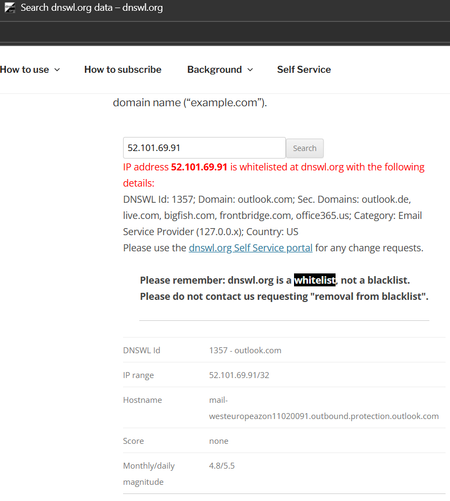
I keep having the issue that system-generated e-mails, e.g. on Trace Reports get classified as spam by the receiving e-mail provider. The sender address is email address removed for privacy reasons and the e-mails go to my M365 mailbox and are redirected to my external monitoring mailbox with that e-mail provider. The e-mail provider calculates a score that includes checking the sender's IP address 52.101.69.91 with dnswl.org . Unfortunately, that address is only whitelisted for outlook.com and some secondary domains, but not for microsoft.com. Of course, the issue also occurs with mailto:email address removed for privacy reasons and other IP addresses, so this is an example. It started to occur around two weeks ago, not sure if the provider changed policies or Microsoft changed the whitelisting; of course the provider refuses to overrun dnswl.org it, e.g. by own whitelisting. Who at Microsoft could I ask to fix that kind of issues? I don't find any appropriate category in their support menues, M365 support says the cannot help (TrackingID#2603031420001611). Thanks in advance for any hints, this is my first posting here, so please forgive me, if this is a dumb question.Solved107Views0likes2Comments
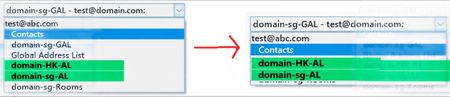
Can we hide default address lists in Outlook Address Book and show only custom ones?
There are existing Custom Address Lists. When users use the MS Outlook App (Office 2019) and open the Address Book, is it possible to hide the other address lists (including domain-sg-GAL, Global Address List, and domain-sg-Rooms), and only display the Custom Address Lists (domain-HK-AL and domain-sg-AL) — the ones shown in green in the photo?97Views0likes1Comment




Events
Recent Blogs
- We wanted to provide a reminder that Exchange 2016 and 2019 ESU program ends in October 2026.Jul 20, 20261.8KViews0likes5Comments
- We have released Security Updates for Exchange Server SE. Exchange Server 2019 and 2016 ESU updates only.Jul 14, 202621KViews1like44Comments