Recent Discussions

ServiceEndpointProxy activity on ADO Service Connection
I have an ADO Service Connection which I don't think is being used by any pipelines but I still see regular entries in the usage history like: Type: ServiceEndpointProxy Details: ServicePrincipalSignInAudience I've not been able to find any information about what causes this. What is causing this activity and will deleting the service connection adversely affect anything assuming this is the only thing using it?4Views0likes0CommentsAzure DevOps Test Plans Test retention - What influences setting back test outcome to Active?
Hey there, I just wanted to understand, what has an effect on the retention of the outcome of a test run. http:// https://learn.microsoft.com/en-us/azure/devops/test/how-long-to-keep-test-results?view=azure-devops#set-retention-period-for-test-results is explaining a setting for that. So, if I set the test retention setting „Days to keep..." to "Never delete" I'm expecting that the test outcome isn't touched after a specific time, right? Are there any other use cases which leads into setting the test outcome back to active automatically, like changing a requirement which is linked (tested by) to the test case? thx249Views0likes2Comments
Azure Admin Login
We have a client who has lost their access information to get into their Azure global admin. This is a non-profit institution that moved the ownership of their Azure account to another entity years ago now can't get in to the global admin for their entire Azure setup. Microsoft requires the global admin login to create a support ticket and in this case, how are they supposed to open up a case when they can't login. The customer is furious and now disputing the CC charges so we open an Azure support ticket 10 days ago for ourselves and since it's not a Critical issue, have gotten no response. This is untenable situation and there is no way to contact some one from MS without the login, how does this get resolved??5Views0likes0Comments
Microsoft 365 business tenant blocked – AADSTS5000228 – sole Global Administrator
Please create a service request for a blocked Microsoft Entra tenant and escalate it to the Data Protection / Tenant Recovery Team. Tenant: valtechme.onmicrosoft.com Tenant ID: 80940ba0-e307-45b2-b5fd-05b9759a4594 Error: AADSTS5000228 I am the sole Global Administrator. I am posting this here, since getting microsoft support is almost impossible , via phone, email or web. Can someone please help me with this issue.56Views0likes2Comments
Azure VM resize: PowerShell lists Dv5 sizes, but Azure Portal only offers Dv4
Hello, We recently migrated two production Azure virtual machines away from the retiring Bv1 family. Initially, the VMs were running as: Standard_B2ms Standard_B4ms Our goal was to move them to a newer supported VM family. Environment Region: France Central Managed OS disks (one Standard SSD, one Standard HDD/Standard LRS) SCSI disk controller Windows Server virtual machines What we observed After stopping and deallocating the VM, we queried the available resize targets using PowerShell: Get-AzVMSize ` -ResourceGroupName "<ResourceGroup>" ` -VMName "<VMName>" For one VM, PowerShell returned, among others: Standard_D2ads_v5 Standard_D2ds_v5 Standard_D2d_v5 Standard_D2as_v4 Standard_D2ds_v4 For the other VM, it returned: Standard_D4ads_v5 Standard_D4ds_v5 Standard_D4d_v5 Standard_D4as_v4 However, when opening VM → Size in the Azure Portal, the v5 sizes were not available. Only the following sizes appeared: Standard_D2as_v4 Standard_D4as_v4 As a precaution, we resized both VMs using the sizes proposed by the Azure Portal: Standard_B2ms → Standard_D2as_v4 Standard_B4ms → Standard_D4as_v4 The migration completed successfully and both VMs are running correctly. Question Can someone explain why there is a difference between: the sizes returned by Get-AzVMSize, and the sizes displayed by the Azure Portal? More specifically: Does Get-AzVMSize return VM sizes that are not actually valid resize targets? Does the Azure Portal apply additional compatibility or capacity checks that PowerShell does not? Is this related to: regional capacity, VM generation, disk controller, managed disk type, host cluster, or another compatibility requirement? Would you recommend staying on Das_v4, or should we plan another migration to Dads_v5 if possible? I am trying to understand the reason behind the different behavior rather than forcing the resize through PowerShell. Thank you in advance for your insights.26Views0likes2CommentsBLOG: Explaining Azure Local additions to licensing and hardware ecosystem - June 2026
Changelog: 1.2 - improved readability in licensing comparison section, adding sources. 1.1 - corrections for S2D + SAN / or SAN only, added link for solution comparison. 1.0 - initial version In this blog I will inform you about noteable additions and changes in terms of Azure Local Licensing and changes to the qualified, certified hardware required. Some of these changes also making it much easier re-using existing hardware with Azure Local, such as SANs. As this blog uses a couple of acronyms, please make yourself familiar with these in the terminology section at the end of this post, as it differs a bit from what is used with Windows Server. 🆕Change 1 - Licensing updates: Microsoft has released an addition to their all-known Azure Local pricelist and licensing conditions. What's new? Host Servicing Fee and revoked Azure Hybrid Benefits for Azure Local have been clarified based on its deployment decisions, when used with S2D + SAN or SAN and ALDO. Formerly revoked for M365 Local through product terms changes. With this Microsoft has introduced a new tier model for Azure Local Host fees based on the specific assignment of the deployed instance. Tier 1: Azure Local using Storage Spaces Direct (default) Tier 2: Azure Local for disaggregated deployments or hyperconverged deployments with external storage. Tier 3: Azure Local with disconnected operations, locally hosted control plane. Learn more about the the new Azure Local pricing tiers. Important note: Please always consult Microsoft Product Terms preferably over other pages, slides etc., understanding the definitive terms that apply. Any licensing statements written or displayed outside Product Terms - including this blogpost - are considered complementary. They might be incomplete or outdated given the context and respective licensing program that applies. 🆕Change 2 - Azure Local Solutions - hardware and ecosystem changes: Microsoft Azure Local Solutions page, formerly Azure Local Solution catalog, has seen a subtle but major overhaul some time ago. I would like to elaborate on these. The previously well-known "pyramid" of hardware certification and defined feature and support set for Azure Local has been revised. Tier 1: Premier Solutions Tier 2: Integrated Systems Tier 3: Validated Nodes The new hardware certification and defined feature and support sets: Tier 1: Premier Solutions Tier 2: Integrated Systems 𝗪𝗵𝗮𝘁 𝗵𝗮𝗽𝗽𝗲𝗻𝗲𝗱 𝗼𝗿 𝘄𝗶𝗹𝗹 𝗵𝗮𝗽𝗽𝗲𝗻 𝘁𝗼 𝘆𝗼𝘂𝗿 𝗩𝗮𝗹𝗶𝗱𝗮𝘁𝗲𝗱 𝗡𝗼𝗱𝗲𝘀? First, Validated Systems not to confuse with Azure Local validated hardware - have been entirely removed from the Azure Local Solutions | Microsoft, as a selectable solution category. Given the indications and filtering options - to my understanding - it is very unlikely that future hardware refreshes will be provided by the OEMs based on the Validated Systems. Thus I consider Validated Systems phased out / deprecated based on the readings on the Solution page, while there is no official announcement I am aware of. 𝗗𝗼𝗲𝘀 𝘁𝗵𝗶𝘀 𝘃𝗼𝗶𝗱 𝘆𝗼𝘂𝗿 validated solution 𝘆𝗼𝘂 𝗵𝗮𝘃𝗲 𝗱𝗲𝗽𝗹𝗼𝘆𝗲𝗱 𝗮𝗻𝗱 𝗿𝘂𝗻𝗻𝗶𝗻𝗴? I'd say no in most cases based on the age of the hardware and would like to advise the following: Brace and keep calm. 🙏🏻 Please consult the Azure Local Catalog for changes at your pace, identifying your deployed hardware. Checking for supportability (limited support or end of support statements). Validated Nodes are still visible in the Azure Catalog when choosing the filter options as shown in the picture, while the category filter itself has been removed. Please check with your Microsoft Partner and OEM, if deployed and still supported Validated Solutions actually got upgraded / or are upgradeable to Premier Nodes. I have been informed some are upgradeable from Validated Solution directly to Premier Nodes but this requires a redeployment of the nodes. How can I find my running Validated Nodes, when not listed (upgraded) in Premier Solutions or Integrated Systems? There is a selector in the Azure Local Solutions overview, call qualification generation. Wait, is that a kind of upselling? Speaking about the hardware for Azure Local, in my understanding this consolidation from a 3-tier model to a 2-tier model was long overdue and in my personal opinion I welcome it based on the technical changes and requirements Azure Local 23H2 and 24H2 implied. I wouldn't describe it as upselling and here is a pointer why: Some time ago, most Integrated Systems (Nodes) have been upgraded to Premier Solutions at no additional cost to partners and customers by Dell Technologies. While Dell took the lead, many OEMs followed suit. This also means that all fully supported deployed Azure Local nodes consistently support Quick Reboot, skipping lenghty BIOS POST time, when no UEFI firmware is pending for installation. Thankfully though, the inital Azure Local 23H2 approach by Dell, which involved pairing Premier Nodes with a mandantory layer of OEM provided software, has been dismissed. This approach required customers accepting the benefits of Premier Solutions while getting charged , storage capacity, CPU and RAM in return for a OEM specific management software and other OEM provided benefits. Vae victis, early adopters. While these remain supported, this is no longer the case for Premier Solutions of neither OEM offering these. What are your benefits when after the change potential upgrade? Please find this verbose comparison and also check the tabs on the top of the linked page: Comparison of Azure Local solutions. The benefits are huge, beneficial and practical for everyday operation, troubleshooting and support. Why the change? Microsoft has drastically improved the servicing workflow by using Azure Update Manager, Cluster Aware Update mechanisms and healthchecks, with the goal to near one-click automate the download, deployment and installation of SBE while also maintaining the Azure Local solution and keeping it up-to-date, with a friction-less and production-safe upgrade mechanism. This means monthly patching for Azure Local, since version 12.x builds based on Windows Server 2025 kernel were introduced, upgrade and monthly update reliability has finally met and exceeded expectations. Note that 11.x builds starting from 23H2 had some 'first release issues', but all teams at Microsoft worked extremely hard to overcome these. Learn more about the Azure Local releases and their update, upgrade and supportability terms. Azure Local Licensing Changes - Azure Hybrid Benefits for Windows Server Datacenter Tier / Scenario CSP Subscription (MCA) EA with SA MCA‑E with SA or Subscription Other Programs with SA 🟩 Tier 1 — Azure Local w. S2D Full AHB benefits Host fee pricing: 10$ per active core per month, unless exempted. 🖥️ No Azure Local fees or Windows Server Guest OS fees 🪪 WS Arc Management benefits elibigle 🔌 Connected 🖥️ No Azure Local fees or Guest OS fees 🪪 WS Arc Management benefits elibigle 🔌 Connected 🖥️ No Azure Local fees or Guest OS fees 🪪 WS Arc Management benefits elibigle 🔌 Connected 🖥️ Azure Host and Guest OS fees apply - you might license Guest OS with Windows Server Azure Subscription or through volume licensing. 🪪 WS Arc Management benefits elibigle 🔌 Connected 🟧 Tier 2 — Azure Local w. S2D + SAN or Azure w. SAN Azure Local host fees apply Host fee pricing: 20.1 $ per active core per month. No exemption. 🖥️ 💲Azure Host and Guest OS fees apply - you might license Guest OS with Windows Server Azure Subscription or through volume licensing. 🗄️S2D + SAN or SAN only 🪪 WS Arc Management benefits elibigle 🔌 Connected 🖥️ 💲Azure Host and Guest OS fees apply - you might license Guest OS with Windows Server Azure Subscription or through volume licensing. 🗄️S2D + SAN or SAN only 🪪 WS Arc Management benefits elibigle 🔌 Connected 🖥️ 💲Azure Host and Guest OS fees apply - you might license Guest OS with Windows Server Azure Subscription or through volume licensing. 🗄️S2D + SAN or SAN only 🪪 WS Arc Management benefits elibigle 🔌 Connected 🖥️ 💲Azure Host and Guest OS fees apply - you might license Guest OS with Windows Server Azure Subscription or through volume licensing. 🗄️S2D + SAN or SAN only 🪪 WS Arc Management benefits elibigle 🔌 Connected 🟥 Tier 3 — Azure Local ALDO Offline, no Azure Arc access Host fee pricing: Contact Microsoft or eligible Microsoft partner 🖥️💲 Azure Host and Guest OS fees apply - you might license Guest OS with Windows Server Azure Subscription or through volume licensing. 🪪 WS Arc Management benefits elibigle 🔌❌ fully disconnected 🖥️ 💲Azure Host and Guest OS fees apply - you might license Guest OS with Windows Server Azure Subscription or through volume licensing. 🪪 WS Arc Management benefits elibigle 🔌❌ fully disconnected 🖥️ 💲Azure Host and Guest OS fees apply - you might license Guest OS with Windows Server Azure Subscription or through volume licensing. 🪪 WS Arc Management benefits elibigle 🔌❌ fully disconnected 🖥️💲 Azure Host and Guest OS fees apply - you might license Guest OS with Windows Server Azure Subscription or through volume licensing. 🪪 WS Arc Management benefits elibigle 🔌❌ fully disconnected 🟦 M365 Local on Azure Azure Local host fees apply Host fee pricing: Contact Microsoft or eligible Microsoft partner 🖥️ 💲Azure Host and Guest OS fees apply - you might license Guest OS with Windows Server Azure Subscription or through volume licensing. 🪪 WS Arc Management benefits elibigle 🔌 Connected 🖥️ 💲Azure Host and Guest OS fees apply - you might license Guest OS with Windows Server Azure Subscription or through volume licensing. 🪪 WS Arc Management benefits elibigle 🔌 Connected 🖥️ 💲Azure Host and Guest OS fees apply - you might license Guest OS with Windows Server Azure Subscription or through volume licensing. 🪪 WS Arc Management benefits elibigle 🔌 Connected 🖥️ 💲Azure Host and Guest OS fees apply - you might license Guest OS with Windows Server Azure Subscription or through volume licensing. 🪪 WS Arc Management benefits elibigle 🔌 Connected sources: https://www.microsoft.com/licensing/terms/productoffering/MicrosoftAzure/MCA#clause-2250-h3-1 (primary) https://learn.microsoft.com/en-us/azure/azure-arc/servers/windows-server-management-overview (complementary) https://azure.microsoft.com/en-us/pricing/details/azure-local/ (complementary) https://learn.microsoft.com/en-us/windows-server/get-started/azure-hybrid-benefit?tabs=azure-local (complementary) Azure Local Terminology Term / Category Definition Nodes Physical servers participating in an Azure Local deployment. Instance A cluster of Azure Local nodes forming a single logical deployment. AzL S2D Azure Local using highest‑performance, highly available local Software‑Defined Storage (S2D). System Builder Extension (SBE) packages Fully tested and supported driver + firmware recipes for the current Azure Local release, provided by OEMs in partnership with Microsoft for Premier Solutions. Solution Categories Defines ease of deployment, support boundaries, and feature availability across Azure Local solution types. Azure Local hyperconverged deployments with external storage (Azure Local S2D + SAN) Azure Local S2D combined with qualified SAN‑attached storage. Azure Local for disaggregated deployments (Azure Local with SAN) Azure Local without S2D, using qualified SAN‑attached storage. Azure Local Disconnected Operations (ALDO) Fully disconnected, locally hosted control plane mimicking Azure Portal functionality, ensuring full‑stack data locality for strict governance requirements. Azure Local M365 Azure Local configuration enabling Microsoft 365‑like services on‑premises using a specialized node and instance setup. Azure Local The on‑premises Azure‑consistent platform for compute, storage, and hybrid management. CSP (Cloud Solution Provider) Sales motion/program. Not related to Intune CSP policies. MCA (Microsoft Customer Agreement) Licensing framework underlying CSP purchases. Microsoft Product Terms (PT) Official licensing terms — the single authoritative source for Microsoft licensing information. Windows Server / Azure (Local) Hybrid Benefits (AHB) Licensing benefits for applicable programs, especially valuable for Arc‑enabled servers with active Software Assurance. Particularly beneficial for customers licensing Windows Server Datacenter hardware cores via Enterprise Agreement with SA or CSP Subscription. AHB varies by product and program; Product Terms remain the authoritative source. Software Assurance (SA) Term based or compulsory in Subscriptions, bundle of licensing and usage benefits compared to perpetual licensing. Since Arc and Azure Local ROI goes far beyond "running the latest". Missed anything, spotted wrong? Let me know in the comments below.Solved919Views3likes5Comments
Building Production-Ready Pipelines in Azure DevOps: Beyond the Documentation Examples
Hi everyone, When moving from basic Azure DevOps tutorials to enterprise production environments, we all quickly realize that documentation examples don't always cover real-world complexities. Handling multi-stage dependencies, keeping Terraform state secure, and managing secrets across environments requires a highly strategic approach. To help DevOps engineers bridge this gap, I recently put together a deep-dive architecture breakdown detailing how to build a resilient, multi-stage YAML pipeline from scratch. Here is a quick look at the core enterprise architecture I focus on: - Multi-Stage Lifecycle: Safe progression flows through Build, Dev, QA, UAT, and Production stages. - Infrastructure Automation: Clean integration with Terraform, including state and secrets management using Azure Key Vault. - Security Gates: Implementation of SAST scanning, Workload Identity, and automated approval policies. - Team Alignment: Connecting Azure DevOps with project tools like Asana to streamline cross-platform tracking. I wanted to share this pattern here to get some community feedback on the YAML structure. Before I post the full configuration snippets, I would love to hear how your teams handle environment gates and approvals. What are the biggest bottlenecks you run into with multi-stage YAML pipelines? Let's discuss in the comments below! Best regards, Abdullah Shahid24Views0likes0Comments
Azure support team not responding to support request
I am posting here because I have not received a response to my support request despite my plan stating that I should hear back within 8 hours. It has now gone a day beyond that limit, and I am still waiting for assistance with this urgent matter. This issue is critical for my operations, and the delay is unacceptable. The ticket/reference number for my original support request was 2410100040000309. And I have created a brand new service request with ID 2412160040010160. I need this addressed immediately.1.1KViews2likes12Comments
DevOps REST API - identity picker (query on list of users)
I'm using DevOps REST API via OAuth 2.0 to populate the fields of work item types. For "identity" fields, such as "System.AssignedTo", I'm having a hard time trying to figure out the best API that allows to retrieve a searchable list of users that mirrors what users see on DevOps website. From the browser inspector I saw the website calls this API, which is not documented: [POST] https://dev.azure.com/MY_ORGANIZATION/_apis/IdentityPicker/Identities as also noted on another discussion. But when I call this API (with the very same request body) from my local server I get a 401 response status code, and HTML content instead of the anticipated JSON. In Microsoft Entra Admin Center, I made sure to include "vso.identity" API permission for my app registration. What am I missing here? If I cannot use this API, what's the best alternative? I saw the https://learn.microsoft.com/en-us/rest/api/azure/devops/ims/identities/read-identities?view=azure-devops-rest-7.0&tabs=HTTP, but when I try to load it on the browser I always get zero results. E.g. https://vssps.dev.azure.com/MY_ORGANIZATION/_apis/identities?api-version=7.0&searchFilter=DisplayName&filterValue=SEARCH_TERM { "count": 0, "value": [] } Also, all the REST APIs I used so far are on https://dev.azure.com. How is https://vssps.dev.azure.com any different? Can I call APIs on a different host with the same OAuth access token?475Views0likes2CommentsBuilding Production-Ready Pipelines in Azure DevOps: Beyond the Documentation Examples
Hi everyone, When moving from basic Azure DevOps tutorials to enterprise production environments, we all quickly realize that documentation examples don't always cover real-world complexities. Handling multi-stage dependencies, keeping Terraform state secure, and managing secrets across environments requires a highly strategic approach. To help DevOps engineers bridge this gap, I recently put together a deep-dive architecture breakdown detailing how to build a resilient, multi-stage YAML pipeline from scratch. Here is a quick look at the core enterprise architecture I focus on: - Multi-Stage Lifecycle: Safe progression flows through Build, Dev, QA, UAT, and Production stages. - Infrastructure Automation: Clean integration with Terraform, including state and secrets management using Azure Key Vault. - Security Gates: Implementation of SAST scanning, Workload Identity, and automated approval policies. - Team Alignment: Connecting Azure DevOps with project tools like Asana to streamline cross-platform tracking. I wanted to share this pattern here to get some community feedback on the YAML structure. Before I post the full configuration snippets, I would love to hear how your teams handle environment gates and approvals. What are the biggest bottlenecks you run into with multi-stage YAML pipelines? Let's discuss in the comments below! Best regards, Abdullah Shahid30Views0likes0Comments
Cost increases when selecting Amortised cost in cost analysis
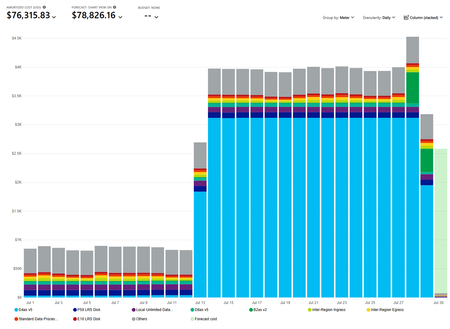
Hi, this seems like a bug. When i select Amortized cost in Cost analysis, our monthly cost jumps from $25,664.54 to $76,315.83. The resource that causes the jump is a Reservation for a D4asv5 virtual machine. It jumps to $3,120.09 per day. Can someone please try it their side.40Views0likes2CommentsHow to create a active bugs trend chart
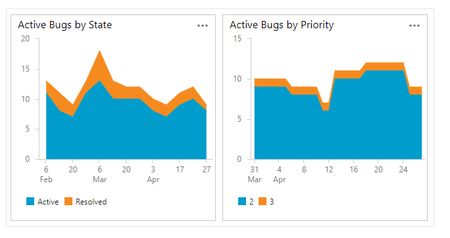
Hi everybody! I'd like to create a Active bug trends, like this: However, everytime that I try to create this, I always have this result My chart always sum the quantity of bugs, not the trend When I try to setup my chart, I have this screen Note that I have the option Count. My question is: How to create a active bug trend chart? I try this documentation but, no success: https://learn.microsoft.com/en-us/azure/devops/boards/backlogs/manage-bugs?view=azure-devops#monitor-bug-status-assignments-and-trends Thanks for Advice Mauricio1KViews0likes3CommentsHow to recover global admin access to tenant
I have already tried posting this to the general Microsoft Q&A forums and received no response. We are desperate to figure something out so if this is not the correct line of communication, please direct me to where I should go. My company is in a bit of a bind right now, and I am at my wit's end after almost a week of trying to get in contact with anyone who could help. We have multiple directories in Azure that belong to us, but they are all independent of each other. As such, some directories have multiple global admins (and thus are not an issue); others -- and quite frankly, the most important ones -- only have one global admin, and it was our DevOps person, who is no longer employed with us. We have no way of accessing his account, and thus no way of accessing a global admin account for these directories/tenants. Access to these directories is critical to our operations. We were informed last Friday by someone from the data protection team that they could not give us access to these tenants we pay thousands of dollars a month for because: Our former DevOps person registered all other users as guests/external users, and DPT "can't give external users admin permissions", and To reset the MFA of the current global admin account, the owner of the account (who no longer works for our company) would need to contact them and verify their identity What options do we have here? We have blobs full of user-uploaded files in these tenants. Starting over from scratch is a doomsday scenario we are trying everything we can to avoid. Surely there has to be something that can be done?152Views1like5CommentsProblems with FSLogix 3.26 - W11 MU - 10 users per Vm
Scenario Overview We are documenting a recurring intermittent Denial of Service (DoS) regarding user profiles in an AVD multi-session environment using Azure Files Premium (SMB). The issue consistently surfaces after updating to the FSLogix 3.26 branch (v3.26.126.19110). Root Cause Analysis (Failure Logs) Through deep log analysis, we identified a "driver poisoning" pattern unique to version 3.26: SMB/Kerberos Handshake Sensitivity: Under varying storage response times (latency spikes of ~350ms vs. the usual ~40ms), version 3.26 triggers an intermittent 1326 error (Logon failure: unknown user name or bad password). Driver Execution Flow Corruption: Unlike previous versions, after this initial network/authentication glitch, the 3.26 driver fails to release execution threads or volume handles properly. Catastrophic Failure (Error 267): The system attempts to access the SecuredProfileRegData path within the mounted VHDX, but the driver returns Event ID 26: "0x10b - The directory name is invalid". Unrecoverable "Zombie" State: Once Error 267 occurs, the VM becomes "poisoned." It blocks all subsequent login attempts and even prevents a clean uninstallation of the agent (MSI Error 0x80070643 due to files being "in use"), necessitating a full VM reboot or redeployment. Has anyone else been through this? My first step was to go back to Agent Version 2506 (2210 Hotfix 4) Evidence of Success with Version 2506 (2210 Hotfix 4) After performing a clean deployment and reverting to version 3.25.626.21064, metrics from April 24, 2026, show absolute stability on the same infrastructure: Consistent Logon Times: Average profile load time of 1.6 seconds across multiple concurrent users Storage Efficiency: FindFile response times remained stable between 39ms and 45ms, with the agent successfully retrying any momentary delays. Error Resilience: Unlike v3.26, if this version encounters an authentication glitch (e.g., on a local service account), it bypasses the error and remains functional, allowing domain users to log in without collateral blockages. Concurrency Support: Seamlessly managed over 20 simultaneously mounted volumes without pointer collisions or kernel hangs.470Views1like4Comments
Microsoft.Maps reports Registered but account creation returns InvalidSubscription
Subscription de4c9e7e-6aea-487d-aace-3d1cf56a5a7c is Enabled PAYG. ARM reports Microsoft.Maps Registered and lists accounts/API versions/locations, but Microsoft.Maps is absent from the Portal provider list. Creating a Gen2 G2 Maps account through Portal, Azure CLI, and REST in Global or East US returns InvalidSubscription. We re-registered and waited over 30 minutes. Latest correlation ID: 50e56235-39b7-493e-9faf-fabf329b61db, timestamp 2026-07-28T18:09:02.3104310Z. How can the Maps subscription registration be repaired?36Views1like2CommentsOpen in VS Code for the web fails ... tunnel 400 error ?
Hello everyone, The last week I have problem connecting to VS Code for the Web, my cloudshell works correctly, my account is ok, everything works BUT when tryont to open through browser - azure portal the VS Code for the Web, I got errors similar to .... *************************** https://ccon-prod-northeurope-aci-01.servicebus.windows.net/.../tunnel Result: 400 Bad Request Response: {"error":{"message":"Error creating dev tunnel","details":""}} Tested from: - Multiple browsers - InPrivate - Different PC - Azure VM *************************** I even renamed ~/code , ~/.vscode-server-insiders and restart cloudshell and VSCode web, same errors (and folders were not recreated) Any help would be greatly appreciated !! BR, Panos73Views0likes4Comments
Azure Open AI
Hi Team, I have been trying to use gpt-4o capability on azure open-ai to pass base64 encoded image. But I m getting this response: {"requestPayload":null,"meta":{"blocking":true},"status":"completed","planId":"38334edf2b3242102d79fa97ce91bf37","capabilities":{"35070ec3fbb68e5007e5f69605efdc04":{"provider":"Azure OpenAI","response":"The provided JSON contains a structure with two main elements: a text prompt and an image URL. The text prompt asks, \"What’s in this image?\" and the image URL is encoded in base64 format. However, the base64 string for the image is incomplete and appears to be corrupted or truncated.\n\nTo properly analyze the image, the complete base64 string is required. If you can provide the full base64 string, I can help you decode and analyze the image. Alternatively, you can upload the image to a file-sharing service and provide the link.","logId":"7b40eb2b3b32c210f27a3c8c24e45ae1","status":"success"}},"startedAt":"2024-06-21 03:38:59","completedAt":"2024-06-21 03:39:07","transactionId":"e5564919-b644-43fb-b0ba-a2bc60016513","message":null} I have ensured the image URL is correct and contains correct base64 value but still its not working. What could be the issue?423Views0likes2CommentsAgentic AIOps vs Traditional AIOps: What Actually Changes in Practice?
Artificial Intelligence for IT Operations (AIOps) has transformed how organizations monitor, manage, and optimize modern IT infrastructure. By combining machine learning, analytics, and automation, Traditional AIOps has helped IT teams reduce alert fatigue, identify anomalies faster, and improve operational efficiency. https://dellenny.com/agentic-aiops-vs-traditional-aiops-what-actually-changes-in-practice/33Views0likes0CommentsHow to Build Your First IT Support Agent Using Azure AI
Artificial Intelligence is transforming the way businesses provide IT support. Instead of waiting for a technician to answer every question, organizations are increasingly using AI-powered support agents that can troubleshoot common issues, answer employee questions, and automate repetitive tasks. Thanks to Microsoft Azure AI, building an intelligent IT support agent is no longer limited to data scientists or large enterprises. Even beginners can create a functional AI assistant with minimal coding. https://dellenny.com/how-to-build-your-first-it-support-agent-using-azure-ai/37Views0likes0Comments




Events
Recent Blogs
- Today, the Azure Arc team is pleased to announce that Extended Security Updates (ESUs) enabled by Azure Arc is now generally available for Windows Server 2016. By connecting your Windows Server 2016 ...Aug 06, 2026142Views1like0Comments
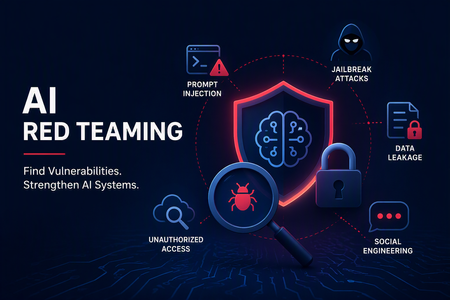
- As enterprise AI systems evolve from standalone models into RAG applications, copilots, and autonomous agents, one question comes up often: Should we use Microsoft Foundry or PyRIT for Red Teaming?...Aug 06, 2026141Views0likes0Comments