azure container apps
236 TopicsStop restricting the agent. Start restricting its environment.
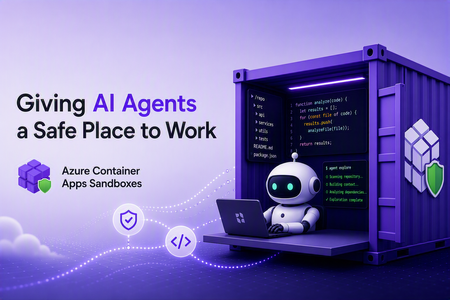
Human review improves safety but limits autonomy. Standing credentials preserve autonomy but increase risk. With Azure SRE Agent, we found a safer middle by moving control out of the model and into the runtime around it.807Views1like1CommentAzure Container Apps Sandboxes (Preview): Giving AI Agents a Safe Place to Work
Co-written by Nikoloz Buligini, Front End Developer at Templafy, and Jan Kalis, Azure Container Apps Sandboxes, Core AI, Microsoft Every team building with multi-tenant AI agent platforms hits the same wall. The agent is smart enough to read your code, reason about a bug, and propose a fix. But the moment it needs to take an action - clone a repo, install tooling, run a command, hit an internal endpoint - you have to answer some uncomfortable questions: where does it run, what permissions does it have and what can it access? Run it on your own infrastructure and inherit the blast radius. Give it broad network access and you have handed an autonomous process the keys to your environment. Lock it down too hard and the agent cannot do its job. This is exactly the problem Azure Container Apps Sandboxes was built to solve. And it is exactly the problem the team at Templafy solved in production. This post walks through what Sandboxes are, the features that make them a good fit for agentic workloads and how Templafy put ACA Sandboxes to work. What are Azure Container Apps Sandboxes? Azure Container Apps Sandboxes (Preview) are secure, isolated compute environments that start in seconds, scale to thousands, and do not charge you for compute while stopped. Each sandbox runs inside its own hardware-isolated microVM, fully separated from the host, the platform, and every other sandbox. Bring your own container image or use an included one, and Sandboxes handle provisioning, isolation, and lifecycle. This is the same compute fabric behind products like Cloud sandboxes in GitHub Copilot, Foundry Hosted Agents, and Azure Container Apps Express, and now you can build directly on it. For platform builders, that means enterprise-grade, multi-tenant isolation as a building block you would otherwise spend years creating. For AI agents, a sandbox becomes a self-configurable tool: spin up a fresh environment in seconds, run untrusted code, compile a project, or explore a codebase, then throw it away. On one side you empower humans to build platforms. On the other you empower agents to extend their own capabilities. The features that make Sandboxes fit agentic work A fast microVM is table stakes. What makes Sandboxes practical for real agent workloads is the control around them. Snapshots capture a fully configured environment and resume from it, ideal for long-running tasks or cloning setups. Egress controls declare exactly what a sandbox may reach, so an agent can pull from source control and package registries but nothing you did not approve. Managed identities authenticate to Azure with no secrets in the image. Automatic suspend and resume map cleanly onto how conversational agents behave, warming back up with full context when a conversation continues. Ports give your orchestrator a channel to a long-running agent process inside the sandbox. Two newer capabilities go further: virtual network integration puts an agent workspace inside your own Azure VNet with access to private endpoints, and bring your own storage lets data and artifacts outlive a session under your compliance rules. Together these turn a fast disposable VM into something you can hand to an autonomous agent in production. Which brings us to Templafy. How Templafy uses Sandboxes, in their own words The following section is written by Nikoloz, Front End Developer at Templafy. At Templafy we built an AI agent that helps our teams by doing longer-running source-code exploration on their behalf. Someone asks a question in a Slack thread, and behind the scenes the agent needs a real, isolated workspace where it can clone repositories, run tooling, and dig through code without touching anything it should not. It started as an engineer-facing tool for deep technical questions, but we recently opened it up to our product team for questions about undocumented product behavior. There, the agent first checks our Help Center through Azure AI Search with no sandbox required and only spins up a sandbox to explore the code when the docs come up short. Since these users aren't engineers, we summarize what the exploration finds into something more approachable. Funnily enough, the product team has been using it more than engineering does, and the feedback since launch has been great. We needed strong isolation, fast startup, and tight control over what each workspace could reach. Azure Container Apps Sandboxes gave us exactly that. We were sold on the model early enough that we built our own TypeScript SDK for Sandboxes before there was an official one, so we could drive the whole lifecycle from our Node stack. Here is what happens when the AI decides to start a workflow for a Slack thread: Create a sandbox from the public node-24 image. Install Git and other development tools. Clone our repositories and configure OpenCode. Restrict egress to only the Azure DevOps, package registry, and service endpoints the agent actually needs. Expose a port used to communicate with the agent runtime. Create and reuse snapshots so we do not repeat the bootstrap process on every run. Associate successful sessions with their Slack threads for a short period, so users can make follow-up requests against the same warm workspace. Stop or suspend idle sandboxes and resume them when a conversation continues. Delete failed or expired sessions. To do all of this we lean on the SDK for the full surface area: sandbox lifecycle operations, command execution, files, snapshots, ports, egress policies, public disk-image inspection, and sandbox state. Two features carry most of the weight for us. The first is restricted egress. Our agent is autonomous and works with our source code, so we are not comfortable letting it talk to the open internet. Declaring a narrow allow-list of endpoints means the workspace can do its job and nothing more, and that control is what let us ship this with confidence. The second is snapshots. Cloning repositories and configuring the toolchain is not free and doing it on every Slack message would make the agent feel slow. With snapshots we pay that cost once and resume from a ready-to-work state, so follow-ups in a thread start fast. This is only the first workflow. We are already looking at background investigations using Application Insights and eventually letting the agent open pull requests for quick bug fixes. The same isolated-workspace pattern extends cleanly to all of it. Who this is for If you are building an AI agent that needs to run code, explore a repository, or reach into your systems, and you have been nervous about where that runs, ACA Sandboxes is for you. You do not have to choose between a capable agent and a safe one. Give it a hardware-isolated workspace, declare exactly what it can touch, snapshot the setup, and let it work. Templafy went from "how do we let an agent safely explore our source code" to a production workflow running out of Slack threads, on infrastructure they controlled end to end. The building blocks are the same ones you can pick up today. Next steps Create your first sandbox - https://sandboxes.azure.com/ Explore Azure Container Apps Sandboxes documentation - https://sandboxes.azure.com/docs/sandboxes/ Start with Azure Container Apps Sandboxes samples - https://github.com/azure-samples/azure-container-apps-sandboxes/1.2KViews3likes0CommentsOrchestrate Azure Container Apps Jobs with Apache Airflow
Azure Container Apps (ACA) Jobs are a great way to run work that starts, does something, and finishes: nightly batch, data processing, ETL, ML scoring, report generation. They scale to zero, bill per execution, and run any container you give them. But the moment your "one job" becomes "a set of jobs that depend on each other," a gap appears: How do I run twenty jobs in parallel, wait for all of them, then run one more job only if they all succeeded — and retry just the one that failed? A single ACA Job can't express that on its own. What you're describing is an orchestrator, and the most widely adopted one in the data world is Apache Airflow. This post introduces two open-source templates that connect the two, so Airflow becomes the brain and ACA Jobs become the muscle. Pick the one that matches what you already run: airflow-on-aca-jobs: you already have Airflow. Drop in an operator and point it at ACA Jobs. Host nothing new. airflow-hosted-on-aca: you don't have Airflow. Get a full one running on Azure Container Apps with one command. Both use the same operator and the same DAGs, so you can start with one and move to the other later without rewriting your workflows. See Airflow orchestrate real ACA Job executions with parallel fan-out, dependency ordering, and automatic retries. Why ACA Jobs need an orchestrator A plain ACA Job is great at one thing: run this container to completion, then stop. That covers a scheduled job or a one-off task perfectly. Real pipelines need more than that: Dependency ordering: step B runs only after step A succeeds. Parallel fan-out: launch one execution per file, per store, or per partition, all at once, then wait for the whole batch. Per-task retries: if one execution in a batch of fifty fails, retry just that one, not the other forty-nine. Backfills and scheduling: re-run yesterday's pipeline, or run every night with a full history of what happened. These are the problems an orchestrator solves. Instead of building that logic yourself, you let Airflow handle the graph, the scheduling, and the retries, while ACA Jobs run the compute. You get serverless, scale-to-zero workers, and you didn't have to stand up a scheduler to get them. The operator that ties them together Both templates ship the same small plugin: an Airflow operator called AzureContainerAppsJobOperator . In a DAG it looks like any other task: report_sales = AzureContainerAppsJobOperator( task_id="report_store_sales", subscription_id="{{ var.value.azure_subscription_id }}", resource_group="{{ var.value.aca_resource_group }}", job_name="{{ var.value.aca_job_name }}", image="python:3.12-slim", command=["python", "-c", MY_PROGRAM], env_vars={"STORE_NAME": "Seattle"}, deferrable=True, ) A few things make this operator easy to work with: Per-execution overrides. It takes the ACA Job you point it at and overrides the image , command , args , and env_vars for that run. You can drive many different workloads from a single ACA Job definition, and you don't need to build or push a custom image just to try something. The example above runs the stock python:3.12-slim image with an inline program. Deferrable by default. With deferrable=True , Airflow frees its worker slot while the ACA Job runs and resumes when it finishes. That means your fan-out width is bounded by ACA, not by how many Airflow workers you have. You can launch dozens of parallel executions cheaply. No secrets required. Authentication resolves in a sensible order: an Airflow Connection if you set one, otherwise an AZURE_ACCESS_TOKEN environment variable, otherwise DefaultAzureCredential (managed identity). In Azure, the hosted template uses a managed identity so nothing sensitive is stored in Airflow at all. Because both templates share this operator, a DAG written for one runs unchanged on the other. Option 1: Bring your own Airflow (host nothing) Choose airflow-on-aca-jobs if you already run Airflow: Azure Managed Airflow, MWAA, Astronomer, or your own deployment. You keep that Airflow exactly as it is and simply teach it to talk to ACA Jobs. +------------------------------------------+ | Your Airflow (you host it, unchanged) | | runs AzureContainerAppsJobOperator | +------------------------------------------+ | | ACA Jobs REST API v +------------------------------------------+ | ACA Job (Azure Container Apps) | | | | store 1 | store 2 | ... | store N | | parallel executions -> scale to zero | +------------------------------------------+ Your existing Airflow runs the operator; ACA Jobs run the work. You host nothing new. Adoption is three small steps: Copy the operator into your Airflow's plugins/ folder. Add a DAG that uses AzureContainerAppsJobOperator . Set three Airflow Variables so the operator knows which job to drive: Airflow Variable Value azure_subscription_id your subscription id aca_resource_group the resource group holding the ACA Job aca_job_name the ACA Job name That's the whole integration. Nothing new to host, no extra scheduler or database, no custom image. ACA Jobs just become another task type Airflow can call. If you want a job to point at first, the template includes an Azure Developer CLI ( azd ) deployment that stands up a sample ACA Job for you: git clone https://github.com/hetvip2/airflow-on-aca-jobs cd airflow-on-aca-jobs azd up # deploys a sample ACA Job, prints its resource group + name Then copy airflow/plugins/ and airflow/dags/ into your Airflow, set the three Variables, and trigger the DAG. Option 2: Airflow hosted on ACA (turnkey) Choose airflow-hosted-on-aca if you don't already have an orchestrator and want one running next to your jobs. One command provisions the whole thing on Azure Container Apps: azd up | v +------------------------------------------+ | Airflow control plane on ACA | | web | scheduler | triggerer | | Postgres (metadata) + Azure Files (dags)| | Managed Identity - no secrets stored | +------------------------------------------+ | | ACA Jobs REST API v +------------------------------------------+ | ACA Job (Azure Container Apps) | | | | store 1 | store 2 | ... | store N | | parallel executions -> scale to zero | +------------------------------------------+ One command deploys the whole Airflow control plane on ACA, right next to the jobs it drives. git clone https://github.com/hetvip2/airflow-hosted-on-aca cd airflow-hosted-on-aca azd env new my-airflow azd up # prints your Airflow URL when it finishes azd up deploys a complete, working Airflow control plane on ACA: airflow-web, airflow-scheduler, and airflow-triggerer running as Container Apps on LocalExecutor, so there's no Celery or Redis to operate. A Postgres metadata database. A user-assigned managed identity with permission to call the ACA Jobs API, so the operator authenticates with no secrets stored in Airflow. A sample ACA Job for Airflow to drive out of the box. Your DAGs and plugins live on a mounted Azure Files share, so you ship new workflows by re-uploading files rather than rebuilding an image: cp my_dag.py airflow/dags/ azd hooks run postprovision # uploads dags + plugins to the share Airflow picks up the change within a minute. You now own a real orchestrator, hosted serverlessly on the same platform as your jobs. Which one should you pick? Option 1: airflow-on-aca-jobs Option 2: airflow-hosted-on-aca Best when You already run Airflow You don't have Airflow yet Setup Copy the operator + a DAG + 3 Variables azd up (one command) Who hosts Airflow You do (unchanged) Azure Container Apps Authentication Connection or short-lived token Managed identity, nothing stored Ownership Lowest: nothing new to run Turnkey: a full orchestrator you own The important part: the workload never changes. The same DAG and the same operator drive the same ACA Job executions in both. Start wherever you are today, and switch later with zero changes to your pipelines. See it end to end Picture a retailer that wants one number every night: total sales across all stores. Each store reports its own sales as a separate ACA Job execution, all running in parallel. When every store is in, a final job adds them into the company total. That one workflow exercises exactly what a plain Job can't do alone: parallel fan-out: one ACA Job execution per store, all at once dependency ordering: the roll-up runs only after every store reports per-task retries: if a store's execution fails, Airflow retries just that store, and the nightly total still lands In Airflow's Graph view you watch the store tasks light up together, then the roll-up run last. In the Azure portal you watch real executions appear under your ACA Job and scale back to zero when they finish. Same job, same DAG, whichever template you chose. Call to action If you run batch, ETL, or any multi-step work on Azure Container Apps Jobs, give one of these templates a try: Already have Airflow? Start with airflow-on-aca-jobs. Need an orchestrator? Start with airflow-hosted-on-aca. Both are open source, deploy with azd up , and share the same operator so you can move between them freely. Try them out and let us know what you orchestrate.474Views1like3CommentsBring Your Own Orchestrator to Azure Container Apps Jobs
Azure Container Apps Jobs are a good fit for batch processing, ETL, machine learning, reports, and other tasks that run to completion. But when those tasks have dependencies, retries, or fan-out, you still need an orchestrator. Many teams already have one. The community-maintained Bring Your Own Orchestrator collection provides 13 templates that connect existing workflow engines to Azure Container Apps Jobs. The collection is also listed in the Microsoft Azure Container Apps template index. The idea is simple: Your orchestrator manages schedules, dependencies, retries, and workflow history. Azure Container Apps Jobs runs each containerized task and reports the result. You keep the control plane your team knows while ACA Jobs provides the execution layer. How it works Each integration follows the same flow: The orchestrator authenticates to Azure. It starts an ACA Job execution. It waits for that execution to succeed or fail. It uses the result to continue, retry, or stop the workflow. Your orchestrator ---> Azure Container Apps Job ^ | +---- execution result ---+ The templates package this flow in the native model of each platform: an Airflow operator, a Temporal Activity, an Argo workflow template, a Camunda service task, or visual actions in Logic Apps and n8n. The workload container stays independent of the orchestrator that launched it. Choose the orchestrator that fits the workflow There is no single best orchestrator for every workload. The useful question is which control plane matches the way your team models work. When this describes your team Start with Why You already operate Airflow Airflow on ACA Jobs Adds an ACA Jobs operator without replacing your Airflow deployment You need a complete Airflow environment Airflow hosted on ACA Deploys the Airflow control plane and the ACA Jobs integration Your workflows are Kubernetes-native and run from AKS Argo Workflows Uses Argo workflow templates and AKS workload identity You model long-running business processes in BPMN Camunda 8 Connects Camunda service tasks to ACA Job executions You use JSON-defined microservice workflows Conductor Uses Conductor workers and native FORK_JOIN workflows You need durable replay, heartbeats, and resilient retries Temporal Keeps Temporal as the durable control plane while ACA Jobs runs the workload You build asset-centric Python data pipelines Dagster Uses Dagster resources, ops, and dynamic mapping You build general Python flows and task automation Prefect Uses Prefect tasks, flows, and mapped execution You prefer visual automation and SaaS integrations n8n Provides visual workflows for starting and observing ACA Jobs You use Azure-native data pipelines Azure Data Factory and Fabric Provides pipeline definitions for Azure data integration workflows You need connector-rich application integration Logic Apps Standard Uses stateful workflows, connectors, and native control flow You want Azure-native, code-first durable orchestration Durable Functions Uses durable orchestrations, activities, retries, and fan-out/fan-in You already operate a Dapr-enabled workflow host Dapr Workflow Demonstrates Dapr Workflow directing external ACA Job workloads The Bring Your Own Orchestrator catalog keeps this comparison current and links to deployment instructions for every option. Before production The existing-orchestrator templates are designed around managed identity, scoped Azure RBAC, failure handling, and native fan-out/fan-in examples. Their fan-out samples default to five shards and accept configurations from 1 to 50. Treat higher shard counts as configuration support, not a throughput guarantee. Test them against your Azure quotas, orchestrator limits, and downstream systems. Two template-specific boundaries are worth calling out: Dapr Workflow is a preview architecture Azure Container Apps Jobs do not host Dapr sidecars. The Dapr workflow runtime must run in a separate Dapr-enabled host and start ACA Jobs through Azure Resource Manager. The template is therefore labeled preview architecture. Fabric still needs a native workspace run The Azure Data Factory path has live validation. The included Fabric pipeline is structurally validated but still needs a native run in a Fabric workspace. Each repository README documents its validation scope and limitations. Get started Open the template catalog. Choose the orchestrator your team already uses. Review that template's prerequisites and validation notes. Deploy the sample ACA Job with azd up . Run the single-job example, then test fan-out and failure behavior. For example, if Airflow is already your standard: git clone https://github.com/hetvip2/airflow-on-aca-jobs cd airflow-on-aca-jobs azd up The exact setup differs by orchestrator, but the target remains ACA Jobs. Try the templates Compare all 13 orchestrator templates and choose the control plane that matches your team. Review the Azure Container Apps Jobs documentation for triggers, permissions, and platform limits. Browse the ACA community template collections to find the collection in the Microsoft Azure Container Apps repository. Closing thoughts Using Azure Container Apps Jobs should not require an orchestrator migration. Keep the workflow engine your team already trusts and use ACA Jobs for containerized task execution. Explore all 13 options in the Bring Your Own Orchestrator to Azure Container Apps Jobs collection. References Azure Container Apps Jobs overview Azure Container Apps Jobs management API Managed identities in Azure Container Apps Azure Developer CLI documentation Bring Your Own Orchestrator template catalog Azure Container Apps community template collections614Views1like0CommentsStaying in the flow: SleekFlow and Azure turn customer conversations into conversions
A customer adds three items to their cart but never checks out. Another asks about shipping, gets stuck waiting eight minutes, only to drop the call. A lead responds to an offer but is never followed up with in time. Each of these moments represents lost revenue, and they happen to businesses every day. SleekFlow was founded in 2019 to help companies turn those almost-lost-customer moments into connection, retention, and growth. Today we serve more than 2,000 mid-market and enterprise organizations across industries including retail and e-commerce, financial services, healthcare, travel and hospitality, telecommunications, real estate, and professional services. In total, those customers rely on SleekFlow to orchestrate more than 600,000 daily customer interactions across WhatsApp, Instagram, web chat, email, and more. Our name reflects what makes us different. Sleek is about unified, polished experiences—consolidating conversations into one intelligent, enterprise-ready platform. Flow is about orchestration—AI and human agents working together to move each conversation forward, from first inquiry to purchase to renewal. The drive for enterprise-ready agentic AI Enterprises today expect always-on, intelligent conversations—but delivering that at scale proved daunting. When we set out to build AgentFlow, our agentic AI platform, we quickly ran into familiar roadblocks: downtime that disrupted peak-hour interactions, vector search delays that hurt accuracy, and costs that ballooned under multi-tenant workloads. Development slowed from limited compatibility with other technologies, while customer onboarding stalled without clear compliance assurances. To move past these barriers, we needed a foundation that could deliver the performance, trust, and global scale enterprises demand. The platform behind the flow: How Azure powers AgentFlow We chose Azure because building AgentFlow required more than raw compute power. Chatbots built on a single-agent model often stall out. They struggle to retrieve the right context, they miss critical handoffs, and they return answers too slowly to keep a customer engaged. To fix that, we needed an ecosystem capable of supporting a team of specialized AI agents working together at enterprise scale. Azure Cosmos DB provides the backbone for memory and context, managing short-term interactions, long-term histories, and vector embeddings in containers that respond in 15–20 milliseconds. Powered by Azure AI Foundry, our agents use Azure OpenAI models within Azure AI Foundry to understand and generate responses natively in multiple languages. Whether in English, Chinese, or Portuguese, the responses feel natural and aligned with the brand. Semantic Kernel acts as the conductor, orchestrating multiple agents, each of which retrieves the necessary knowledge and context, including chat histories, transactional data, and vector embeddings, directly from Azure Cosmos DB. For example, one agent could be retrieving pricing data, another summarizing it, and a third preparing it for a human handoff. The result is not just responsiveness but accuracy. A telecom provider can resolve a billing question while surfacing an upsell opportunity in the same dialogue. A financial advisor can walk into a call with a complete dossier prepared in seconds rather than hours. A retailer can save a purchase by offering an in-stock substitute before the shopper abandons the cart. Each of these conversations is different, yet the foundation is consistent on AgentFlow. Fast, fluent, and focused: Azure keeps conversations moving Speed is the heartbeat of a good conversation. A delayed answer feels like a dropped call, and an irrelevant one breaks trust. For AgentFlow to keep customers engaged, every operation behind the scenes has to happen in milliseconds. A single interaction can involve dozens of steps. One agent pulls product information from embeddings, another checks it against structured policy data, and a third generates a concise, brand-aligned response. If any of these steps lag, the dialogue falters. On Azure, they don’t. Azure Cosmos DB manages conversational memory and agent state across dedicated containers for short-term exchanges, long-term history, and vector search. Sharded DiskANN indexing powers semantic lookups that resolve in the 15–20 millisecond range—fast enough that the customer never feels a pause. Microsoft Phi’s model Phi-4 as well as Azure OpenAI in Foundry Models like o3-mini and o4-mini, provide the reasoning, and Azure Container Apps scale elastically, so performance holds steady during event-driven bursts, such as campaign broadcasts that can push the platform from a few to thousands of conversations per minute, and during daily peak-hour surges. To support that level of responsiveness, we run Azure Container Apps on the Pay-As-You-Go consumption plan, using KEDA-based autoscaling to expand from five idle containers to more than 160 within seconds. Meanwhile, Microsoft Orleans coordinates lightweight in-memory clustering to keep conversations sleek and flowing. The results are tangible. Retrieval-augmented generation recall improved from 50 to 70 percent. Execution speed is about 50 percent faster. For SleekFlow’s customers, that means carts are recovered before they’re abandoned, leads are qualified in real time, and support inquiries move forward instead of stalling out. With Azure handling the complexity under the hood, conversations flow naturally on the surface—and that’s what keeps customers engaged. Secure enough for enterprises, human enough for customers AgentFlow was built with security-by-design as a first principle, giving businesses confidence that every interaction is private, compliant, and reliable. On Azure, every AI agent operates inside guardrails enterprises can depend on. Azure Cosmos DB enforces strict per-tenant isolation through logical partitioning, encryption, and role-based access control, ensuring chat histories, knowledge bases, and embeddings remain auditable and contained. Models deployed through Azure AI Foundry, including Azure OpenAI and Microsoft Phi, process data entirely within SleekFlow’s Azure environment and guarantees it is never used to train public models, with activity logged for transparency. And Azure’s certifications—including ISO 27001, SOC 2, and GDPR—are backed by continuous monitoring and regional data residency options, proving compliance at a global scale. But trust is more than a checklist of certifications. AgentFlow brings human-like fluency and empathy to every interaction, powered by Azure OpenAI running with high token-per-second throughput so responses feel natural in real time. Quality control isn’t left to chance. Human override workflows are orchestrated through Azure Container Apps and Azure App Service, ensuring AI agents can carry conversations confidently until they’re ready for human agents. Enterprises gain the confidence to let AI handle revenue-critical moments, knowing Azure provides the foundation and SleekFlow provides the human-centered design. Shaping the next era of conversational AI on Azure The benefits of Azure show up not only in customer conversations but also in the way our own teams work. Faster processing speeds and high token-per-second throughput reduce latency, so we spend less time debugging and more time building. Stable infrastructure minimizes downtime and troubleshooting, lowering operational costs. That same reliability and scalability have transformed the way we engineer AgentFlow. AgentFlow started as part of our monolithic system. Shipping new features used to take about a month of development and another week of heavy testing to make sure everything held together. After moving AgentFlow to a microservices architecture on Azure Container Apps, we can now deploy updates almost daily with no down time or customer impact. And this is all thanks to native support for rolling updates and blue-green deployments. This agility is what excites us most about what's ahead. With Azure as our foundation, SleekFlow is not simply keeping pace with the evolution of conversational AI—we are shaping what comes next. Every interaction we refine, every second we save, and every workflow we streamline brings us closer to our mission: keeping conversations sleek, flowing, and valuable for enterprises everywhere.749Views3likes0CommentsAzure Container Apps Express for Shipping Container Apps Fast
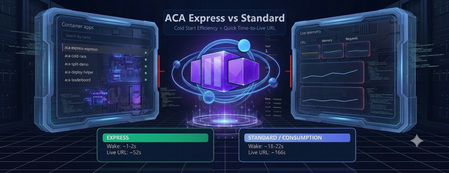
ACA Express Apps are a strong fit for teams that need to ship quickly and can't afford long platform setup cycles. This includes startups, internal platform teams, and product groups deploying APIs, web apps, or agent endpoints that scale with uneven demand. If the priority is fast path-to-production, predictable wake-up behavior, and minimal infrastructure overhead, this model is likely the right choice. To put real numbers behind that, I built a live demo that races Express against a Consumption environment on the same app. The measurements below come from that demo, not from a spec sheet. MicroVMs make cold starts practical Cold start delays usually come from rebuilding runtime state whenever an app wakes up. ACA Express Apps reduce that overhead with MicroVM-based startup paths built for fast boot and isolation. The result is faster instance readiness without trading off security. The gap shows up clearly when both apps have scaled all the way to zero. Waking from a genuine cold start, Express comes back in about 1.5 seconds. The same app in a Consumption environment takes about 20 seconds to answer the first request. Both were measured live in the browser, from request to first response. Disk and memory state restore is the speed multiplier State restoration skips the app's internal boot sequence entirely. Instead of replaying the same initialization work on every start, ACA Express Apps can restore disk and memory state so the app starts closer to ready. That reduces time-to-first-request and smooths scale events, especially for framework-heavy workloads. It's also what lets scale-to-zero stay practical: the app costs nothing while idle, but the wake-up penalty stays in the low single-digit seconds instead of the tens of seconds you'd otherwise pay. Environmentless changes the deployment experience Skipping the environment setup completely changes the deployment workflow. Teams can ship the container app without first managing environment sprawl, while still getting the runtime foundations they need. For fast-moving teams, that means less setup overhead and a shorter path to production. You can see how little there is to fill in. Creating an Express app is a single short form. There is no environment to stand up first. And once it's created, the manage view gives you the live URL, status, and the basics you need to operate it. The numbers, side by side Everything below was measured on the same container image, in the West Central US region. What's measured Express Consumption Cold start from zero (request to first response) ~1.5 s ~20 s Environment provisioning ~14 s ~120 s First-time deploy (environment + app, zero to live URL) ~52 s ~166 s App deploy only (environment already exists) ~30 s ~30 s Express is much faster on the two steps that build infrastructure from scratch: cold start and environment provisioning. Once an environment already exists, the two are about the same. Express isn't a different app runtime, it's the same platform with the first-time setup cost stripped down. Get started Express is in public preview. You can have a container on a live URL in the time it takes to read this post. 📖 Azure Container Apps Express overview — concepts, capabilities, and the current feature support matrix. 🚀 Create your first Express app — the CLI commands and portal steps to get an app running. 🛠️ New Container Apps portal — create and manage Express apps in the streamlined UI. 🧪 Test Express apps locally — validate your container before you deploy. ❓ Express FAQ — preview status, limits, regions, and how Express relates to standard Container Apps. 👉 Deploy an Express app · Read the docs · Browse the FAQ When speed matters, ACA Express is the best tool for deploying containers. It skips the platform setup delays without sacrificing reliability under load.615Views2likes1CommentAuditing and Telemetry for the Agent Governance Toolkit - Getting Started with .NET Core
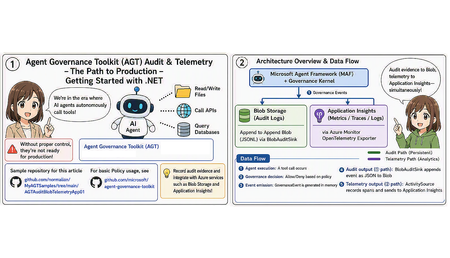
We've entered an era where AI agents autonomously invoke tools — reading and writing files, calling APIs, querying databases. Convenient as this is, without a mechanism to control who can call what, and under what conditions, you can't put it into production. The Agent Governance Toolkit (AGT), open-sourced by Microsoft, is exactly the toolkit for embedding that "gatekeeper" into AI agents. This article walks through getting started with AGT in .NET (C#), based on the following GitHub repository sample.641Views5likes0Comments
Advanced Container Apps Networking: VNet Integration and Centralized Firewall Traffic Logging
Azure community, I recently documented a networking scenario relevant to Azure Container Apps environments where you need to control and inspect application traffic using a third-party network virtual appliance. The article walks through a practical deployment pattern: • Integrate your Azure Container Apps environment with a Virtual Network. • Configure user-defined routes (UDRs) so that traffic from your container workloads is directed toward a firewall appliance before reaching external networks or backend services. • Verify actual traffic paths using firewall logs to confirm that routing policies are effective. This pattern is helpful for organizations that must enforce advanced filtering, logging, or compliance checks on container egress/ingress traffic, going beyond what native Azure networking controls provide. It also complements Azure Firewall and NSG controls by introducing a dedicated next-generation firewall within your VNet. If you’re working with network control, security perimeters, or hybrid network architectures involving containerized workloads on Azure, you might find it useful. Read the full article on my blog247Views0likes1Comment