enterprise integration
122 TopicsAI Gateway tier of API Management now in public preview
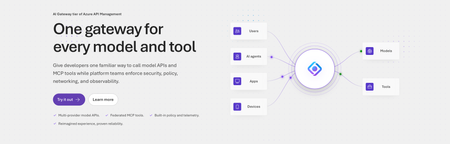
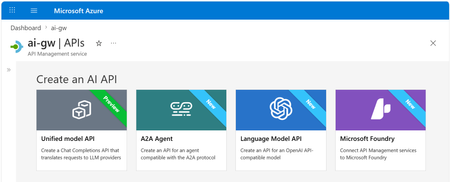
Today, we are introducing the AI Gateway tier of Azure API Management, now in public preview. It gives platform teams a purpose-built experience built specifically for AI workloads - publishing and governing models and MCP servers. Controls are configured through policy cards rather than XML and expressions, and the portal experience and control plane are structured around models, MCP servers, and tools rather than APIs. (For brevity, we refer to the AI Gateway tier as AI Gateway throughout the rest of this article.) AI Gateway is built on Azure API Management, bringing proven operational capabilities to AI workloads. The resource runs in your subscription, uses your Entra tenant, and sends telemetry to destinations you control. The operating model will be familiar to existing API Management customers, but the interface is built around AI workloads. The AI Gateway tier is intended for teams that want this focused experience; other API Management tiers remain the right choice when organizations also need general-purpose API management or capabilities not included in the AI Gateway experience. A practical model for platform teams The AI Gateway gives platform teams a shared place to manage models, MCP servers, policies, and observability destinations, with access controlled through Azure RBAC. For example, a central platform group can connect a set of approved models and tools and publish them for application teams. The application teams can test those assets in the test console and build against them without routing every change through the central group. The platform group still owns the shared guardrails and can see how the assets are being used. After an asset is published, developers can create a named runtime key and begin calling the gateway immediately. Bring the models and tools you already use Most organizations don't standardize on a single model provider. Different models are selected based on quality, latency, cost, geography, or specialized capabilities. The preview supports models from Microsoft Foundry including OpenAI, Anthropic, Mistral, and other Foundry hosted models, as well as models hosted in AWS Bedrock, Google Vertex AI, OpenAI, and Anthropic. A guided wizard simplifies importing models from Microsoft Foundry. Other providers can be added by configuring a connection, with backend authentication configured as part of that connection. All published models are available under the same stable endpoint. Applications continue to use supported API formats such as OpenAI Chat Completions and Responses or Anthropic Messages directly or via SDKs. The AI Gateway extends governance beyond models to the MCP servers and tools agents use to interact with enterprise systems. You can expose an existing MCP server over SSE or Streamable HTTP, turn all or selected operations from a REST API into an MCP server by uploading its OpenAPI specification, or use more than 1,400 connector-backed tools from the Power Platform and Logic Apps library. You can also federate multiple MCP servers behind a single server, so an agent connects once and sees the tools across those servers. Backend authentication supports an API key, OAuth client credentials, managed identity, or mTLS. Governance that's built in Organizations need consistent governance across models and MCP servers without requiring every application team to implement those capabilities independently. The AI Gateway portal presents governance policies through an intuitive card-based experience rather than requiring policy XML. The same policies are expressed as JSON properties, making them easy to manage as infrastructure as code and to audit and enforce across a fleet with Azure Policy. In the public preview, those cards cover request and token rate limits, token quotas, Azure AI Content Safety, and fallback to a secondary model. Policies are applied per asset, making it clear which controls protect each model or MCP server. OpenTelemetry-based token metrics The AI Gateway emits token-usage metrics through OpenTelemetry, with attributes following GenAI and cloud semantic conventions. Metrics can be sent to Application Insights, Datadog, Splunk, Grafana Cloud, or another OTLP endpoint. The portal provides a monitoring view over Application Insights data. Better together: Microsoft Foundry and AI Gateway With AI Gateway, teams can extend the same governance controls, for example token rate limits and quotas, across models hosted in Microsoft Foundry and models hosted elsewhere. Foundry and non-Foundry models are published through gateway-managed endpoints, giving applications and agents a consistent way to access governed models regardless of where they are hosted. Foundry-hosted agents can consume curated sets of tools from Foundry toolboxes, with access to the underlying MCP servers and APIs governed through AI Gateway. Together, Microsoft Foundry and AI Gateway cover the enterprise application lifecycle: Foundry for building and running AI applications, and AI Gateway for publishing, governing, and observing models, tools, and MCP servers across your AI estate. The new AI Gateway tier will soon be available through the gateway experience in Microsoft Foundry portal. We are working toward a seamless, integrated AI Gateway experience within Foundry portal and will share more about that work separately. Available today in public preview The AI Gateway tier is available today at no cost in public preview in East US 2 and Sweden Central. Pricing will be shared separately. To provision a resource, add a model or MCP server, and make a first call click this to go to the AI Gateway tier portal and try it. If you prefer to start from code, use a sample to deploy all the required resources for a Foundry-hosted agent configured to access its model and tools through AI Gateway. We look forward to your feedback as we continue to rapidly evolve AI Gateway.5.8KViews5likes9Comments
Introducing native Service Bus message publishing from Azure API Management (Preview)
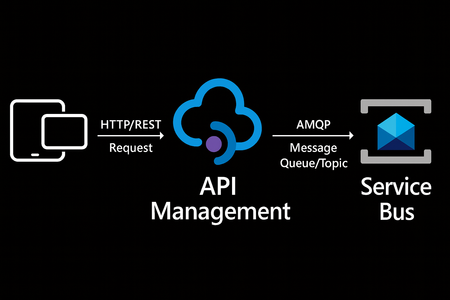
We’re excited to announce a preview capability in Azure API Management (APIM) — you can now send messages directly to Azure Service Bus from your APIs using a built-in policy. This enhancement, currently in public preview, simplifies how you connect your API layer with event-driven and asynchronous systems, helping you build more scalable, resilient, and loosely coupled architectures across your enterprise. Why this matters? Modern applications increasingly rely on asynchronous communication and event-driven designs. With this new integration: Any API hosted in API Management can publish to Service Bus — no SDKs, custom code, or middleware required. Partners, clients, and IoT devices can send data through standard HTTP calls, even if they don’t support AMQP natively. You stay in full control with authentication, throttling, and logging managed centrally in API Management. Your systems scale more smoothly by decoupling front-end requests from backend processing. How it works The new send-service-bus-message policy allows API Management to forward payloads from API calls directly into Service Bus queues or topics. High-level flow A client sends a standard HTTP request to your API endpoint in API Management. The policy executes and sends the payload as a message to Service Bus. Downstream consumers such as Logic Apps, Azure Functions, or microservices process those messages asynchronously. All configurations happen in API Management — no code changes or new infrastructure are required. Getting started You can try it out in minutes: Set up a Service Bus namespace and create a queue or topic. Enable a managed identity (system-assigned or user-assigned) on your API Management instance. Grant the identity the “Service Bus data sender” role in Azure RBAC, scoped to your queue/ topic. Add the policy to your API operation: <send-service-bus-message queue-name="orders"> <payload>@(context.Request.Body.As<string>())</payload> </send-service-bus-message> Once saved, each API call publishes its payload to the Service Bus queue or topic. 📖 Learn more. Common use cases This capability makes it easy to integrate your APIs into event-driven workflows: Order processing – Queue incoming orders for fulfillment or billing. Event notifications – Trigger internal workflows across multiple applications. Telemetry ingestion – Forward IoT or mobile app data to Service Bus for analytics. Partner integrations – Offer REST-based endpoints for external systems while maintaining policy-based control. Each of these scenarios benefits from simplified integration, centralized governance, and improved reliability. Secure and governed by design The integration uses managed identities for secure communication between API Management and Service Bus — no secrets required. You can further apply enterprise-grade controls: Enforce rate limits, quotas, and authorization through APIM policies. Gain API-level logging and tracing for each message sent. Use Service Bus metrics to monitor downstream processing. Together, these tools help you maintain a consistent security posture across your APIs and messaging layer. Build modern, event-driven architectures With this feature, API Management can serve as a bridge to your event-driven backbone. Start small by queuing a single API’s workload, or extend to enterprise-wide event distribution using topics and subscriptions. You’ll reduce architectural complexity while enabling more flexible, scalable, and decoupled application patterns. Learn more: Get the full walkthrough and examples in the documentation 👉 here4.9KViews4likes10CommentsMicrosoft BizTalk Server Product Lifecycle Update
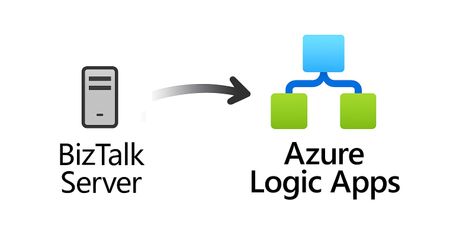
For more than 25 years, Microsoft BizTalk Server has supported mission-critical integration workloads for organizations around the world. From business process automation and B2B messaging to connectivity across industries such as financial services, healthcare, manufacturing, and government, BizTalk Server has played a foundational role in enterprise integration strategies. To help customers plan confidently for the future, Microsoft is sharing an update to the BizTalk Server product lifecycle and long-term support timelines. BizTalk Server 2020 will be the final version of BizTalk Server. Guidance to support long-term planning for mission-critical workloads This announcement does not change existing support commitments. Customers can continue to rely on BizTalk Server for many years ahead, with a clear and predictable runway to plan modernization at a pace that aligns with their business and regulatory needs. Lifecycle Phase End Date What’s Included Mainstream Support April 11, 2028 Security + non-security updates and Customer Service & Support (CSS) support Extended Support April 9, 2030 CSS support, Security updates, and paid support for fixes (*) End of Support April 10, 2030 No further updates or support (*) Paid Extended Support will be available for BizTalk Server 2020 between April 2028 and April 2030 for customers requiring hotfixes for non-security updates. CSS will continue providing their typical support. BizTalk Server 2016 is already out of mainstream support, and we recommend those customers evaluate a direct modernization path to Azure Logic Apps. Continued Commitment to Enterprise Integration Microsoft remains fully committed to supporting mission-critical integration, including hybrid connectivity, future-ready orchestration, and B2B/EDI modernization. Azure Logic Apps, part of Azure Integration Services — which includes API Management, Service Bus, and Event Grid — delivers the comprehensive integration platform for the next decade of enterprise connectivity. Host Integration Server: Continued Support for Mainframe Workloads Host Integration Server (HIS) has long provided essential connectivity for organizations with mainframe and midrange systems. To ensure continued support for those workloads, Host Integration Server 2028 will ship as a standalone product with its own lifecycle, decoupled from BizTalk Server. This provides customers with more flexibility and a longer planning horizon. Recognizing Mainframe modernization customers might be looking to integrate with their mainframes from Azure, Microsoft provides Logic Apps connectors for mainframe and midrange systems, and we are keen on adding more connectors in this space. Let us know about your HIS plans, and if you require specific features for Mainframe and midranges integration from Logic Apps at: https://aka.ms/lamainframe Azure Logic Apps: The Successor to BizTalk Server Azure Logic Apps, part of Azure Integration Services, is the modern integration platform that carries forward what customers value in BizTalk while unlocking new innovation, scale, and intelligence. With 1,400+ out-of-box connectors supporting enterprise, SaaS, legacy, and mainframe systems, organizations can reuse existing BizTalk maps, schemas, rules, and custom code to accelerate modernization while preserving prior investments including B2B/EDI and healthcare transactions. Logic Apps delivers elastic scalability, enterprise-grade security and compliance, and built-in cost efficiency without the overhead of managing infrastructure. Modern DevOps tooling, Visual Studio Code support, and infrastructure-as-code (ARM/Bicep) ensure consistent, governed deployments with end-to-end observability using Azure Monitor and OpenTelemetry. Modernizing Logic Apps also unlocks agentic business processes, enabling AI-driven routing, predictive insights, and context-aware automation without redesigning existing integrations. Logic Apps adapts to business and regulatory needs, running fully managed in Azure, hybrid via Arc-enabled Kubernetes, or evaluated for air-gapped environments. Throughout this lifecycle transition, customers can continue to rely on the BizTalk investments they have made while moving toward a platform ready for the next decade of integration and AI-driven business. Charting Your Modernization Path Microsoft remains fully committed to supporting customers through this transition. We recognize that BizTalk systems support highly customized and mission-critical business operations. Modernization requires time, planning, and precision. We hope to provide: Proven guidance and recommended design patterns A growing ecosystem of tooling supporting artifact reuse Unified Support engagements for deep migration assistance A strong partner ecosystem specializing in BizTalk modernization Potential incentive programs to help facilitate migration for eligible customers (details forthcoming) Customers can take a phased approach — starting with new workloads while incrementally modernizing existing BizTalk deployments. We’re Here to Help Migration resources are available today: Overview: https://aka.ms/btmig Best practices: https://aka.ms/BizTalkServerMigrationResources Video series: https://aka.ms/btmigvideo Feature request survey: https://aka.ms/logicappsneeds Reactor session: Modernizing BizTalk: Accelerate Migration with Logic Apps - YouTube Migration Agent (Complete refactoring from BizTalk to Logic Apps): Bringing all your Integration workloads to Logic Apps Standard | Microsoft Community Hub We encourage customers to engage their Microsoft accounts team early to assess readiness, identify modernization opportunities, and explore assistance programs. Your Modernization Journey Starts Now BizTalk Server has played a foundational role in enterprise integration success for more than two decades. As you plan ahead, Microsoft is here to partner with you every step of the way, ensuring operational continuity today while unlocking innovation tomorrow. To begin your transition, please contact your Microsoft account team or visit our migration hub. Thank you for your continued trust in Microsoft and BizTalk Server. We look forward to partnering closely with you as you plan the future of your integration platforms. Frequently Asked Questions Do I need to migrate now? No. BizTalk Server 2020 is fully supported through April 11, 2028, with paid Extended Support available through April 9, 2030, for non-security hotfixes. CSS will continue providing their typical support. You have a long and predictable runway to plan your transition. Will there be a new BizTalk Server version? No. BizTalk Server 2020 is the final version of the product. What happens after April 9, 2030? BizTalk Server will reach End of Support, and security updates or technical assistance will no longer be provided. Workloads will continue running but without Microsoft servicing. Is paid support available past 2028? Yes. Paid extended support will be available through April 2030 for BizTalk Server 2020 customers looking for non-security hotfixes. CSS will continue to provide the typical support. What is the end of sale date for BizTalk Server? We will announce an end of sale date for BizTalk Server on July 2026. What about BizTalk Server 2016 or earlier versions? Those versions are already out of mainstream support. We strongly encourage moving directly to Logic Apps rather than upgrading to BizTalk Server 2020. Will Host Integration Server continue? Yes. Host Integration Server (HIS) 2028 will be released as a standalone product with its own lifecycle and support commitments. Can I reuse BizTalk Server artifacts in Logic Apps? Yes. Most of BizTalk maps, schemas, rules, assemblies, and custom code can be reused with minimal effort using Microsoft and partner migration tooling. We welcome feature requests here: https://aka.ms/logicappsneeds Does modernization require moving fully to the cloud? No. Logic Apps supports hybrid deployments for scenarios requiring local processing or regulatory compliance, and fully disconnected environments are under evaluation. More information of the Hybrid deployment model here: https://aka.ms/lahybrid. Does modernization unlock AI capabilities? Yes. Logic Apps enables AI-driven automations through Agent Loop, improving routing, decisioning, and operational intelligence. Where do I get planning support? Your Microsoft account team can assist with assessment and planning. Migration resources are also linked in this announcement to help you get started. Microsoft Corporation7.2KViews3likes1CommentLogic Apps Aviators Newsletter - June 2026
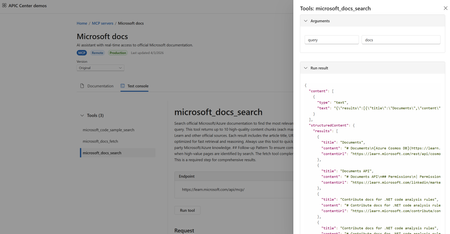
In this issue: Ace Aviator of the Month News from our product group News from our community Ace Aviator of the Month June 2026's Ace Aviator: Florian De Langhe LinkedIn: https://www.linkedin.com/in/floriandelanghe/ What's your role and title? What are your responsibilities? Lead Expert/Team Lead for the Microsoft Integration team at delaware. I have a wide range of responsibilities: - People management - Resource planning - Design and operate our integration solutions at our customers, what we brand as "SmartLink". Next to this, as many of us, I follow the latest AI news closely to keep up to date and try to stay ahead of the curve. Can you give us some insights into your day-to-day activities? I wear many hats so no two days look the same. That is also what keeps it interesting. A typical day starts with reviewing resource planning across our active projects, followed by a technical design review for a new integration. Sprinkle some one-on-one coaching conversations and research into new technologies/features and you have my day. The balance between People leadership and hands-on technical work is what I enjoy most. What motivates and inspires you to be an active member of the Aviators/Microsoft community? I started out being an active member on the Microsoft Logic App forum 10 years ago. I remember going back and forth with Wagner through the forum posts trying to solve questions. Good times. Integration is one of those disciplines where you're constantly connecting systems, teams, and ideas. What motivates me is seeing how members of our community across different companies and countries solve similar problems in completely different ways. The Aviators community has that right mix of deep technical knowledge and willingness to help each other out. Since discovering Integration and the Microsoft community, I basically never left. Looking back, what advice do you wish you had been given earlier? Document everything and treat documentation as a deliverable, not an afterthought. Early in my career I saw documentation as the boring part that you do after the development work. Now I see it as the leverage point. A well-written design document doesn't just help the next person understand what you built, it compounds. It feeds code generation, easier onboarding of new members and validation with your customers on what and how to build it. What has helped you grow professionally? Two things: 1) Always challenge yourself and your implementations; everything can be better, so I am always pushing myself to keep learning, stay up to date, and think about every idea/solution posted in this community—how it could improve my way of thinking or solutions that I am building/have built. 2) Focus on understanding the integration concepts and patterns. At the end of the day everything is a pattern; it is how you implement where we make the difference. So knowing the base layer itself helps a lot when building integration solutions. If you had a magic wand that could create a feature in Logic Apps, what would it be? To be able to control scaling of the workflow service plans more fine grained. Being able to control this would unlock a lot of use cases, especially for the combination of Logic Apps and Service Bus concurrency and throughput. News from our product group Write Logic Apps in C#: introducing the Logic Apps Standard SDK This article introduces the Logic Apps Standard SDK (Microsoft.Azure.Workflows.Sdk), a code-first way to define Logic Apps Standard workflows in C#. Developers compose workflows using a fluent builder with strongly typed triggers and actions, including both built-in and managed connector operations. The SDK preserves the existing runtime, connectors, monitoring, and run history while changing only the authoring experience. It supports control flow constructs, custom C# code steps, and run-after conditions for fault handling. Guidance covers getting started in VS Code, project layout, local F5 execution, and preview limitations such as no service provider connectors and work-in-progress managed identity support. New AI gateway capabilities in Azure API Management Azure API Management expands its AI gateway with a Unified Model API (preview) that lets clients use a single OpenAI-style format across providers, plus model aliases and discovery. GA updates include support for Anthropic and Google Vertex AI and content safety for MCP and Agent-to-Agent (A2A) traffic. Token observability now tracks cached, reasoning, and thinking tokens in Application Insights. Foundry import adds Anthropic API operations. A2A APIs reach GA with richer diagnostics and availability in classic tiers. Together, these features standardize governance, security, and observability for multi-model, multi-protocol AI applications. 🎉 Automation just became a team sport. Meet Azure Logic Apps Automation. Azure Logic Apps Automation (public preview) is a new SKU that delivers a managed, SaaS-like experience for building and running workflow automations. It keeps the enterprise-grade Logic Apps engine while simplifying onboarding, collaboration, and governance with projects and applications, flexible permissions, and policy inheritance. The experience is AI-native with natural language authoring, first-class agents, tools via MCP, and managed sandboxes. It introduces a modern designer, draft mode, live run history, JavaScript expressions, elastic scale to zero, and knowledge-as-a-service integration—aimed at helping teams prototype quickly and operate securely at scale. 📢 Announcing Knowledge as a Service for Azure Logic Apps Knowledge as a Service (public preview) provides a managed knowledge layer for Logic Apps that turns documents into a ready-to-use knowledge base without building a custom RAG pipeline. The service handles ingestion (parsing, chunking, embeddings) and retrieval (query rewriting, semantic search, ranking) and integrates with agentic workflows in Logic Apps Standard and the Automation SKU. On Standard, teams bring their own vector store and models; on Automation, the platform hosts them on behalf of the user. It supports Entra authentication and focuses on secure, grounded responses for agents and workflows. Better Together: Build Agents in Microsoft Foundry, Automate them with Azure Logic Apps This post outlines a combined stack for agentic applications: Microsoft Foundry for building and hosting agents, and Azure Logic Apps for invoking and orchestrating them. New capabilities let teams create or select Foundry agents directly from the Logic Apps designer, pair any trigger with an agent for autonomous execution, and expose 1,400+ Logic Apps connectors and entire workflows as agent tools. The approach enables agents to act across systems, handle long-running processes, and integrate with enterprise events, making deterministic workflows and AI-driven reasoning work together in production. What's new in Azure API Management at Microsoft Build 2026 This roundup covers Build 2026 updates for API Management and API Center: GA for agent registration, assessment, and Git sync in API Center, plus a data plane MCP server for enterprise discovery. API Management adds GA support for JSON‑RPC agent‑to‑agent (A2A) APIs and extends content safety controls to MCP and A2A flows. Unified Model API enters preview to standardize client integration across model providers, and AI Gateway expands to Anthropic and Vertex AI with broader token metrics. Platform enhancements include multi‑domain and wildcard custom hostnames in v2 tiers and workspace support on the built‑in gateway. Azure Connector Namespaces: managed integration for any Azure compute Azure Connector Namespace (preview) offers a fully managed integration layer that brings the Logic Apps connector ecosystem to any Azure or self‑hosted compute without requiring a workflow engine. Apps call strongly typed SDKs for C#, Node.js, or Python to invoke actions and subscribe to triggers, while the namespace handles auth, token rotation, retries, throttling, and webhook delivery. It also projects connectors as MCP servers for agents, and supports hosted MCP servers like Playwright and Azure SQL. The post details building blocks, scenarios, security, governance, and preview limitations. What's new in Azure Logic Apps at Microsoft Build 2026 This Build 2026 overview highlights Logic Apps Automation (public preview), GA for the Logic Apps MCP Server to expose workflows as MCP tools, direct invocation of Microsoft Foundry agents from Logic Apps, Knowledge as a Service, and code‑first development with the Logic Apps Standard SDK (Codeful Workflows). It also introduces a Migration Agent to help modernize from legacy platforms. The theme is making enterprise‑grade automation more accessible while preserving governance, reliability, and operational controls for production use. Hosted MCP Servers in Connector Namespace (Preview) Hosted MCP servers in Connector Namespace let teams deploy managed, enterprise‑ready MCP servers from a curated catalog in minutes. The platform handles deployment, scaling, authentication (inbound with Entra ID, outbound with managed identity or on‑behalf‑of), availability, and observability via Application Insights. Preview servers include Playwright for browser automation and Azure SQL via Data API Builder, enabling agents to use reliable tools without the overhead of self‑hosting. The post explains setup, benefits over self‑hosted servers, and areas of ongoing investment like catalog expansion and VNet support. MCP Test Console and Git Repository synch in Azure API Center Azure API Center adds a built‑in MCP Test Console in the developer portal and Git repository synchronization for MCP servers and other assets. Developers can validate MCP tools interactively on the Documentation tab and browse server tiles with endpoints and schemas. Git sync keeps the API Center inventory aligned with source‑controlled definitions, with secure access via Key Vault and managed identity. Together, these additions streamline discovery, testing, and governance of MCP assets across the enterprise. Bringing all your Integration workloads to Logic Apps Standard This post outlines Microsoft’s guided path for moving enterprise integration workloads—especially BizTalk—to Azure Logic Apps Standard. It introduces the open-source Logic Apps Migration Agent, which delivers an AI‑assisted, stage‑gated process across discovery, planning, baseline conversion, and continuous validation with human‑in‑the‑loop checkpoints. The workflow integrates with VS Code and GitHub Copilot, supports incremental “flow‑group” migration, and accommodates existing black‑box tests. The article also previews mission‑critical capabilities arriving for Standard and Hybrid (HL7, MLLP, Rules Engine, MSMQ, Oracle DB, flat‑file generation, Integration Accounts, and more), giving teams a repeatable, auditable modernization path with reduced risk. Announcing Microsoft Host Integration Server 2028: Modern connectivity for IBM Mainframes Midranges Host Integration Server 2028 (HIS 2028) is the next HIS release, delivered as a standalone SKU decoupled from BizTalk. It modernizes platform foundations (.NET 10) and, for non‑SNA features, introduces Linux support. New investments include Foundry integration for agent scenarios, REST APIs for DB2 and Transaction Integrator workloads, Entra ID and Azure Arc for hybrid management, a move to Visual Studio Code for designers, and alignment with newer IBM middleware. The post also lists product cleanup and deprecations (e.g., 32‑bit, WMI/WCF, BizTalk adapters), helping enterprises secure, govern, and operate host connectivity for years ahead. Easy Auth Configuration for Logic App Standard through CI/CD Enabling App Service Easy Auth on Logic Apps Standard can break run‑history views because SAS‑based runtime calls are blocked before the Logic Apps engine can validate them. This article explains two remedies: allow unauthenticated requests (so the runtime enforces its own auth), or keep Easy Auth strict and exclude runtime endpoints (e.g., /runtime/*) using authsettingsV2. It provides CI/CD‑ready approaches via ARM/Bicep templates or a post‑deployment REST API call, and highlights key settings such as requireAuthentication, unauthenticatedClientAction, excludedPaths, and allowedApplications. The guidance restores run‑history usability while maintaining enterprise authentication policies. Run Javascript code on Agent Loop Azure Logic Apps Agent Loop now supports a JavaScript code interpreter, extending earlier code‑execution support and enabling reliable computations, validations, and transformations alongside LLMs. The runtime executes generated or pre‑written code inside a V8 isolate using the isolated‑vm library, providing memory limits, timeouts, and failure isolation (not a full sandbox) to reduce blast radius. A worked example shows expense‑validation with agent tools orchestrated in a workflow. For Consumption, attaching an Integration Account provides isolated compute for the interpreter. The capability helps teams combine deterministic steps with agentic reasoning to deliver robust, auditable outcomes. Bulk-configure diagnostic settings on Azure Logic Apps Consumptions LA‑BulkDiag is a single‑file PowerShell script that bulk‑applies diagnostic settings across Logic Apps Consumption in a resource group. It inventories workflows, supports quick scopes (bare/all/pick), verifies destinations, auto‑renames on name collisions, and ships with 129 Pester tests. Presets cover logs, metrics, and workflow‑runtime categories; selection grammar enables non‑interactive runs suitable for CI. The post includes quick‑start commands and clarifies scope: it targets Consumption only (not Standard) and doesn’t configure Event Hub sinks. The result is faster, consistent observability at scale without repetitive portal clicks or accidental overwrites. Clean up idle and always-failing Azure Logic App Consumption LA‑CleanUp is a PowerShell utility that scans a subscription for Logic Apps Consumption workflows, classifying them as Idle (no runs in N days) or AlwaysFailing (runs in the window with zero successes). It can export candidates to CSV, then guide per‑item deletion with y/N/q prompts, reporting final counts. Under the hood, it uses OData filters and $top=1 queries for fast server‑side checks, caches an ARM token once, and intentionally avoids cross‑subscription operations. Scope notes: it doesn’t touch Standard workflows or API connections. The tool reduces noise, costs, and operational drag from abandoned or broken apps. News from our community Spec2Integration Post by Balbir Singh Spec2Integration proposes a spec-driven approach to building Azure Integration Services solutions. The open-source toolkit guides teams from a product brief through specification, modeling, contracts, mapping, and architecture to a deployable implementation targeting Azure Logic Apps, Functions, and related services. It includes governance gates for idempotency, observability, retries, and PII handling, plus a VS Code extension that visualizes pipeline status and the integration representation. Templates and tooling support greenfield projects and BizTalk migrations. The result aims to standardize repeatable steps, reduce failure modes, and accelerate delivery while keeping architectural control outside individual workflows. Stateful Orchestration in Azure: When Logic Apps Break, and What to Do Instead Post by Al Ghoniem, MBA This article examines where stateful orchestration with Azure Logic Apps can fall short and how to design around those gaps. It differentiates execution state from business state and highlights common failure modes: long-running instances, retry-induced duplicates, partial completion across SAP/Oracle/APIs, lost correlation, and unowned DLQs. It then contrasts orchestration choices—stateful Logic Apps, Durable Functions, Service Bus–backed orchestration, and choreography—emphasizing idempotency, correlation, reconciliation, and compensation. The guidance steers architects toward a control and observability layer so production incidents can be traced, replayed, and recovered without relying on workflow run history alone. Logic Apps Announcements at Microsoft Build Video by Sebastian Meyer This video recaps Logic Apps announcements from Microsoft Build with insights from a member of the product team. It highlights newly introduced capabilities and shares resources for deeper dives. Viewers get a concise overview of what’s new, why it matters for integration practitioners, and where to learn more. The discussion points architects toward practical use cases and next steps, making it a useful primer for anyone assessing roadmap impacts on existing or upcoming Azure Integration Services projects. Logic Apps Standard vs. Consumption: Which Plan Should You Choose? Post by Chiranjib Ghatak The article compares Logic Apps Standard and Consumption, explaining differences in hosting models, pricing, networking, and development experience. It outlines when to pick each plan, noting Standard’s single-tenant model, VNet/private endpoints, built-in connectors, and local DevOps workflow, versus Consumption’s pay-per-execution model and simplicity for sporadic or low-volume workloads. It also covers performance trade-offs, stateful vs. stateless options available in Standard, and typical enterprise scenarios where Standard provides predictable costs and better throughput. Azure Connector Namespaces: Managed Connectors Beyond Logic Apps Post by Şahin Özdemir This post introduces Azure Connector Namespaces and previews managed connectors for Azure Functions, extending the Logic Apps connector ecosystem to more compute services. It explains the motivation, how namespaces decouple connectors from workflows, and the benefits: reduced custom code, consistent authentication via managed identity, and reuse of Microsoft-managed integrations. A step-by-step walkthrough shows creating a namespace, adding a managed connector, and using the Azure Connectors .NET SDK in Functions, illustrating how teams can standardize connectivity while keeping business logic in code. Stop working harder and start flowing smarter, with Logic Apps Automation Post by Sonny Gillissen Sonny Gillissen explores Logic Apps Automation, a new, governed experience for building enterprise automations. He explains the Project → Application → Workflow model, dedicated portal (auto.azure.com), and reusable Sandboxes for agent code. The post shows how the AI assistant can scaffold workflows from intent, with Knowledge sources to ground agents, while monitoring and analytics provide visibility. Benefits include familiar Logic Apps design, reduced operational overhead, and scale-to-zero. Current gaps are noted—OBO auth shift, occasional assistant syntax issues, managed vs. built‑in connector choices, no migration tooling yet, and pending VNet/private endpoint support. Stop Using Static Filters! Automate DIXF Exports with Logic App Post by Anitha Eswaran Anitha Eswaran demonstrates how to make DIXF exports in D365FO dynamic using Azure Logic Apps and a small X++ customization. A custom OData action updates the DIXF Definition Group filter at runtime based on a parameter such as Customer Group. A Logic App triggered by a business event parses the input, stores the value, calls the OData action, invokes the standard ExportToPackage API, and then retrieves the download URL via GetExportedPackageUrl to fetch the ZIP with a time‑limited SAS token. Screenshots and code samples illustrate the end‑to‑end flow and implementation details. Logic Apps Agent Loops: Master Class Video by Stephen W Thomas Stephen W Thomas compiles his full Logic Apps Agent Loop series into one master‑class video. It covers getting started with Agent Loop on Logic Apps Standard, a human‑in‑the‑loop pattern used to resolve failed code translations, interactive chat agents with secure website embedding via Easy Auth, and when to choose the Consumption tier for simpler, pay‑as‑you‑go deployments. The chaptered format lets viewers jump to relevant topics. The emphasis is on the orchestration pattern—agents that select and compose tools to achieve goals—offering a practical foundation for teams moving from deterministic workflows toward agentic automation. Forget Sampling — This One host.json Setting Cuts Logic Apps Telemetry Costs by 80% Post by Daniel Jonathan This article tackles high Application Insights ingestion costs in Logic Apps Standard and shows a data‑driven path to reduce spend. Through a controlled experiment, it demonstrates that switching Runtime.ApplicationInsightTelemetryVersion to v2 in host.json delivers ~80% reduction without sacrificing troubleshooting. Further options include disabling dependency tracking (eliminates AppDependencies with the trade‑off of losing per‑call HTTP detail) and using adaptive sampling for marginal additional savings, while excluding exceptions. It also explains why some run‑level telemetry bypasses sampling and how to toggle sampling via an environment variable for short‑term diagnostics. Production Is the Only Truth in Integration Post by Marcelo Gomes This piece reframes integration success through a production‑first lens. It argues that reliability emerges when systems are designed for failure as the norm, not the exception. The article urges separating orchestration from business logic—using tools like Azure Logic Apps for coordination and Azure Functions for rules and transformations—to keep retries safe and evolution predictable. It positions production‑readiness as a design concern, emphasizing idempotency, replay, observability, runbooks, and ownership. The practical outcome is reduced operational risk and cost, more predictable behavior, and greater business trust in automated processes. DevUP Talks #05 – Logic Apps Tips & Tricks with Sandro Pereira Video by Mattias Lögdberg In this session, Sandro Pereira distills practical guidance from real projects to help teams build more resilient Logic Apps. Topics include applying environment‑specific timer conditions, deploying Logic Apps in a disabled state to control activation during releases, and using User‑Managed Identity with Azure Service Bus in Logic Apps Standard. The video focuses on patterns that improve reliability, security, and operational control across environments, offering actionable advice for developers and architects working in Azure Integration Services who want fewer surprises in production and a smoother deployment lifecycle. Logic Apps: Service Bus with User‑Assigned Managed Identity Post by Sandro Pereira This best‑practices guide shows how to configure the Azure Service Bus connector in Logic Apps Standard to use a user‑assigned managed identity. Sandro Pereira explains why system‑assigned identities complicate CI/CD—RBAC can’t be fully declared until the identity exists—then demonstrates a pattern that keeps deployments reproducible. The approach uses app settings for the Service Bus namespace and identity resource ID, a custom serviceProviderConnections entry referencing those settings, and workflow actions bound to that connection. The result is secretless, declarative authentication that avoids RBAC timing issues across environments. Logic App Consumption Bulk Failed Runs Resubmit Tool Post by Sandro Pereira Sandro Pereira introduces a small .NET Windows utility that lists and bulk resubmits failed Logic Apps Consumption runs. After authenticating to Azure, users supply the Logic App name, resource group and subscription. The tool can optionally filter by a date range, otherwise it returns up to 250 failed runs for fast triage. It targets a common pain point the portal features don’t fully streamline and includes a link to the GitHub source so teams can adapt or integrate it into operational workflows. A concise “one‑minute brief” outlines the problem and practical benefits. Control the Initial State of Logic Apps Standard Workflows Post by Sandro Pereira This tip explains how to prevent Logic Apps Standard workflows from starting immediately after deployment—a common production risk. Instead of a state property in ARM/Bicep, the initial state is controlled via App Settings on the underlying App Service. By setting Workflows..FlowState to Disabled (in local.settings.json and/or app settings), teams ensure workflows deploy in a safe, non‑running state. The article outlines the rationale, differences from Consumption, and provides concrete examples and screenshots to adopt the practice across environments.Productize, observe, version, and automate MCP servers in Azure API Management
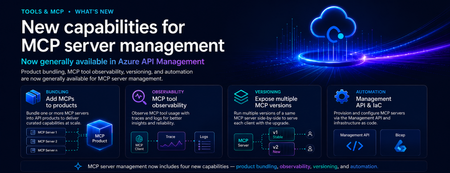
Introduction As organizations move from AI-assisted applications to agentic workflows, MCP servers are becoming a critical integration layer between agents, tools, APIs, data sources, and enterprise systems. Azure API Management already helps teams bring MCP servers under enterprise governance. But as MCP adoption scales, platform teams need more than basic exposure. They need a way to package MCP servers for the right consumers, understand tool usage in detail, manage changes safely, and automate configuration across environments. These are familiar API management challenges — and the same patterns that organizations already use for APIs can now be applied more deeply to MCP servers. We are excited to announce new generally available capabilities for MCP server management in Azure API Management: Add MCP servers to products to package and govern MCP capabilities for specific consumers MCP tool observability to trace tool usage, logs, errors, and payload context MCP server versioning to run multiple versions side by side and manage change safely Management API and Bicep support to automate MCP server configuration as part of CI/CD workflows Together, these capabilities extend MCP server management in Azure API Management and help make MCP servers first-class managed resources — productized, observable, versionable, and automatable. Why MCP server management matters MCP gives agents a standard way to connect with tools and external capabilities. That standardization is powerful, but it also introduces a new operational surface for enterprises. Without a management layer, teams can quickly run into questions such as: Which MCP servers are approved for use? Who can access each server? How do we expose MCP servers to different developer or agent audiences? How do we monitor tool calls, latency, errors, and cost? How do we run preview and production versions side by side? How do we automate MCP server configuration across environments? These are not just developer experience questions. They are enterprise governance questions. With Azure API Management, MCP servers can now be managed using the same core patterns organizations already use for APIs: products, subscriptions, policies, observability, versioning, and automation. What’s new 1. Add MCP servers to products Azure API Management products are a proven way to package APIs for consumption. With this release, you can now add one or more MCP servers to APIM products as well. This makes it easier to expose MCP capabilities to specific consumers, teams, applications, or agent experiences using familiar product-based governance. For example, a platform team can create a product for internal agents that includes approved MCP servers such as: Customer profile lookup Order status retrieval Knowledge base search Ticket creation Workflow automation tools By adding MCP servers to products, teams can use familiar controls such as subscriptions, quotas, approval workflows, and access management to govern how MCP capabilities are consumed. Why it matters: MCP servers are no longer isolated endpoints. They can be bundled, governed, and delivered as secure, consumable products. 2. MCP tool observability As agents use MCP servers to discover and invoke tools, teams need more than basic traffic visibility. They need end-to-end trace context for each agent-to-tool interaction. With MCP observability in Azure API Management, teams can inspect key MCP-specific details, including: Operation context: whether the request was a tools/list or tools/call operation Session context: the MCP session ID through gen_ai.conversation.id Client context: MCP client name and version Protocol context: MCP protocol name and version Server context: MCP server name and version Access context: authentication type and API type Tool context: tool name and tool type for tool invocation traces Error context: error type and error message when a call fails Payload context: tool invocation arguments and results when payload logging is enabled This is especially important for agentic workflows, where a single user request may trigger multiple tool calls across different systems. With APIM, MCP traffic can be traced, inspected, and monitored using the same operational practices teams already use across their API estate. Why it matters: MCP servers are not just accessible through APIM — they are observable. Platform teams can trace tool calls, inspect errors, and understand MCP usage with the same operational discipline they expect from managed APIs. 3. Expose multiple MCP versions Enterprise teams need safe ways to evolve MCP servers over time. With MCP server versioning in Azure API Management, you can expose multiple versions of the same MCP server side by side. This allows teams to run a stable GA version while introducing a preview or next version for early adopters. For example: v1 can serve the majority of production traffic. v2 can be exposed to a subset of consumers for testing. Teams can monitor adoption, errors, latency, and behavior. Once the new version is validated, v2 can be promoted with confidence. This pattern is especially useful when MCP tools evolve, schemas change, new capabilities are added, or teams want to validate agent behavior before rolling changes out broadly. Why it matters: MCP servers can now follow a safer lifecycle model: preview, validate, route, promote, and retire. 4. Management API and Infrastructure as Code MCP server management also needs to work at enterprise scale. With Management API and Infrastructure as Code support, teams can provision and configure MCP servers programmatically through Azure API Management APIs and automation pipelines. This allows platform teams to define MCP server resources as part of repeatable deployment workflows using tools such as Bicep, Terraform, ARM, REST APIs, and CI/CD pipelines. Teams can automate configuration for: MCP server endpoints Runtime and transport settings Authentication configuration Metadata and ownership Versioning Product association Policies Environment promotion This is critical for organizations that need consistent MCP governance across development, test, staging, and production environments. Why it matters: MCP server management can now be automated, reviewed, deployed, and governed like the rest of your API platform. How these capabilities work together Individually, each capability solves an important operational need. Together, they create a complete management model for MCP servers in Azure API Management. A platform team can: Register or expose MCP servers through Azure API Management. Package them into products for specific consumers. Apply access controls, subscriptions, quotas, and policies. Observe tool-level usage, latency, errors, traces, and cost. Run multiple versions side by side. Promote changes safely. Automate deployment through APIs and Infrastructure as Code. This brings the full API management playbook to MCP. Instead of treating MCP servers as unmanaged agent extensions, organizations can operate them as governed enterprise resources. Example scenario Imagine a company building internal copilots for customer support, sales, and operations. Each copilot needs access to different tools: Customer lookup Order history Case management Knowledge search Refund workflows Escalation workflows With MCP and Azure API Management, the platform team can expose these capabilities as MCP servers and organize them into products. The customer support copilot can subscribe to the support product. The sales copilot can subscribe to the sales product. Early adopters can be routed to a preview version of a tool. Operations teams can monitor usage, errors, latency, traces, and cost. Platform teams can automate the entire setup across environments. The result is a more governed and scalable way to bring MCP-based tools into enterprise agent workflows. Getting started To get started with MCP server management in Azure API Management: Create or identify an MCP server you want to expose through Azure API Management. Add the MCP server as a managed resource in APIM. Add the MCP server to an APIM product. Configure access, subscriptions, quotas, and approval workflows. Enable observability to monitor tool-level usage and traces. Use versioning to manage preview and production versions. Use the Management API or Infrastructure as Code to automate configuration. Conclusion MCP is quickly becoming an important standard for connecting agents to tools and enterprise capabilities. But for MCP to succeed in production, organizations need more than connectivity. They need governance, lifecycle management, observability, and automation. With these new MCP server management capabilities in Azure API Management, platform teams can manage MCP servers using the same trusted patterns they already use for APIs. MCP servers are now first-class APIM resources — productized, observable, versionable, and automatable. We are excited to see how customers use these capabilities to build the next generation of governed, enterprise-ready agentic applications.1.3KViews1like0CommentsHosted MCP Servers in Connector Namespace (Preview)
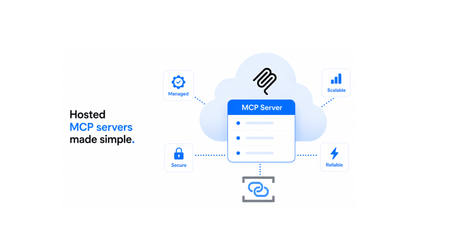
Imagine you've built an agent and you want to give it access to tools via MCP servers. Local servers won't work because your agent can't connect to them in production. Wouldn't it be great if you could quickly stand up secure, enterprise-ready remote MCP servers that your agent can use? This is what Connector Namespace enables. Among other capabilities, the namespace provides a feature called hosted MCP servers that lets you deploy remote MCP servers in minutes. Pick a server from the catalog, deploy it and your agents can discover and call its tools immediately, with infrastructure, deployment, scaling, observability, authentication, and more handled by the platform. Why hosted MCP? Self-hosting MCP servers comes with real operational cost: infrastructure, authentication, monitoring, scaling, availability, and debugging are all on you. For servers that expose standard capabilities like database access or browser automation, that's undifferentiated work that slows you down. Hosted MCP servers shift that burden to the platform, offering a fully managed experience so you can just pick a server and let the platform handle everything else: Hosted MCP server Self-hosted MCP server Setup Deploy from catalog in minutes Build/find server, deploy to your own infra, wire up networking Scaling Platform-managed, scales automatically You configure and manage scaling (VMs, containers, load balancers) Auth Inbound and outbound auth handled by the platform You configure OAuth, managed identity, or OBO end-to-end Observability One-click App Insights integration You set up logging, metrics, and alerting yourself Cold starts Platform manages server lifecycle You manage warm-up, health checks, and process restarts Availability Platform-managed uptime, health monitoring, and automatic recovery You own high availability, e.g. failover and redundancy How it works When you deploy a hosted MCP server, the namespace: Pulls the pre-built server image from the catalog. Provisions the runtime environment with your configuration. Exposes a secure MCP endpoint that agents and MCP clients can connect to. Handles scaling, health monitoring, and authentication. Public preview feature highlight Supported servers During public preview, a curated set of hosted MCP servers is available. The catalog expands over time based on demand. Server What it does Playwright Browser automation tools for web navigation, screenshots, and interaction Azure SQL Exposes SQL operations as MCP tools through Data API builder, enabling AI agents to interact with SQL databases through a controlled, secure contract with entity abstraction, RBAC, and caching. If there's a server you'd like to see in the catalog, file an issue at aka.ms/hosted-mcp-github. Support for publishing custom-built MCP servers to the catalog is planned for the future. Authentication Hosted MCP servers involve two authentication boundaries: Inbound (client → server): OAuth-based authentication with Microsoft Entra ID. Connections from GitHub Copilot in VS Code work out of the box. Outbound (server → downstream service) The server authenticates to the downstream service using either managed identity or on-behalf-of (OBO) flow. You choose the approach during deployment, and the platform handles the rest, including credential management and token exchange. Observability Hosted MCP servers integrate with Azure Application Insights], so you can monitor server health without setting up your own logging infrastructure. After deployment, you can enable monitoring by providing your Application Insights connection string. Once configured, logs and metrics from the server flow directly into your Application Insights resource, where you can search, filter, and analyze them. Get started Quickstart: Create a hosted MCP server in Connector Namespace Hosted MCP overview: Hosted MCP servers in Connector Namespace Connector Namespace overview: What is Connector Namespace? Try it out and let us know what you think! File feedback and feature requests at aka.ms/hosted-mcp-github. What's next Hosted MCP servers are in public preview and the team is actively working to improve the experience. We're looking for your feedback to help shape what comes next. Some areas we're prioritizing: Expanding the server catalog: adding more servers based on demand and community requests Region availability: expanding regional coverage beyond the current preview regions VNet support: deploying Hosted MCP servers inside virtual networks with private endpoints Custom server images: support for bringing your own MCP server images to the catalog Tool-level access control: fine-grained permissions and throttling at the individual tool level322Views0likes0CommentsNew AI gateway capabilities in Azure API Management
Multi-model, multi-protocol AI applications are quickly becoming the norm. Teams are mixing OpenAI, Anthropic, and Vertex AI models, exposing tools through MCP, and wiring agents together with A2A. As that surface grows, so does the work of keeping it secure, observable, and consistent. Our ongoing strategy for the AI gateway capabilities in Azure API Management centers on that problem: providing one place to manage models, MCP tools, and agents, no matter which provider or protocol is behind them. The updates below are the latest steps in that direction. Unified Model API (preview) The headline change in this release: the Unified Model API lets clients speak one API format — OpenAI Chat Completions — while API Management transforms requests to the backend provider, whether that's a model using OpenAI Chat Completions or Anthropic Messages API. By centralizing model access behind a single API layer, you can: Standardize on a single API format for clients, independently from the formats used by backend models. Unify observability, security, and governance with policies that apply across model providers. Configure failover across model providers. Decouple client-facing model names from backend model names using aliases. Learn more about the unified model API. Model aliases Model aliases give clients a stable, provider-neutral name to use when calling a model. By assigning an alias like gpt or claude-sonnet, you decouple the client-facing model name from the actual backend deployment. That makes a few common operations a lot easier: Upgrading a model. Update the alias target to point at a new version — no client code changes required. A/B tests. Shift traffic between backends behind the same alias using API Management's load balancing capabilities. Vendor swaps. Replace one provider with another without touching application code. Model discovery Developers can discover available models by calling the /models endpoint of the Unified Model API. API Management returns the list of model aliases, so apps and tools can adapt to what the platform team has published — without out-of-band documentation. Anthropic and Vertex AI models (GA) AI gateway policies and observability now work with Anthropic and Google Vertex AI models, alongside the providers we already support. You can: Apply runtime policies such as content safety, token limits, and semantic caching to Anthropic and Vertex AI traffic. Collect logs, traces, and metrics for these models in the same place as the rest of your AI traffic. If you're running a multi-provider setup, you no longer need a separate governance story for each vendor. Learn more about AI gateway capabilities in API Management. Anthropic API operations in Microsoft Foundry import When you import a Microsoft Foundry resource as an API in Azure API Management, the import now creates operations for Anthropic APIs alongside the existing model APIs. In a few clicks, you can stand up an API that mediates traffic to Foundry models using either the OpenAI or Anthropic API format — no manual operation definitions needed — and then apply the same policies, security, and observability you use for the rest of your AI traffic. Learn more about Microsoft Foundry import. Token metrics for additional token types (preview) Token tracking used to stop at prompt, completion, and total tokens. Modern models add cached, reasoning, and thinking tokens, which can make up a significant share of token consumption, cost, and latency. API Management now logs metrics for these additional token types into Application Insights, across API formats (OpenAI Chat Completions, OpenAI Responses, and Anthropic Messages API) and providers (Microsoft Foundry, OpenAI, Amazon Bedrock, Google Vertex AI, and others). With richer signals, your cost dashboards, budget alerts, and capacity planning can actually reflect how today's models behave. Learn more about token metrics. Content safety for MCP and A2A (GA) The llm-content-safety policy now covers MCP and A2A traffic in addition to LLM traffic. That includes MCP tool-call arguments, MCP response text, and A2A payloads. A couple of related improvements: llm-content-safety can now be configured directly as an outbound policy. Two new attributes — window-size and window-overlap-size — let you tune how messages exceeding the Azure Content Safety limit of 10,000 characters are chunked and forwarded for validation, balancing detection sensitivity with Azure Content Safety call volume. The result is one consistent safety policy across LLM, MCP, and A2A flows instead of stitching together custom filters per protocol. Learn more about the content safety policy. A2A APIs (GA) Support for Agent-to-Agent (A2A) APIs in API Management is now generally available. Agent APIs can now be governed with the same policies, identity, and observability you use for the rest of your APIs. What you can do with A2A APIs in API Management: Mediate JSON-RPC runtime operations to your agent backend with full policy support — including the content safety improvements above. Expose and manage agent cards, automatically transformed by API Management to represent the managed agent API. Log traces to Application Insights using OpenTelemetry GenAI semantic conventions for deep correlation between API and agent execution traces. What's new in GA, on top of the preview: Available in classic tiers, in addition to v2 tiers — bring A2A governance to existing API Management resources without migrating tiers. Richer diagnostic logging for A2A APIs, giving more actionable telemetry for monitoring and troubleshooting agent traffic. Learn more about A2A support in API Management. Related: Bring Your Own Model in Foundry Agent Service (GA) Last month, Bring Your Own Model (BYOM) in Foundry Agent Service went GA. BYOM lets enterprise teams route Foundry agent model calls through their own infrastructure — typically for compliance, governance, or to reuse an existing model gateway. This pairs naturally with the AI gateway capabilities in Azure API Management. Put API Management in front of your models, apply the policies and observability described above, and have Foundry agents call through it — getting consistent governance for both your direct AI traffic and your agent workloads. Get started Together, these updates make Azure API Management a more complete AI gateway: consistent governance, security, and observability across models from various providers, MCP tools, and agent interactions. Some of these features are still rolling out. They will first become available in v2 tiers of API Management and in the AI release channel for classic tiers, then continue rolling out to the rest of classic tier resources over the following weeks. Get started with the unified model API or explore the AI gateway capabilities in API Management.2.4KViews0likes0CommentsAzure Connector Namespaces: managed integration for any Azure compute
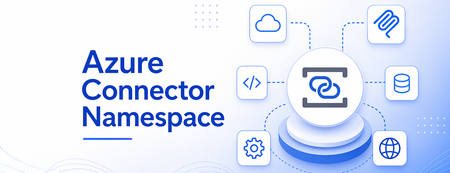
The integration tax nobody budgets for It is always a simple task on paper: connect apps to the systems the business actually runs on — SharePoint, Salesforce, SAP, Outlook — and get back to building features. What gets in the way is rarely the business logic. It's the plumbing. You write a custom API client for each service. You wire up OAuth flows and then babysit token refresh. You add retry policies, handle throttling, page through results, and stand up webhook subscriptions you now have to keep alive. None of that is the feature. All of it is on you. Historically, if you wanted that work done for you, the answer was a workflow engine. That's great when you want a workflow — but a lot of apps just want to call an action or react to an event from code they already have, running on the compute they already use. That's the gap Azure Connector Namespace fills. What is Azure Connector Namespace? Azure Connector Namespace is a fully managed integration service that hosts a catalog of prebuilt, reusable connectors and MCP servers that your apps consume through a consistent programming model. Instead of writing and operating a client for each system, you create a connection once and call typed operations from your code. The namespace handles authentication, credential rotation, polling, webhook delivery, retries, throttling, and error handling on your behalf. Worth saying clearly, because people ask: a connector namespace is independent of Azure Logic Apps. It doesn't require, use, or change anything in Logic Apps, and the Logic Apps connectors gallery keeps working separately for workflows. Connector Namespace is the integration path for compute that doesn't run on a workflow engine — your Functions, Container Apps, App Service, and self-hosted services. Each connector exposes three kinds of surface through one shared connection model: Triggers — event subscriptions your app registers (a new email arrives, a record updates, a file lands in a folder). Actions — operations your app calls (send a message, read a row, upload a file). AI agent tools — the same operations, exposed to agents and Copilot through MCP servers. You call all of it from strongly typed SDKs for C# (Azure.Connectors.Sdk), Node.js (@azure/connectors), and Python (azure-connectors) — or over plain HTTP if a typed SDK isn't a fit. The building blocks Five concepts and you have the whole model: Concept What it is Connector namespace The Azure resource that hosts the connector runtime — loads and runs operations, maintains connection state and credentials, polls source systems, dispatches webhook events, and applies retry and diagnostic policies. Create it from the Azure portal, ARM/Bicep, or the CLI. Connector A prebuilt component for one service (SharePoint, Salesforce, SAP, Outlook). It abstracts the underlying API, auth protocol, pagination, and retry behavior so your code stays on business logic. Connection An authenticated, configured binding to an account or tenant. Connections are reusable — multiple apps and connectors can share one. Auth types: OAuth, API key, and Basic. MCP server A first-class resource that exposes tools to AI agents over the Model Context Protocol. Comes in managed and hosted flavors (more below). Connector SDKs Strongly typed clients for C#, Node.js, and Python that share the same catalog, connection model, telemetry, and retry semantics. Or call connectors over HTTP. What you can actually do with it The point of all this is the scenarios it unlocks. A few that show the range: Scenario What it looks like Process documents and content An Azure Function uses SharePoint connector operations to detect new or updated files, processes them, and writes results back to SharePoint. Monitor events from external services An Azure Container App uses a Salesforce trigger to receive events about new leads as they're created. Automate productivity A Node.js app uses Outlook operations to read and send email — reusing a connection another app already owns. Ground AI and agentic workloads A Python service calls connector actions to enrich model output with data from business systems. Reuse existing app code ASP.NET, Node.js, and Python services use managed integrations with no workflow engine in the call path. Publish connectors to agents Turn any connector into an MCP server in one step so Copilot and other agents can call it as a tool. Connections: authenticate once, reuse everywhere Connections are where the Logic Apps connector ecosystem pays off. You get the same broad catalog of first-party Azure services and popular SaaS apps — built on years of connector investment — without bringing a workflow engine along for the ride. You create a connection to a service, authenticate it once, and then any number of apps and connectors reuse it. Creating one is deliberately simple, which is the point: In the Connector Namespaces portal (connectors.azure.com), open your namespace and select Connections > Create connection. Find and select the connector — say, Office 365 Outlook. Give the connection a clear, specific name so it's easy to pick later. Sign in to authorize, and complete any extra steps the service requires. Confirm the connection shows as healthy on the Overview page — it's now ready for your apps to use. Supported authentication types today are OAuth, API key, and Basic. And because the namespace stores and rotates the credentials, your app never touches a raw secret. Triggers: deliver events to the compute you already run A trigger is an event subscription your app registers on a connector — new email, updated record, new file. When the source system raises that event, the namespace delivers the payload to your compute. And it does the hard part for you: it manages polling schedules and webhook registration based on what the underlying service supports, so you don't stand up or maintain subscription infrastructure. Your app can receive those events running on: Azure Container Apps Sandboxes Azure Functions Direct HTTP — App Services or self-hosted ASP.NET, Node.js, or Python on AKS or VMs, through the same connector namespace. Two details that matter in practice: a trigger is defined independently of any specific app, and multiple apps can subscribe to the same trigger event over the same connection. Actions, for contrast, run synchronously when your app calls them; trigger delivery uses webhooks or pull-based subscriptions depending on the connector and source service. You can learn more about how to use the Connectors SDK to inject connectors on Azure Functions here. MCP servers: turn connectors into agent tools This is the part I'm most excited about. An MCP server in your namespace exposes tools that AI agents — Copilot, custom agents, any MCP-aware client — can discover and call, using the same connection model as everything else. That's how you put your line-of-business systems directly in front of an agent without writing tool wrappers or standing up hosting. There are two ways to get one. Managed MCP servers Take any connector in your namespace and publish it as an MCP server in a single step. The namespace builds and configures the server — tool definitions, lifecycle, runtime — and the only thing you do is authenticate the underlying connection. If you can create a connection, you can give an agent a tool. Hosted MCP servers Sometimes you want a ready-made server rather than one projected from a connector. Hosted MCP servers are pre-built images from a curated catalog that the namespace runs in dedicated compute it provisions for you. You own the configuration; the platform handles hosting, scaling, networking, lifecycle, dependencies, health monitoring, and credentials. When you deploy one, the namespace pulls the image, provisions the runtime with your config, and exposes a secure MCP endpoint agents can connect to. The curated catalog during preview includes: Playwright — browser automation tools for navigation, screenshots, and page interaction. Azure SQL — SQL operations exposed as MCP tools through Data API builder, with entity abstraction, RBAC, and caching so agents work through a controlled, secure contract. It's a deliberately curated set today, and it expands over time based on demand. You can learn more about Hosted MCP Servers here. How agents authenticate Hosted MCP servers have two auth boundaries: Inbound (client to server) — OAuth with Microsoft Entra ID. Connections from GitHub Copilot in VS Code work out of the box; other MCP clients need a little extra config. Outbound (server to downstream system) — either a managed identity assigned to the namespace, or on-behalf-of (OBO) using the calling user's identity for delegated access. How it fits together End to end, the flow for connectors is short: Create a connector namespace resource in your subscription. Create one or more connections to the services you want — say, an OAuth connection to Microsoft 365. Your app — in Functions, Container Apps, App Service, or self-hosted compute — references the namespace and connection through a Connector SDK, then subscribes to triggers or calls actions. The namespace handles authentication, request signing, polling, webhook subscription, and retries. Your app gets back typed responses and event payloads. For MCP servers, it's the same shape: create the namespace, add a managed or hosted server from the catalog, authenticate the underlying connection, and agents can find the server, read its tool catalog, and invoke tools. Where you can run it Azure compute — App Service, Container Apps, and Functions can all consume connector operations. Self-hosted — any self-hosted service works too: ASP.NET, Node.js, or Python on AKS or Azure VMs. Agents, directly — Copilot extensions and MCP-aware clients call tools on MCP servers in your namespace without going through a separate compute layer; the namespace provides the compute that runs the servers. Security and governance, by default Credentials stay with the namespace — it stores, manages, and rotates them; your app never handles raw secrets. Network isolation — restrict access with virtual network integration and private endpoints. RBAC — control who can create connections, register triggers, and invoke actions. Observability — diagnostic logs and correlation IDs flow to Azure Monitor for end-to-end tracing across the namespace and your compute. Before you build: preview realities I'd rather you go in clear-eyed. While Connector Namespace is in preview, keep these in mind: Consideration What to expect No SLA Not recommended for production workloads during preview. Region availability Limited regions today; the list expands over time. Connector coverage High-usage and standard connectors first; enterprise connectors like SAP, IBM MQ, and Oracle Database follow in later waves. Identity API key and OAuth connections now; managed identity for connections comes later (and arrives earlier for select MCP servers). Versioning SDK and namespace runtime versions are paired during preview — expect breaking changes between milestones. Pricing The pricing model isn't finalized; the metering shape may change before GA. Try it, and tell us your feedback If you've ever shipped an integration and then spent the next quarter maintaining its plumbing, this is for you. The preview is open: create a namespace from the Azure portal, wire up a connection at connectors.azure.com, and call your first action or publish your first MCP server. It is easy to start here: Learn more: What is Azure Connector Namespace? Quickstart: Create and manage connector namespaces Create reusable connections in connector namespaces Hosted MCP servers in Azure Connector Namespace Related Blog Posts: Azure Functions - Connectors SDK Hosted MCP Server announcement Samples repositories: Using connectors SDK with Azure Functions This is a preview, which means your feedback genuinely shapes where it goes — which connectors come next, which MCP servers land in the catalog, where the rough edges are. Bring issues, feature requests and feedback to our GitHub page. I read it. Let's build the integration layer you actually want to use.652Views2likes0CommentsMCP Test Console and Git Repository synch in Azure API Center
Why This Matters As organizations race to build AI-powered applications, the Model Context Protocol (MCP) has emerged as the standard way to connect AI agents with external tools and data sources. Managing these MCP servers at enterprise scale, however, has been a growing challenge — until now. AI agents are only as useful as the tools they can access. MCP servers expose those tools — from databases and internal APIs to third-party services — in a standardized way that any AI agent or model can consume. As your MCP ecosystem grows, so does the challenge of keeping track of what's available, what's working, and what your teams are actually using. Azure API Center already serves as a centralized registry for APIs across your organization. Now it extends that same governance model to MCP servers, complete with developer-friendly discovery, live testing, and automated synchronization from your source repositories. New Feature: MCP Test Console in the API Center Portal Developers can now test MCP server tools interactively without leaving the Azure portal. Once an MCP server is registered in your API Center inventory, the API Center portal — your organization's customizable developer portal — surfaces a dedicated test console on the server's Documentation tab. Developers simply select a tool, click Run tool, and immediately see the response. This means your teams can: Validate tools before connecting them to agents — no more building a test harness from scratch. Explore tool schemas interactively — the portal surfaces endpoint details and input/output schemas alongside the live console. Onboard faster — developers browsing your internal MCP registry can go from discovery to verified integration in minutes. The MCP server tiles in the portal provide a clear, browsable view of all registered servers. Each tile surfaces the server's endpoint URL, available tools, and installation instructions for Visual Studio Code — giving developers everything they need to get started in one place. Getting started: Set up your API Center portal, then navigate to any registered MCP server. On the Documentation tab, select a tool and click Run tool to open the test console. New Feature: Synch MCP Servers from a Git Repository Managing API assets shouldn't require manual registration every time something changes. With Git repository integration, Azure API Center can automatically sync assets — including MCP server definitions — directly from your source repository. How It Works When you connect a Git repository to your API Center: An environment is created in your API Center representing the repository as an asset source. API Center regularly synchronizes MCP servers from the repository into your inventory — no manual intervention required. Assets appear in your inventory on the Inventory > Assets page with a visual link indicator, making it easy to identify which assets are source-controlled. This is especially valuable for teams that maintain MCP server definitions, skill files, or OpenAPI specs in version control. As your repository evolves, your API Center inventory stays current automatically. Setting It Up Step 1: Secure your access credentials (for private repos) If your repository is private, store a personal access token (PAT) as a secret in Azure Key Vault. Your API Center instance uses a managed identity to retrieve this secret securely — you can configure the managed identity manually or let API Center handle it automatically during the integration setup. Step 2: Connect the repository In the Azure portal, go to your API Center and navigate to Platforms > Integrations > + New integration > From Git repository. You'll configure: Repository URL — including an optional branch and subfolder path (e.g., https://github.com/<org>/<repo>/tree/main/skills). Git provider — such as GitHub. Asset type configuration — API Center defaults to a skill asset type with the file pattern **/skill.md, but you can add additional asset types to match your repository structure. PAT reference — select the Key Vault secret containing your PAT, if applicable. Environment details — give the repository environment a friendly name, resource ID, type (e.g., Production), and lifecycle stage for synced assets. Step 3: Let the sync run Once created, the integration runs automatically. Your assets will appear in the Inventory > Assets view, linked to their source in the repository. Access Control for Private Repositories The integration uses Azure's managed identity framework to authenticate to Key Vault. Assign your API Center's managed identity the Key Vault Secrets User role on your Key Vault to grant the necessary read access. If you prefer, API Center can configure this automatically — just enable the Automatically configure managed identity and assign permissions option during integration setup. Bringing It Together: A Complete MCP Governance Story Together, these two features complete an end-to-end workflow for enterprise MCP governance: Register → Connect your Git repository and let API Center automatically synch your MCP servers and skills as they evolve. Discover → Developers and AI engineers browse the API Center portal to find the right MCP server for their agent, with full schema visibility and endpoint details. Test → The built-in test console lets developers validate tools interactively before committing to an integration. Govern → Use API Center's access management capabilities to control who can view and consume specific MCP servers across your organization. And if you're building MCP servers on Azure services, the registry integrates directly with Azure API Management, Azure Logic Apps, and Azure Functions — so your MCP ecosystem and your API ecosystem share a single source of truth. Get Started Register and discover MCP servers in Azure API Center Synchronize API assets from a Git repository Set up the API Center portal Explore MCP Center — Azure API Center's public MCP registryMore Control, Less Overhead: Custom Domain Upgrades in Azure API Management v2
Multiple custom domains in Premium v2 Large organizations rarely expose APIs under a single domain. A global enterprise might need api.contoso.com for external partners, apis.hrportal.contoso.com for internal teams, and dev.europe.contoso.com for a regional developer portal — all at once. Until now, achieving this required spinning up separate API Management instances, adding cost and operational complexity. Azure API Management Premium v2 now supports multiple custom domains within a single instance — across gateway, developer portal, and management endpoints. This allows organizations to: Configure distinct hostnames for different endpoints and target audiences Align API experiences with business units, products, or regional brands Simplify domain-scoped networking and security policies Reduce the need for separate APIM instances created solely for domain separation For enterprises managing large, distributed API estates, this provides greater flexibility in how APIs and developer experiences are exposed — while maintaining centralized governance. Wildcard custom hostnames in Premium v2 and Standard v2 As API estates grow, managing individual certificates for every subdomain becomes a scaling problem fast. Each new surface — payments.api.contoso.com, inventory.api.contoso.com, orders.api.contoso.com — previously required its own hostname registration and certificate. Ten new API surfaces meant ten separate management tasks. Azure API Management Premium v2 and Standard v2 now support wildcard entries in custom hostnames. A single *.api.contoso.com entry paired with a single wildcard certificate covers all subdomains automatically — no per-subdomain configuration required. This helps teams: Simplify certificate and domain management at scale Accelerate onboarding of new API surfaces without repeated hostname setup Maintain consistent branded endpoints across dynamic subdomains Reduce operational overhead for rapidly growing API environments By extending this capability to both Premium v2 and Standard v2, Azure API Management makes flexible, scalable domain management accessible to more organizations without requiring higher-tier deployments. Both updates are generally available now. Learn more about Azure API Management v2 tiers and how they help organizations build scalable, enterprise-grade API platforms. Further reading: Configure a custom domain name for Azure API Management