user interface
1712 Topics
Mouse button 'Back/Forward' not working in 'New Teams'
Though there are options to 'pop out' windows from Teams, Teams is a generally a single page app. As such, one of my most used features in 'Classic Teams' is switching back 'n forth between several 'tabs' I'm currently working with. Say I've got somebody on chat, but then have to quickly check something in Teams, then go back to chat. In Classic Teams this works just fine using the mouse's back & forward buttons. In 'New' Teams, this no longer registers any action at all. I assume the feature still exists, since left of the search bar there are still the back/forward UI buttons. But moving the mouse over for every time you need to switch back and forth is a lot slower and less intuitive than just using the mouse buttons. Current behavior: Mouse 'back'/'forward' buttons do not work in 'New Teams' Expected behavior: Mouse 'back/forward' buttons register the 'back' and 'forward' navigation commands as they did in 'Classic' Teams8.3KViews35likes27Comments
Teams users cannot sign in if using personal account
Anyone have any luck with this? Know of a work around? Anything know if this is a known issue and if a fix is on the way? Once again Microsoft Support has lived up to my expectations so I'm reaching out here. Create a meeting invite link and share with a bunch of people. When clicking on the link the user is presented with options to download Teams, use the web or open with the Teams App. This applies to the Teams App link. Users with business accounts, and users who join as guest work without issue. On the join meeting window there's a link to sign in for a better experience. Clicking this link show a signing in page either indefinitely or for a while and reverts back to the join meeting window. It appears that signing in to a Teams meeting with a personal account (Outlook.com, Gmail) simply is not supported. If this is the case I would expect a message to say this but I suspect this is a bug in Teams.21KViews1like13Comments
"None" option missing from Teams background options
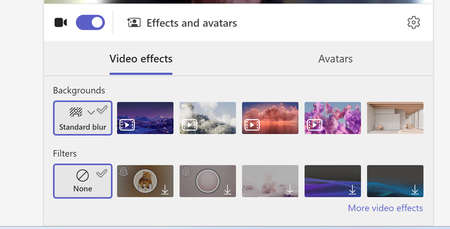
Hi, Our teams "none" background option is missing. Forcing users to use a background or the blur backgrounds. I have tried to revert back to classic teams to see if that is a fix, but I am unable to toggle it off and it takes me to download the classic teams which is just the new teams download. I do see this message "Your org sets background to blur unless something else is selected" when trying to update the background in a call. We are not disabling this option as an organization. And I can switch to other backgrounds.1.8KViews1like7CommentsTeams missing GIF option in messaging
This morning we noticed the GIF option in Teams messaging is missing org wide. Desktop and Web client. Old messages that were sent with a GIF display as a link now instead of the image Our global org policy in the Admin porta is set to On Anyone else seeing this?Solved32KViews16likes39Comments
Teams is unable to access your calendar
I started the below error on a lot of computers today. My co-worker did not get the error UNTIL he updated to the same version of Teams as me You have Microsoft Teams version 25072.1609.3541.7814. You've got the latest version. It was last checked on 4/7/2025. The issue is with multiple windows 11 users and their local teams installation. Brand new issue and trust me I'm the admin there were no changes by me. (in Exchange or Teams) I've run the Exchange connectivity test (ok) The MS remote connectivity test fails with this error Make sure user has Exchange Web Services EWS and REST API protocols enabled. The Microsoft 365 Teams Calendar App diagnostics referenced in the link requires a Microsoft 365 admin account to be executed This worked Friday, it does this today. What changed?Solved2.9KViews3likes11CommentsTeams Events App / Plug-in, targeting events vs registration
Hi all, We would like to leverage Teams Events app in our organization, but find it is less than ideal due to a key function in choosing whether to use a registration form with an event. There is an audience targeting function, which we would like to leverage, that is disabled once a registration form is configured. In turn, that opens the event for people who may not find it relevant in the Events view (i.e. wrong language, wrong timezone). On the other hand, if no form is configured, we can elect to turn off notifications and not add an event automatically to a calendar. That's great, but then there is no option at all to add an event from the Events view. Is there a way to subdivide the teams Events app into organizations behind the scenes, without subdividing the entire M365 tenant? Is there a chance that further development on this resource will allow for audience targeting AND registration?220Views0likes1Comment
Default audio devices in teams
Hi All, I use a Lenovo X1 carbon 6th Generation laptop along with a Thunderbolt Docking station. (Windows 10 operating system) I use a usb headset for teams/ meetings and calls. When I unplug my headset, Teams defaults to my docking station. When I plug it back in, my docking station remains as default without automatically placing my headset back as default. (My headset is defaulted for all sound devices) My headset will appear in device options in Teams and I have to re-select it there in order to use it in -teams again. I've found that even after unplugging my docking station and only having my PC speakers and internal microphone as options, Teams will not automatically default back to my headset. It will remain defaulted to my PC speakers and internal microphone. Teams only defaults back if every other sound option is disabled from the sound control panel. However, other meeting software like Zoom and Cisco Webex automatically default to my headset (or whatever new sound device is plugged in) each time without me having to disable other sound devices or re-select it from the Zoom/Webex devices menu. I and many other users at my company have noticed this behavior. Does anyone have any hints or clues to help us out? Any help will be greatly appreciated. Thank you!70KViews15likes19Comments
Transforming Microsoft Teams into a Project Management Hub
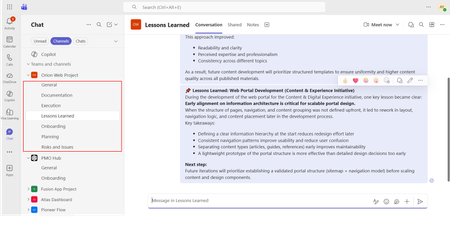
If you use Microsoft Teams only for chats and meetings, you’re missing much of what it can actually do. While Microsoft Teams is often seen as a communication tool, it can also function as a central workspace for managing projects - from planning and brainstorming to execution and documentation - all in one place. When combined with tools like Microsoft Planner, SharePoint, and Microsoft Loop, Teams can become a practical project management hub that keeps work organized and reduces the need to switch between systems. This article walks through a clear, practical approach to setting up and using Teams for real-world project delivery. Why Use Microsoft Teams for Project Management? Organizations often hesitate to introduce new tools due to cost, training effort, or resistance to change. Microsoft Teams offers a strong advantage: it is already widely adopted in many organizations as part of Microsoft 365. Using Teams for project management allows you to: Centralize communication and documentation Reduce tool fragmentation Improve team visibility and collaboration Leverage existing infrastructure without additional cost Instead of switching between multiple platforms, teams can manage conversations, files, tasks, and workflows in one place. Structuring Your Project in Teams A well-structured Team is the foundation of successful project management. Create a Dedicated Team Start by creating a Team specifically for your project. Avoid mixing multiple projects in one Team, as it leads to confusion and poor organization. Recommended channels structure: General (announcements and overview) Planning (timelines, scope, requirements) Execution (daily work discussions) Risks and Issues Documentation Onboarding Lessons Learned This structure ensures clarity and separates strategic discussions from operational ones. Managing Tasks with Planner Task management is a critical part of any project. Inside Microsoft Teams, you can add a Planner tab to manage tasks visually within the same workspace where communication and files are stored. How to use Planner effectively: Create buckets (e.g., To Do, In Progress, Completed, or structured by topic) Assign tasks to team members for clear ownership Set due dates and priorities Attach files and add comments directly to tasks Use labels to categorize work (e.g., Design, Frontend, Backend, Testing) for better filtering and tracking Planner also provides multiple views beyond the basic board: Board view (Kanban-style) for workflow tracking Charts view for progress and workload overview Schedule (Calendar) view to track deadlines visually across time This combination allows teams to switch between operational tracking and higher-level planning depending on the need. This visual approach improves accountability, transparency, and makes task tracking easier even for non-technical users. Document Management with SharePoint Every Team in Microsoft Teams is backed by a SharePoint site. This means all files shared in Teams are stored and managed through SharePoint. Using SharePoint effectively allows you to: Structured storage of project documentation through folders and metadata Maintain version control Role-based access management Centralized file organization Control access permissions Enable real-time collaboration Best practices: Create clear folder & metadata structures (e.g., Contracts, Designs, Reports) Avoid duplicate files Use naming conventions Instead of sending documents via email, teams can collaborate directly within Teams, ensuring everyone works on the latest version. SharePoint Lists in Microsoft Teams SharePoint Lists in Microsoft Teams provide a structured way to store, manage, and track information directly within the collaboration workspace. A SharePoint List is essentially a flexible data table, where each item represents a record with defined fields (such as status, owner, due date, priority, or category). They are especially useful for: Project roadmaps and milestone tracking Action item tracking with ownership and status Checklists for delivery and execution steps Simple status registers and progress tracking Unlike free-form messages or documents, SharePoint Lists keep information structured, filterable, and easy to update, which makes them suitable for ongoing tracking and reporting. When used inside Microsoft Teams, Lists help teams move from discussion to execution by turning decisions into trackable items with clear ownership, status, and visibility. Embedding SharePoint Pages in Teams Beyond file storage, Microsoft 365 allows SharePoint pages to be embedded as tabs within Teams, making key project information easily accessible in one place. SharePoint pages can be added as tabs inside Microsoft Teams channels, providing structured and persistent access to key project information without leaving the collaboration space. In practice, organizations often use SharePoint pages for: Project home page with key links and overview Governance page with rules and standards Onboarding page for new team members Documentation hub for core resources Centralized knowledge hubs This helps ensure that essential information is not scattered across chats or files, but is instead organized and always available within the project workspace. SharePoint is better suited for structured, stable, and long-term information. Microsoft Loop for Real-Time Collaboration Microsoft Loop introduces a more dynamic layer of collaboration inside Microsoft Teams, designed for fast, interactive work where content is continuously evolving. Loop components (such as notes, tables, task lists, and meeting agendas) can be embedded directly into Teams conversations and edited in real time by all participants. It is especially useful for: Live meeting notes Quick decision-making and feedback collection (including simple polls or inputs) 1:1 discussions and follow-ups Brainstorming sessions and idea capture Shared task tracking during discussions In practice, teams can collaborate on meeting notes or brainstorming pages during calls, with updates visible instantly to everyone. This removes the need to switch between documents or wait for post-meeting summaries. Unlike structured tools like SharePoint, Loop is designed for fluid, real-time collaboration, where information is shaped and refined as the discussion happens. Automating Workflows with Power Automate Manual processes can slow down project execution. With Power Automate, you can streamline repetitive tasks. Common automation examples: Notify the team when a task is completed Send reminders for upcoming deadlines Automatically save email attachments to SharePoint Trigger approval workflows Example scenario: When a task in Planner is marked as “Completed,” a notification is sent to the project manager and logged in a tracking list. This reduces manual follow-ups and improves efficiency. Power BI Dashboards Power BI can be integrated into Teams as a tab, allowing teams to access real-time reporting directly within their project workspace. It is commonly used for: Project status dashboards KPI and performance tracking Resource and workload visibility Financial or delivery reporting Instead of switching to a separate reporting tool, teams can monitor progress and insights directly inside Teams, ensuring better visibility and faster decision-making. Microsoft Whiteboard Microsoft Whiteboard provides a visual collaboration space for real-time ideation and planning. It is especially useful for: Brainstorming sessions Process mapping and flow design Workshop facilitation Visual planning during meetings Whiteboard supports freehand drawing, sticky notes, and structured diagrams, making it effective for capturing ideas during live discussions and workshops. Integration with Other Tools (Microsoft & Third-Party) Microsoft Teams can be extended with a wide range of Microsoft 365 services and external applications, allowing it to function as a central hub for project work, reporting, and collaboration. Teams also supports many external tools, allowing organizations to align existing systems without fully replacing them. Common examples include: Jira – agile project and issue tracking Trello – lightweight task and board management ServiceNow – IT service management workflows GitHub – development and repository tracking Salesforce – CRM data and customer-related workflows Communication and Collaboration Effective communication is essential for project success. Microsoft Teams provides multiple ways to facilitate this: Channel Conversations Keep discussions organized by topic instead of using scattered chats. Meetings and Calls Schedule regular check-ins, sprint reviews, or stakeholder updates directly within Teams. Mentions and Tags Use @mentions to notify specific team members and ensure accountability. Practical Use Case Consider a company implementing a new internal intranet. Using Microsoft Teams: A Team is created for the project Planner tracks tasks such as design, content migration, and testing SharePoint stores documents and site assets Power Automate sends reminders for deadlines Teams meetings are used for weekly progress reviews This setup enables the team to manage the entire project lifecycle without introducing additional tools. Best Practices for Success To maximize the effectiveness of Microsoft Teams for project management: Keep your structure simple and consistent Avoid creating too many channels Encourage team members to use channel conversations instead of private chats Regularly review and clean up tasks Use automation where it adds clear value Adoption is just as important as functionality. A well-designed system only works if the team actively uses it. Limitations to Consider While Microsoft Teams is powerful, it has limitations: Not suitable for highly complex project scheduling Limited dependency management compared to dedicated PM tools Reporting capabilities are basic without Power BI For large-scale or highly regulated projects, a dedicated project management tool may still be required. Professional Context and Applied Perspective The approach described in this article reflects practical experience in designing and implementing collaboration environments using Microsoft Teams within real organizational settings. It is based on applied use of integrated Microsoft 365 capabilities, including SharePoint, Microsoft Planner, and Microsoft Loop, to support structured project execution and improve cross-functional collaboration. Rather than relying on isolated tools, this approach focuses on designing a unified digital workspace that aligns communication, task management, documentation, and automation within a single environment. Microsoft Teams is more than just a communication platform. When used strategically, it becomes a practical and efficient tool for managing projects. By combining Teams with Planner, SharePoint, and Power Automate, organizations can create a unified workspace that supports collaboration, task management, and process automation. For teams looking to simplify their toolset while maintaining productivity, Microsoft Teams offers a compelling solution for modern project management.2.1KViews1like1Comment
Change meeting category default options
When creating a new meeting in Teams and clicking the drop down button to select a category, a list of about six options appears that appear to be randomly selected. These don't bear any relation to the most commonly used categories I use, meaning I then have to click through to the list of all categories to find them. Is there a way to change what categories appear in that initial short list to save me a click each time?330Views0likes1Comment