user interface
1717 TopicsMicrosoft Teams update: QR code protection for messages from external users
Microsoft Teams is adding extra security to protect users from phishing and fraud. QR code images sent by external users will be hidden by default. Users can choose to reveal the image before viewing or scanning the QR code. Rollout schedule Targeted Release: Beginning in October 2026 General Availability (Worldwide): Beginning in late October 2026 Impact on your organization Who is affected Organizations that allow communication with external users in Microsoft Teams. Users who receive Teams messages from external senders. Teams administrators and support teams that manage external collaboration policies. QR code images sent by external users will be blurred by default in Teams messages. Users can reveal the image if they trust the sender and want to scan the QR code. A blurred image does not mean the QR code has been identified as malicious. This protection will be applied automatically to QR codes received from external users. No admin configuration or policy changes are required. The feature will be enabled by default during the rollout. Action required and recommendations No admin action is required before rollout. Inform users that QR code images from external senders may appear blurred by default. Remind users to verify the sender before revealing or scanning QR codes. Review existing user education materials related to phishing awareness, QR code safety, and external collaboration. Update internal help desk documentation to reflect the new user experience. https://www.linkedin.com/feed/update/urn:li:activity:7520938452184408065/155Views0likes0Comments
Microsoft Teams transcription language settings
Hi! With a Microsoft 365 Business Premium license and a Copilot license, I can use transcription during a Teams meeting by setting the spoken language to Auto Detect. However, the transcription is sometimes inaccurate. Is there a way to limit the language detection scope? For example, is it possible that I select only English and Chinese, and Auto Detect is restricted to those two languages instead of also attempting to detect languages such as Spanish or French ?406Views0likes2Comments
Shared Channels: @Channel mentions fail to trigger activity notifications for team-shared members
Hello everyone, I am facing a persistent issue regarding notification behavior in Microsoft Teams Shared Channels that I hope someone can clarify or help with. Scenario: We have a Shared Channel that is shared with multiple teams (e.g., 17 teams in total). Note: I know that this way of communicating is not the recommended way, but we are not allowed to use any Viva products etc. Users accessing the channel are members of those shared-in teams, but they are not listed as direct individual members in the Shared Channel's own member list. Users have their channel notification settings correctly configured to receive notifications (e.g., "All new posts" or standard banner/activity settings). The Problem: When someone uses a channel mention (e.g., @ChannelName) in this shared channel, the users who have access via the team-sharing mechanism do not receive any activity feed notifications. The workaround/oddity: They only receive the activity notification if we explicitly add each user as a direct individual member to the Shared Channel. The dilemma: Since the channel is shared with 17 teams, adding hundreds of users manually or via scripts as direct members creates massive redundancy and clutters the UI (users see the team and the channel redundantly). Inconsistency: We noticed that in older shared channels created some time ago, channel mentions worked across team shares without needing direct individual memberships. It seems newer shared channels behave differently and strictly require direct membership to trigger activity feed notifications for @Channel mentions. Questions: Is this a known design limitation or a recent backend change in Microsoft Teams for newer Shared Channels regarding how @Channel mentions resolve indirect team members? How are organizations supposed to utilize @Channel mentions effectively in large-scale collaborations involving multiple shared teams without bloating the direct membership list? Any insights or workarounds would be greatly appreciated. Thank you!553Views0likes2Comments
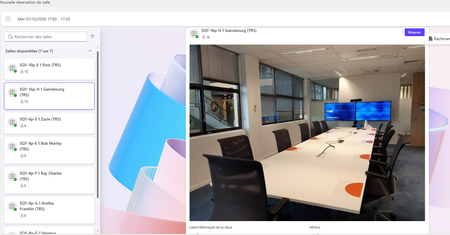
Microsoft Places bug: Room images are too big, hiding info. Need a compact/resize option
Hi everyone, We are currently deploying Microsoft Places and configuring our Resource Mailboxes. We are facing a major UI/UX issue regarding the Room Cards (Space Profiles). No matter what image size, resolution, or aspect ratio we upload for a room (via Entra ID / Exchange mailbox photo), the Microsoft Places interface automatically scales and stretches the image to fill the top banner. The image container is so large that it takes up almost the entire height of the card. As a result, critical information such as room capacity, available features/equipment, and the booking button are pushed completely out of view. Users are forced to scroll down every single time just to see basic details. This creates a poor user experience. While removing the room picture entirely provides a more compact layout, we would still like to use visual cues without sacrificing readability. Feature Requests for the Product Team: Allow administrators to disable or shrink the room image banner directly within the Places settings. Introduce a compact layout option for Room Cards where text and action buttons (like "Book") are prioritized at first glance. Fix the auto-scaling behavior so it doesn't force a massive zoom on standard 1:1 or 16:9 images. Is anyone else experiencing this, or did you find a clean workaround to force a more compact view? Thanks!190Views0likes1CommentTeams Events App / Plug-in, targeting events vs registration
Hi all, We would like to leverage Teams Events app in our organization, but find it is less than ideal due to a key function in choosing whether to use a registration form with an event. There is an audience targeting function, which we would like to leverage, that is disabled once a registration form is configured. In turn, that opens the event for people who may not find it relevant in the Events view (i.e. wrong language, wrong timezone). On the other hand, if no form is configured, we can elect to turn off notifications and not add an event automatically to a calendar. That's great, but then there is no option at all to add an event from the Events view. Is there a way to subdivide the teams Events app into organizations behind the scenes, without subdividing the entire M365 tenant? Is there a chance that further development on this resource will allow for audience targeting AND registration?419Views0likes1CommentChange meeting category default options
When creating a new meeting in Teams and clicking the drop down button to select a category, a list of about six options appears that appear to be randomly selected. These don't bear any relation to the most commonly used categories I use, meaning I then have to click through to the list of all categories to find them. Is there a way to change what categories appear in that initial short list to save me a click each time?433Views0likes1CommentNo function to clear my own chat history like others
Hi, There are "Remove chat history" functionality for others. But There is no way of one shot clear all history of my Own chat history. This should be added to new feature. We can not delete one by one of each notes of our own chat dialog.149Views0likes1Commentmissing crumb trail in Teams channel, cant get back to highest document level
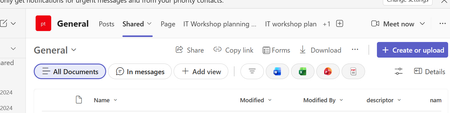
hi discovered yesterday that the crumb trail in teams channels is no longer available, so i cant navigate to the highest document level, however i can get access to the crumb trail from the corresponding sharepoint site, but most of my 5,000 are mainly using teams, can you point me to any documentation to say when this change was happening, screenshots below one from Teams channel other from SharePoint215Views0likes1CommentTeam disappears from the side rail if a channel is in the section
This started around the time Communities have been added to the side rail (the one that shows recent chats, all your teams, etc.). I have a setup where i add channels that i need to a section called Favorites and in that section i enable to show only unread. I put this section above chats in Combined view. This way i see channels with unread messages on top and new chats also appear at the top of the Chats section. This way it is easy to notice unread messages without pesky notifications. Because there is no option to limit the size of Chats section (i would prefer it to show only last 10 chats or less). So, my Teams list is usually too far below to see channels with new messages. I had this setup since Combined view was introduced. But a few weeks ago behavior changed. Now, if a channel is in a section, the whole team is hidden from the side rail and under the Teams section it only shows a link "View all your teams". Which you need to click and it loads list of teams in the main window, then you click on a team and it loads a list of channels and so on. Very slow. It doesn't make sense to hide entire team if you add one of the channels to some section. I still might need to access other channels and i want it to be at my fingertips, not behind 3 clicks and UI loading time. It even looks more like a bug, but probably not many users run into it as i think sections are not as popular as Microsoft have hoped.229Views0likes3Comments