update management
1258 Topics
The i7-7700K meet the minimun requierments to run Win11. But its not suported, Why?
Hi, I have an i7-7700K. This CPU have TPM 2.0, It's compatible with Secure Boot, it have 4 core up to 4.2 GHz. It also is 64bit. I don't know why this CPU is not supported by Microsoft to install Windows 11. Update, 10/18/2021: Yesterday I bought a MacBook Air, I know that the MacBook isn't the best computer and that you are limited within the horizon of Apple. But I don't trust Microsoft and the new Windows 11. What if I bough another computer of 2.000 US dollars and in some years Microsoft decided that I need a new computer? At least, with the new M1 chip of Apple I know that they will support the hardware and the will send me Updates and give Support.433KViews30likes318Comments
Feedback on Windows 11
I've been a Windows customer since the beginning. I was doing computing back on the TSR-80, when we still saved information on audio tape. However, with the changes in the last few versions of Windows; I feel I can on longer use a Windows product. I've been using a Windows 11 system for several months now, and I've hated every time I had to use it. With the increase in non-optional "optional" and non-removable features; I've decided that it's time to move onto a Linux based system. Sincerely, a former Microsoft customer.14KViews21likes60CommentsWhat is an enablement package?
An enablement package is a small update that activates features or functionality that are already present on a device but currently dormant. Think of it as a switch rather than a full operating system replacement. In a traditional feature update, Windows downloads several gigabytes of installation files, replaces major operating system components, and migrates the device to a new OS build. With an enablement package, most of that work has already happened through monthly cumulative updates delivered over time. An enablement package simply turns on the appropriate functionality and updates the Windows version designation. Because the underlying operating system files are already present on the device, Windows does not need to perform a full operating system replacement. Windows 11, version 26H2 will be delivered through an enablement package Windows 11, versions 26H2, 25H2, and 24H2 share the same underlying source code and servicing branch. That means much of the code required for version 26H2 has already been delivered to supported devices through monthly cumulative updates, remaining inactive until the feature update is installed. Once Windows 11, version 26H2 is generally available later this year, organizations can use the enablement package to move devices running Windows 11, version 25H2 or 24H2 to version 26H2 with minimal downtime. For more details on preparing for Windows 11, version 26H2, see Get ready for Windows 11, version 26H2. Note: Because Windows 11, versions 26H2, 25H2, and 24H2 share a common servicing branch, they will share the same release note KB identifiers for both monthly security updates and monthly optional non-security preview updates. You can see this with versions 25H2 or 24H2 today. What are the benefits of an enablement package? For IT organizations, enablement packages provide several practical advantages: Smaller downloads that consume significantly less network bandwidth. Faster installation times compared to traditional feature updates. Shorter maintenance windows and reduced user disruption. Simplified testing because the underlying operating system code is already present and serviced through monthly updates. A familiar update experience that resembles a monthly quality update more than a traditional OS upgrade. Is testing still necessary? Organizations should continue validating new Windows releases according to their internal processes. However, devices moving from Windows 11, version 24H2 or 25H2 to version 26H2 are not moving to a completely different operating system build. Because these releases share the same servicing branch, organizations can generally focus validation efforts on newly enabled default functionality, business-critical applications, and organization-specific configurations instead of revalidating the entire operating system stack.66KViews19likes28Comments
Windows 11 24H2/25H2 System Freeze After January 2026 Updates – Lenovo ThinkPad G2
Dear Microsoft Support Team, We would like to raise a high-priority technical support case regarding a stability issue observed after installing the January 2026 cumulative updates on our Windows 11 devices. Environment Details: Device Model: Lenovo ThinkPad G2 (multiple units) OS Versions: Windows 11 24H2 and 25H2 Update Installed: January 2026 Patch Tuesday cumulative update (KB number can be provided) Deployment Method: WSUS / Intune / Windows Update (specify accordingly) BIOS Version: (Installed Latest available from Lenovo) Issue Description: After installing the January 2026 cumulative updates, devices intermittently experience a complete system freeze. The system becomes fully unresponsive: Mouse and keyboard input stop responding No BSOD is displayed Task Manager cannot be opened System recovery is only possible via hard reboot (power button) Frequency: The issue occurs randomly, both during active use and idle state. Multiple users across our environment are impacted. Troubleshooting Performed: Reinstalled OEM-certified Lenovo display drivers Disabled Fast Startup Ran SFC and DISM health checks (no integrity violations) Updated BIOS to latest version Setting power idle mode, then work normally Request: - Please confirm whether this is a known global issue under investigation. - Advise if any hotfix, Known Issue Rollback (KIR), or registry-based mitigation is available. - Provide guidance on additional diagnostic logging required at kernel or driver level. - Confirm whether crash dump analysis is recommended for this scenario. We are prepared to provide additional diagnostic logs, memory dumps, or reproduction steps upon request. Kindly treat this as a priority case due to multi-user impact in a production environment. Thank you for your support. #Windows11, #Windows 11 24H2, Windows Update, Cumulative Update, System Freeze, Lenovo ThinkPad, Display Driver, Enterprise8.2KViews14likes32CommentsWindows update KB5051987 for Windows 11 stops File Explorer from working
I have a Geekom NUC12 which is a 12th Gen Intel® Core™ i7-12700H 2.30 GHz, also known as a Serpent Canyon NUC 12. It is running Windows 11 Pro Version 24H2 and Windows Update was set to "Get the latest updates as soon as they're available". After installing KB5051987 yesterday, File explorer simply would not start. This is intolerable as this machine is the "master" machine in my home network. I have 5 other machines living in my basement, and I use Remote Connections to manage each of them, if I can't use File Explorer, then I can't get to any of these machines without going up and down the stairs every time! Do Microsoft not bother to test their updates anymore?1.8KViews11likes4Comments
KB5046617 - Failed to Install repeatedly
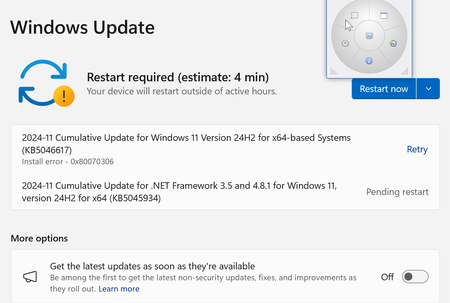
Please help -- I just received a brand-new HP Omnibook Ultra Laptop 14-fd0087nr with Windows 11, 1Tb SSD, 16GB RAM, 2240x1400 res. AMD RYZEN AI processor. It is the latest HP has to offer. I've had it for about 1 week, and everything is working just fine. But about 2 or 3 days ago, Windows 11 update keeps failing on this specific update. It just keeps telling me to "try later" and so far, it looks useless. I am attaching 2 screenshots which I hope can shed some light on what's really going on behind the scenes. I hope someone out there can perhaps find my "problem" to be something they already know more about and what the correct "fix" is. Would be grateful for any tips, suggestions and guidance. Thanks in advance. Thanks in advance, RTan8.9KViews11likes36CommentsSession grid: Microsoft Technical Takeoff
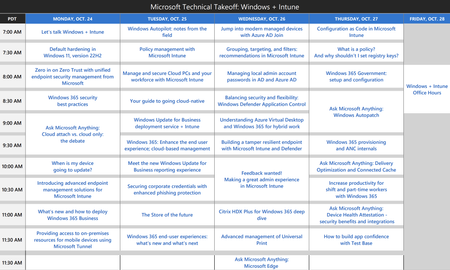
With all the sessions at the Technical Takeoff next week, I wanted to share a grid view of the agenda to make it easier to scan and find the sessions you want to attend live--or watch on demand. Here's a preview. Download the PDF below if you find it helpful. Each session is hyperlinked to its session page. (Note: I updated this on October 24, 2022 to include the Microsoft Edge AMA.)185KViews11likes8CommentsAMD Ryzen 5 2500U and Windows 11 compatibility
I read the list of compatible cpu for Windows 11 and I noted that AMD Ryzen 5 2500U is not in the list. This is a fairly recent CPU as it was released Oct 26th, 2017 and my computer was bought new in April 2019! Is there a process currently utilized by Microsoft to receive requests to revise the list as this specific cpu may have missed the compatiblity list for some reason. I noted that there are many users wanting to upgrade their computer with this specific CPU around the world that are in the same situation and can't upgrade to Windows 11. Looking forward to a feedback about this one !160KViews11likes37CommentsWhy is Add-WindowsCapability so slow for RSAT?
We install RSAT for our technicians by using: Get-WindowsCapability -Name RSAT* -Online | Add-WindowsCapability -Online The download/install is incredibly slow, averaging about ~15 minutes per RSAT tool. There's a total of 21 RSAT tools to install so do the math. No network/traffic blocks. This works just as slow on an open home internet network. No difference between a one-liner approach or foreach logic WUServer is 0 in HKLM path of the registry CBS.log shows about ~10 minutes of Download Progress 49/100 (always at the 49/100 mark) DISM.log doesn't show anything useful Quick googling shows a lot of other people experience slowness. If we can't rely on Windows Update CDN, what's the alternative? Separately downloading, extracting, and storing the content on a network share is cumbersome for each time a new build/FU comes out.20KViews10likes26Comments