scheduling
32 Topics
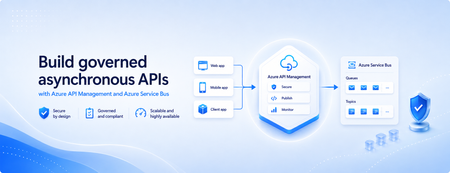
Build governed asynchronous APIs with Azure API Management and Azure Service Bus
Many applications use Azure Service Bus to decouple services, handle traffic spikes, and process workloads asynchronously. However, securely exposing messaging capabilities to applications, partners, and internal teams can require custom middleware or messaging-specific client implementations. Today, we’re announcing the general availability of native Azure Service Bus integration in Azure API Management. With the send-service-bus-message policy, developers can publish messages directly from an Azure API Management gateway to an Azure Service Bus queue or topic. This provides a secure and governed HTTP interface for Service Bus workloads—without requiring teams to build and operate a separate adapter service. Connect APIs directly to Azure Service Bus Azure API Management can act as the governed entry point for applications that submit work to Azure Service Bus. A client sends a standard HTTP request to API Management. The gateway can authenticate and authorize the caller, validate or transform the request, and apply policies such as rate limits and quotas before publishing the message to a Service Bus queue or topic. Once the message is accepted, API Management can immediately respond to the caller while downstream services process the message asynchronously. Alternatively, message publication can be added to an existing API flow while the request continues to its primary backend. This integration brings together API governance in Azure API Management and reliable asynchronous messaging in Azure Service Bus—without adding another intermediary service. Greater control over Service Bus messages As part of general availability, we’re introducing additional controls for building production messaging workflows. 1. Control how messages are processed Developers can configure the following Service Bus message properties directly in the policy: Message IDs to correlate messages and support duplicate-detection or idempotent processing patterns. Session IDs to group related messages for ordered or stateful processing. Time-to-live to prevent messages from being processed after they are no longer relevant. These values can be generated dynamically using API Management policy expressions, allowing them to reflect request IDs, customer identifiers, transactions, or other application context. 2. Capture the send result The response-variable-name attribute captures information about the Service Bus send operation in an API Management context variable. Subsequent policies can use the result to add correlation information to an API response, emit telemetry, record an operational event, or apply conditional logic when a message cannot be sent. 3. Choose how failures affect the API Different messaging scenarios require different failure behavior. When publishing the message is the primary purpose of an API, a send failure can stop policy execution and invoke the API Management error-handling path. When publishing is secondary—such as sending an audit event or initiating optional downstream processing—the ignore-error option can allow the primary API request to continue. Information about the send operation remains available through the response variable for logging or subsequent policy logic. 4. Secure access with managed identity API Management authenticates to Azure Service Bus using a Microsoft Entra managed identity. Customers can use the system-assigned identity of the API Management service or specify a user-assigned managed identity. The selected identity is granted the Azure Service Bus Data Sender role for the appropriate namespace, queue, or topic. This removes the need to store Service Bus connection strings or shared access keys in API policies and makes it easier to apply least-privilege access using Azure role-based access control. Send a message with an API Management policy The following example sends the incoming request body to an orders queue. It assigns a message ID and expiration time, captures the result of the send operation, and treats successful publication as a required part of the API request. <send-service-bus-message queue-name="orders" namespace="contoso-messaging.servicebus.windows.net" message-id="@(context.RequestId.ToString())" time-to-live="00:10:00" response-variable-name="serviceBusResult" ignore-error="false"> <payload> @(context.Request.Body.As<string>(preserveContent: true)) </payload> </send-service-bus-message> A session ID can also be added when related messages need to be grouped for ordered or stateful processing. For a fully asynchronous API, the policy can be followed by return-response so that API Management acknowledges the request immediately after sending the message. For an existing API, the request can continue to its configured backend after the message is published. Common integration scenarios Create asynchronous APIs: Accept an order, document, or processing request through an HTTP API, publish it to a queue, and return immediately while downstream services complete the work. Govern partner integrations: Provide partners with a managed API contract instead of exposing the underlying Service Bus namespace. API Management can authenticate callers, validate requests, and apply quotas before publishing messages. Publish business events: Publish events to a Service Bus topic so multiple subscriptions and downstream services can process them independently. Handle bursts of incoming traffic: Use Service Bus to buffer messages when incoming API traffic temporarily exceeds the rate at which downstream services can process requests. Add events to existing API operations: Publish audit, notification, analytics, or workflow events while allowing the primary API request to continue to its configured backend. Preserve workflow affinity: Use Service Bus sessions to group related messages for ordered or stateful processing based on a customer, transaction, order, or workflow identifier. Get started To send messages from Azure API Management to Azure Service Bus: Create or select an Azure Service Bus queue or topic. Enable a system-assigned or user-assigned managed identity on the API Management service. Assign the identity the Azure Service Bus Data Sender role. Add the send-service-bus-message policy to an API operation. Configure the message payload, processing properties, output variable, and failure behavior. With native Azure Service Bus integration, Azure API Management provides a secure and governed way to connect HTTP APIs with asynchronous messaging workloads—without requiring additional middleware. Learn more Send Service Bus message policy reference Send messages to Azure Service Bus from Azure API Management Azure API Management June 2026 release notes Azure Service Bus documentation945Views0likes0Comments
Outlook calendar: Syntax for describing meeting series is off
When I set up a meeting series to occur on the fourth Wednesday of each month, for example, the calendar invite defaults to read "Occurs every fourth Wednesday." This is incorrect. The problem is more obvious if the meeting falls on, say, the second Wednesday (or whatever day) of the month. The invite then reads "Occurs every second Wednesday." No it does not! "Occurs on the second Wednesday monthly" is what it should read. Please fix!!!230Views1like2Comments
"Scheduling Poll" unintentionally pitted against "Scheduling Assistant ... Why not both?
As a guest invited to a fellow outlook user's scheduling poll, it is unnecessarily difficult to propose additional times that make any sense. It's a strong start towards solving the scheduling problem it's intended to, but it doesn't usually hit the mark, and that's a missed opportunity. Several times, I received a scheduling poll, and each proposed time has already been rejected by one or more required attendees. This is where the "Propose another time" button at the bottom of the poll should help us, . . . Well it's not actually helpful, and will likely generate a lot of email traffic with low chances of helping. I'll explain. The first part of the problem is that there is just no information available about everyone else's schedule. So, how should we expect attendees to propose a reasonable suggestion, even if they are in the same organization and could have had that Free/busy information they need, elsewhere? Going across domains, it makes sense that the information isn't available. But 9 times out of 10, it actually is, because people are using this with people at their workplace. I just would have had to just start over from scratch, although that's bad form because the poll is already in play and this would nominally appear as a conflict. It's also pretty obvious duplicate effort. There just needs to be a better transition between meeting poll and a standard meeting invitation's scheduling assistant view. A person doing that would have to log in if they weren't already, but that seems perfectly fine. Perhaps more importantly, I've got to point out that this is a side-effect of the organizer-as-dictator problem that has been endemic to Outlook & exchange for decades. "FindTime"/"Scheduling Poll" has its place among cross-domain internet email users, but within a work or school environment, it's just good code thrown after bad. The fact that we sometimes need to do a poll before putting any info on the actual calendar is just silly. That's what the calendar is supposed to be for, but locking in the times and making yourself "organizer" just makes the work more awkward. And one last thing, I think it's a mistake that each "Propose another time" sends out another reply-all message. Considering how I described above that we're left just guessing what time could be any good, then sending two or three suggestions in as many separate email messages seems very wasteful. We should be able to set up a few times before saving them and having the poll email re-sent only one more time.1.2KViews1like1CommentAccess Clock In/Out data via Microsoft Graph
I'm looking to integrate Microsoft Teams shifts with some other systems we have. We don't schedule shifts in advance as most of our team work flexibly but need to be able to export clock in/ out data in an automated fashion. Is there a way to do this through the Graph API or at worst through Power Automate?328Views0likes0Comments
Looking for some ideas for this application (see description)
Hello. My work uses sharepoint for their employee webpages and we have something called the "help desk" and there is a different engineer working on the help desk every day. There are usually 10-20 people on the help desk team. We currently use excel for the help desk schedule and everybody in the company can view the help desk schedule to see who is on the help desk on the corresponding day. We have been having many problem with managing it on excel and I am reaching out to see if there are any applications or tools that can make this easier. We want the schedule to be embedded on one of our sharepoint pages and we want it to be easy for engineers to swap help desk days with eachother. Thank you849Views0likes3Comments
SharePoint - Scheduled news will not be published
Hi all, I'm glad it's finaly possible to schedule a newspost in SharePoint. Unfortunately, based on my experiences, I have no confidence in the scheduling functionality. Why? It often happens that on the moment the scheduled newspost must be published, it not happen. Are there others who also run into these problem? Of course I've enabled scheduling on the sitecolletion. 🙂 Kind regards Rob3.6KViews0likes5CommentsProject Activity Inquisition
Hello there, I am in my final year(university) and I major in Project Management, but, I have not really had a project manager's experience neither do I have project managers at my reach to ask questions and this bothers me a lot. I have taken a step in learning MS Project, and I am enjoying it. I want to know, in the process of scheduling for a project, as a new project manager, how will I know the activities to be listed and their respective duration? Will I have to go to each department to request this? I will appreciate a detailed answer. Thanks:)1.6KViews0likes5Comments
Scheduling meetings on behalf group's calendar in desktop app
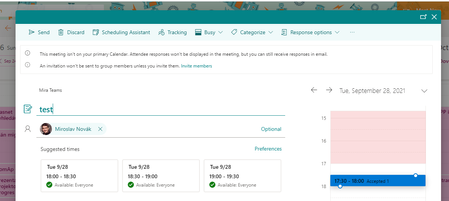
Hello, I have found a way how to schedule a meeting in Group calendar in Outlook online that the meeting is scheduled on behalf the group or it looks like. It is really useful for our scenario because everyone in group can edit the meeting. I would like to schedule the meeting the same way from desktop Outlook but when I add the calendar I am not able to do the same. How to set Outlook destkop, what to change or what to do that I can schedule it? When I schedule it in desktop and try to add another people it is always changed that the organizer is me. Thank you Mirek674Views0likes0Comments
Centralized Scheduling in Teams
We are a non-profit behavioral healthcare organization transitioning to Teams to provide telehealth services. We currently use Zoom for these telehealth appointments and have schedulers create the appointments in Zoom and then enter the meeting links in our EHR. We want to use Teams to do this but cannot seem to find a way to have a user schedule an appointment between a provider and client without delegating calendars in Outlook (which we don't want to do). Does anyone have a good way of having a non-meeting participant schedule for another user and a client?Solved1.7KViews1like2Comments