partner question
271 Topics
Verified by email, but Legal info still shows Verification status None
Hello, Our company (Atlas Software LLC) is stuck on partner verification and we have not been able to get a response through support. What we have done and what we see: - We submitted all the requested documents, and we received an email from Microsoft saying our account was verified. - In Partner Center, the Developer program (Microsoft 365 and Copilot / Teams) shows "Authorized". - Our AI Cloud Partner Program enrollment is "Active". - However, Account settings > Legal info still shows Verification status "None" ("Program Not Found"). Because of this, we cannot complete Microsoft Entra publisher verification, which we need to publish our Teams / Microsoft 365 Copilot app in the store. We opened a support request on October 5 (TrackingID#2610050010000197), added a note to it, and emailed the support engineer, but we have not had a reply. It looks like the verification was completed on one side but not linked to our account's legal information. Could someone from the Partner Center team check this or tell us the right way to get it fixed? Thank you.
AI Cloud Partner Program enrolled but vetting record missing ("Program Not Found")
Our company, Dill Technologies, Inc., is enrolled in the Microsoft AI Cloud Partner Program. The enrollment page shows the program under "Active In," and the agreement was accepted on 10/3/2026. However, our Verification status has stayed at "None" since enrollment, and the Verification Summary page returns "Program Not Found – Failed to load vetting details." Verification never started, and there's no self-service way to begin it. Support ticket 2610050010001898 hasn't resolved it. Support told us to complete enrollment, which is already complete, and attachments fail to upload on the ticket. Could a community manager please escalate this to the Vetting / Trust & Safety team to manually initiate legal entity verification? We need it to complete publisher verification for our Microsoft Entra multitenant app. I'm happy to share our Partner ID and business documents privately.AI Cloud Partner Program enrolled but vetting record missing ("Program Not Found")
Our company, Dill Technologies, Inc., is enrolled in the Microsoft AI Cloud Partner Program. The enrollment page shows the program under "Active In," and the agreement was accepted on 10/3/2026. However, our Verification status has stayed at "None" since enrollment, and the Verification Summary page returns "Program Not Found – Failed to load vetting details." Verification never started, and there's no self-service way to begin it. Support ticket 2610050010001898 hasn't resolved it. Support told us to complete enrollment, which is already complete, and attachments fail to upload on the ticket. Could a community manager please escalate this to the Vetting / Trust & Safety team to manually initiate legal entity verification? We need it to complete publisher verification for our Microsoft Entra multitenant app. I'm happy to share our Partner ID and business documents privately.
Partner credits (billing profile redemption): Cost Analysis shows $0 everywhere
Hi all, I'm a Microsoft partner (MAICPP, Partner Success Core) and I'm stuck on cost visibility for the Azure credit benefit. Has anyone run into this with the new redemption model? Redeemed the $2,400 Azure credit in Sep 2026 through the new Partner Center flow, where credits are deposited directly onto an MCA billing profile. No separate "sponsored" subscription was created. The credit sits on the billing profile and applies to the subscriptions under it. The subscription runs Azure DevOps and Microsoft Fabric. The problem Billing profile > Payment methods > Azure credits shows the credit as Active, with about $320 already consumed (balance around $2,079). Cost Analysis shows $0.00 for everything, at both subscription scope and billing account scope. Services appear in the breakdown, but every value is zero and Actual cost shows "--". So the credit is clearly being drawn down, but I can't see what is consuming it. What I already know / tried I know Cost Analysis doesn't show credits themselves, but it should still show pre-credit usage cost for an Azure plan subscription. The older threads about Sponsorship subscriptions (MS-AZR-0036P) and microsoftazuresponsorships.com seem to describe the legacy model, not this one. I've seen that Microsoft documents a "Transactions" view on the credit resource for MAICPP credits issued after Aug 1, 2026, but I'm still checking it. Questions Has anyone on the new billing profile model seen Cost Analysis stay at $0 while credits were consumed? Did it eventually fix itself? Where did you finally get per-resource usage? The credit Transactions page, the usage CSV on the invoice, the Cost Details or Consumption APIs, or a support ticket? If you opened a billing ticket, what did support say? Is this expected or a bug? Any tips for budgets or alerts while credits are active, so usage doesn't burn silently? Thanks!72Views0likes1Comment
Identity verification closed after a corrected name typo, and no route to support
Our Partner Center identity verification failed and was closed ("no further action will be taken"). The cause was a typo in the primary contact name, which has since been corrected to match the ID exactly. In Help + support the assistant doesn't offer a support request, so we can't ask for the existing verification to be reopened. Could a moderator help reopen verification on the existing account, or point us to the right channel? Happy to share account details privately.
Verification "Authorized" but Partner Center remains deactivated. No support channel reachable.
We are a company seeking help with a Partner Center account state inconsistency (Seller ID available by direct message to a Community Manager or Microsoft employee). Timeline: - Our Windows Hardware Developer Program enrollment was rejected at the Employment Verification stage. - Microsoft Vetting Operations instructed us in writing to update our profile to a company-owned domain and provide domain registration documentation. We complied fully and same-day: registered and verified a company domain on the enrolling tenant, updated the seller contact and company approver to an address on that domain, and supplied registrar documentation. - The verification pipeline re-ran: Email, Identity, and ultimately all stages completed. Legal Info now shows Verification Status: AUTHORIZED. - However, the Partner Center account itself returns "your Partner Center account has been deactivated" on every workspace — Hardware, Programs, and the support wizard — so we cannot file an in-portal support case from the deactivated account. - Email follow-ups to the Vetting Operations thread and to an assigned Dev Center support engineer have gone unanswered for over a week. We hold multiple correlation IDs (most recent: f4fd02fd-d21f-462f-8765-1ea3d6132ad2, 02 Oct 2026). Our read: the account object was deactivated when the earlier application was closed, and was never re-activated when the verification subsequently authorized — a state inconsistency between the vetting record and the account. Ask: could a Community Manager or Microsoft employee escalate this to the team that can re-activate a verified account? The verification work is complete; only the deactivation flag remains, and it is blocking a driver-signing deliverable. We can provide the Seller ID, case numbers, correlation IDs, and full documentation through any private channel indicated. Thank you. Access restricted We're sorry, you don't have permission to access this page because your Partner Center account has been deactivated. For assistance, please contact your Partner Center administrator or support. Correlation ID: f4fd02fd-d21f-462f-8765-1ea3d6132ad2 Correlation vector: leO3sWI4S0K2fExK.4 Time: 02 Oct 2026 22:36:07 +00:00
Unable to purchase a Partner Benefits Package
I'm the Global Admin for our organization (entrusted GmbH) registered in the Microsoft AI Cloud Partner Program, but I'm unable to purchase a Partner Benefits Package — the role required per documentation, "Microsoft AI Cloud Partner Program Partner Admin," cannot be assigned in User Management (no such option/checkbox is visible; only the existing Global Admin role shows). Additionally, when trying to open the Membership/Offers page, I repeatedly get errors: Error ID 2100001, CorrelationId f6d255f8-842c-43e5-a044-9a2f97edd3ef, 29 Sep 2026 06:11:05 GMT Second error, CorrelationId 27805d5f-546c-44c8-9929-5ec4e873a6f, 29 Sep 2026 06:14:35 GMT Goal: Purchase a Partner Success Core Benefits Package. Please advise, either by assigning the missing role or by resolving the access error. Additionally, the support ticket form itself is broken — the required 'Workspace' dropdown shows 'No results found' and cannot be typed into, so I cannot submit a ticket through the standard flow either.55Views0likes0Comments
CSP Indirect Reseller enrollment deactivated + can't open a support ticket
Hello, My partner account (company LIS-INFO, France) has a legal verification status of Authorized as of today, on both the Partner and Reseller profiles. However, when I try to enroll in the Cloud Solution Provider – Indirect Reseller program (via aka.ms/accounts/varEnrollment or via "Other programs" in Account Settings), I consistently get the message: "This program registration has been deactivated for your account." I also notice that the "Customers" workspace shows "Access not granted" under Account Settings > My access, which is consistent with the CSP enrollment being deactivated. I believe this may be related to an earlier partnership application that failed before my current application was approved. I have been unable to submit a support ticket through the normal Partner Center channel — the "Contact support" flow gets stuck on an infinite loading spinner, across multiple attempts over several weeks (different browsers, different sessions). This is why I'm posting here instead. This is currently blocking me from establishing a distributor relationship with my indirect provider (ALSO), who has confirmed they cannot resolve this on their end since the block is on my Partner Center account, not on the distributor relationship itself. I'd be happy to share my Partner/MPN IDs privately with anyone from Microsoft who can help look into this. Thank you for your help.Partner Center enrollment blocked – 715-123160 – requesting manual review
Our Microsoft AI Cloud Partner Program enrollment was blocked by the automated trust filter. Reference number: 715-123160. Correlation ID: 60efdff8-0e40-4745-8d33-d7b950000571. Company: Newox Group AB (Sweden), org. no. 559318-6280, trading as Aida Labs (aidalabs.io). Tenant domain: aidalabs.io (verified). We are an ISV building a B2B analytics SaaS with a planned Microsoft Teams integration. Since no workspace was created, we cannot open a ticket in Partner Center, and the Swedish support phone numbers listed in the M365 admin center do not connect. Please route this to the Partner Center vetting team for manual review. We can provide our company registration certificate immediately.
Error 2100 during MAICPP enrollment – Legal info blank
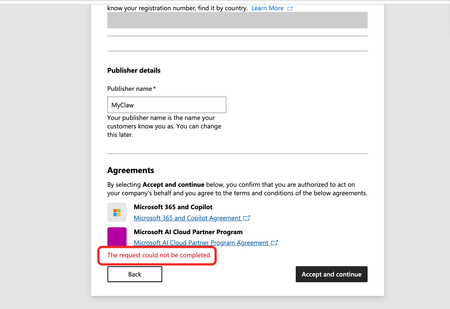
Issue: I'm stuck at the Agreements step of the Microsoft AI Cloud Partner Program (MAICPP) enrollment. When I click Accept and continue, the page displays: The request could not be completed. No further details are provided (no reference number, no transaction ID). Evidence of orphaned legal entity (error 2100): After the failed submission, I navigated to Settings → Account settings → Organization profile → Legal info, and the page renders only the title and description text—no tabs, no form fields, completely blank (screenshot attached). This matches the documented symptom of error 2100 / orphaned legal entity: the backend created a legal entity record during the first submission attempt, but it was never linked to a program enrollment. Subsequent attempts to accept the agreements fail because the system tries to create a duplicate entity. Environment: Tenant ID: 70a418c9-dca7-4bf3-90b0-765294ae60aa Verified domain: http://myclaw.ai/ Publisher name: MyClaw Account type: Company Submitting user role: Global Administrator Target program: Microsoft AI Cloud Partner Program (MAICPP) Goal: Obtain Partner ID → apply for Verified Publisher in Entra ID Already tried: Clearing cache, incognito mode, different browsers – no change Checked Identifiers page – also blank (no Partner ID, no publisher table) Cannot use the standard support form (requires a workspace, which I don't have until enrollment completes) Cannot use the no-login support form (Submit button fails) Request: Please manually clear the orphaned legal entity record or link the existing entity to the MAICPP enrollment, so I can complete the registration. Attached screenshots: "The request could not be completed" error at the Agreements step Legal info page rendering no tabs Thank you.