outlook for ios
204 Topics
Não consigo entrar na minha conta outlook depois de trocar de celular
Depois que eu troquei de celular, e resetaram meu iPhone antigo. O meu atual não está com o autenticador Microsoft funcionando, tento ligar de outras formas com o e-mail de recuperação e número de celular alternativo mas nada funciona74Views0likes1Comment
can't verify my outlook account while logging in on IOS mail app
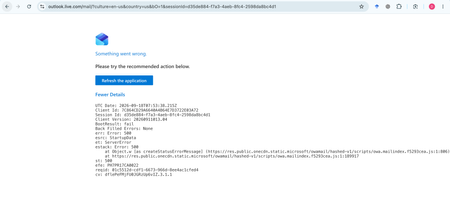
My Outlook.com mailbox cannot be opened on Outlook Web, macOS Mail, or iPhone Mail. Other accounts work normally. Outlook Web shows: HTTP 500, BootResult: fail, esrc: StartupData, et: ServerError. Please check the mailbox provisioning/backend status for my account.361Views0likes1CommentNew Outlook Comes With New Workflows: What Is Still Missing for You?
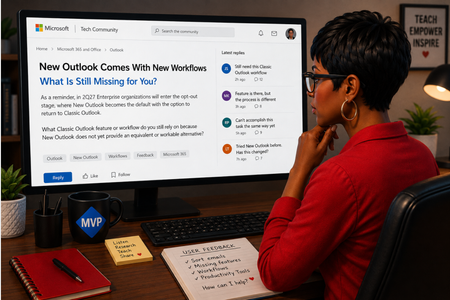
As a reminder, in March 2027, Enterprise organizations will enter the opt-out stage (Message ID 949965), where New Outlook becomes the default with the option to return to Classic Outlook. That is not too far away, especially if you need time to get your workflows and systems in place. That is why I keep coming back to this: New Outlook comes with new workflows. So I’m curious about where New Outlook workflows still fall short for you. A lot has changed. Users now have mail merge, Quick Parts, Unified Inbox, and partial PST support, with Advanced Mail Merge also on the way. New Outlook also has 30+ features and capabilities that are not available in Classic Outlook. What do you still do in Classic Outlook that you cannot accomplish, or cannot accomplish well, in New Outlook today? And if you tried New Outlook a year or two ago and went back to Classic Outlook, I’d be especially interested in what is still keeping you there now. I’m not looking for “I hate New Outlook.” I already know plenty of people do. I want to know the specific feature or workflow that still matters to you. PS: And be kind to me. I don’t work for Microsoft. I’m an MVP who teaches their products. 😉 traccreations4e-p26 8/26/2026655Views1like2Comments
Aptos preset font size in new installations
Hi, Can anyone confirm what the default Aptos font size in Outlook should be on first use, before any user changes are made to the settings? I’m seeing different default sizes depending on the application: 11 pt — Microsoft 365 Outlook for Windows (Classic) 12 pt — Microsoft 365 Outlook for Windows (New Outlook) 12 pt — Outlook for iOS 12 pt — Outlook for Android Based on the above, it appears that 12 pt may be the current standard default across most Outlook clients, with Classic Outlook for Windows being the exception. However, I haven’t been able to find any definitive Microsoft documentation confirming what the intended default Aptos font size should be. Can anyone confirm whether 12 pt is the official/default size?403Views0likes1Comment
Thousands of Sent Items moved to Deleted Items, no rules, no retention
Hello everyone, I'm investigating a very unusual Exchange Online mailbox issue and would appreciate any insights from anyone who has seen something similar. Environment Exchange Online (Microsoft 365) Mailbox: User mailbox Outlook for Mac Outlook for iOS Outlook Web (OWA) Incident Summary On August 13, 2026, approximately 4,997 messages were moved from: The activity occurred over roughly a 3-hour period. Mailbox audit logs show thousands of: Operation: MoveToDeletedItems events. Hourly breakdown: 01:00 - 2,046 events 02:00 - 1,540 events 03:00 - 1,408 events Audit Findings All sampled audit events show: LogonType = 0 (Owner) UserId = affected mailbox owner Result = Succeeded I sampled 5,000 records and all of them were: LogonType = 0 No events were recorded as: LogonType = 1 (Admin) LogonType = 2 (Delegate) Source and Destination Folders Examples from mailbox audit records: Folder : \Sent Items Destination : \Deleted Items Operation : MoveToDeletedItems Message Trace Findings Extended Message Trace was performed on one of the affected emails. The trace confirmed: CopiedToSentItems=True DeleteAfterSubmit=False which indicates: The email was successfully sent. The email was copied to Sent Items. Exchange did not delete the message during transport. So the message existed in Sent Items and was later moved to Deleted Items by a mailbox operation. Rules Investigation Checked: Get-InboxRule -Mailbox <mailbox> -IncludeHidden Findings: No Inbox Rules targeting Sent Items. No hidden Inbox Rules targeting Sent Items. Only two legitimate rules that delete messages from specific Jira/Confluence senders. Delegation Investigation Mailbox permissions reviewed. Known permissions exist, but mailbox audit logs show: 5000/5000 sampled events = LogonType 0 Therefore: No evidence of delegate activity. No evidence of administrative activity. Retention / Compliance Investigation Checked: Get-Mailbox Get-RetentionPolicy Get-RetentionPolicyTag Get-RetentionCompliancePolicy Get-RetentionComplianceRule Findings: No Sent Items retention tag. No retention policy targeting Sent Items. No Purview retention/compliance policy appears to explain this behavior. Activity pattern does not resemble normal retention processing. Add-ins Investigation Mailbox add-ins: Polls Share to Teams Send to OneNote Action Items Bing Maps My Templates Unsubscribe No third-party mailbox-management or archiving add-ins found. Client Information Seen During Investigation Examples observed in mailbox audit logs: Client=OutlookService;MacOutlook/16.112 a { text-decoration: none; color: #464feb; } tr th, tr td { border: 1px solid #e6e6e6; } tr th { background-color: #f5f5f5; } What Has Been Ruled Out ✅ Admin activity ✅ Delegate activity ✅ Inbox Rules ✅ Hidden Inbox Rules ✅ Outlook add-ins ✅ MRM retention policies ✅ Sent Items retention tags ✅ Purview compliance retention policies ✅ Exchange transport deleting the messages Question Has anyone encountered a similar case where: Thousands of messages were moved from Sent Items to Deleted Items Operation = MoveToDeletedItems LogonType = 0 (Owner) No rules No retention policy No delegate activity particularly involving: Outlook for iOS Outlook for Mac Client=OutlookService Any similar experiences, findings, or recommendations would be greatly appreciated. As we need to know the root cause for this issue. Thanks403Views0likes2Comments
New Outlook autocompletes an address that is no longer in use and I can't seem to delete it
Topic says it all, really. Client of mine has a new company and when I type the start of his name Outlook autocompletes for his old company even though it is no longer in my address book and his contact is updated with new information. I seem to recall there used to be an "x" that would let me delete incorrect autocompletes, but I can't find anything and Copilot has no useful suggestions. The autocomplete comes up in both the web version of Outlook--I basically never use this--on my PC which I primarily use, and IOS.3.7KViews5likes4CommentsCannot reset account password
I created an email address for RSVP purposes. I do not remember the password, and cannot find what I wrote it down on, and have never sent an email from it so I cannot provide enough information to recover the account. I have phoned support and all the bot does is refer me to the website reset which does not work. How can I talk to a real person or recover this account?297Views0likes1CommentTwo Linked Outlook Issues Causing Accidental Emails to Wrong Clients Feature Request + Bug Report
Hi Outlook Community, I'm posting this after a real incident at work where I accidentally sent a confidential email to the wrong client. After reflecting on what went wrong, I've identified two separate but related Outlook issues that compounded the mistake and I want to raise both here so they reach the right people. Bug: Autocomplete Recipient Changes After You Press Enter This one is subtle but dangerous. When you start typing a name in the To/CC/BCC field, Outlook shows an initial autocomplete suggestion. If you press Enter before the search fully resolves, the dropdown refreshes mid-selection and the contact that actually gets added is *different* from the one that was highlighted when you hit Enter. You don't get any warning. You believe you've selected the right person. You haven't. I've submitted this via the Feedback Portal here: https://feedbackportal.microsoft.com/feedback/idea/9a32197e-5424-f111-9730-0022485314bc Suggested fix: Freeze the highlighted contact reference at the moment Enter/Tab is pressed, independent of any ongoing background search refresh. --- Feature Request: Cross-Domain Recipient Warning (like the missing-attachment check) Outlook already warns you before sending if it detects you may have forgotten an attachment. I'd love to see a similar pre-send check for this scenario: You are about to send an email to recipients across 3 different organisations. Did you mean to do this? In consulting, legal, finance, and any client-facing role, it's very easy to accidentally include someone from Client B on an email meant only for Client A especially when contacts share similar names. A configurable domain-count threshold (default: 2 external domains) with a soft confirmation prompt would catch this class of mistake before it becomes a compliance incident. Key asks: - Configurable threshold (user-level) - Domain whitelist support (e.g., always allow your own org + a known partner) - Covers To, CC, and BCC combined - Non-blocking same UX pattern as the attachment warning I've submitted this as a feature request here: https://feedbackportal.microsoft.com/feedback/idea/9a32197e-5424-f111-9730-0022485314bc --- Has anyone else run into either of these? Would love to know if the autocomplete bug is reproducible for others that would help push it up the priority queue. Thanks for reading. Sudharm P448Views0likes2Comments
Email from “Kenzie Brooks” in my inbox but the email is …
mailto:email address removed for privacy reasons an email address “outlook_6720859FBEB7B349@outlook.c0️⃣m” I cannot reply to the email. I would like to know if anyone knows what/how this person was able to email me with such a bizarre email, yet maintained her name for the header. is this a hack or something more nefarious?94Views0likes2CommentsBLOG: Microsoft 365 Family - A nine steps plan for security and savings
Table of Contents Introduction What Is Microsoft 365 Family? Benefits Over Office LTSC 2024 Microsoft 365 Copilot at Home OneDrive: Storage, Sync, and Mobile Device Optimisation Protecting Your Microsoft Account (Passwordless Sign‑in) Why OneDrive Is Not a Backup Streamlining Microsoft 365 Apps for Home Users (Removing Unused Components) Outlook, Publisher, and Future Changes Upcoming Blog: Migrating and Syncing Contacts and Calendars and effective sync across devices with Outlook New Final Recommendations 1. Introduction Microsoft 365 Family offers a modern, flexible, and secure digital environment for households. This post explains how to streamline your setup, protect your data, and keep your devices organised with minimal effort. Microsoft 365 Family is a subscription designed for households that need up‑to‑date productivity tools, secure cloud storage, and seamless use across Windows, macOS, iOS, and Android. This article explains why Microsoft 365 Family is a better long‑term choice than Office LTSC 2024, how to streamline the installation by removing unused apps, how to protect your Microsoft Account with passwordless sign‑in, and how to combine OneDrive with Macrium Reflect for proper backup. It also includes recommendations for reducing local storage usage and outlines the role of Copilot for home productivity. 2. What Is Microsoft 365 Family? Microsoft 365 Family is a subscription service for up to six people. Each user receives: Their own private Microsoft apps • 1 TB of OneDrive cloud storage • Email, productivity, and security services • Cross‑device access (Windows, macOS, iOS, Android, Web) Latest changes require all members to become part of a family group, but each users data remains independently. So as long every Microsoft Account member birthday is of age 18 or older (Account > Birthday setting), there is no issue. Mind the licensing terms: you may only share M365 Family with family members. You may not use it for any business use, incl. micro-businesses. $$$ Savings: Consolidate costs for other Cloud storages, such as Google Drive. I believe Google Photos is very nasty keep prompting users for cloud backups of their pictures, even when they declined multiple times. OneDrive will not do this. Try to disable the recurring billing. Amazon has great offers or bundles - don't get trapped for Security suites, Defender is more than enough. Caveat for Amazon based Subscriptions: You can use them but keep in mind that they become activated and effective immediately after purchase. In contradition to the "activate" buttons that exist, the remainder of the subscription time is set at purchase date. Amazon cannot change it. Microsoft Support won't fix it either. Means that hoarding activation keys from Black Friday is no longer possible :/ If you bought a subscription too early, you can return it by calling Amazon Hotline / Callback > Digital Services. 3. Benefits Over Office LTSC 2024 In comparison to Office LTSC 2024, Microsoft 365 Family provides: Continuous feature updates The new Outlook with an ad‑free experience Full Copilot support and experience, even with benefits beyond Office Applications PST read/write support Premium Word, Excel, PowerPoint features (Online Version is available for free). Cloud integration and collaboration tools Better value over time Multi‑device use without extra licences, mobile, tablet and PC Office LTSC 2024 is static, does not support Copilot, and receives only security fixes. $$$ Savings: Office LTSC is the most cost efficient solution with no subscription attached. OneDrive is Limited to 5 GB per Microsoft Account. If you do not need much space and no AI this is for you. Outlook New is still usable, with few ads, but no PST support. 4. Microsoft 365 Copilot at Home Copilot helps you: Summarise long documents Draft messages or essays Organise tasks Extract information quickly Improve language and translation Coding (PowerShell and other lanugages), with Visual Studio Code integration Learn more: https://www.microsoft.com/copilot Consider to install the M356 Copilot app to get the most out of it. On your phone (iOS / Android) you can also use this app, along with Edge Browser and OneDrive for a seamless experience. Microsoft Outlook on Android / iOS has not the same featureset as Outlook New, very unfortunately. $$$ Savings: M365 Family includes Copilot and expands it to everywhere: Edge Browser, M365 Apps. Spare a seperate Copilot or GPT plan. 5. OneDrive: Storage, Sync, and Mobile Device Optimisation Each user gets 1 TB of cloud storage. Key features: Automatic sync across devices • iOS and Android photo upload • Files On‑Demand to reduce disk usage • Access to all files from any device • Easy sharing and version history on all devices, including PC. Stop saving Document version 1, Document version 1.2 :) Trust the XML based Office files and power of OneDrive, which is a bit similar to enterprise trusted SharePoint features. To reduce smartphone storage usage: • Enable camera upload • Keep files online‑only when possible • Store large media primarily in OneDrive On Android Phones, within OneDrive > Settings > Free up Space on your device - you can delete uploaded pictures from your phone, at your own pace with a fingertip. iOS does not have this cleanup feature. Mind you have to use OneDrive or pin - means download caching - files as on PC, if you want to have them accessible when there is no internet connection or your data plan is limited. You can share or download pictures to apps like Whatsapp without manual download. OneDrive now supports optional AI based face recognition which makes it a blast sorting pictures of people. Very unfortunately it does not work with cats. I would love to see OneDrive organizing all cat pictures into a virtual collection, too. Collections made on the Phone or in Windows 11 will seamless sync with Windows Photo App. This makes organizing digital pictures and videos so much easier. Protip: If you trust your partner / friend / family member to the fullest, you can share the OneDrive Picture Upload into one single account across phones. So both share the same pictures, picture of the day / week. Also this makes it obsolete to "can you send me over the photo that you took..." $$$ Savings: Save big on required phone capacity. With OneDrive at hand, you'll never need 128,256 or even 512 GB phone storage, you'll find use for a 64 GB phone again, even more that the HW crisis, thanks or no thanks to AI made flash memory super expensive. :/ - let's not talk about other resources like water, energy and CO2e. 6. Protecting Your Microsoft Account (Passwordless Sign‑in) All Windows 10/11 users are strongly advised to protect their Microsoft Account. Passwordless sign‑in reduces risk and enhances convenience. I recommend this especially when you store files in OneDrive. Windows Hello PIN, Passkeys and Microsoft Passwordless Accounts have not been compromised in my bubble, opposite to Microsoft Accounts without MFA protection or traditional passwords and Windows local users (Password spraying, NTLM attacks). Setup guidance: https://support.microsoft.com/office/passwordless $$$ Savings: Save you mind and sleepless nights that you'd have after an successful hack. The danger is real, and there is no exclusion to home users - even if they pretend there have "nothing to hide", an argument I hear quite often when it comes to account security and password management. 7. Why OneDrive Is Not a Backup OneDrive synchronises files. If you delete a file locally, the deletion syncs to OneDrive. same goes for encryption attacks on your device, especially PCs For real resilience, you need an offline or image‑based backup. To build a safe and simple backup system: Move your OneDrive folder to a dedicated physical drive or partition (not C:) but O:. I recommend a 5400 rpm Harddisk or SATA SSD, as the performance requirements are negible. Disconnect OneDrive and login again, choosing a folder on Drive O: Let OneDrive do the initial sync. Then Configure OneDrive to download all files locally. Use Macrium Reflect X to create an image of that partition (Drive O: - OneDrive). Update the image regularly. If you need super speed > Use external NVMe case from UGreen or Sabrent, and a cheap but reliable NVMe like Samsung, Crucial (as long as available). Note: Macrium Reflect 8 support ends on 27 February 2026, this means it will not receive any updates. In addition I found it is not compatible with SecureBoot certificate 2023 updates. Why I recommend Macrium Reflect X lightweight, no bloat like Acronis nowadays and tons of services one of the few fully x64 apps in the home market supports synthentic full backups, esp. great on SSD or NVMe easy UI, works on Server Core (for business use) Does Backup and Recovery with excelleny, but serves also as Partitioning and Cloning Tool Neat Windows RE integration One of the first to support Secure Boot with CA2023 certificates super fast esp. on NVMe or external NVMe (compared to other products) multi-language support Hyper-V Boot support (with Windows 11 Pro) meaningful and regular application updates, influenced by a strong and active community excellent support agents and quality $$$ Savings: No savings here in terms of money but peace of mind. The cloud is not a backup. Period. I have seen people loosing their digital life. 8. Streamlining Microsoft 365 Apps for Home users (Removing Unused Components) Many home users do not need the full suite of Microsoft 365 You could remove: Access – rarely needed privately • Publisher – discontinued in 2024, will change to read-only access for pub files. Alternatives: Migrate your pub files content to Word or PowerPoint or 3rd party App by copy paste. • Legacy Outlook – supported until ~2029 • Teams (Classic), if unused - -Teams often comes preinstalled in Windows 11 anyway. • OneDrive – comes preinstalled in Windows 11. With Microsoft 365: You receive the new Outlook • Copilot is enabled • You benefit from an ad‑free inbox. • PST files are fully supported / Attach - read - write ODT allows you to install Microsoft 365 with a custom configuration. Do not use the default OfficeSetup.exe in this case, that you would receive from your invitation or Microsoft Account page Typical use cases for ODT at home: Install only Word, Excel, PowerPoint, Outlook Exclude Access, Publisher, and Teams Reduce disk footprint and complexity How-to deploy customized M365 Family: Download ODT to your download folder Extract ODT / execute setup in your download folder Create a config file to your needs at config.office.com - no login required - choose M365 for a while Export & Save the file to your download folder named YourOfficeConfig.xml, Choose Office Format or ODT, depending on your preference. Run PowerShell Windows Key + X > Terminal (Admin) Change to your download folder e.g. cd c:\users\username\downloads Download Microsoft 365 Family .\setup.exe /download c:\users\username\downloads\YourOfficeConfig.xml Install Microsoft 365 Family customized .\setup.exe /configure c:\users\username\downloads\YourOfficeConfig.xml $$$ Savings: Save valuable space on the OS drive (C:). Save monthly update size and time. Benefit from a smaller attack surface. Here is an example for a working officeconfig.xml that will download office without the forementioned features. <Configuration ID="d1fde4ee-5072-4e95-b319-9c0682773668"> <Add OfficeClientEdition="64" Channel="Current" MigrateArch="TRUE"> <Product ID="O365HomePremRetail"> <Language ID="de-de" /> <Language ID="MatchOS" /> <Language ID="MatchPreviousMSI" /> <ExcludeApp ID="Access" /> <ExcludeApp ID="Groove" /> <ExcludeApp ID="Lync" /> <ExcludeApp ID="OneDrive" /> <ExcludeApp ID="Outlook" /> <ExcludeApp ID="Publisher" /> </Product> <Product ID="ProofingTools"> <Language ID="en-gb" /> </Product> </Add> <Property Name="SharedComputerLicensing" Value="0" /> <Property Name="FORCEAPPSHUTDOWN" Value="TRUE" /> <Property Name="DeviceBasedLicensing" Value="0" /> <Property Name="SCLCacheOverride" Value="0" /> <Updates Enabled="TRUE" /> <RemoveMSI /> <AppSettings> <User Key="software\microsoft\office\16.0\excel\options" Name="defaultformat" Value="51" Type="REG_DWORD" App="excel16" Id="L_SaveExcelfilesas" /> <User Key="software\microsoft\office\16.0\powerpoint\options" Name="defaultformat" Value="27" Type="REG_DWORD" App="ppt16" Id="L_SavePowerPointfilesas" /> <User Key="software\microsoft\office\16.0\word\options" Name="defaultformat" Value="" Type="REG_SZ" App="word16" Id="L_SaveWordfilesas" /> </AppSettings> <Display Level="Full" AcceptEULA="TRUE" /> </Configuration> Bonus: If you think this Office customisation isn't giving enough of savings on the OS drive, try this: #windows key + X > Terminal (Admin) #Powershell #PS C:\Users\username> powercfg /h off #saves a bunch of space, if you are not using hibernation / standby (suspend to RAM/ to file). The more RAM installed, the more your savings. powercfg /h off 9. Outlook, Publisher, and Future Changes Publisher will be removed from the Office product family by October 2026. Or change to Read-Only mode when installed, both for security reasons. See announcement • Legacy Outlook will reach its end around 2029. • The new Outlook supports modern sync, Gmail integration, iCloud Integration and PST files support and sophisticated anti-spam and other Exchange Online like security features. $$$ Savings: Nothing to see here. Move on. 10. Upcoming Blog: Migrating and Syncing Contacts and Calendars and effective sync across devices with Outlook New In a follow‑up blog I will cover: Migrating IMAP contacts and calendars to iCloud Why the iCloud Windows app is no longer functional Why Outlook‑for‑Gmail no longer works New approach: add your Google Account directly to the new Outlook 11. Final Recommendations Use Microsoft 365 Family for a modern, secure, up‑to‑date system. • Streamline the suite to what you actually need using ODT. • Protect your device with passwordless sign‑in. • Store data in OneDrive, but use Macrium Reflect for real backup. • Keep an eye on upcoming changes to Outlook and Publisher741Views2likes2Comments