notification
50 Topics
Forward/be notified of emails sent to nonexistent address on same domain? Not admin. School account.
My student email address (Outlook) contains a misspelling of my name (one missing letter). So it's very easy for people to send their emails to an address that doesn't exist, thinking they're sending it to me. What would be great if I could somehow have those emails forwarded to the correct address, or at least be notified when people try to send an email to the nonexistent address. I've tested things a bit. When I try sending an email to the "wrong" (correct spelling of my name, but nonexistent) address, I usually get an email from Microsoft indicating the mistake. But not always. And even when I do, it sometimes takes a few minutes, or it goes to some easily overlooked folder besides the main inbox. I worry that busy people might send an email to the wrong address and move on, never noticing the following error email. I know one obvious solution is to ask my school's IT department to make a new address with the correct spelling, and have all emails sent to the previous incorrectly-spelled address forwarded to the new one. But 1. I don't know if I'll be allowed to keep two addresses, and 2. I don't trust Outlook to successfully forward everything to the new address. I'd rather use a "catch-all" solution, where emails sent to the correctly spelled (but nonexistent) address are automatically forwarded to the existing (but incorrectly spelled) address. Or maybe I can somehow get a notification that someone has tried to send an email to the nonexistent address? Are either of these (or something else I haven't thought of) possible? Before taking this to my school's IT department, I want to see if there's anything I can do myself. Like I said, it's a student email address, so my options are probably limited. But I'm wondering if I have access to any settings (I mainly use the web version of Outlook, but I also have the PC app), or if there's any 3rd party solutions I can implement on my own that could accomplish something like what I have in mind. If I do end up having to ask my school's IT department for help, what should I tell them to try?528Views0likes3Comments
Noise (sorry) after downloading a file
After the latest upgrade to Edge, all downloaded files, and I have them every day, come with an annoying audio effect I would like to turn off. As this appears to be specific to Edge, and I can't find anything to change in settings, I'm guessing I'd have to go into Developer Tools to find the solution. Am I right there?78Views0likes0CommentsMicrosoft Planner @Mention and Comment Notification in Microsoft Teams - NEW VERSION
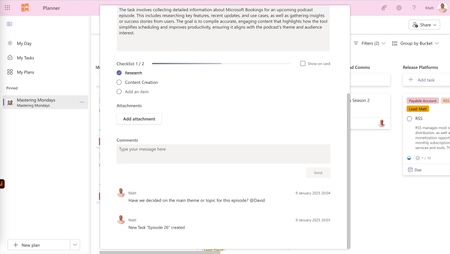
Hi Planner Community, Thank you for the overwhelming support for my original post last year on how to @mention someone within the Microsoft Planner community and have a message automatically emailed to them. I'm excited to share that I've completely redesigned and updated the solution to now support the new Microsoft Teams Planner and remove the issues some users found with setting up the solution. Additionally, the notification is now an adaptive card within the Microsoft Teams chat to the user you @mentioned in the Microsoft Planner comment. Screenshot example above shows a comment posted by me in a Microsoft Planner task where I’ve @mentioned David at the end of the message. Screenshot example above shows the comment posted by me in Planner being automatically sent to David (thanks to the @mention in the comment) on Microsoft Teams. Allowing David to reply in either the traditional Planner or new Teams Planner. Attached is a zip file containing the Microsoft Power Automate solution, along with a detailed walkthrough to help you set it up. Enjoy! If you download the solution, all I ask is that you please give this post a thumbs up. Thanks, everyone! Matthew Davis No More Bad Monday7.3KViews13likes22Comments
Notification not working on projects for the web
Hello! My team of 12 part-time employees and I recently switched from MS Planner to Projects on the web. As they have been updating/combining Planner and Projects we have found we are no longer receiving notifications when a task/project is complete in Projects. We have checked our settings to no avail. Any tips?Solved276Views0likes2CommentsNotification for incoming calls without options to accept/decline call
Hi everyone. I have a very special customer with a special requirement... I've got asked, if it possible to notify people about incoming calls, without options to accept/decline the call. The customer just wants a simple notification about incoming calls, which show the number/person that is calling. Has someone an idea on how this could be achieved? Thanks for every answer ❤️1.5KViews0likes3Comments
Call notification/Ring not appearing in Teams Preview desktop client
Issue: Call notification/Ring not appearing in Teams Preview desktop client. Version You have Microsoft Teams version 23088.1500.1978.6338. You've got the latest version. It was last updated on 4/10/2023. The client version is 49/23032918805. Troubleshooting/Isolation steps: Cleared Teams client cache - Still issue. Notification on Teams web current & Preview - Works Notification for Teams mobile - Works Notification settings for Windows - All enabled still issue. This seems a bug with the preview teams preview client. I will have a ticket open with MS to report this as a bug.Solved
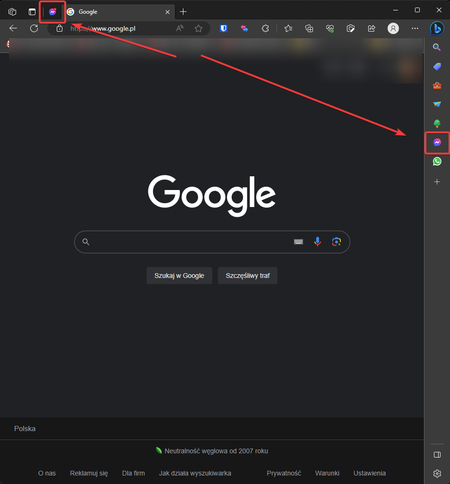
Push notification for Messenger on the right sidebar.
Hey there! Recently, I switched from Chrome to Edge, and it's been great so far! Love using the vertical tabs, as well as the sidebar on the right for apps and sites. The one thing that keeps me from enjoying it fully is the lack of push notifications on the sidebar, especially for Messenger. Spotify has one when music is played, but not Messenger when I receive a message. Is there any way to turn this function on, and if there's not, are there any plans to bring it to the sidebar? Thanks in advance!994Views0likes0CommentsAssign Task Reminders to Assigned Individuals
Currently, To-Do allows you to assign a new task to someone in your shared list. It is great! However, I notice that whenever I assign a task to someone I would have to contact them (via email or text, or phone call) to confirm they have completed the task. I think it would be a very nice feature to have the option to assign task reminders for workers or others to complete the task they are assigned instead of just being given the task. I understand that when a task is assigned you can manually input a reminder for yourself once assigned. However, more times than not, you often forget, therefore, when given a reminder from your boss or manager you are able to be reminded by the app. This would eliminate the need to have your boss remind you to complete the task.6.1KViews6likes3Comments