microsoft 365 copilot admin
90 TopicsCopilot Chat vsus. Microsoft 365 Copilot. What's the difference?
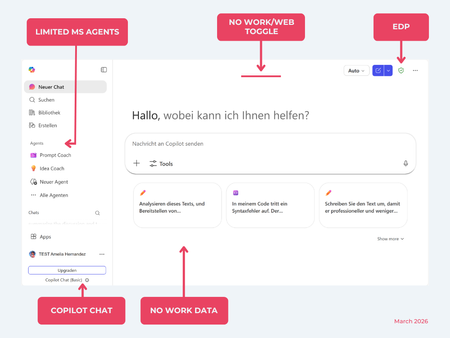
While their names sound similar at first glance, Microsoft 365 Copilot and Microsoft 365 Copilot Chat, they differ in several aspects. And more importantly: one is built on top of the other. What is Copilot Chat (Basic)? First things first. Microsoft 365 Copilot Chat is often simply called Copilot Chat. Copilot Chat (Basic) generates answers based on web content, while Microsoft 365 Copilot (Premium) is also grounded on users' data, like emails, meetings, files, and more. Since early 2025, Microsoft 365 Copilot Chat has been available to all users in organizations, becoming the entry point to AI assistance for many organizations. Copilot Chat (Basic) is the foundational Copilot experience available at no extra cost for everyone with an eligible Microsoft 365 plan, including: Microsoft 365 E3 / E5 Microsoft 365 A3 / A5 Microsoft 365 Business Standard & Business Premium Copilot Chat (Basic) is secured, compliant, and it does not required the full Copilot add-on license. Copilot Chat (Basic) is able to ground responses on: Public web content. Content explicitly shared or work data manually uploaded to the chat by the user. On-screen content or content displayed on-screen in apps like Outlook, Word, Excel, PowerPoint, and OneNote. When it comes to agents, Copilot Chat (Basic) offers these features: You can create your own declarative agents grounded on public web content with Agent Builder. You can use agents built by your org grounded on organizational data with the pay-as-you-go method. There are Microsoft prebuilt agents available like Prompt Coach, however Microsoft premium prebuilt agents like Researcher or Analyst are not included. The screenshot below shows how Copilot Chat looks and highlights its main capabilities. Note the Upgrade button, meaning this is not Microsoft 365 Copilot, but the Copilot Chat (Basic) experience. Note that EDP (Enterprise Data Protection) is available in Copilot Chat (Basic). What is Microsoft 365 Copilot (Premium)? Microsoft 365 Copilot (Premium) is a paid add-on license that builds on top of Copilot Chat and unlocks Copilot's full power. It is available for selected Microsoft 365 plans, including: Microsoft 365 E3 / E5 Microsoft 365 A3 / A5 Microsoft 365 Business Standard & Business Premium With a Microsoft 365 Copilot license, users get everything Copilot Chat (Basic) offers, plus much more: Data grounding: Microsoft 365 Copilot (Premium) includes Copilot Chat grounded on web and/or on user's Microsoft 365 data like emails, meetings, chats, and documents. Office apps: It integrates deeply into Microsoft 365 apps like Outlook, Teams, Word, Excel, and more. The integration includes features like Edit with Copilot allowing Copilot to adjust live your documents or email based on your prompts. Custom agents: It brings the capability to create your own declarative agents grounded in organizational data and/or web data. You can create agent either using Agent Builder or Copilot Studio. MS prebuilt agents: Premium prebuilt agents like Researcher and Analyst are included in Microsoft 365 Copilot (Premium). The screenshot below shows the Copilot chat experience for users who have a Microsoft 365 Copilot license. Note that EDP or Enterprise Data Protection also applies here How can I access Microsoft 365 Copilot Chat? Today, Copilot Chat is accessible via https://m365.cloud.microsoft or https://copilot.cloud.microsoft using your Entra ID (work or school account). One important difference in day-to-day experience: Users with a Microsoft 365 Copilot license typically see Copilot prominently surfaced across Microsoft 365 apps. Users with Copilot Chat only may not see it pinned by default on the Microsoft 365 home page. To improve discoverability, Microsoft 365 Copilot administrators can pin Copilot Chat via the Microsoft 365 admin center, ensuring that users can easily access it without friction. Especially convenient is that if you use the M365 Copilot Chat app on Windows, you can open Copilot using the keyboard shortcut Ctrl + C. What’s the difference? The differences between Copilot Chat and Microsoft 365 Copilot mainly come down to: Licensing Data grounding (web-only vs. personal work data) Integration depth within Microsoft 365 apps I’ve listed the key differences in the comparison below. 👇Solved8.5KViews8likes21Comments
Download links not working
I spent hours creating a training guide on copilot but when it finished the document, the download link did not work. I have tried checking updates, verifying permissions, clearing cache and restarting laptop. Has copilot lost all my work / my document?8.3KViews0likes9Comments
What's difference creating Agent from Copilot page vs from Copilot Studio -> Copilot for M365?
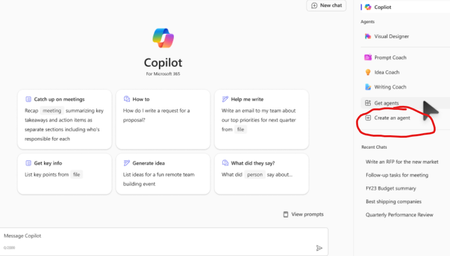
Hello, I am learning about Copilot and was very confused by these two different ways to do it. My understanding is both are "Declarative Agents" which lets the Microsoft 365 Copilot do the most heavy lifting. Method 1. First way is to go to Copilot page and clicking 'Create an Agent' w3 Method 2: Going to Copilot Studio -> Agents -> Copilot for Microsoft 365 -> New Agent (Couldn't find a screenshot) Q1. Anyway, first, I created an Agent using the first Method 1 above, and now I see it on the Copilot page under 'Agents' section. However, when I go to Copilot Studio -> Agents -> Copilot for Microsoft 365, I don't see that Agent there. Is this normal and intended? Q2. Is an Agent created using the Method 1 only available to people who have Copilot license? (as long as they are shared; I see options are only me, anyone in the organization, and specific users in the organization) Q3. Could you please confirm agents created using either way above are both "Declarative Agents"? Sorry for the newbie questions in advance... I took the course MS-4010 and reviewed several posts but still confusing...4.9KViews4likes10Comments
Use Copilot with Microsoft ToDo
It would be great if I could have Microsoft Copilot Pro talk to and be able to query these few responses. 1. What are my important task that I am missing? 2. What task do I need to focus on in the next few days? 3. Look at this project/doc/sharepoint file and add additional task to my ToDo that isn't currently on my list.4.8KViews5likes2CommentsWhat the hack is a "Microsoft 365 Copilot Bizchat"?
I am taking a training course on learn.microsoft and this word "Microsoft 365 Copilot Bizchat" just came out of nowhere... I went few slides/pages of the training course and even googled it but there is no definition or clarification of it either sigh... What is that4.2KViews2likes4Comments
Disable Agent Creation for Select Users
When will we be able to allow declarative agent use but disable creation for some users? We want only selected users to be able to create agents. We currently have not way to restrict this. If users can use agents, then they get the Create and agent option.3.4KViews4likes8CommentsCopilot Agent with Salesforce
I am currently developing a custom agent in Microsoft Copilot Studio to streamline access to key information from our Salesforce sandbox, including Leads, Opportunities, I have successfully integrated Salesforce as a knowledge source using the Salesforce connector, authenticated via a service account with admin privileges in Salesforce. The integration is technically working as expected. However, I’ve encountered a security concern: At present, any user interacting with the Copilot agent can retrieve all data from Salesforce, regardless of their individual permissions in Salesforce. This appears to be due to the elevated privileges of the service account used for the connector. I would like assistance with configuring user-level access control within this integration. Specifically, I want to ensure that: Only authorized users can access specific Salesforce data through the Copilot agent. Users can only perform actions or retrieve records that their Salesforce permissions allow. Could you please guide me on how to properly implement permission scoping or data access control within Copilot Studio when using a high-privilege service account in the Salesforce connector?2KViews0likes1Comment
How to force users to sign in at copilot.com
Hi, I've seen several sets of instructions for this, using conditional access, but none of these seem to work for me. We want to ensure that users do not go to copilot.com from their workstation and start using it for business without first signing in to provide commercial data protection. We have Copilot 365 licenses, Entra, and Intune. Has anyone been able to get this to work, or should we block copilot.com entirely?1.9KViews0likes2Comments
Copilot - Your education account is not yet supported
University sysadmin here. An increasing number of users with A5 licenses (Copilot Chat) are receiving the following error when trying to access https://copilot.microsoft.com/ "Continue as a guest or sign in with a personal account instead. Your education account <email address> is not yet supported." Is not impacting all users and seems to be transient. Cornell is also reporting the issue: https://itservicealerts.hosting.cornell.edu/view/7585 Workaround: User can sign in to Microsoft Teams and access the Copilot app without issue. -Matt1.7KViews0likes0Comments
I don't see conversation option in m365 chat
when i use this link https://m365.cloud.microsoft/chat?auth=2, which is m365 chat Vs Copilot.com. I do not see option for conversation where i can use mic to have a conversation with copilot. But when i use coiplot.com i see that option available. I tried to use copilot to figure it out but didn't get any answer which helped.1.7KViews1like6Comments