licensing
387 Topics
Windows 11 Pro OEM License Invalid After BIOS Update
Hello, A few days ago, I updated my motherboard's BIOS, and afterward my Windows could no longer be activated. Before the update, I couldn't find my original Windows box, so I followed a YouTube guide and retrieved my product key from the Registry. My Windows 11 Pro OEM license was purchased from a reputable retailer in Canada, and I've been using it on the same PC for about three years without any issues. After updating my BIOS, Windows became deactivated with error code 0xC004F211. Running the Activation Troubleshooter didn't help. When I selected "I changed hardware on this device recently," I received the following message: Unable to activate Windows We can't find any devices linked to your Microsoft account that can be used for reactivating the device you're using right now. Make sure you're signed in with the same Microsoft account you linked to the Windows 10 digital license on this device or try again later. However, when I log into my Microsoft account, I can actually see two identical PCs listed under my linked devices. I explained this to Microsoft Support, but they told me that my Microsoft account does not have a valid Windows license, and asked me to contact the license seller. I contacted the seller with my receipt, but they told me to contact Microsoft. When I contacted Microsoft again, they just sent me back to the seller again. I'm confused. If my Windows has been running with a genuine OEM license for three years, why is the product key from the Registry now being reported as invalid? Does the Registry not actually contain the original product key, or is something else going wrong after the BIOS update? Any help is appreciated. Thanks.246Views1like2Comments
How can I sign out Microsoft Account into Local Account?
When I updated my Windows 10 to 11, I created a local account. Today, with my new employer, I was given a company email and invited to use Microsoft office 365 family (small small business). Custom email domain name and everything. In order to accept the office license invitation, I created a microsoft account with the new email. That went fine and now I wanted to use the desktop version of excel. I signed into the app with the licensed account and now I see it changed my entire PC to a connected profile and I dont know how to change it back to a local account without making a new user. But of course that is like a fresh install. I dont want my employers email account tied to my PC at all. I just wanted to use the office suite and thats it. I tried following all the instructions online but it seems a critical option of "Click Sign in with a local account instead" doesnt exist for me. Can anyone offer any insight to why it did this and how I can sign out to avoid making a new user profile on my PC? I am more than happy to share screenshots so I can be guided easier. Thanks!396Views0likes4Comments
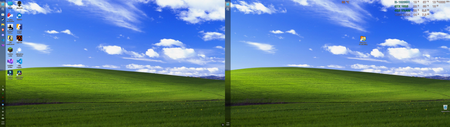
The left-side taskbar in Windows 11 offers an excellent experience in a multi-monitor setup
I’ve always been used to having the taskbar at the bottom, but recently I saw someone on Reddit using a left-side taskbar layout, so I gave it a try. It turned out to be surprisingly good on a dual-monitor setup—not only is it more efficient, but it also looks more balanced. Best of all, many apps look more natural with the taskbar on the left; for example, Discord’s left-side menu pairs very well with the taskbar. Configuration: Device: Dell G15 5510 laptop CPU: i5-10200H @ 2.4GHz GPU: GTX 1650 (laptop version) RAM: 16GB DDR4 Storage: 512GB NVMe SSD72Views0likes0Comments
Windows 11 won't activate following BIOS upgrade and reinstall (0xC004F213)
I upgraded my bios and did a full reinstall of Windows 11 on my PC. Everything went well, but I get the following error: 0xC004F213 When I follow the instruction to reactivate after a "hardware change", I just can't get my PC to be activated. In my Microsoft account, I do still see my PC which I can't activate anymore. Is there anything I could do to fix this or I need to call the Microsoft support directly?157Views0likes3CommentsThe installation of Windows 11 gets stuck and won't continue
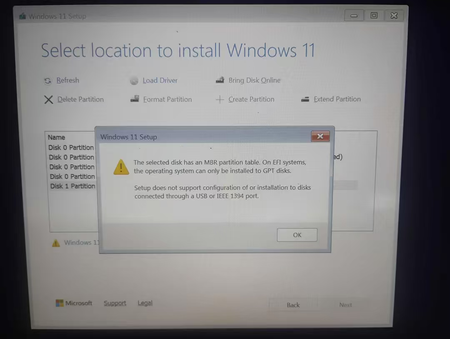
I've been trying to clean install Windows 11 on my Acer Aspire A515-43 (Ryzen 3 3200U, 4GB RAM, 119GB storage), but I always get stuck at the same screen and can't move forward. I'm using a 32GB SanDisk Ultra USB drive with only the Windows 11 installation media on it, and I have basically zero experience with this kind of thing. Is there a way to get past this screen? Do I need to convert the drive to GPT, and if so, how do I do that? Or is Windows 11 just not meant to run on this laptop? If anyone can explain it like I'm five, I'd really appreciate it.142Views0likes2Comments
Windows Activation problem
Hello, Since 2012, I've had a Windows "Retail" activation key that I transfer from one PC to another without any problems. When I bought my current PC with Windows 11, I had no issues activating it with this key. Due to a problem, I had to reinstall Windows 11. Unfortunately, this key is no longer accepted: when I enter it, I get this message: "The product key you entered doesn't work. Check it, and then try again or enter another one. (0x80041014)" Thank you for your help. Sincerely301Views1like3CommentsReinstalling the Microsoft Gaming Overlay
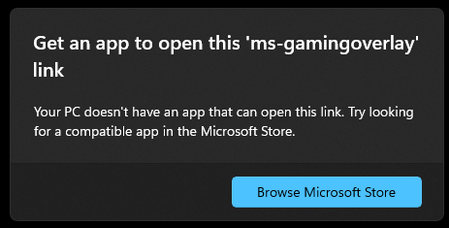
Hi! Some time ago, I uninstalled the Microsoft Gaming Overlay - I think it was the overlay used by the Xbox Game Bar (win+G to bring it up). I am trying to reinstall it, but I can't figure it out. Is there a powershell command I can use to reinstall it? Every time I launch a game, I get the following popup a few times: Any ideas? Thanks!223KViews3likes42CommentsWhy does the touch keyboard keep popping up on my non-touch laptop?
Why does the touch keyboard keep appearing at random times on my Windows 11 laptop, even though it doesn't have a touchscreen and I have no intention of using it? Why does it sometimes pop up when I click into a text field, and why does it refuse to stay closed even after I dismiss it? Could this be caused by a setting in the taskbar, a driver issue, or something in the accessibility options? And is there a way to disable it permanently without breaking other input features?54Views0likes0CommentsSecond-hand laptop stuck in previous owner's Windows Autopilot tenant – how to reach human support?
Hi, I'm trying to find the correct human Microsoft support team for Windows Autopilot deregistration. I own a second-hand Lenovo ThinkPad X1 Yoga Gen 6 which I purchased on eBay on August 6, 2023. I used Linux on it for the last few years, so I only discovered the problem now after installing Windows 11 Pro. During OOBE, the laptop downloads an Autopilot profile belonging to a previous organization and forces organizational enrollment. Autopilot diagnostics confirm: CloudAssignedForcedEnrollment = 1 IsForcedEnrollmentEnabled = 1 DeploymentProfileName = CSE Autopilot Pilot I have no relationship with the previous organization and no access to its tenant. The eBay seller is no longer active. I contacted regular Microsoft Windows Support. I provided: eBay purchase/order confirmation signed bank transaction device serial number screenshots Autopilot.cab diagnostics Support acknowledged that I own the device and that I cannot remove the registration myself. However, instead of escalating the case, they repeatedly directed me to Autopilot deployment documentation, Feedback Hub and Tech Community. Microsoft's documentation says that a device permanently leaving an organization should be deregistered from Windows Autopilot. I have also found Microsoft Q&A cases suggesting that Commercial/Intune Support can review inaccessible-tenant deregistration cases after proof of ownership has been verified. My question is simply: how can a private end user actually reach a human Microsoft Intune/Autopilot support engineer who can review and escalate this? I do not have an Intune tenant or access to the previous organization's tenant, so I cannot open a support request from their Intune Admin Center. I am not asking for a way to bypass Autopilot. I am asking for the legitimate device ownership to be reviewed and the stale Autopilot registration to be removed from Microsoft's service. If anyone from Microsoft can provide the correct support route or escalate this internally, I would greatly appreciate it.213Views1like1Comment
Windows 11 Activation after Drive changed
Hi all, I recently had a host of issues on my SSD and this lead to me having to install windows on a new SSD. I wasn't too worried since I had a digital license from when I upgraded to windows 11. After the setup though I am seeing that I am no longer activated. I have run the Troubleshooter (With the Hardware change option) and it just says: "We can’t find any devices linked to your Microsoft account that can be used to reactivate the device that you’re using at the moment. Make sure that you’re signed in with the same Microsoft account that you linked to the Windows 10 digital licence on this device, or try again later." I do see the new drive's PC name on the Microsoft Devices list I would prefer to contact someone at Microsoft who can look at my account directly but there is no way past the AI chatbots143Views0likes2Comments