files
3314 Topics
Sharing with an external user who has changed their email
I have had an issue with trying to share a folder with somebody who changed their email from, for illustrative purposes only, mailto:email address removed for privacy reasons to mailto:email address removed for privacy reasons. because his company EW had merged with Elsewhere. I believe that the second email was an alias for the first as both his actual addresses will reach him. The issue was that when I went to share a folder with his new email it would default back to his original email every single time. Eventually our IT department deleted all trace of his original email from Sharepoint which then recognised and allowed me to share with his new email. My question is - how does Sharepoint know these two different emails are the same person? Is it randomly deciding there is enough similarity in the email addresses- which in my view would be very dangerous, or does it know that both domains are registered to the same organisation?59Views0likes1Comment
OneDrive storage bugged
My OneDrive is displaying that I have used 293% of my storage space but when I go to my plan, it says I should have 1Tb of storage. This recently changed so nothing backs up anymore because it thinks I'm over my limit. Does this have anything to with OneDrive not working with Samsung sync after this month or is there something else going on?99Views0likes1CommentOneDrive won't allow installation on fixed D: drive
Since 24 Sep 2026, OneDrive refuses to use my internal D:\ drive, even though the OneDrive build and Windows haven't changed. This applies to my Personal OneDrive and institutional OneDrive accounts. Build 26.168.0830.0006 (per-machine install, installed 20 Sep 2026) synced both of my accounts to D:\ normally from 20 to 23 Sep. At the 24 Sep morning boot, OneDrive could not find either folder. Setup now rejects D:\ with "Your OneDrive folder can't be created in the location you selected," and Learn More links to the article on external drives. The rejection persists with my existing folders (after renaming them) and with a brand-new empty folder (D:\ODTest). E:\, an identical Crucial T500 4TB NVMe in the motherboard's native M.2 slot, is accepted. The only difference is that D:\ is attached through an M.2-to-PCIe adapter card in an internal PCIe 4.0 slot (in place since Nov 2025). Windows reports D:\ as Fixed and NTFS (Get-Volume, DriveInfo, Win32_DiskDrive), and it does not appear in Safely Remove Hardware. Dropbox on the same drive is unaffected. With the build unchanged and Windows Update paused, this looks like a server-side change in how OneDrive classifies drives. Please restore support for internal NVMe drives attached through PCIe adapter cards.96Views0likes0Comments
OneDrive stuck on "Processing 7 changes" for weeks. Can't identify what the 7 files are.
After upgrading from windows 10 to 11 and reinstalling onedrive several weeks ago, it got stuck "processing 7 changes". It was actually more than 7 at first, but I was able to find some of the files that were stuck and deleting them reduced the number to 7. But now I can't find the last 7 that are stuck processing. The files I managed to find had the wheel icon that indicates they are syncing, but I can't find any more files with that icon now. I have thousands of files in thousand of folders/subfolders, so I can't manually check every folder to see if a file has the syncing icon. Other than that everything seems to be working. Onedrive syncs new files and downloads files on demand correctly. It's just that "processing 7 changes" message never goes away. If Onedrive named the files it was trying to process, I could easily go to them and delete or replace them, but there doesn't seem to be a way to identify the files.82Views0likes1CommentSharePoint file links are not working
Recently we have noticed that when you copy the link and share with others (even ourselves), the link fails to open. If we use the path link under details, that works 100% of the time. The only difference we see is there are more gibberish in the link path. Initially, we thought the PDF files were having issues but it can be any file type. Our thought is the issue is with the SharePoint site.138Views0likes2CommentsHow to Download Video Clip from Microsoft Teams Programmatically
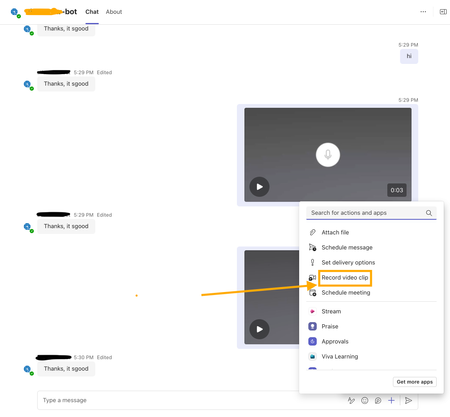
I’m developing a bot app for Microsoft Teams, and part of its functionality involves handling videos recorded using the Teams widget(see screenshot attached). I am receiving a video clip link in the bot app's backend message. Where is this video file uploaded and how can I download the video clip using that link? I have attempted the SSO auth via Entra ID to fetch the auth token and attached it against the GET request to the video clip link as the bearer token. But still getting 401 errors? Need help and guidance in this matter. Thanks.516Views0likes7Comments
Excel Desktop App hangs when attempting to open documents from SharePoint to edit
User attempts to open Excel Documents saved in SharePoint by selecting Edit in Desktop App. As the Excel Desktop App begins to open a message displays stating: We have opened this document in Microsoft Excel in your computer. However, the Excel App just hangs without fully opening (see Screenshot). No problem detected when opening the Excel Desktop app directly, Desktop App opens freely. Excel MS365 is up-to-date version 2609 build 16.0.20430 64 Bit (Before reinstall). I have uninstalled the MS365 Office packet and reinstall it directly from the User's Office Portal, to no avail.145Views1like2Comments
My Microsoft account got deleted and my onedrive files are gone
I got a notification that my onedrive had stopped syncing a couple days ago. Upon trying to login to my microsoft account for the last 2 days I am met with an error message stating that the account doesn't exist. I have been unable to get any agent support or related document as to how to possibly get back my onedrive files. The only reason I am able to post this is because I had to recreate an account just to post. I have been a consistent onedrive subscribed user from atleast 2016 and all my files were backed up there, I have a ton of email and payment trails to prove so. I need an actual person to assist with trying to recover my files and an explaination as to what happened to my account.156Views0likes1Comment
Please help, OneDrive sync and missing/deleted work files
I have OneDrive installed on both my PC and laptop because I use OneNote sometimes. The other day while I was on my PC, OneDrive randomly decided to sync my laptop and PC, I think, and all my files from my laptop were on my PC. This is a big problem because my PC is for personal use and laptop for work. Then I deleted some files thinking they were still on my laptop anyways. But today when I opened my laptop, all of my work files were gone. My desktop was just my PC desktop. I need help because the work files were really really important and I'm freaking out. Why would OneDrive do this? They are separate, I don't want them synced. Please help. Can I recover them?267Views0likes3Comments