external sharing
21 TopicsOneDrive disk 5tb- guest link sharing has stopped working.
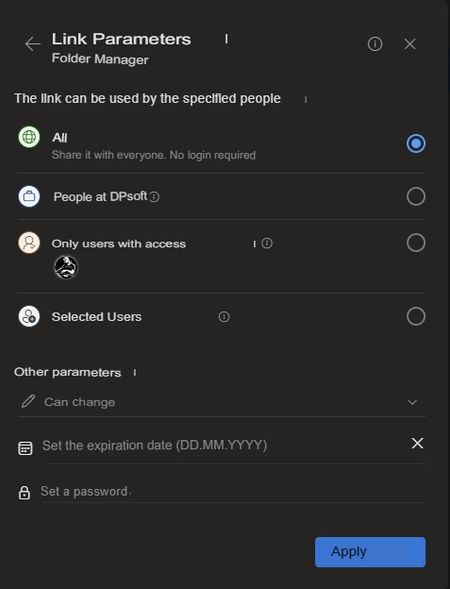
Hello. I've been using it for so long and everything worked fine, it worked flawlessly. Now, in a 5TB OneDrive drive, the other day, guest link sharing stopped working. I give all the permissions. (Share with everyone. No login required) I'm creating a link. The participant is trying to open the link. But. They write: Access is prohibited. You do not have permissions to access this resource. And they require you to log in with an account.95Views0likes0Comments
External Sharing in OneDrive and SharePoint
Hello, some users have external sharing permissions. I need to create a rule and policy to track which files they are sharing and with whom. I checked via Purview, an alert came through, but I can't see who the files were shared with, and the main issue is that those users don't have external sharing permissions. We have checked many ways but could not understand what we need to do.100Views0likes0CommentsShare with specific people
I am trying to figure out what seems to be a contradiction in Microsoft's documentation with regard to "Share to specific people". https://support.microsoft.com/en-us/office/share-onedrive-files-and-folders-9fcc2f7d-de0c-4cec-93b0-a82024800c07#:~:text=Klicken%20Sie%20einfach%20mit%20der,der%20gew%C3%BCnschten%20Stelle%20einf%C3%BCgen%20k%C3%B6nnen. states To track access and ensure security, you can only share with someone who is in your organization or has a Microsoft Account. But https://support.microsoft.com/en-us/office/external-or-guest-sharing-in-onedrive-sharepoint-and-lists-7aa070b8-d094-4921-9dd9-86392f2a79e7 states The recipients won't need a Microsoft account. Is there a difference in the two scenarios which I don't recognize? Or is this a recent change where one of the two documentations has not been properly updated yet?1.6KViews0likes2Comments
Unable to share externally on Shared Channels
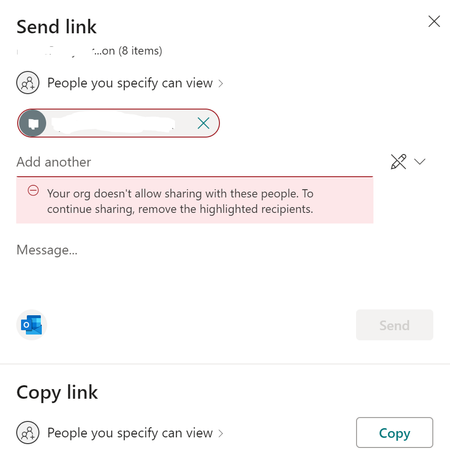
We are unable to share files and folders on shared channels with external users. We get the following message when trying share with an external email address: “Your org doesn't allow sharing with these people. To continue sharing, remove the highlighted recipients.” We are able to share externally on Standard and Private channels. Guest Access is On in the Teams admin console: In the SharePoint admin console > Policies > Sharing > External Sharing, both SharePoint and OneDrive are set to “New and existing guests”. In the SharePoint admin console > Sites > Active Sites, the team site in question has External Sharing set to “This site can be shared with new and existing guests”. On the General channel we are able to share with external users. However, on the shared channel sites, External Sharing defaulted to “This site can't be shared externally”. There is no edit button. As a workaround, I leveraged PNP PowerShell to enable external sharing with the following command: Set-PnPTenantSite -Url $SiteURL -SharingCapability ExternalUserSharingOnly The SharePoint admin console now indicates that I can share externally on the shared channel site. External Sharing shows “This site can be shared with new and existing guests”. However, I still receive the aforementioned error when trying to share externally. What am I missing? How do I enable external sharing on shared channel sites? Why is this not consistent with SharePoint, OneDrive, and Teams standard/private channels?30KViews2likes23Comments
Sharepoint Externe Freigabe für jede Seite
Hallo alle zusammen, ich möchte Dokument an jeden freigeben können, nicht nur innerhalb der Organisation. Ich habe schon organisationsweit diese Möglichkeit freigeschaltet: https://docs.microsoft.com/de-de/sharepoint/turn-external-sharing-on-or-off Leider muss ich für jede neu erstellte Seite (Microsoft Teams) aber erneut das in den Seiten-Einstellungen machen: https://docs.microsoft.com/de-DE/sharepoint/change-external-sharing-site Kann ich dies als Standard-Einstellung für alle Seiten setzen?533Views0likes0CommentsCan't configure external sharing per site basis for SharePoint site that is connected to O365 Group
Hi There,, I have a security-related concern and was talking to the Microsoft support team and was advised to post my concern here for the developer to take a look... Please see the concerns originally posted with the link below... https://techcommunity.microsoft.com/t5/sharepoint/can-t-configure-external-sharing-per-site-basis-for-sharepoint/m-p/2231211 Thanks756Views0likes0Comments
request and send files to external
currently our sharepoint admin center, we allow certain external domain (parent and other subsidiary company only) sharepoint external sharing is set 'new and existing guest' so files and folders that need to share with parent and other subsidiary are done at sharepoint. onedrive external sharing is set 'only people in your organisation' because we dont want user's onedrive to share with external. however we have this scenarios which is sending huge file size to external company and request huge files size to external company who are not our parent and subsidiary. anyone has any idea or other ways to send huge file size to external company and request huge files size to external company who are not our parent and subsidiary?? thanks811Views0likes0CommentsOption external sharing for single user not visible
Hi everyone I'm currently having issues with managing external sharing for a single user in our tenant in the 365 admin center. Since I've once disabled external sharing for explicit this user, it won't show up now anymore. https://docs.microsoft.com/en-us/onedrive/user-external-sharing-settings tells me that in the OneDrive tab should be "manage external sharing". All other users have this option. Other priviledged admins also cant see it for this user. (licensing is still the same and correct -> Office E365 E3) Is there a Powershell command to reactivate it again? Thanks for your help 🙂Solved1.5KViews0likes1Comment