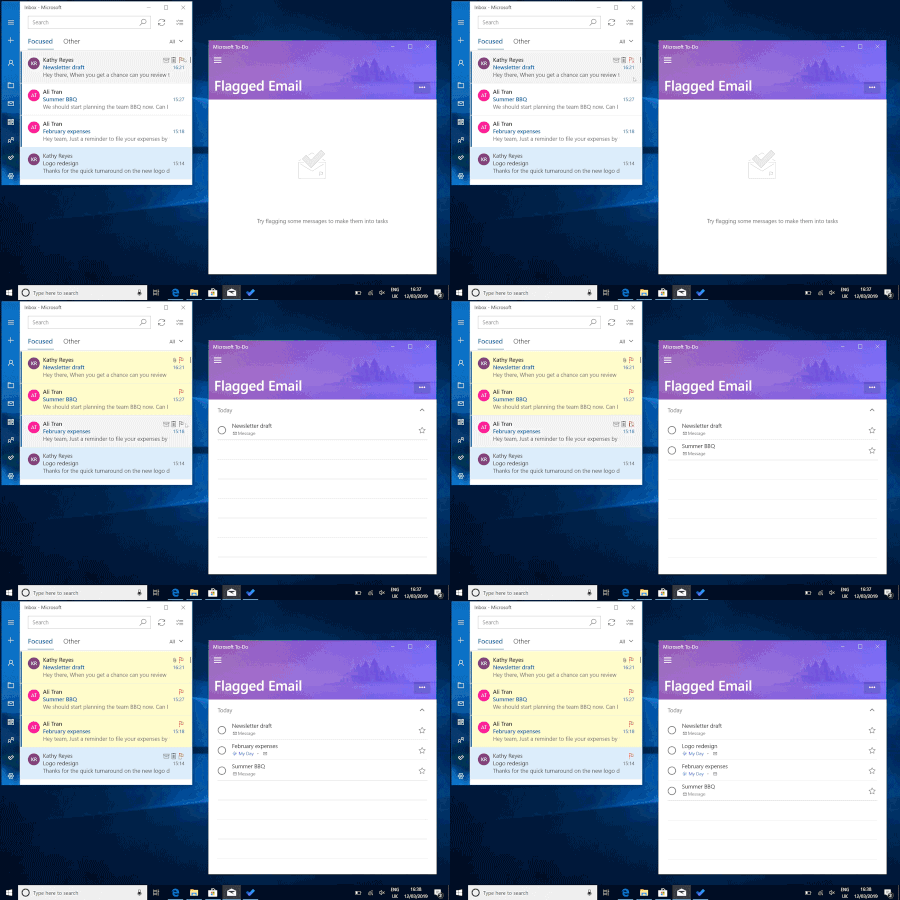
Flagged emails come to Microsoft To-Do
Microsoft To-Do is always here to help you plan your day, but sometimes an inbox full of urgent emails can get in the way of careful planning. Don’t worry, with our latest update, you won't have to juggle your emails and your task list—you can now add your flagged emails to To-Do (for work and school accounts), giving you one unified view of what you need to accomplish today.85KViews38likes94CommentsAdvanced Threat Protection (ATP) is ruining Outlook.com
About a week ago, I noticed that all URLs were suddenly extremely long/obscure, and beginning with something like: https://nam02.safelinks.protection.outlook.com/?url= It destroys the URL visibility experience. I quickly realized that this was an Office 365 (E5) feature called https://technet.microsoft.com/en-us/library/exchange-online-advanced-threat-protection-service-description.aspx?f=255&MSPPError=-2147217396, but I'm not talking about Office 365 here but rather the consumer Outlook.com site. I need to find out if we're going to be able to disable this, and when. It's unbelievable that MS just foisted it on us, since it's not even in the vast majority of Office 365 plans! I realize that some people have been seeing it longer than one week.151KViews14likes74CommentsIntroducing Follow in inbox and other improvements for managing group emails in Outlook
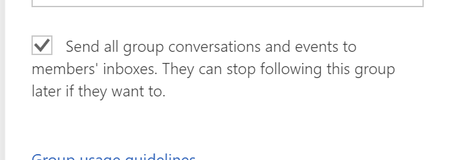
The latest set of for Groups in Outlook introduces new ways to manage the group emails you receive in your inbox. These updates are, in large part, based on customer feedback about the Groups subscription model. That model has now been replaced with Follow in inbox.75KViews9likes13Comments
Microsoft 365 Outlook Classic Latest Update Copilot issues
Hello to all, we are currently using the Microsoft 365 Outlook Classic, using version Version 2604 Build 16.0.19929.20172 (Current Channel) Copilot works as expected; However ever since the next update was released (Version 2605 (Build 20026.20076)) some users including me, have been getting the below error: I have tried uninstalling and installing the latest version directly, with the same issue. Scanned for any corrupted system files with no issues,but still get the error; I have tried the update Licence from the Outlook application, with no issues but the copilot something went wrong error keeps on persisting. Internet searches are very vague and the I have found some registry suggestions which I have also tried with no solution. The only way to get Copilot working on Outlook Classic was to revert to a previous working version, only then Copilot works as expected. This only happens in Outlook Classic; Copilot works fine on the latest version of Microsoft Office 365 with Word, Excel, etc. For those that maybe might ask why not switch to the New Outlook, we have had issues with it and it has been recommended to use the Classic Outlook for the time being. Has anyone been experiencing such issues please? Thanks for any help.5.6KViews5likes14Comments
Turning off email notifications about new comments in one certain file
Hi All! I found a solution to turn off all email notifications on new comments in my shared files (through settings on SharePoint), but it doesn't really solve my problem. In project files I work on with my colleagues, email notifications are helpful for monitoring workflows and streamline the process. At the same time, I'm an owner of yearly excel files shared with a big team in order to monitor the work on all clients and automate the visualization of it, but it gets commented on a lot and I don't need to get all of that on my Outlook. Is there any way to turn off email notifications about new comments for just one file without turning them off on all my shared files? Kind regards, Jakub Banasik22KViews4likes6CommentsWindows Mail App Bug - Not sending e-mails from Gmail accounts
Hello, everyone! I'm a long-term user of the Windows Mail and Calendar app, and it has always worked like a charm for me. However, something happened recently and now every time I try to send away an e-mail from a Gmail account, I got a message saying: "There was an error sending your message". Everything else works: I can read new e-mails normally, and the other e-mail services attached to the app still fully functional (Outlook, Office360, Yahoo). I also noticed that when I try to send an e-mail from a Gmail account, what I wrote goes to the "Draft" folder. I can even access the "draft" on the Gmail website, but when I open it, the formatation is completely crazy. I got a Dell XPS 13 9370, and I'm running the latest versions of both Windows 10 and the Mail and Calendar app. I've tried everything I could: 1) I removed the Gmail accounts and added them again but the problem persists; 2) I uninstalled and reinstalled the "Email and Calendar" app but the problem persists; 3) I disabled the antivirus and the firewall but the problem persists (I got a kaspersky); 4) I have already run system corruption checks at the command prompt, but nothing has been found; What should I do? This is the pop-up that appears (I'm a Brazilian user, so it is in Portuguese):Solved31KViews4likes33Comments
Now Easily Audit Email Deletion in Office 365
I have created a PowerShell script to find out who deleted an email from the Office 365 mailbox. By using in-built filtering params, you can generate 7 granular email deletion audit reports. https://o365reports.com/2021/09/02/audit-email-deletion-in-office-365-mailbox-powershell/ I have listed a few use-cases of the script below, - Tracks all the deleted emails - Identifies who deleted emails from a shared mailbox - Audits deleted emails from a specific mailbox - Finds deleted emails by subject - Audits email deletion for custom period - Schedules audit report to track email deletion16KViews3likes1Comment
Unable to upload .msg files via forms
Hello All, I want my users to upload .msg files through forms. They are unable to upload .msg files which are saved as messages from outlook. They are able to upload all other files like word, excel etc. Any help on this please ? Regards, Naveen M9.1KViews3likes14Comments