comments
18 Topics
How do I get balloon commenting on the right side of the page?
I'm using Word 2024 because I don't want AI in my interface. Now commenting all appears in the tab side bar. I can click on the "Comment" pulldown in the ribbon to show comments properly, but I can't write in them. This is aggressively hostile to people with vision difficulties. Even with my glasses, that's much smaller than I'm comfortable with. How can I get the comments that were so good and useful back? If not, how can I change the type size in the sidebar so I can read and write comments? Microsoft, please, don't ruin your products because you want to make us use AI for things that it's not helpful for. I don't use Word for anything I want AI in and deal with documents I cannot legally allow to be exposed to unverified servers like AI chatbots.Solved181Views0likes1Comment
Unable to @ mention external collaborators in comments within Office online files
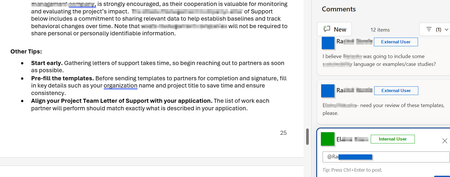
Is anyone aware of whether Microsoft will someday enable the ability to @ mention users who do not belong to the M365 tenant within comments in Office online files? I've attached a screenshot of what this looks like in a Word Online file in OneDrive. There are a number of Microsoft feedback posts about this, but it really feels like an unnecessary gap in functionality. Anyone have any insights on roadmap?571Views0likes1Comment
notes attached to cells not visible, broken since last excel update (Office 365 on Mac)
I've got many notes (the yellow non-threaded formerly called comments) in my excel sheets. Since the latest software update I can not display/view my notes anymore. The cells containing note still show the red triangle-mark, but the note does not show up when I mouse over. By clicking "show all notes" in the ribbon menu, it will just only show the connection lines between cell and invisible note rectangle. But I can not access view or even edit the notes. Also right click on the cell -> edit note does not show anything. is there a fix or at least a workaround existing? regards dewege macos: high sierra, excel (office 365) version 16.21.1 (190123)99KViews3likes24Comments
SharePoint modern pages - posting comments with specified date, author, etc.
For this project, I am attempting to load comment data from a SharePoint modern page and then re-publishing those comments exactly as they were first posted on a different site. I am able to get and post the comments, but in posting, I cannot seem to edit any property of the comment besides the comment text. Is it possible to alter the date published, author info, etc. to match the original comments? Thanks in advance!1.4KViews1like2CommentsSharepoint list - Comments icon not displayed
In one of my SP Online Lists, I don't see the comment icon when I bring the mouse cursor on that item. I do see the comment icon in the ribbon. The comments are enabled for this list. See the picture below: In another list, I see this information. See picture below: I've checked that the list settings are the same for both lists. Please help Thanks4.6KViews2likes7CommentsHow to turn off or on mail notification when comments added to the files on Document Libraries?
We know that this is very useful feature to receive mail notification when any comment is added to the file uploaded on Document libraries. Would like to understand more about this functionality, as I noticed we are receiving mail notification even when @ mention isn't used. What is the general rules for sending, not sending email notification and how to turn on & off this feature??20KViews0likes2Comments
Adding pictures to Notes on Excel Office 365 on Mac.
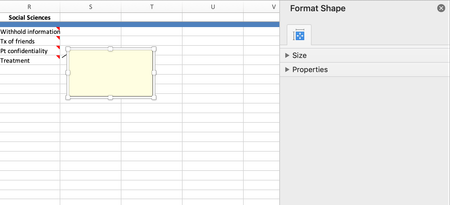
Hi there, is there a way to add pictures to Notes in Excel Office 365 on Mac? I was able to do it on previous versions of excel, when Notes was previously just termed Comments by using: 1.Edit comment 2.Format comment 3.Color fill in etc... However, the only formatting I am able to do is only format the shape. Any help would be appreciated!6.9KViews1like6Comments