office 365
656 Topics
Corrupted VT+ transaction files
We are a small accounting company using VT+ Transaction on a local drive synchronized with OneDrive for backup and file storage. A few days ago when we tried to open the application, we suddenly started receiving the following error messages: Run Time Error 0 and Run Time Error 440, and the program does not start. According to VT+ support the program files are corrupted and the data can only be restored up to the year 2022, as the more recent backups are also affected. Somehow the system is overriding our backups, which makes the latest ones unusable. Any advice what could cause that and how to resolve the issue. Thanks10Views0likes0Comments
Copy Paste issues within OneDrive web-based
So I was copying across a couple documents between 2000 and 4000 words each. I had three more to go and I noticed the clip board copied the last one, not the current one I copied. I thought maybe I didnt hit the button right so I right clicked and clicked copy then went to the new document and right clicked and selected paste. Still only gave me the the previous one, not the one I just tried to copy. I tested several other copy paste functions in other apps, or browsers, or programs and everything worked fine. I could copy something from outside onedrive and paste it in the document but I could no longer copy from one document to another within onedrive. It feels like a cashing issue so I cleared my cookies and cash, restarted the browser, still wouldnt work. I did system updates and checked to make sure my browser was up to date, everything was fine. I tried creating new documents to paste into and still wouldnt work. I restarted my computer and it was still having issues. Now I have a document with crap in it I dont need and I cant even delete the document because it tells me its currently in use and I know its not because I just did a restart. I dont know whats going on but it feels like the clipboard may be "full" but any documentation that I can find on how to clear my clipboard is for the app, not the web based version. HELP! I need to be able to copy and paste again!3.1KViews1like4CommentsOneDrive asks to "Delete these 13888 items?"
We have MS 365 Family with six users. The last few days, in updating one of the PCs with MS 365 Family, maybe two minutes after each restart, I get this message: Microsoft OneDrive Delete these items? Review the 13888 items before they are deleted. You are going to delete [filename], [filename] and 13886 more items (Checkbox) Don't ask again for large number of deletes {Button) Keep 13888 items (Button) Delete all items FYI – I opened this OneDrive and looked in its Recycle Bin, and none of these 13888 items is there. That Recycle Bin is currently empty. I am not at all sure what happens where if (a) I do “Keep 13888 items”, (b) I do “Delete all items” or (c) I check “Don’t ask again for large numbers of deletes”. Does anyone have personal experience with this and knows what happens (and where) for each of these choices? Thanks.114Views0likes2CommentsOver storage problem
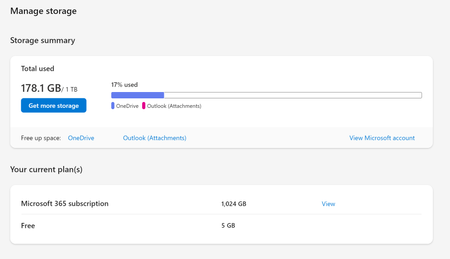
Hello, I have Family 365 Office version. I have recently run out of subscription and updated it again with a few weeks delay. The onedrive on my main account is working fine, but one of my family member's account is not updating properly. It still shows that I am over the storage with about 0.2TB files stored whereas the subscription plan allows for 1 TB - see photographs below. Could you please advise what can be done? Many thanks, Suzy68Views0likes1Comment
Move files from Account A to Account B 165 GB data
I’ve been using Microsoft Office 365 Family for several years, sharing it with my family members. We have 6 accounts, each with 1 TB of storage. One of my accounts has now reached 985 GB, so I need to transfer files from Account A (my account) to Account B (my wife’s account). These files mainly consist of photos and videos — over 200,000 files in total. I tried transferring a 6 GB wedding shoot (.ISO format), but it took more than an hour. Re-downloading and uploading all the data isn’t feasible as my internet connectivity is limited to 100 mbps only. I’m looking for the best and most efficient way to move these files directly between OneDrive accounts.231Views0likes2CommentsOneDrive for Business sync client issue - not finishing
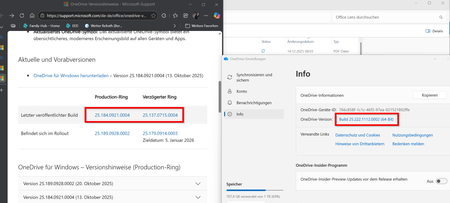
Hi all, I’m experiencing an issue where OneDrive does not finish synchronizing. It runs for about an hour. Upload is not starting until download worked fine. Everything seems to set up correctly: Internet connection is working No large file involved (9,9 MB of 10,3 MB) Logged in sucessfully Free space available loacally and in OneDrive No sync conflicts E3 License is active and paid No Windows updates Pending (Windows 11, version 24H2) Tried solutions: Restarted OneDrive Restarted Windows Paused and resumed sync Stopped and restarted sync What i am wondering: My local OneDrive version is not listed in the https://support.microsoft.com/de-de/office/onedrive-versionshinweise-845dcf18-f921-435e-bf28-4e24b95e5fc0 .... How can I identify the specific file causing the issue? I don’t see the filename currently being processed. Help highly appreciated :-) Regards, EricSolved240Views0likes4Comments
Add Shortcut to Files fails
My wife and I have a family Office 365 subscription. I have shared a folder with her with permissions to edit. She gets the email confirming this and can open the link and see the files in the folder. When she clicks "Add shortcut to My files" she gets a message "1 shortcut wasn't added". This happens using Onedrive web (through Edge) and on the Onedrive app on her iPhone. On the iPhone she hit "Add Shortcut to Files" and it says "By addding "Folder Name" to your OneDrive, you can sync it on your computers with other OneDrive files". When she clicks OK it says "Adding" and then comes up with a message "Something went wrong". Any ideas?3.1KViews11likes14Comments
Fresh Win11 install, fresh Office365 install, Onedrive backup no connection to OneDrive-service
Hi community, got a new laptop with win11. fresh installation, Installed Office 365 (family license) as first package. No firewall/Antivirus other backup software installed. Onedrive says it´s connected. But if I start to select folders (documents/pictures) to automatically backup, the feedback is "Problem with connecting to the onedrive-service" File length or file names can´t be the issue, same error if folders are empty (fresh installation) No matter if I´m connected through my router (LAN/WLAN), hotspot on my mobile phone, neighbour´s network. Tried all resetting options Microsoft and web search is giving. No other result. Can anyone help me? trying to reach the support leads to "this support is currently not available"115Views0likes2Comments