microsoft teams
859 TopicsAnnouncing the 2026 Microsoft 365 Community Conference Keynotes
The Microsoft 365 Community Conference returns to Orlando this April, bringing together thousands of builders, innovators, creators, communicators, admins, architects, MVPs, and product makers for three unforgettable days of learning and community. This year’s theme, “A Beacon for Builders, Innovators & Icons of Intelligent Work,” celebrates the people shaping the AI‑powered future — and the keynote lineup reflects exactly that. These leaders will set the tone for our biggest, boldest M365 Community Conference. Below is your first look at the official 2026 keynote order and what to expect from each session. Opening Keynote Jeff Teper — President, Microsoft 365 Collaborative Apps & Platforms Building for the future: Microsoft 365, Agents and AI, what's new and what's next Join Jeff Teper, to discover how AI-powered innovation across Copilot, Teams, and SharePoint is reshaping how people communicate, create, and work together. This session highlights what’s new, what’s fundamentally different, and why thoughtful design continues to matter. See the latest advances in AI and agents, gain insight into where collaboration is headed, and learn why Microsoft is the company to continue to bet on when it comes to building what’s next. Expect: New breakthroughs in collaboration powered by AI and agents Fresh innovations across Teams, Copilot, and SharePoint Practical guidance on how design continues to shape effective teamwork Real world demos that show how AI is transforming communication and content Insight into what is new, what is changing, and what is coming next Business Apps & Agents Keynote Charles Lamanna — President, Business Apps & Agents In this keynote, Charles Lamanna will share how Microsoft 365 Copilot, Copilot Studio, Power Apps, and Agent 365 come together to help makers build powerful agents and help IT teams deploy and govern them at scale. We’ll share how organizations can design, extend, and govern a new model for the intelligent workplace – connecting data, workflows, and systems into intelligent agents that move work forward. Copilot, apps, and agents: the next platform shift for Microsoft 365 Microsoft 365 Copilot has changed how we interact with software. Now AI agents are changing how work gets done – moving from responding to prompts to taking action, across the tools and data your organization already relies on. Expect: A clear explanation of how to leverage and build with Copilot and agents How agents access data, use tools, and complete multi-step work A deeper look at the latest capabilities across Microsoft 365 Copilot, Copilot Studio, and Power Apps End-to-end demos of agents in action Security, Trust & Responsible AI Keynote Vasu Jakkal — Corporate Vice President, Microsoft Security & Rohan Kumar — Corporate Vice President, Microsoft Security, Purview & Trust In our third keynote, Vasu Jakkal and Rohan Kumar join forces to address one of the most urgent topics of the AI era: trust and security at scale. As organizations accelerate into AI‑powered work, safeguarding identities, data, compliance, and governance is mission‑critical. Securing AI: Building Trust in the Era of AI Join Vasu Jakkal and Rohan Kumar as they unveil Microsoft’s vision for securing the new frontier of AI—showing how frontier firms are protecting their data, identities, and models amid rapid AI adoption. This session highlights how Microsoft is embedding security and governance into every layer of our AI platforms and unifying Purview, Defender, Entra, and Security Copilot to defend against threats like prompt injection, model tampering, and shadow AI. You’ll see how built-in protections across Microsoft 365 enable responsible, compliant AI innovation, and gain practical guidance to strengthen your own security posture as AI transforms the way everyone works. Expect: Microsoft's unified approach to secure AI transformation Forward‑looking insights across Security, Purview & Trust Guidance for building safe, responsible AI environments How to protect innovation without slowing momentum Future of Work Fireside Keynote Dr. Jaime Teevan — Chief Scientist & Technical Fellow, Microsoft Dr. Jaime Teevan, one of the foremost thought leaders on AI, productivity, and how work is evolving. In this intimate fireside‑style session, she’ll share research, real‑world insights, and Microsoft’s learnings from being both the maker and the first customer of the AI‑powered workplace. Expect: Insights from decades of workplace research The human side of AI transformation Practical guidance for leaders, creators, and practitioners Why collaboration is essential to unlock the true potential of AI. Community Closer Keynote Karuana Gatimu - Director, Microsoft Customer Advocacy Group & Heather Cook - Principal PM, MIcrosoft Customer Advocacy Group From Momentum to Movement: Where Community Goes Next As the final moments of Microsoft 365 Community Conference come to a close, Heather Cook and Karuana Gatimu invite the community to pause, reflect, and look forward together. This Community Closer keynote connects the breakthroughs, conversations, and shared experiences of the week into a bigger story—one about people, purpose, and progress. Together, they’ll explore how community transforms technology into impact, how advocates and builders shape what’s next across Microsoft 365, and why this moment matters more than ever. More than a recap, this session is a call to action—challenging attendees to take the energy of the conference back to their teams, regions, and communities, and turn inspiration into sustained momentum. You’ll leave not just with ideas, but with clarity, confidence, and a renewed sense of belonging—because community doesn’t end when the conference does. It’s where the real work begins. More Than Keynotes: Why You’ll Want to Be in Orlando The M365 Community Conference brings together: 200+ sessions and breakouts 21 hands‑on workshops 200+ Microsoft engineers and product leaders onsite The Microsoft Innovation Hub Ask the Experts, Meet & Greets, and Community Studio Women in Tech & Allies Luncheon SharePoint’s 25th Anniversary Celebration And an epic attendee party at Universal’s Islands of Adventure Whether you create, deploy, secure, govern, design, or lead with Microsoft 365 — this is your community, and this is your moment. Join Us for the Microsoft 365 Community Conference April 21–23, 2026 Loews Sapphire Falls & Loews Royal Pacific 👉 Register now: https://aka.ms/M365Con26 Use the SAVE150 code for $150USD off current pricing Come be part of the global community building the future of intelligent work.2.1KViews2likes0CommentsWhat to Expect from the Copilot & AI Sessions at Microsoft 365 Community Conference
AI isn’t a side conversation at the Microsoft 365 Community Conference—it’s at the center of how work is changing. The Copilot, Agents, & Copilot Services Sessions are designed for anyone who wants to move beyond curiosity and into real-world application. This is an opportunity to learn how Copilot works today and how agents extend it. You will also explore how organizations can govern, scale, and operationalize AI across Microsoft 365. Questions these sessions will help answer: How do we move from experimentation to real value? How do we scale AI responsibly? How do agents fit into the way we already work? What skills do teams need next? Business leaders, IT pros, developers, and community practitioners will join sessions to find practical insights into how AI shows up in your daily work, and what it takes to deploy it responsibly and effectively. There will also be a focus on change management, champion programs, and adoption frameworks, because deploying AI isn’t just a technical decision, it’s a cultural one. From Copilot to Agents: The Shift from Assistance to Action One of the biggest themes across the sessions are the evolution from AI as a helper to AI as an active participant in work. If you’re curious about what “agentic AI” actually means in practice, attending these sessions will make it concrete. Join your peers as you learn how Microsoft 365 Copilot is being extended through agents that reason, act, and automate. Learn about agent orchestration across tools like Copilot Studio, SharePoint, Teams, Planner, and Power Platform. Discover new agent patterns including declarative agents, multi-agent configurations, workflows agents, and computer-use agents. In these sessions you’ll explore how agents can: Take action on your behalf and do more than suggest content. Work across apps, data sources, and workflows. Participate alongside humans as part of the team. Real Adoption Stories (Not Just Demos)! Go beyond feature walkthroughs to focus on how organizations are actually adopting Copilot and agents at scale. In these adoption stories you’ll hear: How Microsoft uses Copilot and agents internally as Customer Zero. What adoption looks like across large enterprises, frontline environments, and regulated industries. Lessons learned from early adopters—what worked, what didn’t, and what they’d do differently. Governance, Trust, and Control Are Front and Center AI adoption only works when people trust it—and trust is built through strong governance. Learn how organizations are balancing innovation with oversight and enabling teams to build and use agents while maintaining enterprise-grade guardrails. A significant portion of the Copilot & AI track is dedicated to: Agent lifecycle management. Security, compliance, and data protection. Preventing oversharing and managing risk. Observability and control using tools like Agent 365, Microsoft Purview, and Copilot Control System. This is especially valuable for IT and security leaders who are being asked to “move fast” without compromising standards. Building with Copilot: No-Code, Low-Code, and Pro-Code Paths No matter where you sit on the technical spectrum, there’s a clear path to learning how to build responsibly and effectively. Not everyone builds the same way and organizations need prompt engineering that delivers results. In these sessions you’ll learn how to choose the right agent type for the job, extending Copilot with enterprise data, and designing agents that are production ready—not just impressive in demos. These sessions are tailored to: Business users and makers getting started with Copilot Studio Low-code developers extending Copilot with workflows, connectors, and prompts Pro developers building advanced agents using APIs, MCP servers, Microsoft Graph, SharePoint Embedded, and Azure AI Copilot in the Flow of Everyday Work Rather than abstract AI concepts, you’ll see end-to-end workflows that demonstrate how Copilot helps people save time, reduce manual work, and focus on higher-value outcomes. The emphasis in these sessions is on practical impact, not hype showing how AI is grounded in real work. These sessions will showcase Copilot and agents embedded into: Meetings, chats, and channels. Task and project management. Content creation and knowledge management. Business processes and frontline operations. Why the Copilot and AI track matters If AI is part of your roadmap, or already part of your day, this track will show you how strategy can meet execution. Join us to explore clear mental models for Copilots and agents, see real examples you can apply to your work, and gain a better understanding of what’s now—and what’s coming next. Each year, #M365Con26 is built around one simple idea: bringing our global community together to learn, grow, innovate, and get hands-on with the technologies shaping the next era of work. This year’s conference delivers our most expansive program yet, including: 200+ sessions, workshops, and AMAs, covering Microsoft 365 Copilot, Teams, SharePoint, OneDrive, Copilot Studio, and more. 100+ Microsoft-led sessions, giving you unprecedented access to the people building the apps and AI capabilities you use every day. A keynote lineup featuring Microsoft leaders including Jeff Teper, Charles Lamanna, Vasu Jakkal, Rohan Kumar, Jaime Teevan, and many more. Deep-dive workshops to elevate your skills with real-world scenarios and hands-on learning. Exclusive attendee parties and networking events where you can connect with peers and icons. You’ll also get the chance to meet hundreds of Microsoft executives, engineers, and product leaders—ask questions, share feedback, and help shape the roadmap of the technologies you rely on. Register now, save $150 with code SAVE150 - https://aka.ms/M365ConRegister311Views0likes0Comments
Does Microsoft have an employee directory?
Hi everyone, Quick question for the group. My company uses Microsoft Teams every day, and people are constantly trying to find the right person internally, who owns what, who reports to who, who sits in which team/department, etc. Teams search and profile cards help a bit, but we’re really looking for a proper employee directory, specifically: A clean employee directory experience (not scattered across different places). Rich employee profiles (photo, title, department, manager, contact info, location, etc.). Strong employee search (by name, department, role, location, ideally more) Is there a native employee directory in Microsoft 365 that does this well out of the box. If not, what are people using instead, SharePoint, Viva, custom build, or a third-party directory that pulls from Entra ID / M365? Would love to hear what’s working in real life.Solved117Views1like1CommentBlock users from creating Public Microsoft Teams groups
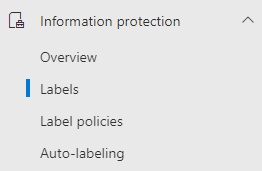
Hi Community, Is already know that Teams creation in Microsoft Teams is related to O365 groups, and if you would like to block users from creating teams, you need to block them from creating O365 groups, right? Ok, right. But what if we only want to block the possibility to create public teams, but still allow them to create private ones? Would that be possible? The answer is YES. And the solution is Microsoft Purview. You'll need to create a new Label/Label Policy under Information Protection. We'll configure the Label for the scope "Site, UnifiedGroup", with group settings as "Private" and applying the label automatically. Then we can configure/publish the Label Policy as mandatory for all the users, some of them or, as in my example, to a DL that contains all the users that I would like to block. Once published, depending on your tenant size, it can take up to 24 hours to propagate. In my test environment it was quite immediate. Now, the users added to the DL that I configured in the Label Policy can still create teams, but not Public ones ( and can't change the label ) as that option is greyed out. The answer is YES. And the solution is Microsoft Purview.18KViews0likes16Comments
Audit Log, what is TokenIssuedAtTime?
I used audit log to search user delete MS Teams files, by using Recycled File and Recycled Folder, I got the log file. Why the TokenIssuedAtTime and the CreationTime are so much different? Below is one of the log record {"AppAccessContext":{"AADSessionId":"8f382a1d-b233-425c-92f4-3cf9ed395c9e","CorrelationId":"ae68fba0-40db-2000-ce07-a7bde7727c3f","TokenIssuedAtTime":"2023-12-23T00:47:57","UniqueTokenId":"U4m5SFCmckOiN_QLrysqAQ"},"CreationTime":"2023-12-26T04:24:52","Id":"7a3dc23c-2699-485b-0a87-08dc05ca9b40","Operation":"FolderRecycled","OrganizationId":"7cf9c29c-c6af-4790-b98b-4eff7637f9be","RecordType":6,"UserKey":"i:0h.f|membership|email address removed for privacy reasons","UserType":0,"Version":1,"Workload":"SharePoint","ClientIP":"2001:d08:e2:58d:61cb:e4bc:c451:aef9","UserId":"email address removed for privacy reasons","AuthenticationType":"FormsCookieAuth","BrowserName":"","BrowserVersion":"","CorrelationId":"ae68fba0-40db-2000-ce07-a7bde7727c3f","EventSource":"SharePoint","IsManagedDevice":false,"ItemType":"Folder","ListId":"33880cd7-1db1-450f-9cd0-5c437c0ccaee","ListItemUniqueId":"184cd92b-40cf-4fa1-82aa-ad5fa61a2a05","Platform":"WinDesktop","Site":"f1bb631d-8ff4-4411-b49f-066e20be905c","UserAgent":"Microsoft SkyDriveSync 23.246.1127.0002 ship; Windows NT 10.0 (19045)","WebId":"aa607282-8b47-47d1-938b-c0cde8e2d87d","DeviceDisplayName":"2a01:111:2055:202:4701:ee31:fe3f:156","CrossScopeSyncDelete":false,"HighPriorityMediaProcessing":false,"SharingType":"","SourceFileExtension":"","SiteUrl":"https://mysharepoint.sharepoint.com/sites/mysite/","SourceRelativeUrl":"Shared Documents/test/MyFolder","SourceFileName":"Quotation","ObjectId":"https://mysharepoint.sharepoint.com/sites/mysite/Shared Documents/test/MyFolder/Test1"}986Views0likes1CommentTeams External Collaboration Administrator Role Arrives
Microsoft is introducing a new Entra ID role. The Teams External Collaboration administrator role allows users to manage external collaboration settings. Quite how often Microsoft 365 tenants need to manage these settings is unknown, but it’s a useful prompt to review the current set of roles used and users who are members of those roles. Time for an annual clean-up. https://office365itpros.com/2026/01/14/new-entra-id-role/173Views0likes0CommentsMicrosoft 365 Community Conference: A Beacon for Builders, Innovators, and Icons of Intelligent Work
You’re passionate about what you do, and we’re passionate about empowering your potential. Microsoft 365 Community Conference - is your chance to keep up with AI, build game-changing skills, and take your career (and business) even further. With over 200 sessions, workshops, keynotes, and AMAs, you’ll learn directly from the experts and product-makers who are reimagining what’s possible in the workplace. Conference Details Join us in Las Vegas April 21-23. 2026 for the premier Microsoft 365 community event. We want to help you get the most out of the tools you use every day, so we’re bringing back the conference you know and love—with even more opportunities to learn, connect, and level up. Here’s what you can expect: Meet one-on-one with the people who create Microsoft products—ask questions, share feedback, and discover real-world solutions Explore Microsoft’s latest product updates and learn about what’s on the horizon Build and sharpen skills you can use immediately to be more productive, creative, and collaborative with the Microsoft tools you use every day Grow your network, dive deep, and have fun with the best community in tech How to Register Register today and get ready to transform the way you work. Save $150 with our exclusive customer code SAVE150. https://aka.ms/M365ConfWebsite Explore Sessions and Workshops There’s plenty of breadth—and depth—to the learning opportunities at the Microsoft 365 Community Conference. No matter your role or experience level, we've got something for everyone! https://aka.ms/M365ConfSessionsWebPage Meet the Speakers Our lineup of speakers includes some of the brightest minds behind the most powerful Microsoft innovations. You’ll hear from experts like: Jeff Teper | President, Collaborative Apps and Platforms Charles Lamanna | President, Business Apps and Agents Vasu Jakkal | Corporate Vice President, Microsoft Security Business Rohan Kumar | Corporate Vice President, Microsoft Security, Purview & Trust The Microsoft 365 Community Conference is more than an event. It’s the gateway to what’s next for your career, community, team, customers, and business—and for work itself. Claim your front-row seat to the future of work today!406Views0likes0CommentsSharePoint vs Teams vs OneDrive: When to Use Each (and When Not To)
If your organization uses Microsoft 365? then you have gone through the pain point of which tool to use “Should this live in SharePoint, Teams, or OneDrive?” At first glance, all three tools seem to do the same thing store files, share documents, and help people collaborate. But using the wrong tool in the wrong situation can quickly lead to duplicated files, messy permissions, frustrated users, and lost productivity. This blog breaks down what SharePoint, Microsoft Teams, and OneDrive are actually for, when to use each one and more importantly when not to. https://dellenny.com/sharepoint-vs-teams-vs-onedrive-when-to-use-each-and-when-not-to/248Views1like0Comments