Customization
13 TopicsCompleting your profile & connecting social media profiles
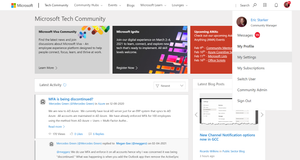
Changing an avatar Click on the default avatar at the top right of the navigation bar and select 'My Settings'. Click the edit button over the current avatar. Upload your own image, or choose a default avatar, then click save. Create a bio Click your avatar at the top right of the navigation bar and select “My Settings”. Click on the Personal tab, and provide your name, preferred pronouns, bio, and other details about yourself. When finished, click 'Save'.7.4KViews21likes0CommentsHow about Base Sets for keyboard shortcuts that are further customizable?
The idea is very similar to what we have in some games. VSCode is similar, too, but not exactly what I mean here. Here's what I expect to have from the users' perspective: Download the New Microsoft Edge using a (a) Microsoft Edge, (b) Mozilla Firefox, (c) Google Chrome, (d) Safari, ... On the first run, at the top of the initial welcome page, I see a fancy "Shortcuts for the browser has been set to match the ones in (a/b/c/d/...) for you to feel at home." Perhaps another line saying "Want to use the shortcut layout from another browser?" with a drop-down right next to it for me to choose. Perhaps one more saying "Or perhaps customize them altogether?" with a button to take me to the View/Edit Keyboard Shortcuts page in the Settings. The difference of VSCode is at that it offers this via Extensions, which I think is too much of a hassle. Like this, it's more streamlined, offering more of a ready-to-go experience. For this magic to happen, in the background and from the developer perspective, these needs implementing: A framework in the background for editable keyboard shortcuts. This probably is already there. A front-end for users to edit the shortcuts. An extensive table of shortcut-assignable-functions vs major-browsers. Cells should contain which shortcut has been assigned to that function on that browser. One table per OS, as browsers have different features/shortcuts per OS most of the times. Installers for each column on those tables. Detect the OS (already here) and browser used for downloading. Set the HREF of the Download button to download the installer that defaults the base-shortcuts to the respective browser's shortcuts on that OS. Sensible defaults. Editable to personal preference. Extendable via extensions. Best of every-single-world. You will win the hearts of a bunch with this. If the browser used for downloading is not one that is explored, then fall back to Edge or Chrome or something.5.6KViews1like25CommentsMake Start Menu's background Blurry with Acrylic and Transparent theme
Make Start Menu's background Blurry with Acrylic and Transparent theme style. Settings app has this blur effect and it's really nice, it would be great to be able to set blurry effect for the start menu background instead of solid colors. Upvote this: https://aka.ms/AA6odtm3KViews0likes0Comments
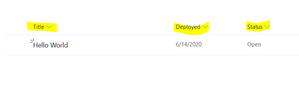
How to customize SharePoint List (Field Label) in Bold and How to increase the Size.
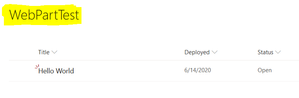
Hi SP Experts, I am very new to SharePoint, I have 1 requirement regarding the Header Field Label formatting and Customization in SharePoint List. Issue - I need to enlarge and size of Field Label of SharePoint List. (Please Find the Yellow highlight Field). I need to achieve like below. I didn't find a proper solution or Guidance on Internet Please if possible suggest me the solution Thanks,2.8KViews0likes1CommentIntune MDM Setup-Screen anpassen
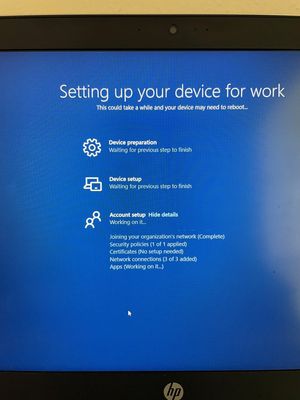
Hallo zusammen, ist es möglich, den MDM-Einrichtungsbildschirm mit personalisiertem Text zu versehen? Anstatt "Setting up your Device for work..." würden wir uns einen eigenen Text wünschen. Unter den OOBE Einstellungen finde ich dazu nichts. Vielen Dank im Voraus!2.1KViews0likes3Comments
Updates Change Settings
I'm beyond frustrated...every time there is an update, I lose all my customized settings. I have customized my quick access tool bar, even my theme changes. I frequently lose folders and documents I have pinned. These settings save me time and increase my efficiency. Me spending an hour recreating my settings is stealing time from my employer, and I'm not happy about it. Not what I wanted to see when I log in first thing on a Monday morning.1.5KViews0likes2Comments
How to create a teams template with site template (webparts etc)
I want to create a ”Microsoft Teams” -template that provisions team related settings and related site collection items (documents, web parts, and so on). As far I am aware this is not possible. Teams template does not create a site collection, and it is not possible to create a new team using the site template. Would the best idea be to create a site model and request that users first use this template to create team site and then use this new team site as to create team? Any ideas?1.5KViews0likes1Comment