User Profile

Inger_Christensen
Brass Contributor
Joined Oct 05, 2020


User Widgets
Recent Discussions
Copilot in Outlook - 'Sound like me' tone is missing in both new and classic outlook
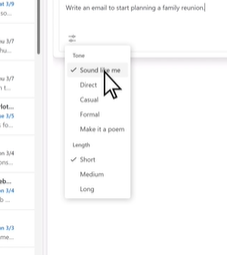
In this short video it shows a tone 'Sound like me'. This is missing in our menu, how do I enable this option? https://support.microsoft.com/en-us/office/draft-an-email-message-with-copilot-in-outlook-3eb1d053-89b8-491c-8a6e-746015238d9b From video From my computer:Solved2.4KViews1like2CommentsRe: Unable to drag and drop a PowerPoint, Excel and Word files from New Outlook to New Teams
RobertSparnaaij - thank you for the reply. Just to make sure that I understand this correctly. There is no place where I can see which files Microsoft is starting with making available for drag and drop, nor other types which is already planned, or which are not currently in scope where I should go in and make a suggestion? I would like to make some communication to our users, but without documentation on what is taking place it is hard to communicate and create awareness. In advance thank you.773Views0likes0CommentsRe: Unable to drag and drop a PowerPoint, Excel and Word files from New Outlook to New Teams
RobertSparnaaij - How can I see if the feature is implemented on our Tenant? I just tried drag and dropping to both File Explore and New Teams and the only type of file I can drop is .jpg when using New Outlook. Is there a place where I can find the details on all the senarios included in the feature Microsoft is releasing right now?867Views0likes2CommentsUnable to drag and drop a PowerPoint, Excel and Word files from New Outlook to New Teams
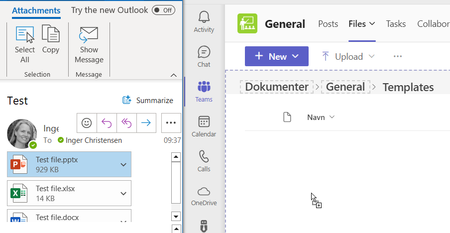
In Old Outlook I am able to drag and drop PowerPoint, Excel, Word and Jpg to Teams, but in New Outlook I am only able to drag and drop jpg files to New Teams. See below first picture is old outlook with the (+), second picture is new Outlook with the stop sign. Anyone else experience the same and is there a timeframe for when all file types will work from New Outlook?1.2KViews0likes6CommentsRe: Unable to add "Lists" in Teams - user is not a guest
We have found that if there is an & sign in the Team name then it fails if you try to add Lists. We tried renaming the Team and it still failed. Looking at the path in SharePoint we can see that the rename only took effect on Teams and not SharePoint, so the error properly reside on the SharePoint side more than Teams. As it was a new Team she just created one without & in the name. We have asked our partner to create ticket for Microsoft support to get i corrected. Would have been nice just to tag this post for correction. As we have duplicated the error801Views0likes0CommentsTask in Word comment does not show in Planner or To Do
When I check of to assign a task to a person the task is not assigned in Planner nor in To Do. It only send an email. Is there a setting which needs to be changed? https://support.microsoft.com/en-au/office/using-modern-comments-in-word-edc6ae71-0a2d-49fe-8faa-986f1e48136a940Views2likes1CommentUnable to add "Lists" in Teams - user is not a guest
I have a user who is unable to add "Lists" in Teams. She can select the app and which template she wants to use, but when she clicks on "Use template" it just adds the tab at the top and takes her to the view which shows the different channels. I have tried the same steps and I am able to add a list using the same template. She is owner of the team and is not a guest on the Tenant Anyone else seen this issue and good suggestions?1KViews0likes3CommentsIs it possible to create corporate meeting templates for Outlook
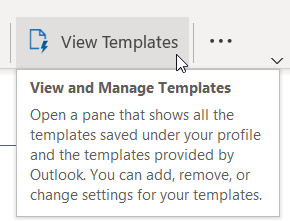
A user can create a meeting template and save in C:\Users\USERINITIAL\AppData\Roaming\Microsoft\Templates\*.oft If we want to make corporate templates available would they have to be saved same place? If so is there a way to make subfolders or will we have to make a naming standard to keep templates from different business units together, i.e. HR - Interview mgt? I have only been able to find enduser information, no backend. https://support.microsoft.com/en-us/office/video-create-templates-for-calendars-tasks-and-contacts-58e88e78-3779-44b1-a5da-3fa26ca4123b In advance thank you.4.3KViews1like12CommentsRe: Is it possible to create corporate meeting templates for Outlook
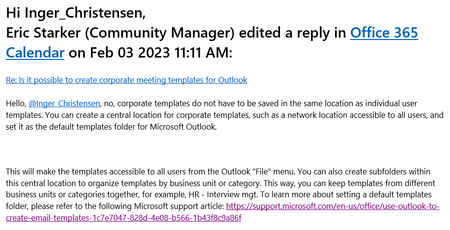
EricStarker - I received following message from you Friday. The message is not visible in the thread and the link is not working (Hover over shows Microsoft link), so I hope that you see this message and can provide an updated link. In advance thank you 🙂3.6KViews0likes3CommentsRe: Is it possible to create corporate meeting templates for Outlook
Victor_Ivanidze - Ok, thank you for sharing your idea. I was looking for something using Microsoft standard features, as it look like the thoughts are there. When the user is allowed to create templates for own use, then I assume that the setup also supports a governed setup, just like the template feature in Word and PowerPoint.3.7KViews0likes0CommentsNew files started from + New starts in default layout and not company branded
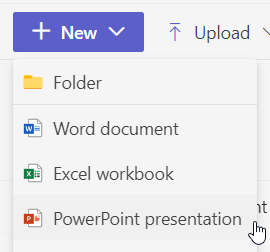
Is it possible to make a configuration on the Tenant to have the + New. Open to "Home", where it shows the branded template as an option, i.e. if you select + New from within teams it opens up directly to a blank non branded slide rather than where the user is prompted to select the template they want to use. As a workaround the user can select Design to change to branded version, but would prefer it to open like below.597Views0likes0Comments
Recent Blog Articles
No content to show