User Profile

Aji_
Copper Contributor
Joined May 19, 2020


User Widgets
Recent Discussions
Warning Message onClick of Close (X) in a Team Meeting
This is a suggestion on adding new feature to Teams. Please can a prompt pop-up when the close(X) button is clicked inadvertently? This would help prevent the Participant from leaving the meeting unintentionally. Thanks.3.4KViews0likes4CommentsWindows - A JavaScript error occurred in the main process
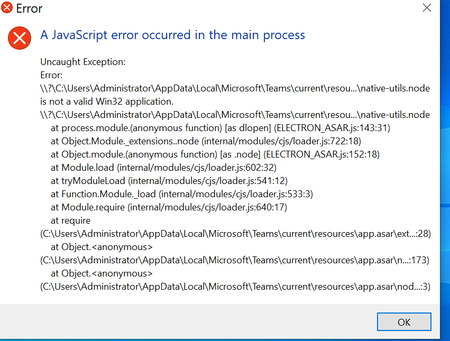
Hello Everyone, While installing Microsoft Teams, the error message described in the subject line is thrown. Am running Microsoft Windows Version - 1909 A couple of troubleshooting tips found on https://docs.microsoft.com/en-us/MicrosoftTeams/troubleshoot-installation have been tried but the error still shows up. Any idea on how to resolve this issue will be greatly appreciated. UPDATES I did a comparison of 2 SquirrelSetup.log files. (Both PC runs Windows 1909 and the same build number. The PC 1(Throwing up the JavaScript error above)logged some issues not found in the PC 2 as shown below: ----start---- ApplyReleasesImpl: Couldn't run Squirrel hook, continuing: C:\Users\Administrator\AppData\Local\Microsoft\Teams\current\Teams.exe: System.OperationCanceledException: The operation was canceled. at System.Threading.CancellationToken.ThrowOperationCanceledException() at Squirrel.Utility.<>c__DisplayClass11_0.<InvokeProcessAsync>b__0() at System.Threading.Tasks.Task.InnerInvoke() at System.Threading.Tasks.Task.Execute() --- End of stack trace from previous location where exception was thrown --- at System.Runtime.CompilerServices.TaskAwaiter.ThrowForNonSuccess(Task task) at System.Runtime.CompilerServices.TaskAwaiter.HandleNonSuccessAndDebuggerNotificat ion(Task task) at Squirrel.Utility.<InvokeProcessAsync>d__11.MoveNext() --- End of stack trace from previous location where exception was thrown --- at System.Runtime.CompilerServices.TaskAwaiter.ThrowForNonSuccess(Task task) at System.Runtime.CompilerServices.TaskAwaiter.HandleNonSuccessAndDebuggerNotificat ion(Task task) at Squirrel.UpdateManager.ApplyReleasesImpl.<>c__DisplayClass18_1.<<invokePostInsta ll>b__2>d.MoveNext() ---end---- FURTHER UPDATES Many suggestions found on GitHub, Microsoft support site, blogs and other websites have been tried. So after spending several hours googling and searching for a working solution, the following finally worked on the PC in question. A standard user account was created on the PC. Downloaded a new Microsoft teams app. In services.msc, the status of a service called Quality Windows Audio Video Experience was also manually started. Executed the app and no JavaScript error was thrown. N.B: I am still not satisfied with this fix, cos i applied the same troubleshooting approach on another PC throwing up the same JavaScript error, and the fix doesn't work on it. 🙂Solved
Recent Blog Articles
No content to show