User Profile

Arun_J_Yadav
Copper Contributor
Joined Mar 02, 2020


User Widgets
Recent Discussions
Using Graph to get Inventory of Teams, Channel, Users (Internal + External) in Teams Tenant
Hi Graph Community, I need an Inventory Report of Teams Tenant for the last 90 days in Excel or CSV format for the below listed via MS Graph. 1) Teams, 2) Channel, 3) Users (Internal + External) 4) User Role (Owner, Member) 5) Connected SharePoint Site URL. I hope Graph has limitations up to maximum 999 results. Kindly let me know how to achieve the above without limitations using MS Graph. Thank You, Arun J Yadav390Views0likes0CommentsCreate Internal Use Document Library in existing SPO Site and make it Unique Permission
Hi SPO / Powershell Community, I'm looking for a Powershell script to achieve the need below in SPO Site in the process order below. 1) Get existing SPO Site URL 2) Create new Document Library with DocLib Name, Internal Use only sensitivity 3) Unique Permission for this new Document library in Point (2) The Powershell script should ensure all the above process steps to be accomplished in one go when I run the script. NOTE: Powershell script is the primarily expected solution. But, if alternative approaches are there in case of any shortcomings with Powershell script please feel free to suggest. Your help is appreciated. Thank You, ArunChange Farm Admin Service Account to brand new Service Account (SharePoint 2013)
Dear SharePoint Administrator Community, We have On-Premise SharePoint 2013 Farm (Prod & Dev). The current Farm Admin account needs to be replaced with brand new Farm Admin Service Account for Security reasons. The SharePoint 2013 Environment has Nintex Workflows and Nintex Forms in usage additionally. Kindly advise the procedure which will ensure smooth transition to new Farm Admin Account. Thank You, Arun1KViews0likes1CommentRe: Send mail to Multiple People while updating list item for a specific Dropdown value
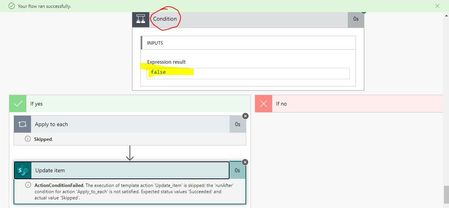
Hi Vikram_Samal Welcome your valuable inputs!! As you suggested, i have made the same configurations with Power Automate. As you can see in the Flow's Runtime screenshot below am getting FALSE in the Condition due to which Email sending is skipped. My Flow's settings you could see in next screenshot below. Kindly advise where do I make mistake here to fix it? Thank You, ArunSend mail to Multiple People while updating list item for a specific Dropdown value
Dear Team, I have a SharePoint Online List with Columns below 1) Task Status(Lookup Column) and 2) Assigned To(People column - Multiple Selection) - Task status is Dropdown having values a) Open, b)WIP, c) Closed - Assigned To can have 3 people or more When a existing list item is modified with Task Status as Closed, separate Mail(s) with Attachment should be sent to all people in that list item Assigned To column. Kindly help with a best approach asap. Thank You!Merge Mutiple Document Libraries into One Document Library with SharePoint Online
Dear Team, I have a requirement to merge existing Documents from multiple Document Libraries and show these files in a single Document Library in same Site inside SharePoint Online. This has to be done without Copying/Duplicating the existing files in that Site. Can this be achieved via Power Automate or SPFx or any other approach for SharePoint Online? Kindly advise. Thank You, Arun J Yadav12KViews0likes1CommentValidation of SPO List Form fields Instantly when a Field loses focus
Dear Community, I would like to validate SharePoint Online List Form fields instantly when a Field loses focus instead of validating at very end by clicking on SAVE button in Form and as discussed in the Website URL below. https://www.codeproject.com/Questions/777537/Check-and-Validate-input-field-when-loses-focus VALIDATIONS NEEDED: A) First Letter CAPS, B) Removing Leading and Trailing spaces in Text Field. Any MS documentation or similar solution would be great to implement same. Kindly advise Thank You, Arun668Views0likes0CommentsSharePoint Powershell console in Client Computer(Laptop)
Hi, I have Full Control access to a SharePoint Online Site collection only in browser but NOT SharePoint Admin Center for admin actions. Would I be able to use Powershell for SharePoint Online in my Laptop PC to use Commands to find who created List and Document Libraries in this Site collection or any other import, export data tasks? If yes, what are the steps to configure a working SharePoint Online Powershell Console in my Laptop PC ? Kindly advise. Thank You!849Views0likes1CommentRe: Auto Filling SharePoint Library columns with Outlook Email Quick parts Data
Nice! Do you have any document or article explaining the process how to parse and extract Data from Email Content in Subject Line and Body via VARIABLES in POWER AUTOMATE to SharePoint Document Library columns ?2.7KViews0likes0CommentsRe: Auto Filling SharePoint Library columns with Outlook Email Quick parts Data
Sudharsan, thank you for update. I see Variables as one of the Feasible thing to Parse email content and extract data via Power Automate. Other options are Content parsing 3rd Party Apps like PARSERR which needs separate login unlike SSO in O365 to parse and extract data. Which option do you think will be apt to Parse the Email Body and Subject Content ?2.7KViews0likes4CommentsAuto Filling SharePoint Library columns with Outlook Email Quick parts Data
Hi, I'm using Flow(MS Automate) to export Email with Attachments in my Inbox to a SharePoint Library. This worked. Now the next requirement, I need to capture(populate) the Metadata AUTOMATICALLY in SharePoint Document Library for this Email item from the same E-Mail Content aforementioned say the Email Sender's A) Company name, B) Employee Name, C) Industry Domain of their Company etc Can this requirement be achieved with Quick Parts in Outlook or any other method? If yes, Please explain the Process for the same . Mark-Kashman wbaer2.9KViews0likes6Comments
Recent Blog Articles
No content to show