User Profile

WarrenBelz
Copper Contributor
Joined Jan 29, 2020


User Widgets
Recent Discussions
Re: Sharepoint as order database - adding multiple items
Hi lukaszp89 , Firstly, if you have done any work with Power Apps Integrated Forms, this could be achieved with a "child" list for the orders. SharePoint has Multi-Choice columns, but these are a single field, so you could not specify two separate (Product and Quantity) values in them. https://learn.microsoft.com/en-us/sharepoint/managed-metadata, columns support multiple dependant fields, but not multiple values of these.269Views0likes0CommentsRe: SharePoint List - save as Template
Thanks Hanne_Lauritzen , I had a look at it - I do not have an immediate need, however it seems it would be quicker to simply create the new lists in the other Tenant. I suspect there will be developers not happy with this omission - I hope it gets back on the UI as it was a valuable resource.395Views0likes1CommentRe: SharePoint List - save as Template
Thanks Hanne, My issue is being able to migrate the lists to another tenant. The Power Apps Solution is easy enough, but previously I could also import the templates in the other tenant, then create lists from them. "From existing list" has always been there to my knowledge and is what I use within the same tenant. I assume MS have disabled this never to be seen again ?783Views0likes3CommentsSharePoint List - save as Template
There might be a simple answer to this, but some time ago, I created a Classic Site specifically to copy lists to and then save as templates. I needed to do another set recently and found this option is now gone. I can still add Apps from previous templates, but nothing to allow me to save new templates. Is there a simple solution to this or is this something else from the Classic days that is now disabled ?1.1KViews0likes5CommentsDelete a "sub-profile"
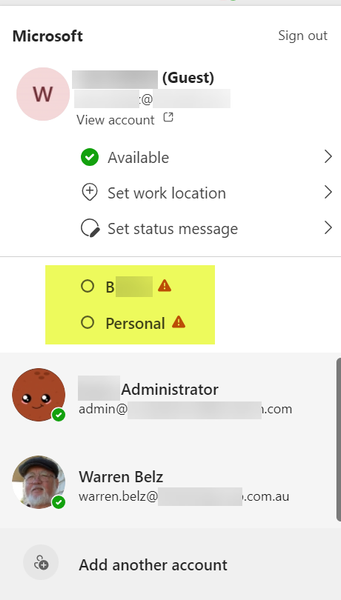
I have multiple Teams profiles, with two from business accounts (which work fine) and a personal email account with three different profiles collected over time from different things I have been involved in. One is still required (Microsoft - I am involved in the Power Apps and MVP Communities), but the other two are from jobs I did some time ago and are no longer valid. How do I delete these two without deleting the one I need ?672Views0likes3CommentsIssues with SharePoint over the last few days
We are experiencing issues with retrieving current SharePoint data both in the native interface (shows last version viewed before update) and to a lesser extent Power Apps. There have been a number of posts of the Power Apps Community with similar data retrieval issues. Does anyone know the problem and if it has been resolved ?5KViews0likes0CommentsRe: Pre-populate fields in Microsoft Forms via URL parameter?
ChrisCollao , https://www.cognitoforms.com/forms can accept multiple incoming parameters (we launch them from Power Apps) including the ID of the SharePoint List Item to update with Power Automate, the email of the user to respond to and any pre-population of the form. They are very powerful, reasonably priced and quick to develop and make MS Forms a third-rate alternative for anything other than self-marking exams. We use them mainly for field-based data collection and can easily be Word-merged / PDF including signatures.65KViews0likes0Comments
Recent Blog Articles
No content to show