User Profile

A819A1L
Brass Contributor
Joined Jan 21, 2020


User Widgets
Recent Discussions
MERGE INTO statement increasing previously captured "snapshot" data
Hello, I need help understanding why my snapshot logic isn't working: I have a table that captures "snapshot" data for staff absences each day. On Friday 11th I did a simple select query which returned 109,541 rows. The SKEY_ROW_START and SKEY_ROW_END are the fields used to determine which records should be included in each snapshot date (D.SKEY_DATE as shown below). SELECT * FROM HR.FACT_STAFF_ABSENCE_SNAPSHOT LEFT JOIN HR.DIM_DATE AS D ON D.SKEY_DATE BETWEEN SKEY_ROW_START AND SKEY_ROW_END WHERE D.SKEY_DATE = 20230811 I ran the same query today (15th), which returned 109,614 rows. This is a problem because regardless of when the query is run, it should always return the same result when querying a specific date. This is the sql that populates the snapshot table. The purpose if this statement is to compare the results from both non-snapshot and snapshot table based on ROW_HASH. Where they match update the SKEY_ROW_END to "Today". Where they don't match, insert new records and set SKEY_ROW_START and SKEY_ROW_END to "Today". I didn't write this code, it was implemented by a developer that no longer works at my organization. But the statement seemed fine to me. I believe it was designed this way because each "snapshot date" should be an accumulation of absence records in the last year. WITH S AS (SELECT distinct [ABSENCE_DAYS] ,[ABSENCE_HOURS] ,[ABSENCE_WEEKS] ,[ABSENCE_NUMBER] ,[APPOINTMENT_ID] ,[SKEY_PERSON] ,[START_DATE] ,[END_DATE] ,[ABSENCE_REASON_CODE] ,[ABSENCE_REASON_DESCRIPTION] ,[RETURN_TO_WORK_INTERVIEW] ,[SKEY_START_DATE] ,[SKEY_END_DATE] ,[SKEY_ACTIVE_CONTRACT] ,[SKEY_LATEST_APPOINTMENT] ,[SKEY_COLLEGE_OF_SCHOOLS] ,[SKEY_SCHOOL] ,[SKEY_DEPARTMENT] ,[SKEY_DIVISION] ,[SKEY_ACTUAL_GRADE] ,[SKEY_EMPLOYEE_STATUS] ,[SKEY_EMPLOYEE_SUB_STATUS] ,[SKEY_EMPLOYEE_LOCATION] ,[SKEY_HESA_DEFINED_STAFF_CONTRACT] ,[SKEY_CATEGORY] ,[SKEY_LEAVING_CODE] ,[SKEY_REASON_CODE] ,[SKEY_APPOINTMENT_STATUS] ,[SKEY_COST_CENTRE] ,[SKEY_PAY_CODE] ,CAST(CONVERT(VARCHAR(8),GETDATE(),112) AS INT) SKEY_ROW_START ,CAST(CONVERT(VARCHAR(8),GETDATE(),112) AS INT) SKEY_ROW_END ,CONVERT(VARBINARY(32) ,HASHBYTES('SHA2_256',CONCAT([ABSENCE_DAYS] ,'|' ,[ABSENCE_HOURS] ,'|' ,[ABSENCE_WEEKS] ,'|' ,[ABSENCE_NUMBER] ,'|' ,[APPOINTMENT_ID] ,'|' ,[SKEY_PERSON] ,'|' ,[START_DATE] ,'|' ,[END_DATE] ,'|' ,[ABSENCE_REASON_CODE] ,'|' ,[ABSENCE_REASON_DESCRIPTION] ,'|' ,[RETURN_TO_WORK_INTERVIEW] ,'|' ,[SKEY_START_DATE] ,'|' ,[SKEY_END_DATE] ,'|' ,[SKEY_ACTIVE_CONTRACT] ,'|' ,[SKEY_LATEST_APPOINTMENT] ,'|' ,[SKEY_COLLEGE_OF_SCHOOLS] ,'|' ,[SKEY_SCHOOL] ,'|' ,[SKEY_DEPARTMENT] ,'|' ,[SKEY_DIVISION] ,'|' ,[SKEY_ACTUAL_GRADE] ,'|' ,[SKEY_EMPLOYEE_STATUS] ,'|' ,[SKEY_EMPLOYEE_SUB_STATUS] ,'|' ,[SKEY_EMPLOYEE_LOCATION] ,'|' ,[SKEY_HESA_DEFINED_STAFF_CONTRACT] ,'|' ,[SKEY_CATEGORY] ,'|' ,[SKEY_LEAVING_CODE] ,'|' ,[SKEY_REASON_CODE] ,'|' ,[SKEY_APPOINTMENT_STATUS] ,'|' ,[SKEY_COST_CENTRE] ,'|' ,[SKEY_PAY_CODE] ,'|' ,[SKEY_WORK_LOCATION]))) AS ROW_HASH ,[SKEY_WORK_LOCATION] ,SKEY_ABSENCE_TERM FROM HR.FACT_STAFF_ABSENCE WHERE SKEY_START_DATE >=(DATEPART(YEAR,GETDATE())-1)*10000 +801 ) MERGE INTO HR.FACT_STAFF_ABSENCE_SNAPSHOT AS T USING S ON T.ROW_HASH = S.ROW_HASH WHEN MATCHED THEN UPDATE SET T.SKEY_ROW_END = CAST(CONVERT(VARCHAR(8),GETDATE(),112) AS INT) WHEN NOT MATCHED BY TARGET THEN INSERT ([ABSENCE_DAYS] ,[ABSENCE_HOURS] ,[ABSENCE_WEEKS] ,[ABSENCE_NUMBER] ,[APPOINTMENT_ID] ,[SKEY_PERSON] ,[START_DATE] ,[END_DATE] ,[ABSENCE_REASON_CODE] ,[ABSENCE_REASON_DESCRIPTION] ,[RETURN_TO_WORK_INTERVIEW] ,[SKEY_START_DATE] ,[SKEY_END_DATE] ,[SKEY_ACTIVE_CONTRACT] ,[SKEY_LATEST_APPOINTMENT] ,[SKEY_COLLEGE_OF_SCHOOLS] ,[SKEY_SCHOOL] ,[SKEY_DEPARTMENT] ,[SKEY_DIVISION] ,[SKEY_ACTUAL_GRADE] ,[SKEY_EMPLOYEE_STATUS] ,[SKEY_EMPLOYEE_SUB_STATUS] ,[SKEY_EMPLOYEE_LOCATION] ,[SKEY_HESA_DEFINED_STAFF_CONTRACT] ,[SKEY_CATEGORY] ,[SKEY_LEAVING_CODE] ,[SKEY_REASON_CODE] ,[SKEY_APPOINTMENT_STATUS] ,[SKEY_COST_CENTRE] ,[SKEY_PAY_CODE] ,[SKEY_ROW_START] ,[SKEY_ROW_END] ,[ROW_HASH] ,[SKEY_WORK_LOCATION] ,SKEY_ABSENCE_TERM) VALUES (S.[ABSENCE_DAYS] ,S.[ABSENCE_HOURS] ,S.[ABSENCE_WEEKS] ,S.[ABSENCE_NUMBER] ,S.[APPOINTMENT_ID] ,S.[SKEY_PERSON] ,S.[START_DATE] ,S.[END_DATE] ,S.[ABSENCE_REASON_CODE] ,S.[ABSENCE_REASON_DESCRIPTION] ,S.[RETURN_TO_WORK_INTERVIEW] ,S.[SKEY_START_DATE] ,S.[SKEY_END_DATE] ,S.[SKEY_ACTIVE_CONTRACT] ,S.[SKEY_LATEST_APPOINTMENT] ,S.[SKEY_COLLEGE_OF_SCHOOLS] ,S.[SKEY_SCHOOL] ,S.[SKEY_DEPARTMENT] ,S.[SKEY_DIVISION] ,S.[SKEY_ACTUAL_GRADE] ,S.[SKEY_EMPLOYEE_STATUS] ,S.[SKEY_EMPLOYEE_SUB_STATUS] ,S.[SKEY_EMPLOYEE_LOCATION] ,S.[SKEY_HESA_DEFINED_STAFF_CONTRACT] ,S.[SKEY_CATEGORY] ,S.[SKEY_LEAVING_CODE] ,S.[SKEY_REASON_CODE] ,S.[SKEY_APPOINTMENT_STATUS] ,S.[SKEY_COST_CENTRE] ,S.[SKEY_PAY_CODE] ,CAST(CONVERT(VARCHAR(8),GETDATE(),112) AS INT) ,CAST(CONVERT(VARCHAR(8),GETDATE(),112) AS INT) ,S.[ROW_HASH] ,S.[SKEY_WORK_LOCATION] ,S.SKEY_ABSENCE_TERM) ; When I compared the two result sets, I managed to identify the additional 73 records based on the ROW_HASH. In each one the SKEY_ROW_END was greater than 20230811, as expected. But the SKEY_ROW_START of these records pre-dates 20230811, which explains why they are included in the select query. What I don't understand is, how? Surely if they are new records added after 20230811, the SKEY_ROW_START should be greater than 20230811? Is anyone able to identify anything wrong with the MERGE/INSERT statement that might explain what's happened? CheersSolved927Views0likes3CommentsRe: Convert DATETIME to YYYYMMDD
Hi Jeff_Moden Yes, I did. I have used convert many times in the past, I just couldn't find the code for the format I needed at the time I needed it. So in my haste, I posted here. As always, I appreciate the information supplied and effort volunteers put in to help me out 👍20KViews0likes0Comments- 24KViews0likes2Comments
MSSQL - Can't create view with data from two databases in one server
Hello I'm trying to create a view using data from two databases and 3 tables in total but it isn't working. The two databases are thardata and Gardners The three tables are thardata.dbo.WorkingOperations, thardata.dbo.MachinesAndLabour and Gardners.dbo.CurrentIDCActivities$ The first link is WorkingOperations.OperationCode = MachineAndLabour.Code. The second link is MachinesAndLabour.Code = CurrentIDCActivities$.Code. First I right clicked views in the main db, selected new view and entered the following.. SELECT thardata.dbo.WorkingOperations.OperatorName ,thardata.dbo.WorkingOperations.OperationCode ,thardata.dbo.WorkingOperations.OperationName ,thardata.dbo.WorkingOperations.DateTimeStarted ,thardata.dbo.WorkingOperations.JobNo ,thardata.dbo.WorkingOperations.TerminalID ,thardata.dbo.WorkingOperations.InterruptedDateTime ,thardata.dbo.MachinesAndLabour.Resource ,Gardners.dbo.CurrentIDCActivities$.StatusType FROM thardata.dbo.WorkingOperations INNER JOIN thardata.dbo.MachineAndLabour ON thardata.dbo.WorkingOperations.OperationCode = thardata.dbo.MachineAndLabour.Code JOIN Gardners.dbo.CurrentIDCActivities$ ON thardata.dbo.WorkingOperations = Gardners.dbo.CurrentIDCActivities$.Code WHERE (thardata.dbo.WorkingOperations.Interrupted = '0') This resulted in an error: Could not find server 'Gardners' in sys.servers. Both databases are in this one server and I have permissions to create views and select data in both. After doing some research https://dba.stackexchange.com/questions/223763/create-a-view-from-multiple-databases I created a view in a query... CREATE VIEW dbo.AD_LiveData AS SELECT WorkingOperations.OperatorName ,WorkingOperations.OperationCode ,WorkingOperations.OperationName ,WorkingOperations.DateTimeStarted ,WorkingOperations.JobNo ,WorkingOperations.TerminalID ,WorkingOperations.InterruptedDateTime ,MachinesAndLabour.Resource ,NULL AS StatusType ,NULL AS Code ,'thardata' AS thardata FROM thardata.dbo.WorkingOperations INNER JOIN thardata.MachinesAndLabour ON thardata.dbo.WorkingOperations.OperationCode = thardata.MachinesAndLabour.Code WHERE (thardata.dbo.WorkingOperations.Interrupted = '0') UNION ALL SELECT CurrentIDCActivities$.StatusType ,CurrentIDCActivities$.Code ,NULL AS OperatorName ,NULL AS OperationCode ,NULL AS OperationName ,NULL AS DateTimeStarted ,NULL AS JobNo ,NULL AS TerminalID ,NULL AS InterruptedDateTime ,NULL AS Resource ,'Gardners' AS Gardners FROM Gardners.dbo.CurrentIDCActivities$ JOIN thardata.MachinesAndLabour ON Gardners.dbo.CurrentIDCActivities$.Code = thardata.MachinesAndLabour.Code WHERE Gardners.dbo.CurrentIDCActivities$.Code = thardata.MachinesAndLabour.Code I understand that using UNION ALL requires an equal amount of objects on either side which is why I used NULL for the associated columns. The query did work in creating the view however, the table result didn't link the data it just sandwiched two views on top of each other (see attached screenshot). Can someone help me figure this out? My knowledge of creating views is basic. Many thanks,Solved7.2KViews0likes3CommentsRe: Need macro to auto-populate master sheet with data from other tabs
Thanks Patrick2788 I've edited the report so that all the data is on one sheet. What formulas should I use that would achieve what I need? I tried with FILTER but got a value error. I haven't used this formula much so I 'm not sure if I'm doing it correctly. Cheers8KViews0likes2CommentsNeed macro to auto-populate master sheet with data from other tabs
Hi there! I'm here looking for some help with an excel problem. Attached is the workbook I need to edit. All the sheets are identical (with the exception of one hidden sheet) with the sheet names being different sales categories and the first sheet is the master sheet ("Prospects Master"). Each sheet will be populated with data, but when a tick is entered in columns J ("First Contact") or K ("Intro /Deck") I want all the data in that row to auto-populate into the master sheet. So the master sheet will be a list of clients/projects that are active. I would also like for the row to be automatically removed from the master sheet if column N ("Non Contract") is ticked on the associated sheet. Is this possible? I'm using Excel Office 365 version 16.47.1 on a Mac. Many thanks!Solved8.3KViews0likes4CommentsNeed Macro to auto-populate master sheet with criteria
Hi there! I'm here looking for some help with an excel problem. Attached is the workbook I need to edit. All the sheets are identical (with the exception of one hidden sheet) with the sheet names being different sales categories and the first sheet is the master sheet ("Prospects Master"). Each sheet will be populated with data, but when a tick is entered in columns J ("First Contact") or K ("Intro /Deck") I want all the data in that row to auto-populate into the master sheet. So the master sheet will be a list of clients/projects that are active. I would also like for the row to be automatically removed from the master sheet if column N ("Non Contract") is ticked on the associated sheet. Is this possible? I'm using Excel Office 365 version 16.47.1 on a Mac. Many thanks!872Views0likes0CommentsRe: SUMIFS excluding duplicate values
Hi All, Thank you for your input! Both solutions work well. Apologies if I wasn't clear enough, it's a new problem that I hadn't come across before and wasn't sure how to explain it. The reason why I need a formula to calculate the result is because the master spreadsheet I am using will be updated over several days. The desired outcome is to have a summary page for all machines that would update with any new data. Thanks again.96KViews0likes0CommentsSUMIFS excluding duplicate values
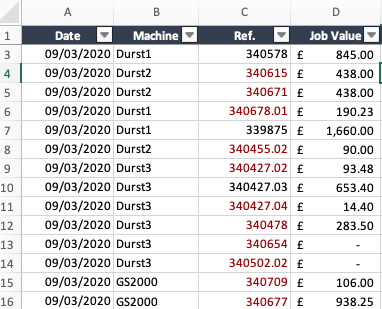
Hello, The goal is to sum the job value (column D) for each machine (column B). The issue is that a value will be included more than once because a job reference is listed more than once (column C). How do I write a formula to sum the job value with the Machine name as the criteria and filtering through the job reference to only sum the value of that job once? This is what I have so far but it's either returning 0 or the SPILL error: =IF(B2:B350="Durst1",SUMPRODUCT(1/COUNTIF(C2:C350,D2:D350&""),D2:D350),0) Many thanks for your help.Solved99KViews0likes18CommentsRe: SUMIFS excluding duplicate values
I have used just tried this formula: SUMPRODUCT($D$2:$D$345,IF($C$2:$C$345="",0,1/COUNTIF($C$2:$C$345,$C$2:$C$345))*($B$2:$B$345="Durst1")) Which is returning the value of £14,052.68 for "Durst1", whereas it should be £20,873.55. I think this is because it's including the value of a job only once across all machines rather than individual machines.97KViews0likes12CommentsRe: Help with SQL statement to pivot field values into column headers
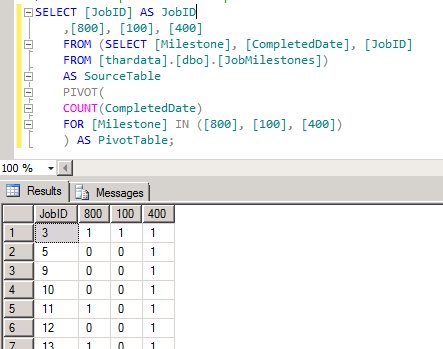
I've found a solution for part of the problem which will pivot the Milestones into column headers. But I'm having the same issue with the aggregate function. How do I display the DateTime instead of counting the entries?1.6KViews0likes0Comments
Recent Blog Articles
No content to show