Forum Discussion

A819A1L
Mar 16, 2020Brass Contributor
SUMIFS excluding duplicate values
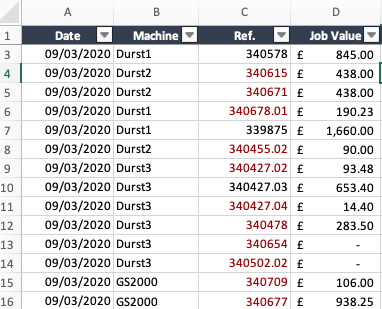
Hello, The goal is to sum the job value (column D) for each machine (column B). The issue is that a value will be included more than once because a job reference is listed more than once (column ...
- Mar 16, 2020
Couple of more variants if only I understood the logic correctly
with
=SORT(UNIQUE(FILTER(B2:B350,B2:B350<>"")))and
=SUM(INDEX($D$2:$D$350,XMATCH($F345&UNIQUE(FILTER($C$2:$C$350,$B$2:$B$350=$F345)),$B$2:$B$350&$C$2:$C$350,0)))Another one is simple Power Query (Sheet2)


Detlef_Lewin
Mar 16, 2020Silver Contributor
Well, it's the desired result.
Perhaps it would have been better if the thread opener had given the desired results for the other machines as well.

A819A1L
Mar 17, 2020Brass Contributor
Hi All,
Thank you for your input! Both solutions work well.
Apologies if I wasn't clear enough, it's a new problem that I hadn't come across before and wasn't sure how to explain it. The reason why I need a formula to calculate the result is because the master spreadsheet I am using will be updated over several days. The desired outcome is to have a summary page for all machines that would update with any new data.
Thanks again.