Forum Discussion

SUMIFS excluding duplicate values
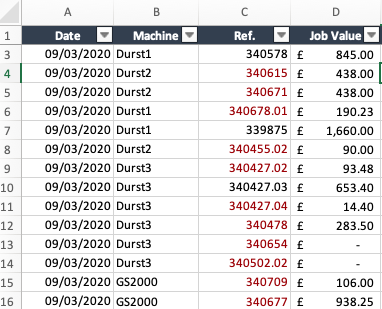
- Mar 16, 2020
Couple of more variants if only I understood the logic correctly
with
=SORT(UNIQUE(FILTER(B2:B350,B2:B350<>"")))and
=SUM(INDEX($D$2:$D$350,XMATCH($F345&UNIQUE(FILTER($C$2:$C$350,$B$2:$B$350=$F345)),$B$2:$B$350&$C$2:$C$350,0)))Another one is simple Power Query (Sheet2)


This formula is returning the SPILL error:
IF($B$2:$B$345="Durst1",SUMPRODUCT($D$2:$D$345,IF($C$2:$C$345="",0,1/COUNTIF($C$2:$C$345,$C$2:$C$345))),"")
- SergeiBaklanNov 19, 2020Diamond Contributor
I don't remember details, but SUMIFS() doesn't work here since we shall exclude duplicates. Thus SUMPRODUCT() pattern or other formulas. With introduced dynamic arrays related functions are more suitable for such task. Power Query is even more natural here, but it requires refresh.
In general, if few solution exists, that's only you own decision. For me, if performance is not a bottleneck, main reason is how easy it'll be with such solution on maintenance phase. Is it routine and well known approach for me or some exotic pattern; will the workbook be distributed to other people and, if so, how it is compatible with their environment, how easy it'll be to customize when necessary; etc.
 foreverlearnerNov 18, 2020Copper Contributor@Sergeri Sir, Yes you are right, I downloaded again, not sure what happened and I could able to do the same to my data in power query. Is there a specific reason you have taken this approach of unique, index match ? what is the advantage of this over Sumif () and copying it as value and deleting the duplicates. Thanks a ton
- SergeiBaklanNov 18, 2020Diamond Contributor
- foreverlearnerNov 18, 2020Copper Contributor
Hi Sergei, I am trying the same, unfortunately there is no sheet 2 in the solution and I am keen to get the power query solution.
- SergeiBaklanMar 16, 2020Diamond Contributor
Couple of more variants if only I understood the logic correctly
with
=SORT(UNIQUE(FILTER(B2:B350,B2:B350<>"")))and
=SUM(INDEX($D$2:$D$350,XMATCH($F345&UNIQUE(FILTER($C$2:$C$350,$B$2:$B$350=$F345)),$B$2:$B$350&$C$2:$C$350,0)))Another one is simple Power Query (Sheet2)
- PReaganMar 16, 2020Bronze Contributor
Hello A819A1L,
I would first suggest creating a helper column in column B that concatenates the Machine name and Ref. This formula could be like:
=C2&D2
The helper column will help with the following formula. For "Durst2" in cell H347 that could be something like (Press Ctrl+Shift+Enter):
=SUMPRODUCT(
  (COUNTIF($B$2:$B$342,$B$2:$B$342)/COUNTIF($B$2:$B$342,$B$2:$B$342)^2)*
    IFERROR(SEARCH($G347,$C$2:$C$342),0),
  $E$2:$E$342
 )
Attached is a file with the formula for each Machine. I left the results of my method in columns G, H, and I if you had any interest in how this formula works.
Please verify the solution.
P.S. I noticed that some Machine names in the table A1:E342 do not match the Machine names in the table G345:H359. For example, "Durst2" and "Durst 2". The extra space would create no matches. The Machine names must be exactly the same.
