Forum Discussion

SUMIFS excluding duplicate values
- Mar 16, 2020
Couple of more variants if only I understood the logic correctly
with
=SORT(UNIQUE(FILTER(B2:B350,B2:B350<>"")))and
=SUM(INDEX($D$2:$D$350,XMATCH($F345&UNIQUE(FILTER($C$2:$C$350,$B$2:$B$350=$F345)),$B$2:$B$350&$C$2:$C$350,0)))Another one is simple Power Query (Sheet2)


I have used just tried this formula:
SUMPRODUCT($D$2:$D$345,IF($C$2:$C$345="",0,1/COUNTIF($C$2:$C$345,$C$2:$C$345))*($B$2:$B$345="Durst1"))
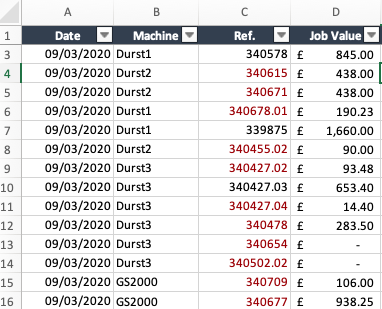
Which is returning the value of £14,052.68 for "Durst1", whereas it should be £20,873.55. I think this is because it's including the value of a job only once across all machines rather than individual machines.
- A819A1LMar 16, 2020Brass Contributor
This formula is returning the SPILL error:
IF($B$2:$B$345="Durst1",SUMPRODUCT($D$2:$D$345,IF($C$2:$C$345="",0,1/COUNTIF($C$2:$C$345,$C$2:$C$345))),"")
- SergeiBaklanMar 16, 2020Diamond Contributor
Couple of more variants if only I understood the logic correctly
with
=SORT(UNIQUE(FILTER(B2:B350,B2:B350<>"")))and
=SUM(INDEX($D$2:$D$350,XMATCH($F345&UNIQUE(FILTER($C$2:$C$350,$B$2:$B$350=$F345)),$B$2:$B$350&$C$2:$C$350,0)))Another one is simple Power Query (Sheet2)
 foreverlearnerNov 18, 2020Copper Contributor
Hi Sergei, I am trying the same, unfortunately there is no sheet 2 in the solution and I am keen to get the power query solution.
- PReaganMar 16, 2020Bronze Contributor
Hello A819A1L,
I would first suggest creating a helper column in column B that concatenates the Machine name and Ref. This formula could be like:
=C2&D2
The helper column will help with the following formula. For "Durst2" in cell H347 that could be something like (Press Ctrl+Shift+Enter):
=SUMPRODUCT(
  (COUNTIF($B$2:$B$342,$B$2:$B$342)/COUNTIF($B$2:$B$342,$B$2:$B$342)^2)*
    IFERROR(SEARCH($G347,$C$2:$C$342),0),
  $E$2:$E$342
 )
Attached is a file with the formula for each Machine. I left the results of my method in columns G, H, and I if you had any interest in how this formula works.
Please verify the solution.
P.S. I noticed that some Machine names in the table A1:E342 do not match the Machine names in the table G345:H359. For example, "Durst2" and "Durst 2". The extra space would create no matches. The Machine names must be exactly the same.
