User Profile

Thai_Lam
Brass Contributor
Joined Jun 16, 2019


User Widgets
Recent Discussions
Re: Get-MessageTrackingLog showing no results - Exchange 2013
anhtnt You have to test the following in your lab before doing it. It was sometime ago and this happened to me so i can't recall exactly what i did but here it is. There is a index folder in the message tracking log folder, you may try to delete it (just the file in it not the folder) and restart "Microsoft Exchange Transport Log Search" service, it should take a while to rebuild. I would suggest not to tinker on the message tracking log file, make sure antivirus exception was made to the path. If you need to work on the file, you can try to copy it to another location and work on it, log parser etc.5.6KViews0likes0Commentsmeeting update failed to a particular person.
Hi Person A is trying to update a calendar to person B, C, and D. Person C and D received it. Person B sent and ndr to sender with following error. I have tried the following 1) New-MailboxRepairRequest -Mailbox ayla -CorruptionType ProvisionedFolder,SearchFolder,AggregateCounts,Folderview -Detect but there wasn't any corruption detected 2) Move the mailbox to another DB and move it back 3) In the error above, i noticed [DestinationFolderId: LgAAAADMwDAP1TWTR4bLRC1uxJ0cAQCuCSeZcD6ARLHYtkKawbw1AAAAARfHAAAB] and i tried to search the folderID with get-mailboxfolderstatistic but it no where to be found. 4) the mailbox has no quota issue and is receiving email from other senders. Anyone has any idea? Thanks!423Views0likes0Commentsteams calendar missing
Hi fellow, I am having trouble getting calendar to show up for some accounts. The user mailbox is on Exchange 2019. I've tried to move myself to the exact mailbox database, my Teams calendar is showing with no problem. EWS was enabled for all mailboxes When the problematic user account was use to ran "Teams Calendar Tab" in Microsoft Remote Connectivity Analyzer, it failed with "Verify if the user's mailbox is discoverable by the Teams service." (as attached) .My account was fine. Thanks!4KViews0likes1CommentMove mailbox from Ex2013 to Ex2019 outlook require restart
Hello fellow Just wanted to confirm on the behavior, i was trying to move mailbox from exchange 2013 to exchange 2019. Mailbox which successfully move was disconnected and require outlook restart to get it back connected. However I don't see this happened for moving mailbox from exchange 2016 to 2019. I also noticed this in outlook for the 1st time moving mailbox from 2013 to 2019. Its not showing anymore after moving from 2019 back to 2013 but outlook stay disconnected until restarted. "The Microsoft Exchange administrator has made a change that requires you quit and restart Outlook"745Views0likes0CommentsRDS html5 web client disable automatic reconnection
Hi I have been trying to disable "Enable automatic reconnection", it works for rdp file but the html5 web client still keep reconnecting. I have tried version 1.0.26.0 - 1.0.24.0, i am not able to stop it from auto reconnecting. Anyone has any experience on this? Thanks!1.3KViews2likes3Commentsdefinition of AutoDagTotalNumberOfDatabases
Hello fellow, Referring to following links, https://docs.microsoft.com/en-us/exchange/high-availability/database-availability-groups/metacachedatabase-setup?view=exchserver-2019 quote from the above link, "AutoDagTotalNumberOfDatabases: The number of databases in your DAG (for example, 50)." Does AutoDagTotalNumberOfDatabases refers to total number of active+passive? or Just the active one? As always, thanks for clarification.Solved871Views0likes1CommentExchange 2016 SU and AdminDisplayVersion
Hi fellow I noticed that after applying exchange SU, the AdminDisplayVersion (with get-exchangeserver) and ecp does not have the version updated correctly. AdminDisplayVersion and Ecp will just be showing the CU version. Is this normal? Thanks!1KViews0likes0CommentsHybrid MFA with exchange 2016
Hello fellow, In hybrid mfa setup with Exchange 2016, we would set the mapi authentication as following IISAuthenticationMethods : {Ntlm, OAuth, Negotiate} What will happen if we removes Ntlm and Negotiate? as following, will outlook still works? IISAuthenticationMethods : {OAuth} Thanks!689Views0likes0CommentsProtect exchange against account locked out
Hello fellow Have been thinking how to protect against account locked out and DoS attack for exchange. Typical scenario would be someone lost their phone or some one id was targeted and therefore was used to attempt login from multiple location and cause the id to always lockout. Does anyone came across anyway of handling this? Had been reading through this https://www.messageware.com/epg/. Not sure how affective is it? and that would means another software to patch etc. Wanted to tap into the big brain of internet how to effectively or commonly dealing with this, regardless from network, appliance etc. Thanks and cheers!1.1KViews0likes0CommentsExchange 2016 Japanese character not readable
Dear Fellow I have recently encounter a problem much similar to following. https://docs.microsoft.com/en-us/answers/questions/394418/exchange-messages-encoding-error.html My situation however, 1) Some not readable Japanese characters email appears correctly after applying disclaimer using exchange transport rule (new email). 2) 1 of the non problem problematic sender starts having problem after applying the disclaimer (disclaimer was in html format). I have applied <add key="DisableDetectEncodingFromMetaTag" value="True"> as suggested from following links, however its not helping for situation 2) as above. https://docs.microsoft.com/en-us/answers/questions/394418/exchange-messages-encoding-error.html Non readable character looks like following !&!& (Bァ $B!& (B Any suggestion is greatly appreciated. Thanks!1.1KViews0likes1Commentunable to sign in with auto configuration
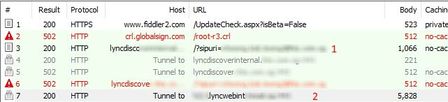
Hi, I am having difficulty to sign in sfb on premises with automatic configuration. Manual works fine. The following gathered from fiddler. We can see it is resolving lyncdiscoverinternal.domain.com (autodiscover) and it was tunnel to lyncwebint.domain.com. However it is not directing to hostname lyncwenint.domain.com. It just stuck on tunneling, failed and continue with other autodiscover method (autodiscover remaining) The fiddler has https decryption enabled. What is the likely cause here? Thanks!

Recent Blog Articles
No content to show