User Profile

RobSoto
Iron Contributor
Joined Oct 02, 2024


User Widgets
Recent Discussions
Re: Trimming Viva Engage default “All Company” community membership
Great suggestion! I've done this before. The only challenge I find with some tenants is that user data is not clean enough for this strategy and dynamic M365 groups rely on a clean and accurate user directory. Otherwise, it's a great workaround!190Views0likes0CommentsRe: Connections icons
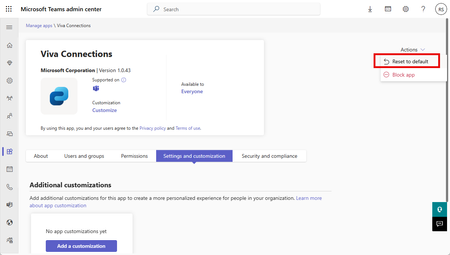
There is an option to restore the app to default in the Teams admin center (screenshot below). Of course, this would restore all default settings, including the name of the app and reverse any other changes you've made. But you could do this temporarily to retrieve the images and then customize the app again to the desired settings.69Views0likes0CommentsRe: Connections icons
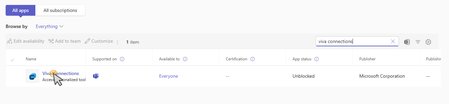
Hi MarkSHU Yes, you can download them. There is only one method I know of to do it. Go to admin.teams.microsoft.com > Manage Apps. Find Viva Connections and click on it to open its settings. Then click Customize: Then go to the bottom of the right-hand menu and right-click each image and click Save Image As Try this out and let me know how it goes! -Rob15Views0likes0CommentsRe: Fewer users in "Users" table than in "Messages" — how to ensure full user data?
Hi Lucas_Morales123 How large is the discrepancy? 5-10 users or dozens? Did you open up the Admins table as well? It's possible that there are many admins and those are not listed in the Users table. I tested the data export and noticed that detail. But I didn't find a Messages table in the ZIP export from the new Engage admin center. Can you elaborate on the Messages table and where you found it? -Rob95Views0likes0CommentsRe: Unable to post to subsites
Hi ctessaro I don't think Amplify will meet that need. In general, the new rule for modern SharePoint Online is "Hub not sub". A flat architecture is far better in terms of accommodating the inevitable changes that occur as a business grows. Subsites are an antiquated feature at this point, with many options for architecture flexibility. My recommendation is to reevaluate your subsite architecture and map out a migration to a flat hub architecture. Not only does this help you get around your current dilemma, but it will also set you up for long term success. I understand that a migration can be stressful. I've done many of them. What I've observed is as long as your planning phase is solid and you do your diligence for hub architecture, the only decision that remains is which tool you use to migrate. The most cost-effective option is Share Gate. It's packed with features that also help you assess the sites/subsites in scope before you migrate. Hope this helps! Feel free to ask more questions if you have them. -Rob45Views0likes0CommentsRe: Viva Amplify - SharePoint Publications with Required Meta-data
Hi JakeWarren This is a great catch! I found the same limitation when implementing Amplify for a client recently. There is no easy answer right now. You must alter metadata to a publication in the destination site. But this is a glaring gap in functionality and my presumption is that they will allow some connection of destination site metadata in the future. For now, we have to do it manually.78Views2likes0CommentsRe: New Group-Less Campaigns
JakeWarren Great question! I'm wondering the same thing. Without knowing much else, my theory is they may use SharePoint site permissions, considering Amplify is basically SharePoint Online wrapped in different colors and layout. One future roadmap item I saw will bring the Amplify publishing workflow into SharePoint Online menus, directly from the destination site. As well as another update that allows republishing Amplify publications. All those updates combined make me think they are leaning further into SharePoint for management of Amplify data. Just not sure what that looks like yet.81Views0likes0CommentsRe: "You no longer have access to that data" error when creating a comment on a task card
Hi brendon_lucas I'm curious if you and your team can do other tasks in that Plan successfully. Can you add new tasks and change other settings? I found another post about this that might help you and includes the same suggestions and questions I was planning on writing. I am unable to add a comment to "Tasks by Planner and To Do" within Microsoft TEAMS - Microsoft Q&A Check that out and let me know if it addresses the issue. -Rob169Views0likes1CommentRe: Trimming Viva Engage default “All Company” community membership
Hi Anders Dissing There isn't a way to trim users from the "All Company" community. But you can use a dynamic group and an exclusionary conditional access policy to restrict the usage of Viva Engage. The challenge lies in the fact that those contractors still need the E3 license, just not the Viva Engage feature. So, while group-based licensing would normally work, it won't in your case. Your dynamic rule can have multiple conditions that define the membership automatically. For example: "user email ends with" could include approved users only, filtering out domain accounts that are not meant to use Engage. Depending on your user properties, this could be a viable solution. Change Static Groups to Dynamic Membership Groups - Microsoft Entra ID | Microsoft Learn Create or Edit a Dynamic Membership Group and Get Its Processing Status - Microsoft Entra ID | Microsoft Learn Building Conditional Access policies in Microsoft Entra - Microsoft Entra ID | Microsoft Learn Caution: Do not delete the "All Company" group as it may be a challenge to restore it. I've seen the fallout from this mistake and it's a messy recovery. Hope this helps! -Rob465Views1like1CommentRe: Notifications
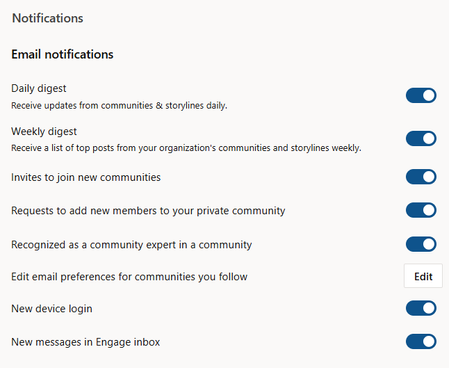
Hi Cathrina_de_Lange These are the notification options for Viva Engage users. And here's KB article about managing notifications. Manage your Viva Engage notifications - Microsoft Support I don't believe there is a way to disable notifications for comments on posts, but you should be able to mute or unfollow a post in the post's three-dot menu. I recommend trying that. -Rob126Views0likes0CommentsRe: Roles in Viva Engage
Hi Ruth_Allen_SH In Viva Engage, you can't yet assign different posting privileges to individual members within a community. It’s an all or nothing model, unless you switch the entire group to Restricted Posting, which restricts creation of posts to admins only. There’s not yet a “viewer” role for communities. Granting users too much access is a valid concern and tough to work around in this context. Community admins can do a lot of damage if not properly educated. You might consider dividing your communities differently to try to avoid the need for granular permissions. I haven't seen any signs that a "viewer" role is being developed for Engage communities. But never rule it out! I wish I had better news for you. But hope this helps! -RobRe: Sharepoint missing - how to get support?
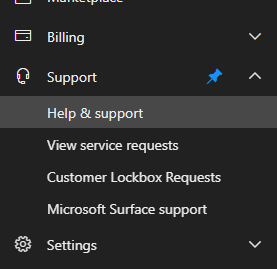
Hi Michael Brooks, What a strange issue! The best approach to opening cases and getting support is using the Support option in the admin center. Calling Microsoft for support is a challenge without a Technical Account Manager and Premium Support. Search for similar cases, and when given the option, click Contact Support. Then you can have them call you or send them an email. Hope this helps! -Rob11Views0likes3CommentsRe: Viva Goals Retirement
FYI - Microsoft has added a new "Export" feature to Viva Goals that sends data to CSV or JSON file to possibly make the migration to another OKR platform a bit easier, considering available import options. It began rolling out in June and should be finished by end of July. Keep an eye out!231Views0likes0CommentsRe: site Members vs site Members
Hi ecflyer If your synced AD security group was named the same as your SharePoint Online group, it would appear identical and could be confusing. An easy way to tell is by looking at the "type" column. If it says, "SharePoint Group", that is usually the Site group from SharePoint. If it says, "Domain Group", that group is being synced from your AD environment. The best practice for permissions is to nest AD groups in your SharePoint Online groups and it appears you've done that successfully. If you were to add members to that SharePoint Online group from the modern menu in your screenshot, it would be adding users directly to the SharePoint Online group, not the AD group. And that's not what you want. The correct approach is to add users to the AD group only, and then that will sync with SharePoint Online. This approach helps keep permissions clean. Hope this helps! -Rob117Views1like1CommentRe: Restrict Document Library so that only specific folders shared with a user are visible to them
Hi MikeRiley, It's an interesting project. Technically, it's feasible but it will be very cumbersome. I have a few questions for you that might help think differently about the goal. What's the business value of keeping the archive? Is it a legal requirement or fear of loss of institutional knowledge? Follow up to that question - Is there a way to reduce the number of channels in scope to something more reasonable? How often to users revisit past Slack conversations now? If it's not common, the future archive may go completely unused when all is said and done. There would be little to no return on investment. File/Folder level permissions are challenging to architect. Do you have any scripting capabilities that could automate this with a CSV import or something? Have you considered the governance demand with the idea of using SharePoint Copilot agents? You may end up with multiple agents to manage if you want the responses to be meaningful. Caution: If permissions are at all inaccurate when the archive is made visible to users, adoption may suffer, and the setup of the archive may not produce the outcome you intended. Ultimately, if the return on the investment isn't expected but the outcome is still a hard requirement for the migration to Teams, my recommendation is to simplify the goal where possible. That might mean reducing scope or minimizing requirements. Hope this helps! -Rob77Views0likes0CommentsRe: SharePoint Brand Center - missing ability to change text color?
Hi JSlei I checked and don't see any font color options in the new Brand Center yet. My developer tenant is set to Targeted Release so if any font color options were released, I'd see them. My presumption is that feature is on the way, but I don't yet see any roadmap items related to font color. The alternative is creating your theme in the old theme generator, then installing with PowerShell. Get your PowerShell code from the theme generator website here: Fluent UI Theme Designer Export the theme in the upper right corner. Then use the provided PowerShell Code in the PowerShell cmdlet for adding a theme. Add-SPOTheme (Microsoft.Online.SharePoint.PowerShell) | Microsoft Learn With that approach, you also have the option to granularly adjust HEX color codes to your liking. It's just not nearly as convenient as the Brand Center. Hope this helps! -Rob13Views0likes0CommentsRe: Why custom list item versions do not preserve the attachments when restore an old version
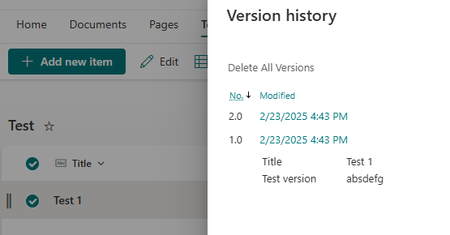
Hi johnjohn-Peter , The list item creation and upload of the attachment creates two versions immediately. I created a custom list and added an item. I then checked version history right away and saw two versions. I then deleted the attachment and replaced it with a new version and checked version history again. There were 4 versions. This means that restoring an item to a previous version won't also restore the attachment because that action creates a completely separate version. It's also not easy to spot which version is related to the new attachment. I don't see any option around this within a list. If the file attachment is critical to your process, my recommendation would be to shift your approach to use a document library and then add the item's metadata there. That way your version history restore process will happen as you want it to. It might be worth trying out in a test library. Hope this helps! -Rob19Views0likes0CommentsRe: SharePoint Group - Access Denied
Hi lgonyea , The group disappearing is a strange issue I've not heard before. Maybe for an on prem environment that would seem more plausible. But for SharePoint Online, there shouldn't be any changes to permissions like that without an action from a user. It makes me curious if you have any services that are integrated with SharePoint Online that automate admin tasks. Got anything like that? Maybe a governance solution is in use that manages permissions automatically? Share Gate is one example. As for the Access Denied issue, it sounds like you've got the site level permissions covered. But I've seen this symptom when the Site Pages library (where the Home.aspx page lives) is too restricted, despite the site level permissions being correct. Perhaps users don't have "read" access to the Site Pages library. If the library permissions are correct, I recommend you check the Home.aspx page to make sure item level permissions are not affecting access. Also, the "Check Permissions" button in the ribbon of the Permissions screen does wonders to find pesky permission inconsistencies. My last recommendation is to open up the troubleshooting to even more users and sites to understand the problem a bit more. Testing with at least three users and sites is a good way to isolate the root cause. Hope this helps! Please report back your progress. -Rob141Views0likes1Comment

Recent Blog Articles
No content to show