User Profile

AlbertSP
Copper Contributor
Joined Jan 20, 2019


User Widgets
Recent Discussions
JSON Formatting button to start workflow, not initiating run command.
In a SharePoint list I use the json code below on a column (Register) to initiate a workflow when clicking on the button. When I add the code to the formatting of the list's Gallery view, it opens the item in Edit Mode, instead of starting the workflow. { "$schema": "https://developer.microsoft.com/json-schemas/sp/column-formatting.schema.json", "elmType": "span", "style": { "color": "#0078d7" }, "children": [ { "elmType": "span", "attributes": { "iconName": "Flow" } }, { "elmType": "button", "style": { "background-color": "transparent", "color": "#0078d7", "cursor": "pointer" }, "txtContent": "Register", "customRowAction": { "action": "executeFlow", "actionParams": "{\"id\": \"653381c7-37b5-41b7-b429-cf99287ebac2\"}" } } ] }1.1KViews0likes1CommentPnP Modern Search Filter - Managed Metadata fields display additional properties
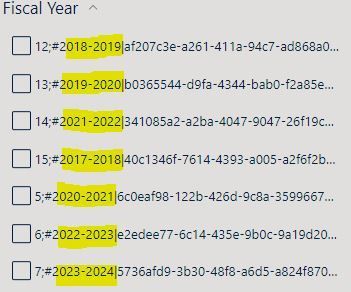
The PnP Filter webpart uses the managed Property "RefinableString01" mapped to a "Fiscal Year" term set. There are additional properties being displayed that may seem confusing to end user and we would like only to display the years. There is a description of the Property bag properties values. https://microsoft-search.github.io/pnp-modern-search/usage/search-filters/5.4KViews0likes4CommentsSharePoint Migration tool general questions
Hi, I wanted to get a better understanding of the SPMT operations. If I have the tool installed on Server A in the East coast (200MB/s upload speed) and the ServerB (file to be migrated to SP) on the West coast (50MB/s upload speed), which upload speed is being used? Is it recommended to install SPMT on the Server B? Otherwise, is the network traffic slows down migration if I keep SPMT on server A? On a spertated question, the Scan Report shows a root folder with a padlock icon. What does it indicate?Solved1.1KViews0likes1CommentContent Type & Metadata retained in a files coming from a different site collection or tenant
Hi, We noticed that files coming as email attachments from different site collections or tenants retain content type and metadata. When users save the file to a local SharePoint Library it auto assigns a content type (since the source CT doesn't exist in their library). Is there a method to prevent this from happening? We are not interested in enabling a Content Hub, only saving the document as-is and applying our existing content type and metadata.1.9KViews0likes2CommentsExcel Comments - All reviewer names changed to Author
My users are collaborating on an Excel workbook. All the names of the Reviewers were changed to Author, which makes it hard for them to collaborate. To overnight the names, users would have to change them via >Info>Inspect document. What else could have caused the Comments Reviewer name to be replaced with Author?3.4KViews0likes3CommentsPrompt new file to select Content Type
I have several Content Types associated with a document library. The default CT is the OOTB "Document". Is there a way to prompt a newly uploaded document to select a Content Type from the available CT in associated with the document library? Currently, it sets the default content type to the one that is ranked 1st, without an option to allow users to select the document content type on creation.1.7KViews0likes2CommentsSharePoint online "Check Permission" shows "None" for users added to the MS 365 group (members)
I added 25 users to an (MS 365) group as site members with edit permission. When sharing links to files, we noticed bounceback from a couple of users, with the system indicating they have no access to the site, even thou they are members of the group. I removed them from the group and added them again, but the "Check Permission" still indicates 'None' for access. The only thing in common those users have is that they been away and may have not logged in to SharePoint yet. Any troubleshooting idea will be greatly appreciated. Thank you and a happy new year2.6KViews0likes1CommentRe: No Edit Item option for a list in Modern SharePoint page,
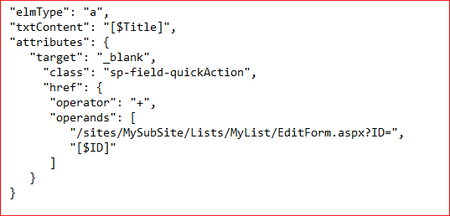
Got it to work by modifying the Title Column Formatting, with the JSON code below. Add "EditForm.aspx?ID=" to open the item in edit mode. https://docs.microsoft.com/en-us/sharepoint/dev/declarative-customization/column-formatting20KViews1like1CommentNo Edit Item option for a list in Modern SharePoint page,
Hi, I noticed in a Modern SP page that list Items don't have the option Edit option. The option is available in the list itself (and the permission are set currently), however when I add the list to a page, my only options are Share, Copy Link and Delete. Is this Modern page limitation or am I doing something wrong?Solved21KViews0likes8Comments
Recent Blog Articles
No content to show